https://github.com/hari31416/md2pdf
Lightweight Markdown-to-PDF conversion in pure Python, built on ReportLab and mistletoe.
https://github.com/hari31416/md2pdf
markdown markdown-to-pdf pdf-generation pure-python python typesetting
Last synced: 26 days ago
JSON representation
Lightweight Markdown-to-PDF conversion in pure Python, built on ReportLab and mistletoe.
- Host: GitHub
- URL: https://github.com/hari31416/md2pdf
- Owner: Hari31416
- License: mit
- Created: 2026-06-12T15:48:03.000Z (about 1 month ago)
- Default Branch: main
- Last Pushed: 2026-06-20T16:43:59.000Z (29 days ago)
- Last Synced: 2026-06-20T18:21:56.680Z (29 days ago)
- Topics: markdown, markdown-to-pdf, pdf-generation, pure-python, python, typesetting
- Language: Python
- Homepage: https://hari31416.github.io/md2pdf/
- Size: 11.1 MB
- Stars: 0
- Watchers: 0
- Forks: 0
- Open Issues: 0
-
Metadata Files:
- Readme: README.md
- Changelog: CHANGELOG.md
- Roadmap: ROADMAP.md
Awesome Lists containing this project
README
# md2pdf — Markdown to PDF in Pure Python
`md2pdf` converts your Markdown documents into beautiful, print-ready PDFs using **pure Python** — no Pandoc, Node.js, or headless Chrome needed. Powered by ReportLab and mistletoe.
[](https://pypi.org/project/pymd2pdf/)
[](https://pepy.tech/projects/pymd2pdf)
[](https://pypi.org/project/pymd2pdf/)
[](https://github.com/Hari31416/md2pdf/blob/main/LICENSE)
[](https://github.com/Hari31416/md2pdf/actions/workflows/ci.yml)
[](https://codecov.io/gh/Hari31416/md2pdf)
---
## Why md2pdf?
Most Markdown-to-PDF tools require heavy system dependencies — and even then, getting diagrams or math to render often means installing additional packages. `md2pdf` works out of the box:
| Tool | Requires Pandoc | Requires Chrome | Diagrams & Math | Pure Python |
| :------------------- | :-------------- | :-------------- | :--------------------------------------------------------- | :---------- |
| Pandoc-based | ✅ Yes | ❌ No | ⚠️ Extra packages (e.g. mermaid-filter, LaTeX distribution) | ❌ No |
| Puppeteer/Playwright | ❌ No | ✅ Yes | ⚠️ Depends on setup | ❌ No |
| **md2pdf** | ❌ **No** | ❌ **No** | ✅ **Built-in (via Kroki and matplotlib)** | ✅ **Yes** |
Beyond zero system dependencies, you also get:
- **Diagrams & Math** — Mermaid and LaTeX via Kroki (with SHA-256 disk caching); matplotlib used for offline LaTeX rendering when configured
- **PDF bookmarks** — every heading clickable in your PDF viewer's navigation panel
- **Multi-page tables** — split cleanly across pages with repeated headers
- **Colour emoji** — Twemoji-powered PNG emoji in your PDFs
- **Extensible plugins** — custom handlers, themes, and preprocessors
---
## Performance
Although performance was not a primary design goal, `md2pdf` is highly efficient. By parsing the Markdown AST and mapping it directly to ReportLab flowables, it naturally avoids browser launching, process forking, and intermediate HTML rendering overhead.
### Benchmarks (macOS-arm64, Apple Silicon)
To evaluate compilation speeds, we compared `md2pdf` against **Pandoc** (using various PDF engines) and **Playwright (Chromium)** across documents of different sizes:
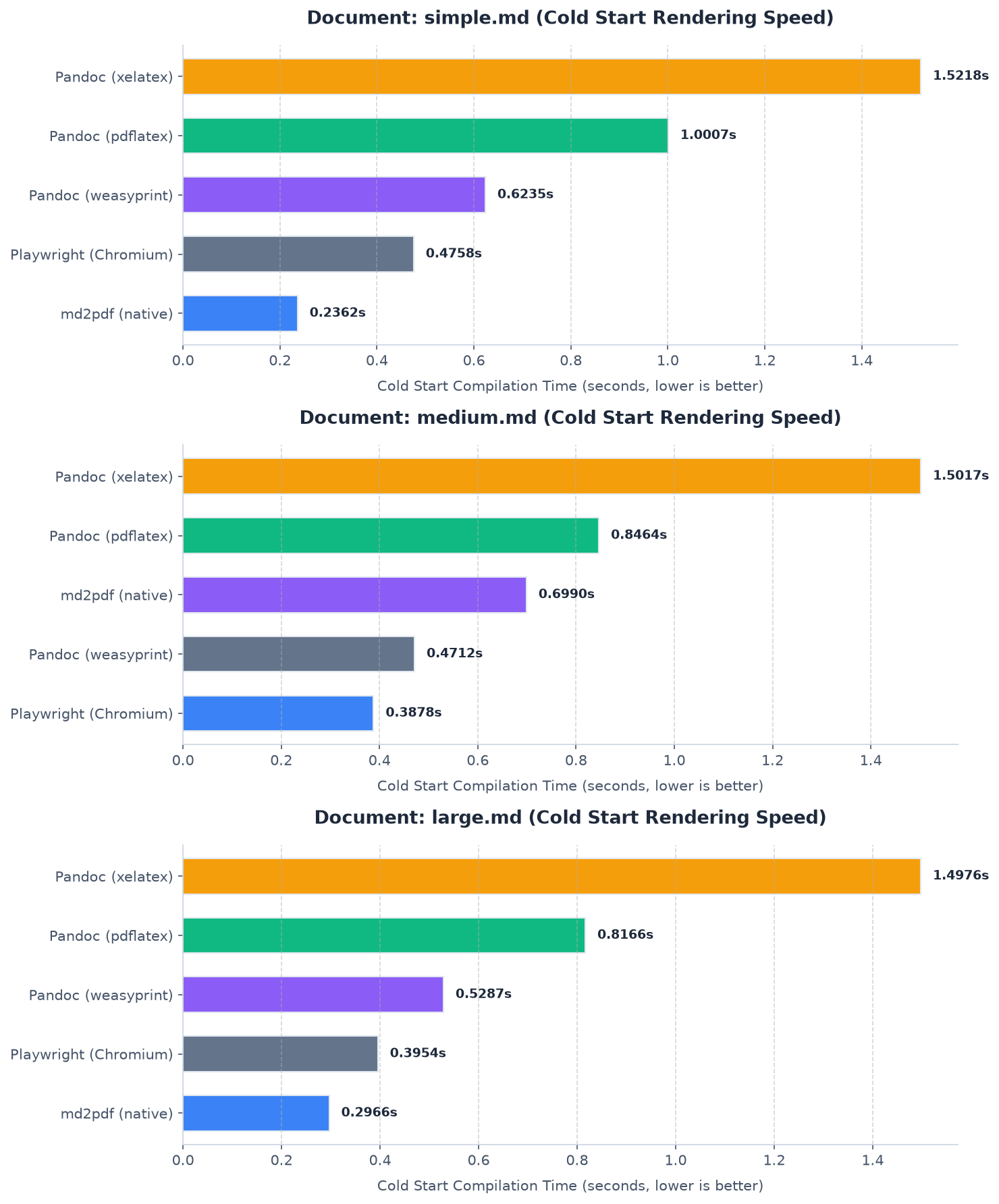
* **Cold Start**: Spawns a clean process to capture initialization costs (like browser startup for Playwright or module import overhead for `md2pdf`).
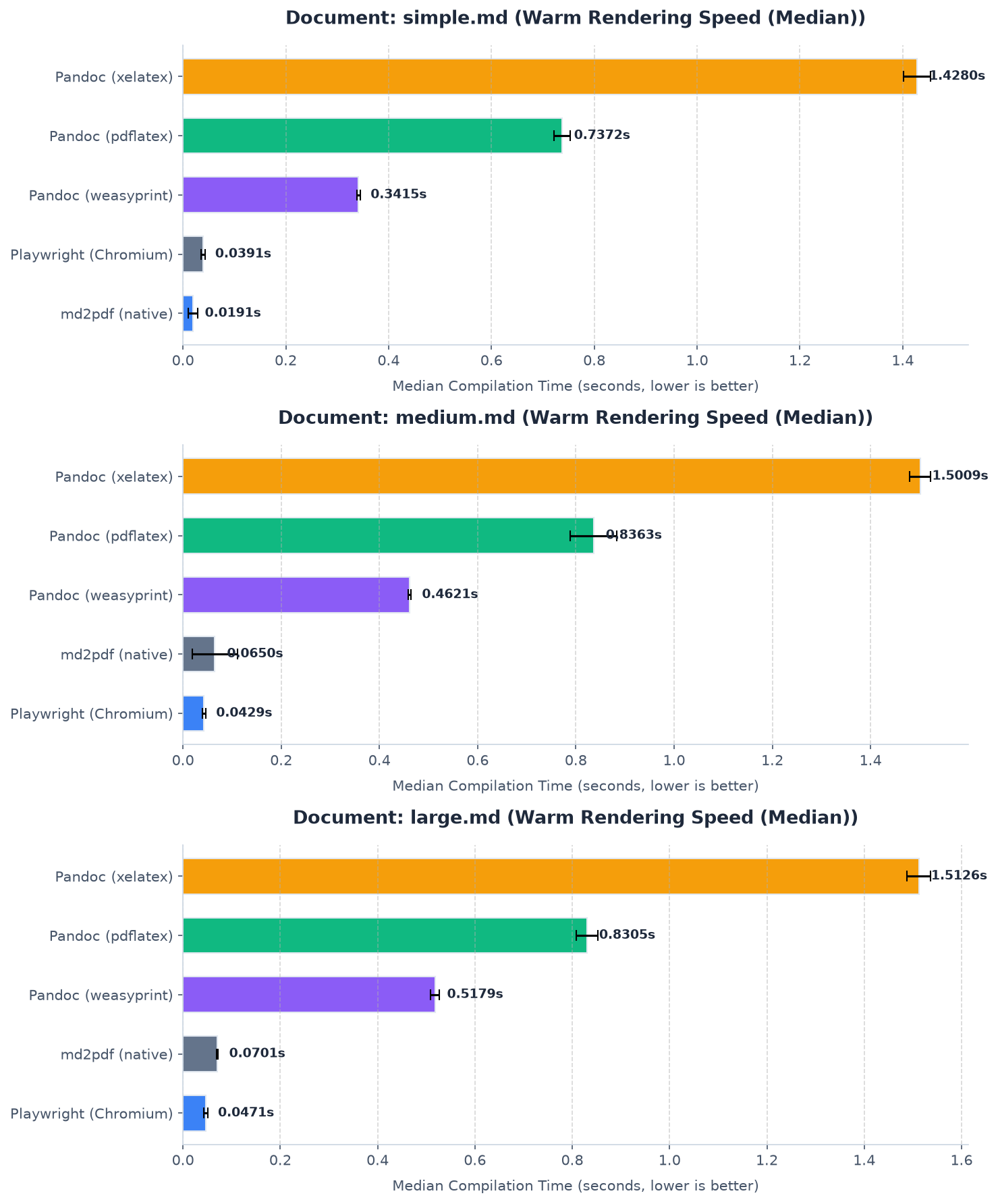
* **Warm Start (Median)**: Measures rendering throughput by averaging subsequent runs in a warm environment.
#### Warm Start Rendering Speed (Median)
#### Cold Start Rendering Speed
#### Summary Metrics (seconds, lower is better)
| Document | Engine | Cold Start (s) | Warm Median (s) | Status |
| :------------------- | :-------------------- | :------------: | :-------------: | :------ |
| **`simple.md`** | **md2pdf (native)** | **0.236s** | **0.019s** | Success |
| *(Short document)* | Playwright (Chromium) | 0.476s | 0.039s | Success |
| | Pandoc (weasyprint) | 0.624s | 0.342s | Success |
| | Pandoc (pdflatex) | 1.001s | 0.737s | Success |
| | Pandoc (xelatex) | 1.522s | 1.428s | Success |
| **`medium.md`** | Playwright (Chromium) | 0.388s | **0.043s** | Success |
| *(With math/code)* | **md2pdf (native)** | **0.699s** | **0.065s** | Success |
| | Pandoc (weasyprint) | 0.471s | 0.462s | Success |
| | Pandoc (pdflatex) | 0.846s | 0.836s | Success |
| | Pandoc (xelatex) | 1.502s | 1.501s | Success |
| **`large.md`** | Playwright (Chromium) | 0.395s | **0.047s** | Success |
| *(Multi-page guide)* | **md2pdf (native)** | **0.297s** | **0.070s** | Success |
| | Pandoc (weasyprint) | 0.529s | 0.518s | Success |
| | Pandoc (pdflatex) | 0.817s | 0.831s | Success |
| | Pandoc (xelatex) | 1.498s | 1.513s | Success |
*Note: For `medium.md`, `md2pdf`'s cold start is higher because it contains mathematical formulas, which initializes the LaTeX math typesetting subsystem. For `large.md` (which has no math), `md2pdf`'s cold start is much faster.*
To run these benchmarks on your local system:
```bash
make benchmark
```
---
## Installation
Using `uv` (recommended):
```bash
uv tool install pymd2pdf
```
Using `pip`:
```bash
pip install pymd2pdf
```
**Heavy math documents** (physics, engineering)? Install the optional matplotlib backend for faster offline LaTeX rendering:
```bash
pip install "pymd2pdf[matplotlib]"
```
or
```bash
uv tool install "pymd2pdf[matplotlib]"
```
> **Note:** The PyPI package name is `pymd2pdf`, but the CLI command and Python import are both `md2pdf`.
---
## Quick Start
```bash
# Convert a Markdown file to PDF
md2pdf input.md -o output.pdf
# Run validation checks without producing a PDF
md2pdf input.md --validate-only
# Work offline (diagrams show source code placeholder instead)
md2pdf input.md -o output.pdf --offline
```
That's it. For most use cases, the first command is all you need.
---
## Key Features
- **Standard Elements**: Headings (H1–H6), paragraphs, lists, blockquotes, horizontal rules, and hyperlinks.
- **Multi-page Tables**: Tables split cleanly across page boundaries with repeated column headers on each page.
- **Diagrams & Math**: Mermaid diagrams and LaTeX math blocks rendered via the Kroki API, with transparent margin cropping, offline fallbacks, and SHA-256 disk caching.
- **PDF Bookmarks & Outline Panel**: Every heading (H1–H6) becomes a clickable, correctly nested entry in your PDF viewer's navigation/bookmarks panel.
- **Colour Emoji**: Twemoji-powered PNG emoji rendering in PDFs, with graceful network fallbacks.
- **Admonitions & Callouts**: GitHub-style alerts (`> [!NOTE]`, `> [!WARNING]`) and MkDocs/Obsidian fenced containers (`:::note`).
- **Broad Unicode Support**: Bundled DejaVu Sans fonts cover Latin Extended, Greek, Cyrillic, math operators, arrows, and box-drawing — no system font dependency needed.
- **Custom Fonts & Themes**: Supply your own TTF fonts and TOML-based theme overrides.
- **Extensible Plugin System**: Load custom element handlers, preprocessors, post-processors, and stylesheet/theme layers.
- **Typesetting Safeguards**: Orphaned heading prevention, ghost page elimination, and widow/orphan protection.
- **Pre-render Validation**: Catches nested tables, empty diagrams, and unsupported elements before committing to a render.
---
## CLI Options
| Flag | Shortcut | Description |
| :--- | :------- | :---------- |
| `--output` | `-o` | Output PDF path (default: `.pdf`). |
| `--config` | `-c` | Path to a custom `md2pdf.toml` config file. |
| `--theme` | `-t` | Theme name to apply (default: `default`). |
| `--offline` | | Skip Kroki API calls; use source code placeholders instead. |
| `--validate-only` | | Run validation and exit without producing a PDF. |
| `--verbose` | `-v` | Output debug-level logging to `stderr`. |
| `--toc` | | Prepend a dynamically generated Table of Contents page. |
| `--header` | | Running header template (supports `{title}` and `{section}`). |
| `--header-on-first-page` | | Render the running header on the first page too. |
| `--min-image-scale` | | Minimum image scale before moving to a new page (default: `0.8`). |
| `--emoji` / `--no-emoji` | | Enable or disable Twemoji colour emoji (default: enabled). |
| `--progress` / `--no-progress` | | Show stage-level progress output on `stderr` (default: enabled). |
---
## Python API
```python
from md2pdf import convert, Config, Pipeline
# One-liner conversion
convert("input.md", "output.pdf")
# Advanced: custom config and pipeline
config = Config(
offline=False,
cache_dir=".md2pdf_cache",
output_file="my_document.pdf"
)
pipeline = Pipeline(config)
# Validate before rendering
issues = pipeline.validate("# Hello World")
for issue in issues:
print(f"[{issue.severity}] {issue.code}: {issue.message}")
# Render
pipeline.run(raw_md="# Document Title\n\nSome body text.")
```
---
## Configuration
`md2pdf` auto-discovers a `md2pdf.toml` config file in these locations (in order):
1. `./md2pdf.toml` (project-local)
2. `~/.config/md2pdf/md2pdf.toml`
3. `~/.md2pdf.toml`
You can also pass one explicitly with `--config`. See the annotated [`md2pdf.toml.example`](md2pdf.toml.example) for all available options.
---
## Documentation & Examples
| Resource | Description |
| :------------------------------------------- | :------------------------------------------------- |
| [User Guide](docs/user-guide.md) | Comprehensive features reference |
| [Themes & Styling](docs/themes.md) | Custom themes, fonts, and stylesheet overrides |
| [Plugin Authoring](docs/plugin-authoring.md) | Writing custom handlers and preprocessors |
| [User Manual (PDF)](docs/user_manual.pdf) | Consolidated print-ready manual |
| [Examples](examples/) | Four production-grade templates with rendered PDFs |
### Example Templates
| Example | Showcases |
| :------------------------------------------------ | :------------------------------------------------------- |
| [`academic_paper/`](examples/academic_paper/) | LaTeX math, citations, Mermaid flowcharts |
| [`business_invoice/`](examples/business_invoice/) | Tables, custom Corporate Blue theme |
| [`project_roadmap/`](examples/project_roadmap/) | Task lists, admonitions, Gantt charts, code highlighting |
| [`simple_cv/`](examples/simple_cv/) | Resume layout, structural tables, clean margins |
---
## Tech Stack
| Component | Library | Description |
| :------------------------------- | :---------------- | :---------------------------------------------------------------- |
| **Core Language** | Python >= 3.11 | Strict type-hinting throughout |
| **PDF Generation** | ReportLab >= 4.0 | Low-level document layout engine |
| **Markdown Parsing** | mistletoe >= 1.3 | Fast, extensible Markdown AST parser |
| **HTTP Requests** | requests >= 2.31 | Kroki API communication |
| **CLI Framework** | typer >= 0.12 | CLI builder with validation |
| **Image Processing** | Pillow >= 10.0 | Auto-cropping and dimension detection |
| **LaTeX Rendering** *(optional)* | matplotlib >= 3.8 | Offline LaTeX math rendering (`pip install "pymd2pdf[matplotlib]"`) |
---
## Development Setup
```bash
# Clone the repository
git clone https://github.com/Hari31416/md2pdf.git
cd md2pdf
# Create virtual environment and install all dependencies (including dev)
uv sync
source .venv/bin/activate
# Install pre-commit hooks
uv run pre-commit install
# Run the test suite
uv run pytest
```
To rebuild all documentation PDFs and example renders:
```bash
make docs
```
---
## Architecture Overview
`md2pdf` runs as a four-stage pipeline: preprocessing → parsing/validation → element rendering → layout composition.
```mermaid
graph TD
Input[Markdown File] --> Pre[Preprocessors]
Pre --> Parser[MarkdownParser]
Parser --> Tokens[Token Stream]
Tokens --> Val[DocumentValidator]
Tokens --> Reg[Plugin/Handler Registry]
Reg --> Handlers[Element Handlers]
Handlers --> Kroki[Kroki API / Cache]
Handlers --> Flowables[ReportLab Flowables]
Flowables --> Layout[LayoutComposer]
Layout --> Post[Postprocessors]
Post --> Renderer[ReportLab PDF Engine]
Renderer --> Output[Output PDF]
```
For detailed sequence-level logic, see the [User Guide](docs/user-guide.md).
---
## Project Structure
```txt
md2pdf/
├── docs/ # Documentation suite (Markdown & consolidated PDF)
├── examples/ # Production-grade example templates with rendered PDFs
├── md2pdf/ # Core source package
│ ├── assets/ # Kroki client, caching, and fallback elements
│ ├── core/ # Engine pipeline, parser, validator, layout, registry
│ ├── handlers/ # Element-specific flowable generators
│ ├── styles/ # Default stylesheet and theme configs
│ └── cli.py # CLI entry point
├── scripts/ # Helper scripts (e.g. build_docs.py)
├── tests/ # Automated test suite
├── md2pdf.toml.example # Annotated configuration reference
└── pyproject.toml # Build system and dependency declaration
```