https://github.com/harmoninux/hish
Run Linux Shell on HarmonyOS devices, including Phone, Pad, 2in1/PC (like iSH on iOS and iPadOS).
https://github.com/harmoninux/hish
emulator harmonyos linux shell terminal virtual-machine
Last synced: 6 months ago
JSON representation
Run Linux Shell on HarmonyOS devices, including Phone, Pad, 2in1/PC (like iSH on iOS and iPadOS).
- Host: GitHub
- URL: https://github.com/harmoninux/hish
- Owner: harmoninux
- Created: 2025-09-06T07:43:25.000Z (10 months ago)
- Default Branch: master
- Last Pushed: 2025-09-13T12:42:30.000Z (10 months ago)
- Last Synced: 2025-09-13T13:58:50.107Z (10 months ago)
- Topics: emulator, harmonyos, linux, shell, terminal, virtual-machine
- Language: JavaScript
- Homepage:
- Size: 7.62 MB
- Stars: 30
- Watchers: 1
- Forks: 1
- Open Issues: 2
-
Metadata Files:
- Readme: README.md
Awesome Lists containing this project
README
# HiSH
[GitHub](https://github.com/harmoninux/HiSH) | [GitCode](https://gitcode.com/realhackeris/HiSH) | [Gitee](https://gitee.com/hackeris/HiSH) | [English](README_EN.md)
在HarmonyOS设备上运行Linux Shell。基于[harmony-qemu](https://github.com/hackeris/harmony-qemu),支持2in1(PC)、平板和手机。

## 如何获取
可以选择下面任一方法获取HiSH:
- 从[Releases](https://github.com/harmoninux/HiSH/releases)下载hap文件,自行签名后安装到设备或模拟器(支持JIT,运行效率更高)
- 通过[应用市场](https://appgallery.huawei.com/app/detail?id=app.hackeris.hish)安装(不支持JIT,运行效率一般)
- 使用DevEco Studio编译源码,参考 [构建HAP](#构建hap)(支持JIT,运行效率更高)
## 核心功能
- 完整的arm64 Linux内核
- 网络支持,并支持端口转发
- Alpine Linux根文件系统
- 虚拟按键(Tab/Ctrl/Esc/方向键)
- 共享文件夹
- JIT(仅开发者可用)
- 镜像导入([Ubuntu24.04镜像](https://github.com/harmoninux/linux-config/releases/download/rootfs-20251213/ubuntu-base-24.04.zip) / [Debian12镜像](https://github.com/harmoninux/linux-config/releases/download/release-20251129-debian/debian12.zip))
## 使用指南
参考 [使用指南](docs/guide)
## 讨论交流
微信群二维码

## 授权许可
使用本项目代码,按照[惯例](https://www.n.cn/share/r1/d256b59a563047a3a052e58042ae2547)需在软件本体"关于"中注明基于本项目(HiSH)以及本项目的仓库地址。
# 构建指南
- HAP包
- libqemu-system库(可选)
- Linux内核(可选)
- 根文件系统(可选)
## 构建HAP
* 克隆代码到本地
* 复制`build-profile.template.json5`到`build-profile.json5`
* 下载以下文件到指定位置:
- [entry/libs.zip](https://github.com/harmoninux/qemu/releases/download/hish-20260110/libs.zip)(解压到`entry/libs`)
- [entry/src/main/resources/rawfile/vm/kernel_aarch64](https://github.com/harmoninux/linux-config/releases/download/rootfs-20260117/kernel_aarch64)
- [entry/src/main/resources/rawfile/vm/rootfs_aarch64.qcow2](https://github.com/harmoninux/linux-config/releases/download/rootfs-20260117/rootfs_aarch64.qcow2)
* 在DevEco Studio中构建项目
* 签名后在设备或模拟器上运行
## 构建libqemu-system(可选)
在Ubuntu或Windows的WSL2环境下构建自定义的`libqemu-system-aarch64.so`:
* 安装依赖:
```shell
sudo apt install -y build-essential cmake curl wget unzip python3 libncurses-dev \
git flex bison bash make autoconf libcurl4-openssl-dev tcl \
gettext zip pigz meson
```
* 从[华为开发者官网](https://developer.huawei.com/consumer/cn/download/)下载Linux版"Command Line Tools"
* 解压后将`TOOL_HOME`环境变量设置为解压目录
* 进入`deps`目录运行构建脚本`build.sh`(默认针对x86_64模拟器):
* 针对真机的构建(arm64-v8a),需要将`build.sh`脚本中的`OHOS_ARCH`改为`aarch64`,`OHOS_ABI`改为`arm64-v8a`
```shell
cd deps
./build.sh
```
* 构建产物位于`deps/output`目录
## 构建Linux内核(可选)
* 安装依赖:
```shell
sudo apt install build-essential gcc bc bison flex libssl-dev \
libncurses5-dev libelf-dev gcc-aarch64-linux-gnu \
clang lld llvm make
```
* 克隆Linux内核源码:
```shell
git clone --depth=1 -b v6.12 https://github.com/torvalds/linux
```
* 下载内核配置:
```shell
cd linux
curl https://raw.githubusercontent.com/harmoninux/linux-config/refs/heads/master/arm64_virt > .config
```
* 编译内核:
```shell
export KCFLAGS='-march=armv8.5-a+crc+crypto+lse+rcpc+rng+sm4+sha3+dotprod+fp16 -mtune=neoverse-n1 -O2 -falign-functions=64 -fno-strict-aliasing -mllvm -vectorize-loops -mllvm -force-vector-width=2'
env KCFLAGS="$KCFLAGS" make ARCH=arm64 CROSS_COMPILE=aarch64-linux-gnu- LLVM=1 LLVM_IAS=1 menuconfig
env KCFLAGS="$KCFLAGS" make ARCH=arm64 CROSS_COMPILE=aarch64-linux-gnu- LLVM=1 LLVM_IAS=1 -j$(nproc)
```
* 内核镜像位于`arch/arm64/boot/Image`,复制到项目对应目录
## 构建Linux根文件系统(可选)
以下是构建自定义根文件系统的完整流程
* 准备Alpine根文件系统
```shell
# 创建目录并解压Alpine最小根文件系统
mkdir alpine
wget https://dl-cdn.alpinelinux.org/alpine/v3.22/releases/aarch64/alpine-minirootfs-3.22.1-aarch64.tar.gz
tar xvf alpine-minirootfs-3.22.1-aarch64.tar.gz -C alpine
```
* 创建磁盘镜像文件
```shell
# 创建8GB大小的原始镜像文件(可根据需要调整大小)
qemu-img create -f raw rootfs.img 8G
# 格式化为ext4文件系统
mkfs.ext4 rootfs.img
```
* 挂载并填充文件系统
```shell
# 创建挂载点并挂载镜像
sudo mkdir -p /mnt/rootfs
sudo mount -o loop rootfs.img /mnt/rootfs
# 复制Alpine文件系统内容
sudo cp -a alpine/* /mnt/rootfs/
# 卸载镜像
sudo umount /mnt/rootfs
```
* 转换为qcow2格式
```shell
# 转换格式(qcow2支持动态分配空间)
qemu-img convert -p -f raw -O qcow2 rootfs.img rootfs.qcow2
```
* 部署到项目
```shell
# 将生成的文件放入项目目录
mkdir -p entry/src/main/resources/rawfile/vm/
mv rootfs.qcow2 entry/src/main/resources/rawfile/vm/rootfs_aarch64.qcow2
```
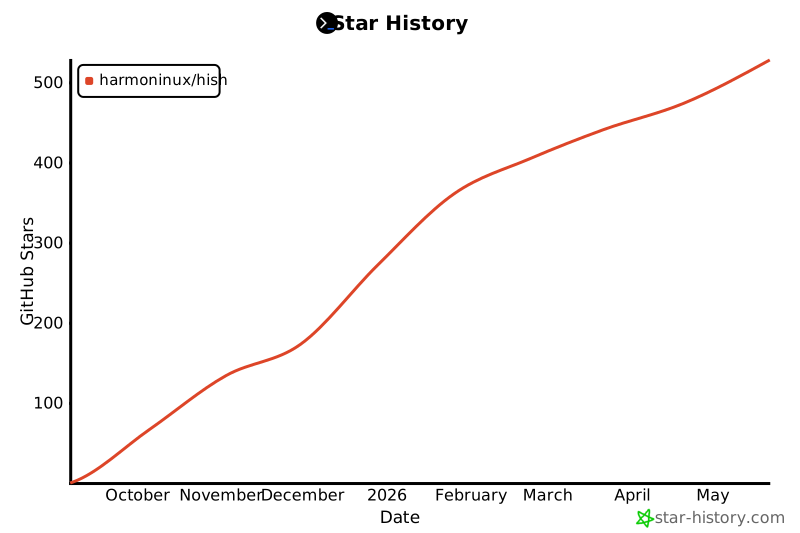
# Star history
[](https://www.star-history.com/#harmoninux/hish&Date)