https://github.com/harness-community/nodejs-pipeline-samples
https://github.com/harness-community/nodejs-pipeline-samples
continuous-integration docker kubernetes nodejs pipeline
Last synced: 5 months ago
JSON representation
- Host: GitHub
- URL: https://github.com/harness-community/nodejs-pipeline-samples
- Owner: harness-community
- License: mit
- Created: 2022-09-13T10:23:40.000Z (almost 4 years ago)
- Default Branch: main
- Last Pushed: 2022-11-18T12:56:38.000Z (over 3 years ago)
- Last Synced: 2024-07-30T17:54:00.394Z (almost 2 years ago)
- Topics: continuous-integration, docker, kubernetes, nodejs, pipeline
- Language: JavaScript
- Size: 384 KB
- Stars: 7
- Watchers: 1
- Forks: 11
- Open Issues: 1
-
Metadata Files:
- Readme: README.md
- License: LICENSE
Awesome Lists containing this project
README
# Nodejs Sample Pipelines in Harness

Introduction
============
This repository is a home for snippets of YAML code and a sample hello world server of scripting for the Harness CI Community.
## Layout
The repository is broken up into six directories currently:
**[Tutorial](docs/tutorial.md)**
**[Requirements](docs/requirements.md)**
**[Harness Sample YAML](.harness)**
**[Getting Started](#GettingStarted)**
**[Workflow](#Workflow)**
**[Build Instructions](docs/build.md)**
## Getting Started
Use this README to get started with our sample pipeline repository for Nodejs. This guide outlines the basics of getting started with the Harness CI and provides a full code sample for you to try out.
This sample doesn’t include configuration options, for in depth steps and configuring the pipeline for example using triggers or using our templates see the [Pipeline Configuration Docs](#).
Here we have build a simple two-stage CI Pipeline in Harness. Setting up and running the Pipeline will take about 30 minutes.
The Pipeline will build and run a unit test on a sample nodejs repository upload the artifact to Docker Hub and then run integration tests.
You can use publicly-available code, images, and your Github and Docker Hub accounts.
## Workflow
- Use a Kubernetes cluster build farm.
- Build the code and run unit tests in the build farm.
- Package the app as a Docker image and upload it to Docker Hub.
- Pull the uploaded image to the build farm as a Background Task. Check out more about background tasks [here](google.com)
- Run an integration test against the sample app.
## Graphical Summary
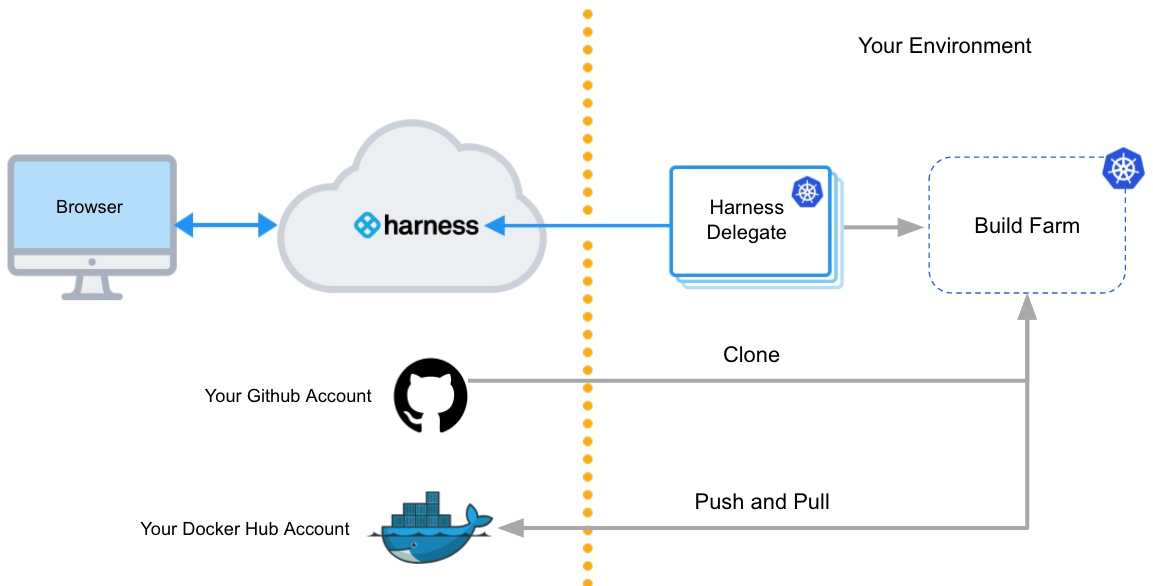
## Docs
- [Pipeline Creation & Build Set-up](docs/createpipeline.md)
- [Configuring the infrastructure & setting up Build & Run Unit Test stage](docs/createbuild.md)
- [Build & Push Image to Docker](docs/dockerpush.md)
- [Create Integration Stage and Run the Pipeline](docs/integration.md)
## Code of Conduct
All users and contributors of the Harness community should adhere to the following [Code of Conduct](https://github.com/harness/community/blob/main/CODE_OF_CONDUCT.md)!
## Communication
Refer [Harness Community Communications Guide](https://github.com/harness-community/overview/blob/main/community_communication_guide.rst) to interact with the wider community users/contributors, join slack workgroups to get help/help other users and create topics in [community.harness.io](https://community.harness.io)
### License
MIT License. See [COPYING](LICENSE) for more information.