https://github.com/harness-community/python-pipeline-samples
https://github.com/harness-community/python-pipeline-samples
continuous-integration harness kubernetes pipeline
Last synced: 6 months ago
JSON representation
- Host: GitHub
- URL: https://github.com/harness-community/python-pipeline-samples
- Owner: harness-community
- License: mit
- Created: 2022-09-08T10:07:27.000Z (almost 4 years ago)
- Default Branch: main
- Last Pushed: 2023-02-21T12:07:57.000Z (over 3 years ago)
- Last Synced: 2023-03-02T21:22:36.760Z (over 3 years ago)
- Topics: continuous-integration, harness, kubernetes, pipeline
- Language: Python
- Size: 1.6 MB
- Stars: 10
- Watchers: 1
- Forks: 72
- Open Issues: 5
-
Metadata Files:
- Readme: README.md
- License: LICENSE
Awesome Lists containing this project
README
# Python Sample Pipelines in Harness

Introduction
========================
This repository is a home for snippets of YAML code and a sample hello world server for the Harness CI Community.
## Layout
**[Tutorial](docs/CreatePipeline.md)**
**[Requirements](docs/requirements.md)**
**[Harness Sample YAML](.harness/Pipeline.yaml)**
**[Getting Started](#GettingStarted)**
**[Workflow](#Workflow)**
**[Build Instructions](docs/CreatePipeline.md)**
## Getting Started
Use this README to get started with our sample pipeline repository for Python. This guide outlines the basics of getting started with the Harness CI and provides a full code sample for you to try out. This sample doesn’t include configuration options, for in-depth steps and configuring the pipeline for example using triggers or using our templates see the Pipeline Configuration Docs.
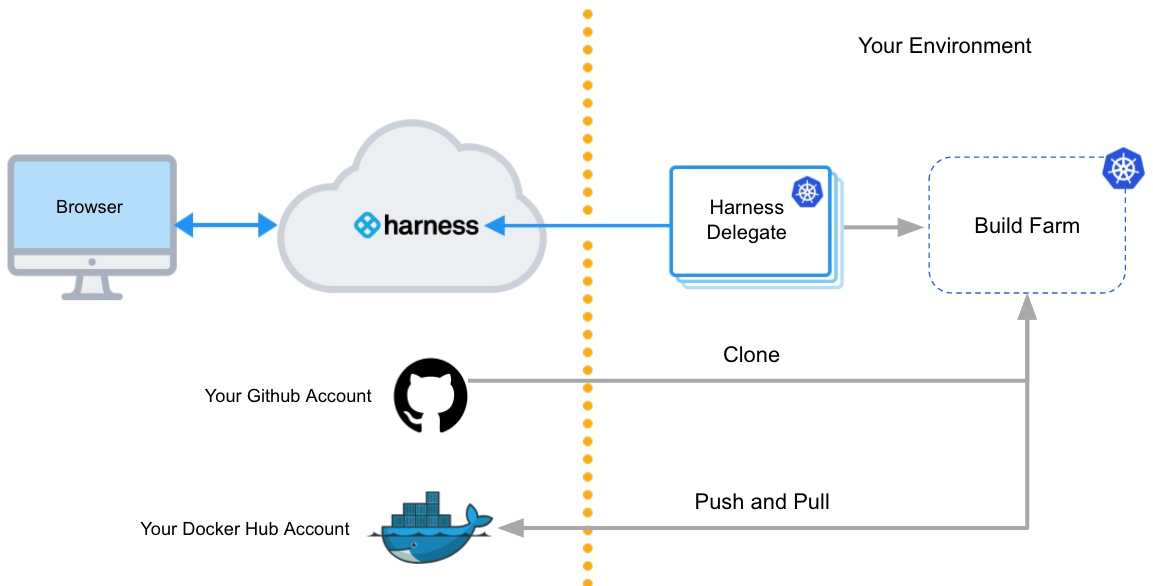
Here we have built a simple two-stage CI Pipeline in Harness. Setting up and running the Pipeline will take about 30 minutes. The Pipeline will build and run a unit test on a sample nodejs repository, upload the artifact to Docker Hub, and then run integration tests. You can use publicly-available code, images, and your GitHub and Docker Hub accounts.
## Workflow
- Use a Kubernetes cluster to build a farm.
- Build the code and run unit tests in the build farm.
- Package the app as a Docker image and upload it to Docker Hub.
- Pull the uploaded image to the build farm as a Background Task. Check out more about background tasks here
- Run an integration test against the sample app.
## Graphical Summary
## Docs
**[Pipeline Creation & Build Set-up](docs/CreatePipeline.md)**
**[Configuring the infrastructure & setting up Build & Run Unit Test stage](docs/build.md)**
**[Build & Push Image to Docker](docs/DockerPush.md)**
**[Create Integration Stage and Run the Pipeline](docs/Integration.md)**
## Contributor License Agreement
In order to clarify the intellectual property license granted with Contributions from any person or entity, Harness Inc. ("Harness") must have a Contributor License Agreement ("CLA") on file that has been read, accepted, and followed by each contributor, indicating an agreement to the CLA terms located [here](https://github.com/harness-community/overview/blob/main/Contributor_License_Agreement.md). This license is for your protection as a Contributor as well as the protection of Harness; it does not change your rights to use your own Contributions for any other purpose.
## Code of Conduct
All users and contributors of the Harness community should adhere to the following [Code of Conduct](https://github.com/harness/community/blob/main/CODE_OF_CONDUCT.md)!
## Communication
Refer [Harness Community Communications Guide](https://github.com/harness-community/overview/blob/main/community_communication_guide.rst) to interact with the wider community users/contributors, join slack workgroups to get help/help other users and create topics in [community.harness.io](https://community.harness.io)
## License
MIT License.
See [COPYING](LICENSE) for more information.