https://github.com/hashsumr/hashsumr
Fast, cross-platform, multi-algorithm hash tool with parallel checksums and progress display
https://github.com/hashsumr/hashsumr
blake3 checksum cli cross-platform developer-tools file-integrity hash hashing md5 multi-threaded parallel-processing sha256
Last synced: 5 months ago
JSON representation
Fast, cross-platform, multi-algorithm hash tool with parallel checksums and progress display
- Host: GitHub
- URL: https://github.com/hashsumr/hashsumr
- Owner: hashsumr
- License: mit
- Created: 2026-01-03T15:11:45.000Z (7 months ago)
- Default Branch: main
- Last Pushed: 2026-02-27T09:47:36.000Z (5 months ago)
- Last Synced: 2026-02-27T15:08:49.883Z (5 months ago)
- Topics: blake3, checksum, cli, cross-platform, developer-tools, file-integrity, hash, hashing, md5, multi-threaded, parallel-processing, sha256
- Language: C
- Homepage:
- Size: 208 KB
- Stars: 0
- Watchers: 0
- Forks: 0
- Open Issues: 0
-
Metadata Files:
- Readme: README.md
- License: LICENSE
Awesome Lists containing this project
README
# hashsumr
**hashsumr**: Fast, cross-platform, multi-algorithm hash tool with parallel checksums and progress display.
hashsumr (pronounced hash-summer) is a command-line utility designed for developers and power users who need to compute file hashes efficiently across multiple platforms. It is compatible with GNU coreutils conventions, supports multiple hashing algorithms, computes hashes for multiple files in parallel, and displays a progress bar for long-running operations.
## Features
- ✅ Multi-algorithm support: MD5, SHA1, SHA256, SHA512, BLAKE3, and more
- ✅ Parallel processing: compute hashes for multiple files at the same time to maximize speed
- ✅ GNU coreutils compatible: familiar CLI arguments and behavior (--check, --tag, etc.)
- ✅ Cross-platform: works on Linux, FreeBSD, macOS, and Windows
- ✅ Progress bar: visually track hashing progress for large files
- ✅ Automatic detection: selects the hash algorithm when verifying BSD-style checksum files
## Pre-Built Binaries
You can find pre-built binaries from the [releases](https://github.com/hashsumr/hashsumr/releases) page. No extra dependencies are required for executing the CLI tool.
Available pre-built binaries:
- `hasusumr-linux-amd64-static`; For Linux x86_64 platform
- `hasusumr-linux-arm64-static`: For Linux aarch64 platform
- `hashsumr-amd64.exe`: For Windows x86_64 platform (require [Visual C++ Redistributable](https://learn.microsoft.com/cpp/windows/latest-supported-vc-redist))
- `hashsumr-arm64.exe`: For Windows aarch64 platform (require [Visual C++ Redistributable](https://learn.microsoft.com/cpp/windows/latest-supported-vc-redist))
## Compile from Source Codes
### Dependencies
#### Linux
- Alpine: `apk add git make cmake gcc g++ musl-dev openssl-dev openssl-libs-static`
- archlinux: `pacman -S git make cmake gcc openssl`
- Debian/Ubuntu: `apt install git make cmake gcc g++ libssl-dev`
- Fedora: `dnf install git make cmake gcc g++ openssl-devel`
- openSUSE: `zypper install git make cmake gcc gcc-c++ openssl-devel`
#### FreeBSD
(tested on FreeBSD 15.0) `pkg install git gmake cmake gcc`
#### macOS
Install [Xcode Command Line Tools](https://developer.apple.com/documentation/xcode/installing-the-command-line-tools/) and [Homebrew](https://brew.sh/) first, then install the required packages using the following command:
```
brew install cmake openssl
```
#### Windows
Install [Visual Studio Community](https://visualstudio.microsoft.com/vs/community/) and select the following components in the Visual Studio Installer.
- **"Desktop development with C++"** workload
- **"Git for Windows"** component
### Build and Install
- General instructions
```
git clone --recursive https://github.com/hashsumr/hashsumr.git
cd hashsumr
make all
cp hashsumr /path/to/install/
```
- Note#1: For FreeBSD, use `gmake` instead of `make` to build `hashsumr`.
- Note#2: For Windows
- Please launch the terminal using the appropriate shortcut, for example, **"x64 Native Tools Command Prompt for VS"**.
- Use `nmake /f NMakefile` to build `hashsumr.exe`.
- Use `copy hashsumr.exe c:\path\to\install\` to install the executable.
## Usage
Launching `hashsumr` without any argument displays the following message. The available algorithms vary by platform.
```
Usage: hashsumr [OPTION]... [FILE]...
Print or check hash-based checksums.
AVAILABLE ALGORITHMS: (case insensitive)
SHA1 SHA224 SHA256 SHA384 SHA512 SHA512/224 SHA512/256 SHA3/224 SHA3/256 SHA3/384 SHA3/512 SHAKE128 SHAKE256 MD5 BLAKE2b BLAKE2s BLAKE3
OPTION: (* - not implemented, for compatibility only)
-1, --one classic mode (no progress bar, no workers)
-a, --algorithm choose the algorithm (default: SHA256)
-b, --binary read in binary mode (default)
-c, --check read checksums from the FILEs and check them
--gnu create a GNU-style checksum
--tag create a BSD-style checksum (default)
-t, --text (*) read in text mode
-z, --zero end each output line with NUL, not newline,
and disable file name escaping
--workers set the number or parallel workers
--np no progress bar (default)
-p, --progress show progress bar
The following five options are useful only when verifying checksums:
--ignore-missing don't fail or report status for missing files
-q, --quiet don't print OK for each successfully verified file
--status don't output anything, status code shows success
--strict exit non-zero for improperly formatted checksum lines
-w, --warn warn about improperly formatted checksum lines
-h, --help display this help and exit
-v, --version output version information and exit
```
## Demo
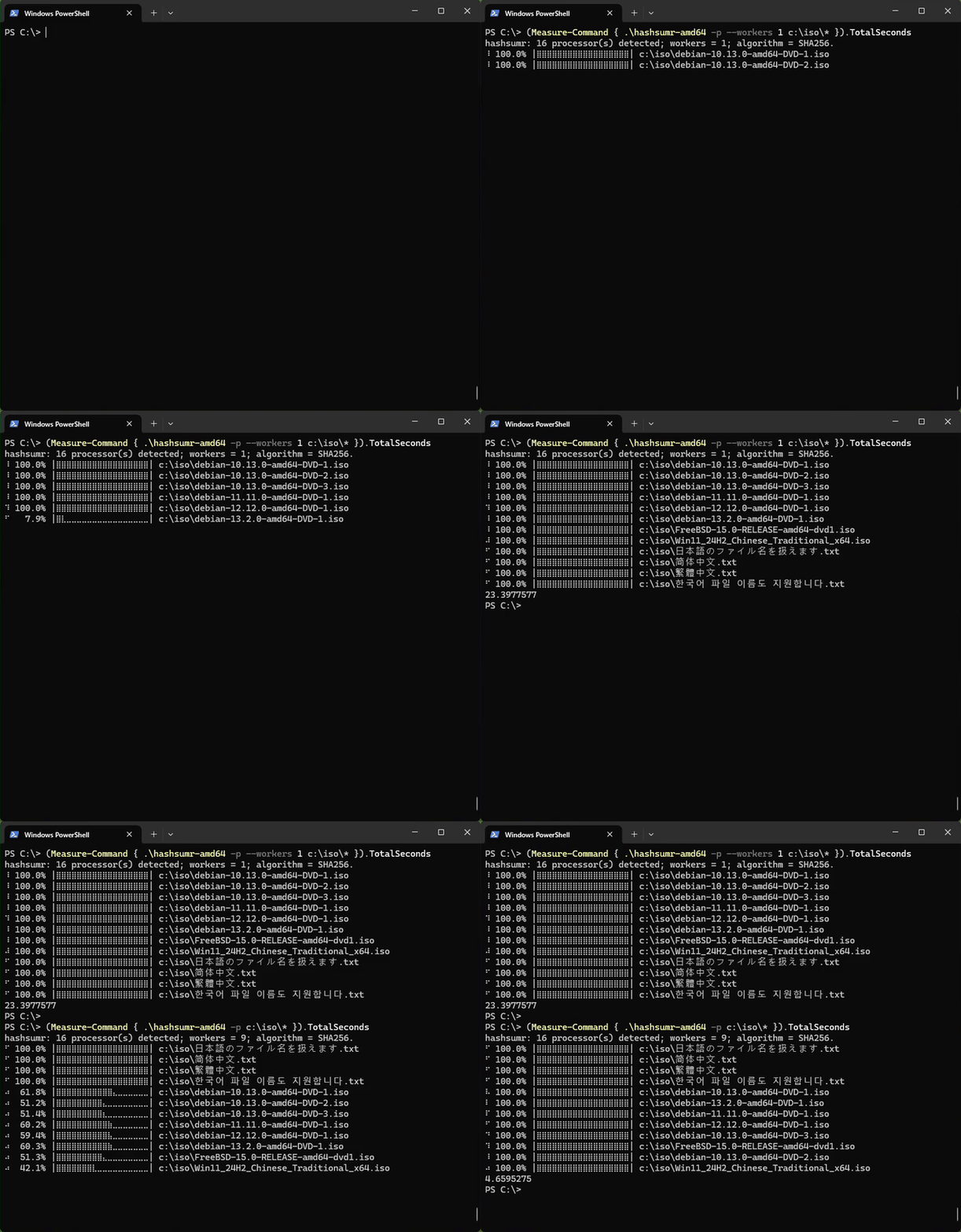
### Single Worker vs. Multiple Workers on Windows
> Hardware: Intel i7-1260P CPU + WD Blue SN570 SSD
> Files: Debian/FreeBSD/Windows ISO files x8 (35,385,284,608 bytes) + CJK filenames x4 (108 bytes)
> Summary: 1 worker (23.40s) vs. 9 workers (4.66s ~ 5.02x speedup)
> Commands (PowerShell):
```
(Measure-Command { .\hashsumr-amd64 -p --workers 1 c:\iso\* }).TotalSeconds
(Measure-Command { .\hashsumr-amd64 -p c:\iso\* }).TotalSeconds
```
### Single Worker vs. Multiple Workers on MacOS
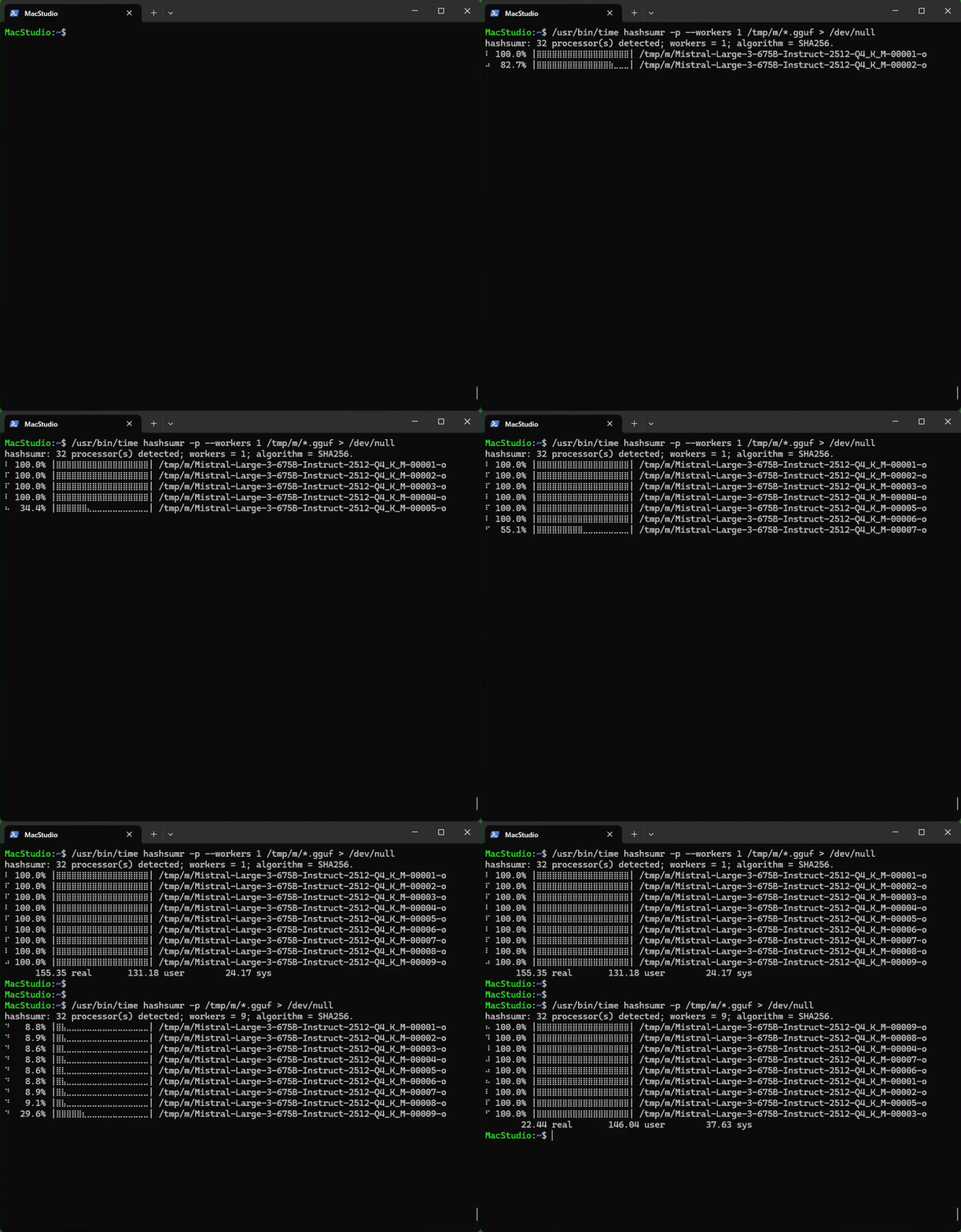
> Hardware: Apple M3 Ultra CPU + Mac Studio built-in SSD
> Files: [Mistral-Large-3-675B-Instruct-2512-GGUF](https://huggingface.co/unsloth/Mistral-Large-3-675B-Instruct-2512-GGUF/tree/main/Q4_K_M) model files x9 (406,989,520,384 bytes)
> Summary: 1 worker (155.35s) vs. 10 workers (22.44s ~ 6.92x speedup)
> Commands:
```
/usr/bin/time hashsumr -p --workers 1 /tmp/m/*.gguf > /dev/null
/usr/bin/time hashsumr -p /tmp/m/*.gguf > /dev/null
```
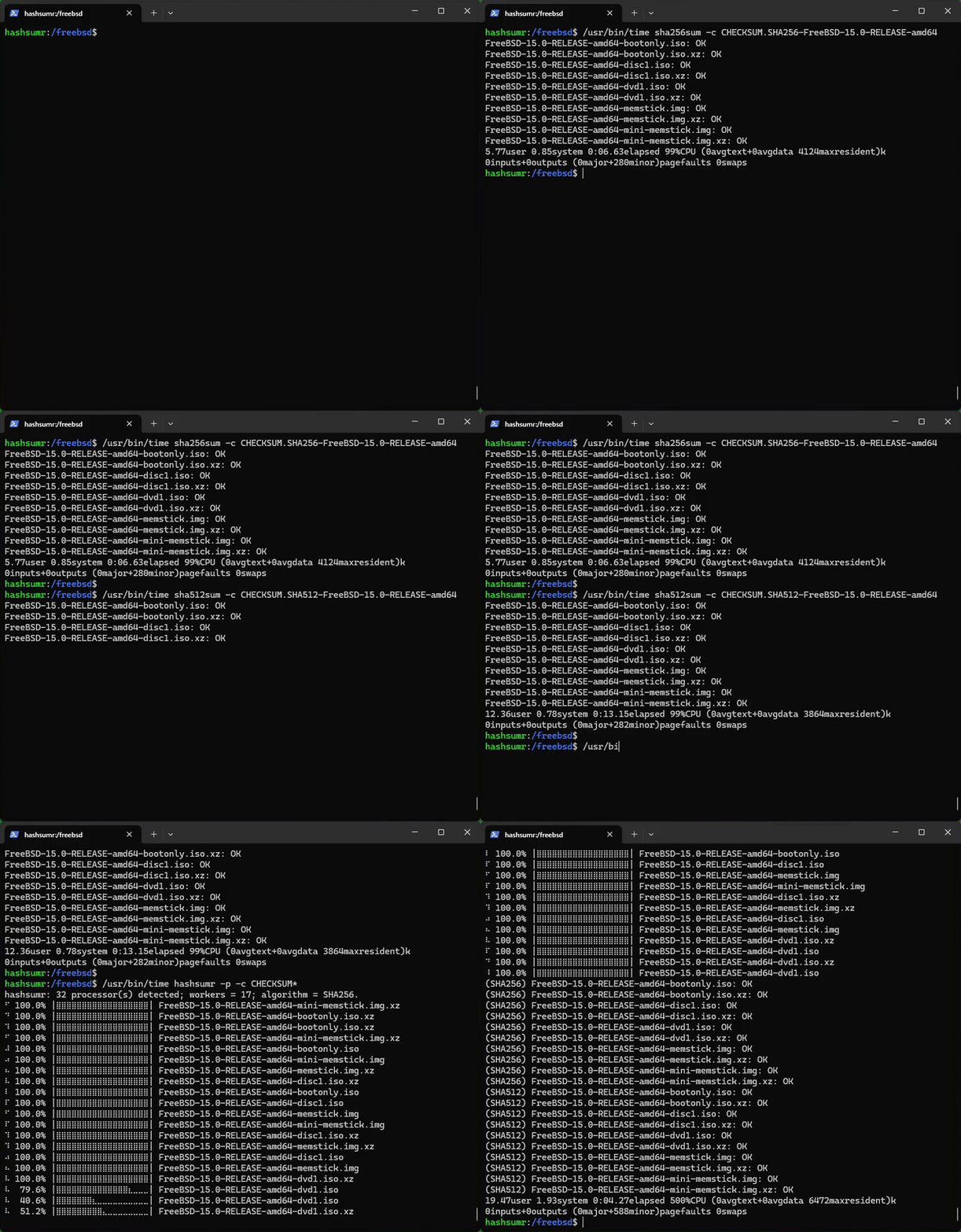
### Checksum Verification
> Hardware: AMD Ryzen 9 5950X CPU + Intel 670P SSD [RAID1]
> Files: FreeBSD 15.0 amd64 Release [files](https://download.freebsd.org/releases/ISO-IMAGES/15.0/) x10 (14,156,216,784 bytes)
> Summary: sha256sum (6.63s) + sha512sum (13.15s) vs. 17 workers (4.27s ~ 4.63x speedup)
> Commands:
```
/usr/bin/time sha256sum -c CHECKSUM.SHA256-FreeBSD-15.0-RELEASE-amd64
/usr/bin/time sha512sum -c CHECKSUM.SHA512-FreeBSD-15.0-RELEASE-amd64
/usr/bin/time hashsumr -p -c CHECKSUM*
```