https://github.com/hatixntsoa/github.codespace
Simple setup scripts for Git config and timezone, optimized for GitHub Codespaces.
https://github.com/hatixntsoa/github.codespace
git-config github-codespaces shell-scripts timezone
Last synced: 18 days ago
JSON representation
Simple setup scripts for Git config and timezone, optimized for GitHub Codespaces.
- Host: GitHub
- URL: https://github.com/hatixntsoa/github.codespace
- Owner: hatixntsoa
- License: mit
- Created: 2025-09-11T07:50:33.000Z (11 months ago)
- Default Branch: master
- Last Pushed: 2025-10-19T13:57:09.000Z (9 months ago)
- Last Synced: 2025-11-03T17:10:36.355Z (9 months ago)
- Topics: git-config, github-codespaces, shell-scripts, timezone
- Language: Shell
- Homepage: https://codespace.hatixntsoa.site
- Size: 326 KB
- Stars: 2
- Watchers: 0
- Forks: 0
- Open Issues: 0
-
Metadata Files:
- Readme: README.md
- License: LICENSE.md
Awesome Lists containing this project
README
# GitHub Codespace 🚀

`github.codespace` is a project aiming to automate startup script that instantly configures your **GitHub Codespace environment** — no manual setup required.
It helps you quickly set your **timezone** and **Git credentials** on every new session in just one command.



### Contents
[Quick Start](#quick-start-) |
[Screenshot](#screenshot-) |
[Project Structure](#project-structure-) |
[How It Works](#how-it-works-) |
[Deployment](#deployment-) |
[License](#license-)
## Quick Start ⚡
To configure your Codespace environment instantly, run this single command in your terminal:
```bash
curl -sL codespace.hatixntsoa.site | bash
````
You’ll be prompted to enter:
* Your **timezone offset** (e.g., `3` for GMT+3)
* Your **Git username**
* Your **Git email**
Once complete, the script will:
* Set your system’s timezone accordingly
* Configure your Git credentials locally within the Codespace
## Screenshot 📸
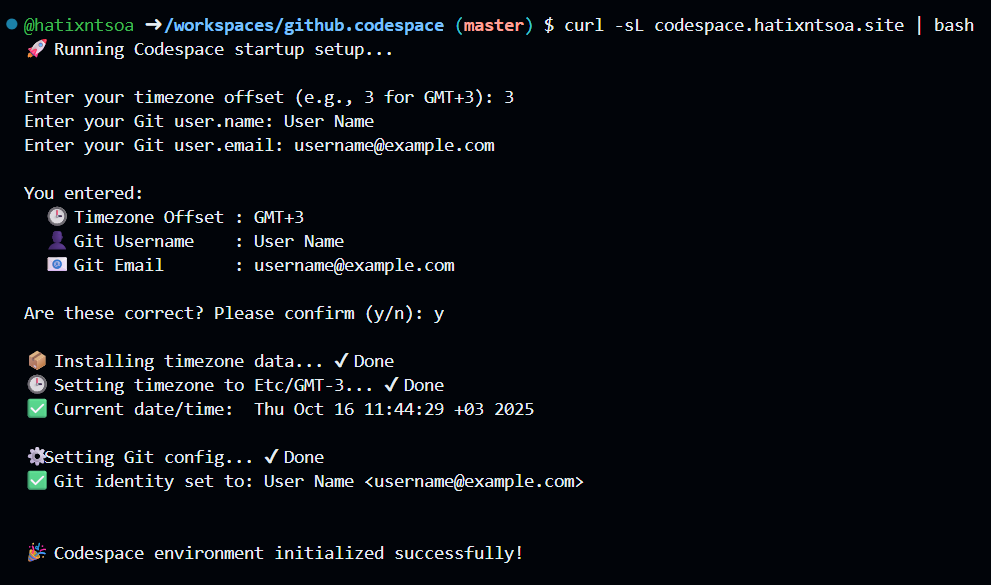
Example: Script Execution inside a GitHub Codespace Terminal session.
## Project Structure 📦
```
.
├── setup/
│ ├── git.creds.sh # Sets up Git username and email
│ ├── timezone.sh # Configures system timezone
│ └── startup.sh # Main startup script (alias: index.html)
├── CNAME # Custom domain for GitHub Pages
├── index.html # Serves bash or web content depending on context
├── LICENSE.md
└── README.md
```
## How It Works 🔧
The startup script (`index.html`) performs the following actions:
1. **Fetches and runs `timezone.sh`**
* Applies your timezone based on offset input (e.g., `Etc/GMT-3`).
2. **Fetches and runs `git.creds.sh`**
* Configures `user.name` and `user.email` for Git locally in the Codespace.
You can view the raw script here:
👉 [https://codespace.hatixntsoa.site](https://codespace.hatixntsoa.site)
## Deployment 🌐
This project is hosted via **GitHub Pages** with a [custom domain](https://codespace.hatixntsoa.site).
All scripts inside the `setup/` directory are public and accessible at:
```
https://codespace.hatixntsoa.site/setup/
```
**Examples:**
* [git.creds.sh](https://codespace.hatixntsoa.site/setup/git.creds.sh)
* [timezone.sh](https://codespace.hatixntsoa.site/setup/timezone.sh)
## License 🛡
This project is licensed under the **MIT License**.
See the [LICENSE.md](LICENSE.md) file for details.