https://github.com/haunchen/n8n-skills
Designed specifically for AI assistants, the n8n Workflow Automation Skills Suite.
https://github.com/haunchen/n8n-skills
automation claude n8n n8n-skills n8n-workflow skills
Last synced: about 1 month ago
JSON representation
Designed specifically for AI assistants, the n8n Workflow Automation Skills Suite.
- Host: GitHub
- URL: https://github.com/haunchen/n8n-skills
- Owner: haunchen
- License: other
- Created: 2025-10-31T11:41:48.000Z (8 months ago)
- Default Branch: main
- Last Pushed: 2026-04-01T06:45:07.000Z (3 months ago)
- Last Synced: 2026-04-01T09:27:24.978Z (3 months ago)
- Topics: automation, claude, n8n, n8n-skills, n8n-workflow, skills
- Language: TypeScript
- Homepage: https://n8n-skills.frankchen.tw
- Size: 5.41 MB
- Stars: 300
- Watchers: 4
- Forks: 25
- Open Issues: 0
-
Metadata Files:
- Readme: README.md
- Changelog: CHANGELOG.en.md
- Contributing: CONTRIBUTING.en.md
- License: LICENSE
- Code of conduct: CODE_OF_CONDUCT.en.md
- Security: SECURITY.en.md
Awesome Lists containing this project
- awesome-openclaw-money-maker - **n8n-skills** - n8n Workflow Automation Skills Suite designed for AI assistants. Ready-to-use workflow templates. (Workflow Automation / Browser Automation Agents)
- awesome-claude-skills-zh - n8n-skills - 让 AI 助手直接理解和操作 n8n 工作流。 (技能列表 / 生产力与组织)
- awesome-deepagent-skills - n8n-skills - Enables AI assistants to directly understand and operate n8n workflows. (Skills / Productivity & Organization)
- awesome-claude-skills - n8n-skills - Enables AI assistants to directly understand and operate n8n workflows. (Skills / Productivity & Organization)
- awesome-openclaw-skills - n8n-skills - | (Productivity & Workflow)
README
# n8n Skills
[English](README.md) | [繁體中文](README.zh-TW.md)
> Supported n8n version: v2.21.7
n8n Skills is an automation skill pack that enables AI assistants to directly understand and operate n8n workflows, covering comprehensive information on 545 nodes and 20 curated templates. Through n8n Skills, AI assistants can help you quickly design workflows and explore node functionalities, making workflow automation more intuitive, intelligent, and saving significant development time.
## Why Choose n8n Skills
n8n Skills provides a complete n8n Skill Pack solution for AI assistant workflow integration:
- Covers detailed documentation and usage guides for 545 n8n nodes
- Provides 20 curated workflow templates covering common scenarios like AI chatbots, data processing, and communications
- Multi-dimensional priority ranking system ensuring the most useful information is presented first
- Node compatibility analysis to help design correct workflow connections
- Supports Claude Code, Claude.ai Web, and Claude Desktop platforms
- Continuously maintained and updated to follow the latest n8n versions
With n8n Skills, you can:
- Quickly query any node's features, parameters, and configuration methods
- Have AI assistants recommend suitable node combinations for specific tasks
- Learn workflow design best practices and common patterns
- Explore unlimited application possibilities with 545 nodes
## Who Should Use
n8n Skills is designed for the following users:
AI Assistant Developers
- Engineers developing with Claude Code CLI tool
- Users seeking n8n knowledge in Claude.ai web version
- Claude Desktop application enthusiasts
n8n Workflow Users
- Automation engineers who want AI-assisted workflow design
- n8n developers who need quick node functionality queries
- Learners hoping to explore node best practices
Automation Enthusiasts
- Innovators looking to integrate AI with workflow automation
- Efficiency seekers aiming to boost productivity
## Project Overview
This package provides AI assistants with the ability to access n8n node information, helping AI understand and operate n8n workflows.
### Key Features
- Provides complete information on n8n nodes
- Supports node search and exploration
- Node configuration validation
- Workflow structure analysis
- Support for 30+ popular community packages
- Community packages organized by category (AI tools, communication, web scraping, etc.)
### Technical Architecture
This project is built upon the [n8n-mcp](https://github.com/czlonkowski/n8n-mcp) architecture, converted into an n8n Skill Pack generator with added priority ranking, node grouping, and documentation integration features. n8n Skills adopts a five-layer modular architecture (collectors, parsers, organizers, generators, build scripts), automatically collecting information from n8n NPM packages, APIs, and documentation, and generating skill packs best suited for AI assistants through intelligent ranking.
## Using n8n Skills
This project generates the n8n Skills automation skill pack, allowing you to use comprehensive n8n workflow knowledge in Claude Code, Claude.ai, or Claude Desktop.
### Download n8n Skill Pack
1. Go to the [GitHub Releases](https://github.com/haunchen/n8n-skills/releases) page of this project
2. Download the latest version of the `n8n-skills-{version}.zip` file
3. After extraction, you will get the following file structure:
```
n8n-skills/
├── SKILL.md # Main skill file
└── resources/ # Detailed node documentation
├── input/ # Input category nodes
├── output/ # Output category nodes
├── transform/ # Transform category nodes
├── trigger/ # Trigger category nodes
├── organization/ # Organization category nodes
├── misc/ # Miscellaneous nodes
├── community/ # Community package nodes
└── templates/ # Workflow templates
```
### Installation Methods
Choose the n8n Skills installation method according to the Claude platform you are using:
#### Claude Code (CLI Tool)
Suitable for developers using Claude Code in the terminal, loading n8n Skills through local skills directory.
1. Create a `.claude/skills/` directory in your project root:
```bash
mkdir -p .claude/skills/n8n-skills
```
2. Copy the extracted `SKILL.md` and `resources/` directory to that directory:
```bash
cp -r n8n-skills/* .claude/skills/n8n-skills/
```
3. The directory structure should look like this:
```
your-project/
└── .claude/
└── skills/
└── n8n-skills/
├── SKILL.md
└── resources/
```
4. Verify installation: Ask Claude Code "List available n8n nodes". If the Skill is correctly invoked, the installation is successful.
#### Claude.ai Web (Web Version)
Suitable for general users in browsers.
1. Log in to [Claude.ai](https://claude.ai)
2. Go to the "Settings" page and find the "Capabilities" section
3. Click "Upload skill"
4. Select the downloaded `n8n-skills-{version}.zip` file to upload
5. After upload completes, you will see "n8n-skills" below. If not enabled, click to enable it.
6. Return to the conversation window and ask questions about n8n. Successfully using n8n-skills indicates successful installation.
#### Claude Desktop (Desktop Application)
Suitable for users of the Claude Desktop application.
1. Open the "Claude" desktop application
2. Go to the "Settings" page and find the "Capabilities" section
3. Find the "Skills" section and click "Upload skill"
4. Select the downloaded `n8n-skills-{version}.zip` file to upload
5. After upload completes, you will see "n8n-skills" below. If not enabled, click to enable it.
6. Return to the conversation window and ask questions about n8n. Successfully using n8n-skills indicates successful installation.
### Basic Usage Examples
After installation, you can use it like this:
Query specific node information:
```
"What are the main features of the HTTP Request node?"
"How to send email using the Gmail node?"
"What programming languages does the Code node support?"
```
Explore workflow patterns:
```
"How to create a scheduled workflow?"
"What are the common node combinations for data transformation?"
"How to handle API errors and retries?"
```
Search for specific functionality:
```
"Which nodes can connect to Google Sheets?"
"What AI-related nodes are available?"
"What trigger nodes are available?"
```
### Real-world Use Cases
Here are real-world scenarios using n8n Skills:
Case 1: AI-Assisted Workflow Design
Scenario: You want to create a workflow that "automatically sends daily operational reports."
Before n8n Skills: You need to manually search n8n documentation, research each node's functionality, and repeatedly trial-and-error to find the correct node combination.
After n8n Skills: Simply ask the AI assistant "How to create a scheduled email report workflow?", and the AI will recommend based on n8n Skills knowledge:
1. Schedule Trigger (for scheduling)
2. HTTP Request or Google Sheets (for data retrieval)
3. Code or Item Lists (for data processing)
4. Gmail or Send Email (for sending emails)
Time Saved: From hours of research reduced to minutes of design.
Case 2: Exploring the Best Node Combinations
Scenario: You want to integrate Slack notifications into your existing workflow but aren't sure which nodes are available.
With n8n Skills: Ask "Which nodes can send Slack messages?", and the AI will tell you:
- Slack node (official integration, most comprehensive features)
- HTTP Request (uses Slack API, highest flexibility)
- Webhook (receives Slack events)
Along with explaining the pros and cons of each node, suitable scenarios, and configuration methods.
Benefit: Quickly find the most suitable solution for your needs, avoiding detours.
Case 3: Learning Workflow Best Practices
Scenario: Beginners want to learn how to handle API errors and retry mechanisms.
With n8n Skills: Ask "How to handle HTTP Request errors and retries?", and the AI will reference 20 curated templates and 542 nodes of knowledge to share:
- How to use Error Trigger node
- Built-in retry settings for HTTP Request
- Error handling pattern using If node with Stop and Error
- Real-world workflow examples
Accelerated Learning: From zero foundation to mastering best practices, systematically improving skills.
### FAQ
Skill won't load?
- Confirm the `SKILL.md` file is in the correct location
- Check if the file name is correct (case-sensitive)
- Verify the `resources/` directory structure is complete
- Restart the Claude application or refresh the webpage
File structure errors
- Ensure `SKILL.md` and `resources/` are in the same directory level
- Do not modify the file structure inside the `resources/` directory
- If there are multiple directory levels after extraction, move the contents to the correct location
Version compatibility
- Newer versions of n8n may have new nodes, but most features will still work
- It's recommended to regularly update the Skill Pack to get the latest node information
How to update to a new version
1. Download the latest version from GitHub Releases
2. Delete the old Skill files
3. Reinstall the new version following the installation steps
4. Restart the Claude application
### Reference Resources
- [Claude Skills Official Documentation](https://support.claude.com/en/articles/12580051-teach-claude-your-way-of-working-using-skills)
- [n8n Official Documentation](https://docs.n8n.io)
- [Issue Reporting](https://github.com/haunchen/n8n-skills/issues)
## Development Environment Setup
```bash
npm install
```
## Development Commands
```bash
# Build project
npm run build
# Development mode
npm run dev
# Run tests
npm test
# Type checking
npm run typecheck
```
## Technical Requirements
- Node.js >= 18.0.0
- TypeScript >= 5.3.0
## Project Information
Maintainer
- Frank Chen ([@haunchen](https://github.com/haunchen))
- Project Homepage: https://github.com/haunchen/n8n-skills
Version Information
- Current Version: 1.2.0
- Supported n8n Version: v2.21.7
- Last Updated: May 2026
- Release Frequency: Follows n8n major version updates
Project Statistics
- Node Coverage: 542 built-in nodes
- Community Packages: 30+ packages
- Curated Templates: 20 templates
- Output Files: 126 files
- Total Documentation Size: 2.7 MB
- Supported Platforms: Claude Code, Claude.ai Web, Claude Desktop
Technical Features
- Multi-dimensional priority scoring system (usage frequency, documentation quality, community popularity)
- Node hierarchical merging strategy to optimize file structure
- Automated CI/CD pipeline ensuring quality
- Caching mechanism to accelerate build process
- Node compatibility matrix analysis
## Acknowledgments
This project was built using the following resources:
- Based on the [n8n-mcp](https://github.com/czlonkowski/n8n-mcp) project architecture created by Romuald Czlonkowski @ [www.aiadvisors.pl/en](https://www.aiadvisors.pl/en)
- Uses n8n node type definitions and metadata
- References n8n official documentation
Thanks to all contributors and the open source community for their support.
## Related Links
- n8n Official Website: https://n8n.io
- n8n GitHub: https://github.com/n8n-io/n8n
- n8n Documentation: https://docs.n8n.io
- n8n-mcp Project: https://github.com/czlonkowski/n8n-mcp
## Community and Support
We welcome your participation and feedback!
Issue Reporting and Feature Suggestions
- Encountered a problem? Please report it at [GitHub Issues](https://github.com/haunchen/n8n-skills/issues)
- Have a feature suggestion? Feel free to open a new Issue for discussion
- Found a bug? Please provide detailed reproduction steps
Contributing
- Check [CONTRIBUTING.md](./CONTRIBUTING.en.md) to learn how to contribute
- Fork the project and submit a Pull Request
- Improvements to documentation, bug fixes, and new features are all welcome
- Help translate into other languages
Stay Connected
- Follow [GitHub Releases](https://github.com/haunchen/n8n-skills/releases) for notifications about new versions
- Star this project to support our development work
- Share with friends and colleagues who might need it
Technical Support
- Usage questions: Please first check the "FAQ" section
- Technical discussions: Feel free to initiate discussions in Issues
- n8n-related questions: Please refer to [n8n Official Documentation](https://docs.n8n.io) or [n8n Community Forum](https://community.n8n.io)
## License Information
This project is licensed under the MIT License, but includes the following third-party resources:
1. n8n-mcp - n8n Model Context Protocol Integration
- License: MIT License
- Source: https://github.com/czlonkowski/n8n-mcp
- Author: Romuald Czlonkowski @ www.aiadvisors.pl/en
For detailed license information, please refer to [ATTRIBUTIONS.md](./ATTRIBUTIONS.md) and [LICENSE](./LICENSE).
## License Terms
MIT License - See [LICENSE](./LICENSE) for details.
All trademarks and copyrights belong to their respective owners.
---
## Get Started with n8n Skills
Ready to let AI assistants help you design n8n workflows?
Download Now
Visit [GitHub Releases](https://github.com/haunchen/n8n-skills/releases) to download the latest version of n8n Skills and start experiencing AI-assisted workflow design!
Join the Community
- Star this project on [GitHub](https://github.com/haunchen/n8n-skills) to support our development
- Follow [Releases](https://github.com/haunchen/n8n-skills/releases) for notifications about new versions
- Share your experience or suggestions at [Issues](https://github.com/haunchen/n8n-skills/issues)
Contribute Your Ideas
n8n Skills is an open source project, and we welcome all forms of contribution:
- Report issues or suggest new features
- Improve documentation or translations
- Submit code improvements
- Share your use cases
Visit [GitHub](https://github.com/haunchen/n8n-skills) now and start your n8n automation skills journey!
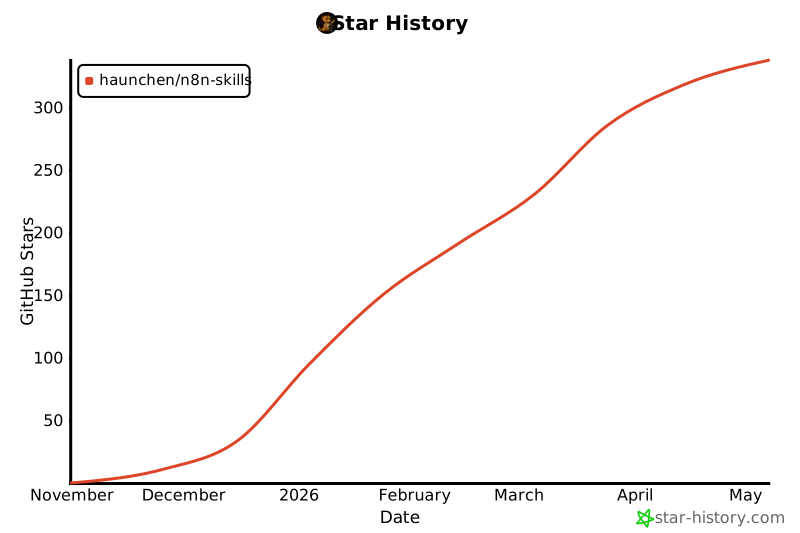
## Star History
[](https://www.star-history.com/#haunchen/n8n-skills&type=date&legend=top-left)