https://github.com/hdfgroup/hdflab_examples
Python Notebook examples for HDFLab
https://github.com/hdfgroup/hdflab_examples
Last synced: 3 months ago
JSON representation
Python Notebook examples for HDFLab
- Host: GitHub
- URL: https://github.com/hdfgroup/hdflab_examples
- Owner: HDFGroup
- License: mit
- Created: 2018-07-12T05:06:23.000Z (almost 8 years ago)
- Default Branch: master
- Last Pushed: 2024-01-29T02:54:46.000Z (over 2 years ago)
- Last Synced: 2025-08-12T21:11:36.082Z (10 months ago)
- Language: Jupyter Notebook
- Size: 19 MB
- Stars: 6
- Watchers: 6
- Forks: 2
- Open Issues: 0
-
Metadata Files:
- Readme: README.md
- License: LICENSE
Awesome Lists containing this project
README
# HDF Lab Examples
HDF Lab provides a convenient environment for exploration of HDF5 data using HSDS or the HDF5 Library
It consists of the following components:
* JupyterLab hosted on AWS
* HDF Server (HSDS) - a REST-based service for HDF data
* h5pyd - a Python client to the Kita Server REST API based on the popular h5py package
* Many other popular Python packages for data analytics: Pandas, xarray, scipy, etc.
* Sample data files
* Example Python notebooks (this repository)
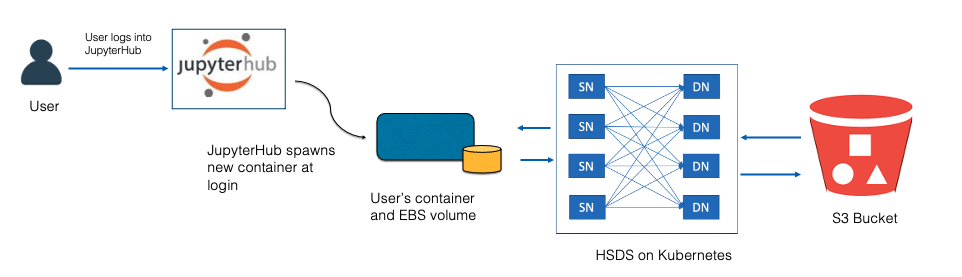
The diagram below outlines the different components of HDF Lab. Each component is implemented as a pod that runs on a Kuberentes cluster.
## How Does HDF Lab work?
HDF Lab runs as a set of components (pods) on a Kubernetes cluster in AWS. When a user signs into HDF Lab, they are authenticated using their HDF Group credentials, then a new pod is spun up that will host their virtual computing environment. Each user pod is linked with a virtual disk drive of 10 GB that can be used to store notebooks, code, or data files. Any information you store on the drive will be available to you next time you log in.
In addition, you will have access to the HSDS service (which itself is running as a set of pods). HSDS enables high performance read/write access to content stored on AWS S3. Since your compute environment, HSDS, and S3 are all located in the same AWS Region, and share a high-speed network, you get much better performance compared with accessing cloud data from your desktop computer.
On HSDS there are example data files under “/shared/” that all HDF Lab users have access too. In addition, the folder /home/<username>/ will be available for you to host whatever data you like—up to 200 GB.
## Running the sample notebooks
You'll get the best results by running the examples within HDF Lab. Getting access is easy - follow these steps:
### Get an HDF Group account
Go to and click the "Create Free Account" button.
### Sign up for HDF Lab
Go to , accept the license term and click the
register button.
### Sign in to HDF Lab
Once your account is approved (you will be notified by email), go to to sign in and start your HDF Lab session.
### Open the first notebook
In HDFLab, you'll find your disk contains this tutorial. Click on examples/Tutorial/01.intro.ipynb to get started
## Links
* Reference
* [Code hsds](https://github.com/HDFGroup/hsds)
* [Docs h5py](http://docs.h5py.org/en/latest/index.html)
* [Code h5pyd](https://github.com/HDFGroup/h5pyd)
* [Code REST API](https://github.com/HDFGroup/hdf-rest-api)
* [HDF Lab FAQ](https://portal.hdfgroup.org/display/KITA/HDF+Lab+Frequently+Asked+Questions)