https://github.com/heaths/azsdk-samples-mcp
MCP Server to build context from dependencies' sample content
https://github.com/heaths/azsdk-samples-mcp
azure-sdk mcp-server
Last synced: 5 months ago
JSON representation
MCP Server to build context from dependencies' sample content
- Host: GitHub
- URL: https://github.com/heaths/azsdk-samples-mcp
- Owner: heaths
- License: mit
- Created: 2025-12-22T18:02:44.000Z (7 months ago)
- Default Branch: main
- Last Pushed: 2026-02-07T07:48:49.000Z (6 months ago)
- Last Synced: 2026-02-07T17:41:07.698Z (6 months ago)
- Topics: azure-sdk, mcp-server
- Language: C#
- Homepage:
- Size: 129 KB
- Stars: 0
- Watchers: 0
- Forks: 0
- Open Issues: 5
-
Metadata Files:
- Readme: README.md
- Contributing: CONTRIBUTING.md
- License: LICENSE.txt
- Agents: AGENTS.md
Awesome Lists containing this project
README
# Azure SDK Samples MCP (Unofficial)
[](https://github.com/heaths/azsdk-samples-mcp/releases/latest)
[](https://github.com/heaths/azsdk-samples-mcp/actions/workflows/ci.yml)
An MCP (Model Context Protocol) server that discovers and retrieves code samples from Azure SDK packages. When working with Azure SDKs, having access to relevant code examples can significantly improve development efficiency and reduce errors. This MCP server automatically discovers Azure SDK samples from your project's dependencies (NuGet, npm, Cargo) and makes them available to AI agents and coding assistants like GitHub Copilot.
**Key features:**
- Discovers Azure SDK samples from multiple package managers (NuGet, npm, Cargo)
- Lists project dependencies and their available samples
- Integrates seamlessly with AI agents and coding assistants via the MCP protocol
- Supports .NET, Node.js, and Rust projects
## Demo
[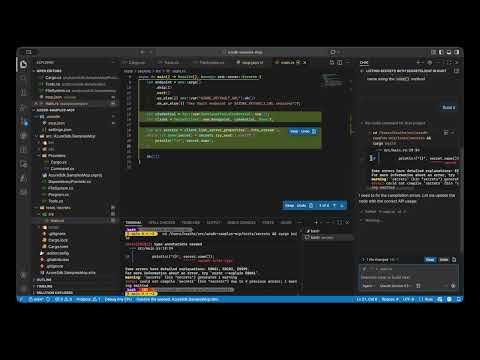](https://www.youtube.com/watch?v=MAhdQDmkZOs)
## Installation
### Install as a Global Tool
Install the MCP server as a global .NET tool from nuget.org:
```bash
dotnet tool install --global AzureSdk.SamplesMcp --prerelease
```
### Clone the Repository (Optional)
If you prefer to run from source or contribute to the project:
```bash
git clone https://github.com/heaths/azsdk-samples-mcp.git
cd azsdk-samples-mcp
```
You can automatically configured the server as described blow:
```bash
dotnet run --project src/AzureSdk.SamplesMcp/AzureSdk.SamplesMcp.csproj -- config copilot
```
Or just build it to configure it manually, also described below:
```bash
dotnet build
```
## Configuration
### Automatic Configuration
Use the `config` command to automatically generate MCP configuration files:
```bash
# Configure for GitHub Copilot (local - in repository)
azsdk-samples config copilot
# Configure for GitHub Copilot (global)
azsdk-samples config copilot --global
# Configure for VS Code (local only)
azsdk-samples config vscode
# Configure for Claude Code (local)
azsdk-samples config claude
# Configure for Claude Code (global)
azsdk-samples config claude --global
```
This will create or update the appropriate configuration files:
- **Copilot**: `.copilot/mcp-config.json` (local) or `~/.copilot/mcp-config.json` (global)
- **VS Code**: `.vscode/mcp.json` (local only)
- **Claude Code**: `.mcp.json` (local) or `~/.claude.json` (global)
> **Note:** For global configurations, the command assumes you have the tool installed globally. For local configurations, it will find your repository root (by looking for `.git`) and create the config there.
### Manual Configuration
For more control or troubleshooting, you can manually configure the MCP server:
- **Copilot**: See [Extend coding agent with MCP](https://docs.github.com/copilot/how-tos/use-copilot-agents/coding-agent/extend-coding-agent-with-mcp)
- **VS Code**: See [Use MCP servers in Visual Studio Code](https://code.visualstudio.com/docs/copilot/customization/mcp-servers)
- **Claude Code**: See [Model Context Protocol](https://code.claude.com/docs/en/mcp)
#### Example: Manual VS Code Configuration
Create or edit `.vscode/mcp.json` in your repository:
```json
{
"servers": {
"azsdk-samples": {
"type": "stdio",
"command": "azsdk-samples"
}
},
"inputs": []
}
```
## Usage
Once integrated into your IDE:
- Ask your AI assistant about Azure SDK samples relevant to your code
- The assistant will have access to real examples from your dependencies
- Get context-specific guidance on how to properly use Azure SDK APIs
## Samples
Example applications demonstrating how to use this MCP server:
- [Download Azure Storage blob in .NET](samples/download-blob/README.md)
- [List Azure App Configuration values in TypeScript](samples/list-appconfig/README.md)
- [List Azure Key Vault secrets in Rust](samples/list-secrets/README.md)
To provision Azure resources for running these samples, see [infra/README.md](infra/README.md).
## License
Licensed under the [MIT](LICENSE.txt) license.