https://github.com/hello-java-maker/sms-verification
手机短信验证,功能包括:短语验证、语音通话验证等功能
https://github.com/hello-java-maker/sms-verification
Last synced: about 1 year ago
JSON representation
手机短信验证,功能包括:短语验证、语音通话验证等功能
- Host: GitHub
- URL: https://github.com/hello-java-maker/sms-verification
- Owner: hello-java-maker
- Created: 2018-06-21T08:35:51.000Z (almost 8 years ago)
- Default Branch: master
- Last Pushed: 2018-06-21T08:43:54.000Z (almost 8 years ago)
- Last Synced: 2025-04-02T04:23:02.226Z (about 1 year ago)
- Language: Java
- Homepage:
- Size: 6.52 MB
- Stars: 29
- Watchers: 3
- Forks: 27
- Open Issues: 0
-
Metadata Files:
- Readme: README.md
Awesome Lists containing this project
README
# SMS-verification
手机短信验证现在在各种系统可以说都是用的非常普遍的,这个可能是方便和安全性的考虑,所以才广泛的使用,这篇文章就以一个短信接口的实例,来讲解一下怎么使用短信接口。
### 一、前期工作
首先,我们需要选定一家短信接口的公司,然后去注册和获取一系列的ID等,然后就可以正式的创建我们的短信业务了。下面以某个短信接口为例讲解。
## 1.1、注册
http://www.miaodiyun.com/index.html(对于用哪个平台的看个人,这个只是实例)
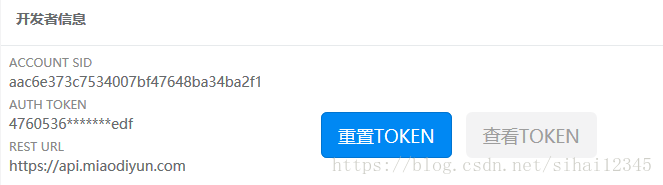
## 1.2、获取到ACCOUNT SID和AUTH TOKEN
## 1.3、创建短信模板
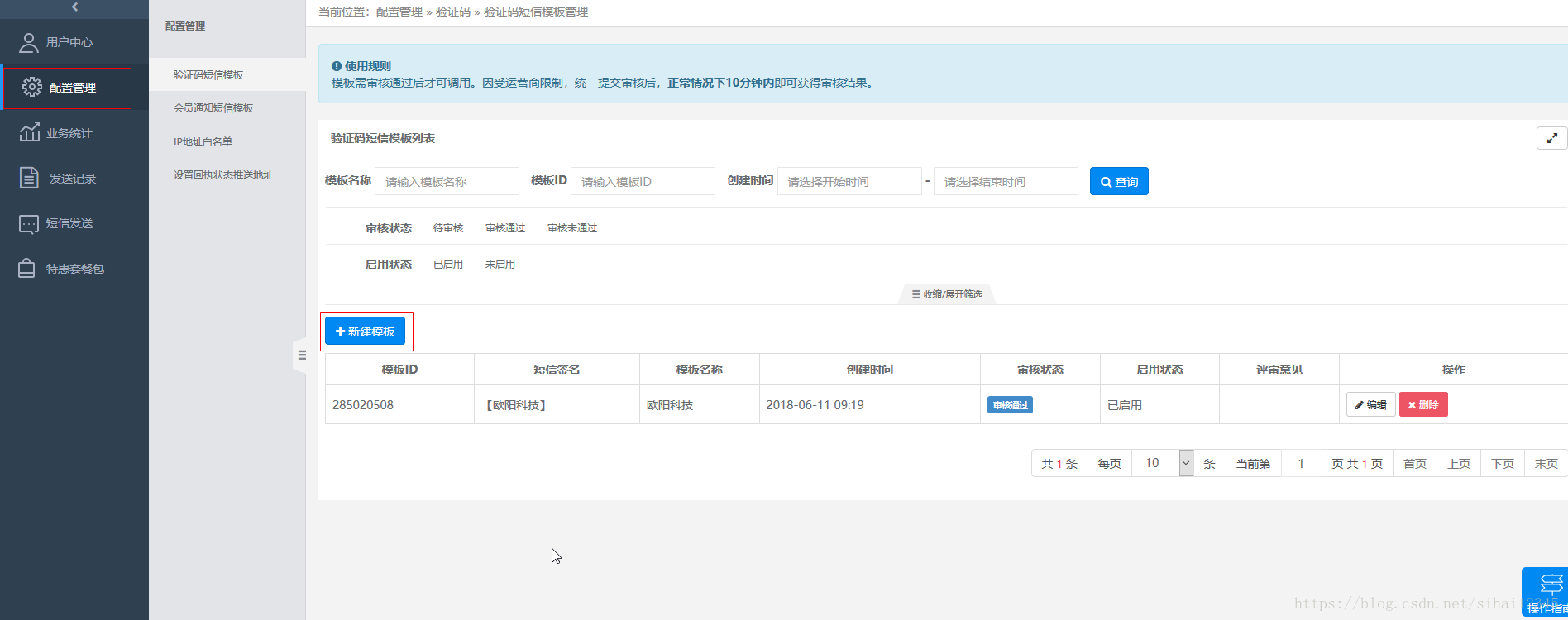
如上图,点击**配置管理**,然后进入到**短信模板**,再点击**新建模板**,创建好你的**短信模板**。
下面给出我的模板作为参考。
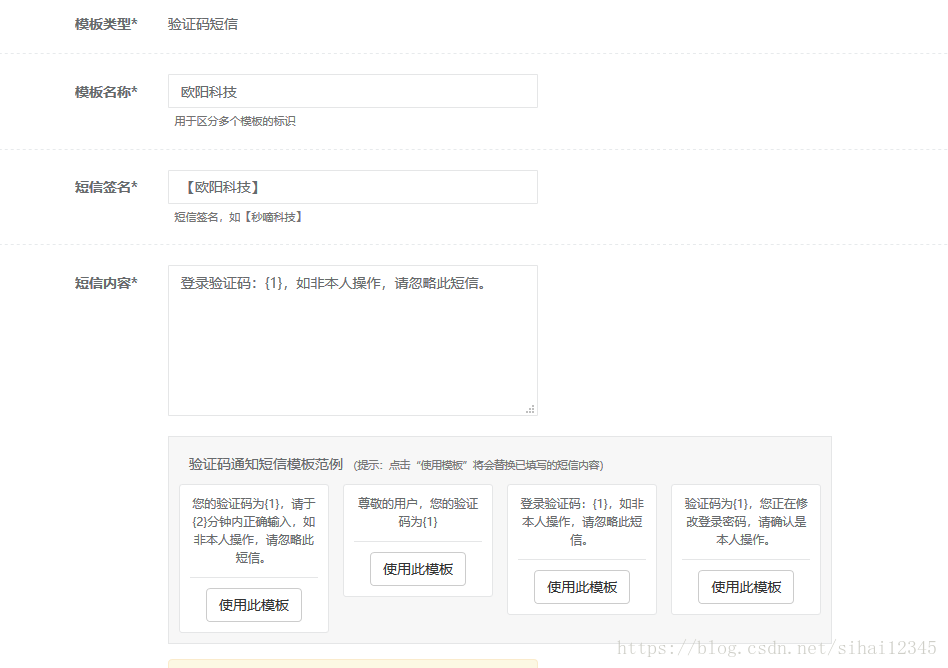
**注意:**上面创建的**短信模板**的信息,需要在代码中用到,并且一定需要保持一致,否则,会出现异常。
例如,上面的**短信模板**的信息应为:“【欧阳科技】登录验证码:{1},如非本人操作,请忽略此短信。”,`{1}`为占位符,是你的短信验证码。
好了,有了这些准备之后,就可以开始发短信了。
### 二、具体代码
**config.java:**
这个类主要是一些常亮参数的配置信息。
这里我们需要修改我们注册时获取到的`ACCOUNT SID`和`AUTH TOKEN`。
```
/**
* 系统常量
*/
public class Config
{
/**
* url前半部分
*/
public static final String BASE_URL = "https://api.miaodiyun.com/20150822";
/**
* 开发者注册后系统自动生成的账号,可在官网登录后查看
*/
public static final String ACCOUNT_SID = "aac6e373c7534007bf47648ba34ba2f1";
/**
* 开发者注册后系统自动生成的TOKEN,可在官网登录后查看
*/
public static final String AUTH_TOKEN = "47605360a97a4f81bcd576e8e0645edf";
/**
* 响应数据类型, JSON或XML
*/
public static final String RESP_DATA_TYPE = "json";
}
```
**HttpUtil.java(http请求工具):**
```
import java.io.BufferedReader;
import java.io.IOException;
import java.io.InputStreamReader;
import java.io.OutputStreamWriter;
import java.net.URL;
import java.net.URLConnection;
import java.text.SimpleDateFormat;
import java.util.Date;
import org.apache.commons.codec.digest.DigestUtils;
/**
* http请求工具
*/
public class HttpUtil
{
/**
* 构造通用参数timestamp、sig和respDataType
*
* @return
*/
public static String createCommonParam()
{
// 时间戳
SimpleDateFormat sdf = new SimpleDateFormat("yyyyMMddHHmmss");
String timestamp = sdf.format(new Date());
// 签名
String sig = DigestUtils.md5Hex(Config.ACCOUNT_SID + Config.AUTH_TOKEN + timestamp);
return "×tamp=" + timestamp + "&sig=" + sig + "&respDataType=" + Config.RESP_DATA_TYPE;
}
/**
* post请求
*
* @param url
* 功能和操作
* @param body
* 要post的数据
* @return
* @throws IOException
*/
public static String post(String url, String body)
{
System.out.println("url:" + System.lineSeparator() + url);
System.out.println("body:" + System.lineSeparator() + body);
String result = "";
try
{
OutputStreamWriter out = null;
BufferedReader in = null;
URL realUrl = new URL(url);
URLConnection conn = realUrl.openConnection();
// 设置连接参数
conn.setDoOutput(true);
conn.setDoInput(true);
conn.setConnectTimeout(5000);
conn.setReadTimeout(20000);
conn.setRequestProperty("Content-Type", "application/x-www-form-urlencoded");
// 提交数据
out = new OutputStreamWriter(conn.getOutputStream(), "UTF-8");
out.write(body);
out.flush();
// 读取返回数据
in = new BufferedReader(new InputStreamReader(conn.getInputStream(), "UTF-8"));
String line = "";
boolean firstLine = true; // 读第一行不加换行符
while ((line = in.readLine()) != null)
{
if (firstLine)
{
firstLine = false;
} else
{
result += System.lineSeparator();
}
result += line;
}
} catch (Exception e)
{
e.printStackTrace();
}
return result;
}
/**
* 回调测试工具方法
*
* @param url
* @param reqStr
* @return
*/
public static String postHuiDiao(String url, String body)
{
String result = "";
try
{
OutputStreamWriter out = null;
BufferedReader in = null;
URL realUrl = new URL(url);
URLConnection conn = realUrl.openConnection();
// 设置连接参数
conn.setDoOutput(true);
conn.setDoInput(true);
conn.setConnectTimeout(5000);
conn.setReadTimeout(20000);
// 提交数据
out = new OutputStreamWriter(conn.getOutputStream(), "UTF-8");
out.write(body);
out.flush();
// 读取返回数据
in = new BufferedReader(new InputStreamReader(conn.getInputStream(), "UTF-8"));
String line = "";
boolean firstLine = true; // 读第一行不加换行符
while ((line = in.readLine()) != null)
{
if (firstLine)
{
firstLine = false;
} else
{
result += System.lineSeparator();
}
result += line;
}
} catch (Exception e)
{
e.printStackTrace();
}
return result;
}
}
```
**验证码通知短信接口:(最重要)**
这里需要修改我们在注册时获取到的信息。
- 修改smsContent
把这个短信的内容修改为你创建的**短信模板**
**注意:**一定要保持一致。
```
import java.net.URLEncoder;
import com.miaodiyun.httpApiDemo.common.Config;
import com.miaodiyun.httpApiDemo.common.HttpUtil;
/**
* 验证码通知短信接口
*
* @ClassName: IndustrySMS
* @Description: 验证码通知短信接口
*
*/
public class IndustrySMS
{
private static String operation = "/industrySMS/sendSMS";
private static String accountSid = Config.ACCOUNT_SID;
private static String to = "13767441759";
private static String code = smsCode();
// 登录验证码:{1},如非本人操作,请忽略此短信。
private static String smsContent = "【欧阳科技】登录验证码:"+code+",如非本人操作,请忽略此短信。";
/**
* 验证码通知短信
*/
public static void execute()
{
String tmpSmsContent = null;
try{
tmpSmsContent = URLEncoder.encode(smsContent, "UTF-8");
}catch(Exception e){
}
String url = Config.BASE_URL + operation;
String body = "accountSid=" + accountSid + "&to=" + to + "&smsContent=" + tmpSmsContent
+ HttpUtil.createCommonParam();
// 提交请求
String result = HttpUtil.post(url, body);
System.out.println("result:" + System.lineSeparator() + result);
}
//创建验证码
public static String smsCode(){
String random=(int)((Math.random()*9+1)*100000)+"";
System.out.println("验证码:"+random);
return random;
}
}
```
上面这些是主要的类,还有其他的类在文章末尾给出源代码。
### 三、手机短信验证测试
```
public class Test
{
/**
* @param args
*/
public static void main(String[] args)
{
// 验证码通知短信接口
IndustrySMS.execute();
}
}
```
#####源代码下载
https://download.csdn.net/download/sihai12345/10472391