https://github.com/helvecioneto/gp5-wc
gp5 Web Controller
https://github.com/helvecioneto/gp5-wc
gp5 valeton
Last synced: 5 months ago
JSON representation
gp5 Web Controller
- Host: GitHub
- URL: https://github.com/helvecioneto/gp5-wc
- Owner: helvecioneto
- License: apache-2.0
- Created: 2025-11-05T01:15:56.000Z (7 months ago)
- Default Branch: main
- Last Pushed: 2025-11-05T01:33:33.000Z (7 months ago)
- Last Synced: 2025-11-05T03:13:53.580Z (7 months ago)
- Topics: gp5, valeton
- Language: HTML
- Homepage: https://helvecioneto.github.io/gp5-wc/
- Size: 65.4 KB
- Stars: 0
- Watchers: 0
- Forks: 0
- Open Issues: 1
-
Metadata Files:
- Readme: README.md
- License: LICENSE
Awesome Lists containing this project
README
# 🎸 GP-5 Web Controller
A web-based controller for the **Valeton GP-5** multi-effects pedal with **dual-mode support**: Bluetooth (advanced) and USB MIDI (basic). Control your GP-5 directly from your browser - no additional software required!



## 📸 Web Example [https://helvecioneto.github.io/gp5-wc/](https://helvecioneto.github.io/gp5-wc/)
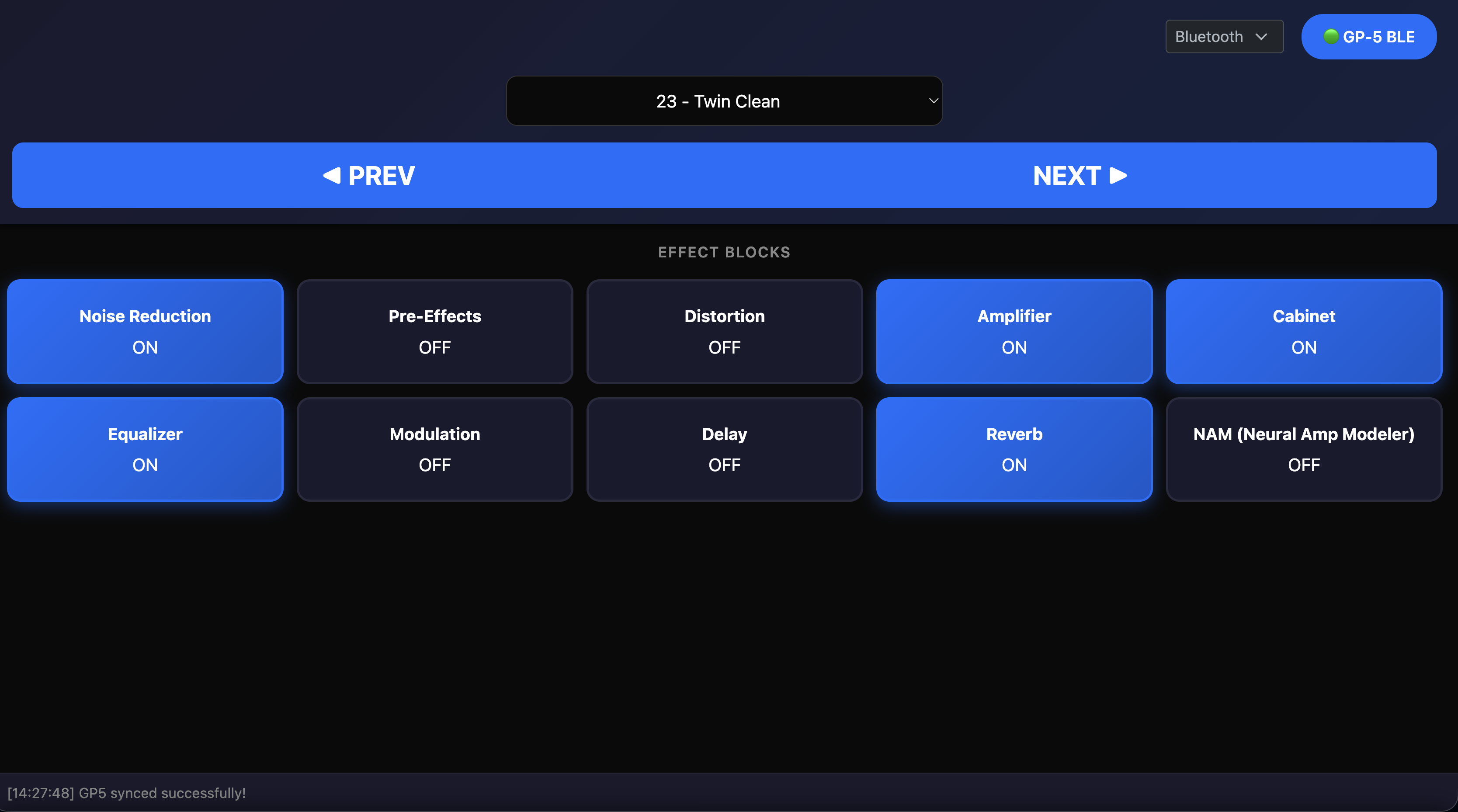
GP-5 Web Controller interface
## ✨ Features
### 🔌 Dual Connection Mode
- **Bluetooth Mode** (Advanced): Full control via Web Bluetooth + SysEx
- **USB MIDI Mode** (Basic): Simple control via Web MIDI + Control Change
### Common Features
- 🎚️ **Preset Management**: Navigate through presets 00-99
- 🎛️ **Module Control**: Toggle all 10 effect modules (NR, PRE, DST, N→S, AMP, CAB, EQ, MOD, DLY, RVB)
- 🎵 **Parameter Control**: Adjust patch volume in real-time
- 🛠️ **Customizable**: Edit MIDI CC mappings via JSON
### Bluetooth Mode Only
- 📋 **Patch Names**: Load and display custom patch names
- 🎨 **Effect Selection**: Change individual effects within blocks
- 🎛️ **Advanced Parameters**: Full access to all effect parameters
- 🔄 **Bidirectional Sync**: Automatic state synchronization
## 🚀 Getting Started
### Prerequisites
- A modern web browser:
- **For Bluetooth**: Chrome, Edge, Opera (with flag enabled)
- **For USB MIDI**: Chrome, Edge, Opera
- Valeton GP-5 multi-effects pedal
- USB cable (for USB mode) or Bluetooth connection (for BT mode)
### Usage
#### Option 1: Online (Bluetooth Mode)
1. **Access the controller**: [https://helvecioneto.github.io/gp5-wc/](https://helvecioneto.github.io/gp5-wc/)
2. Select **Bluetooth** mode
3. Click **"Connect"** button
4. Pair with your GP-5
5. Start controlling! 🎉
#### Option 2: Local (USB MIDI Mode - Recommended for testing)
```bash
# Clone the repository
git clone https://github.com/helvecioneto/gp5-wc.git
# Navigate to the project folder
cd gp5-wc
# Start a local HTTP server (required for file loading)
python3 -m http.server 8000
# Open in browser
# http://localhost:8000/gp5-controller.html
```
**Important**: Don't open files directly with `file://` - use a local server!
### Selecting Connection Mode
1. Open `gp5-controller.html`
2. Look for the dropdown in the top-right corner
3. Select **Bluetooth** or **USB**
4. Click **Connect**
## 🐛 Debugging
Open the browser **Console** (F12) to see detailed logs:
- `[init]` - Configuration loading
- `[connectMidi]` - MIDI connection
- `[listMidiPorts]` - Detected MIDI ports
- `[sendBlockStatus]` - Module commands
- `[changePatch]` - Patch changes
## 📦 Project Files
- `gp5-controller.html` - Main interface (dual-mode support)
- `index.html` - Legacy USB-only version
- `ble_sysex.json` - Bluetooth/SysEx configuration
- `cc_commands.json` - MIDI CC mapping
- `README.md` - This file
python -m http.server 8000
# Then open http://localhost:8000/test.html
## 🎮 How to Use
### Connecting
1. Click the **"Connect GP-5"** button
2. The button will turn **green** when connected successfully
3. If no device is found, it will turn **red**
### Presets
- Use **Previous/Next** buttons to navigate presets
- Or enter a specific preset number (00-99) and click **"Go →"**
- The **current preset display** shows which preset is active
### Modules
- Click any module button to toggle it **ON/OFF**
- **Green** = Module is active
- **Gray** = Module is inactive
- Changes sync bidirectionally with your pedal
### Parameters
- Use the **Patch Volume** slider to adjust volume (0-100)
- Changes are sent to the GP-5 in real-time
### Advanced
- Click **"Edit CC Map"** to customize MIDI CC mappings
- Edit the JSON structure and click **"Apply"**
- Or **"Reset to Default"** to restore factory mappings
## 📋 MIDI CC Reference
Based on the official GP-5 MIDI implementation:
| CC# | Parameter | Range | Description |
|-----|-----------|-------|-------------|
| 0 | Preset | 0-99 | Select preset 00-99 |
| 7 | Patch Volume | 0-100 | Adjust patch volume |
| 22 | Bank − | 0-127 | Bank down (ten digit) |
| 23 | Bank + | 0-127 | Bank up (ten digit) |
| 24 | Patch − | 0-127 | Previous patch |
| 25 | Patch + | 0-127 | Next patch |
| 29 | Song − | 0-127 | Previous song patch |
| 30 | Song + | 0-127 | Next song patch |
| 48 | NR | 0-63/64-127 | Noise Reduction Off/On |
| 49 | PRE | 0-63/64-127 | Preamp Off/On |
| 50 | DST | 0-63/64-127 | Distortion Off/On |
| 51 | N→S | 0-63/64-127 | Noisegate→Send Off/On |
| 52 | AMP | 0-63/64-127 | Amp Off/On |
| 53 | CAB | 0-63/64-127 | Cabinet Off/On |
| 54 | EQ | 0-63/64-127 | EQ Off/On |
| 55 | MOD | 0-63/64-127 | Modulation Off/On |
| 56 | DLY | 0-63/64-127 | Delay Off/On |
| 57 | RVB | 0-63/64-127 | Reverb Off/On |
| 58 | Tuner | 0-63/64-127 | Tuner Off/On |
| 69 | CTL | 0-127 | Control |
## 🤝 Contributing
Contributions are **welcome**! This is a community project, and everyone is encouraged to:
- 🐛 Report bugs
- 💡 Suggest new features
- 🔧 Submit pull requests
- 📝 Improve documentation
- 🌍 Translate to other languages
### How to Contribute
1. Fork the repository
2. Create your feature branch (`git checkout -b feature/AmazingFeature`)
3. Commit your changes (`git commit -m 'Add some AmazingFeature'`)
4. Push to the branch (`git push origin feature/AmazingFeature`)
5. Open a Pull Request
## 📄 License
This project is licensed under the **MIT License** - see the [LICENSE](LICENSE) file for details.
You are free to:
- ✅ Use this project commercially or personally
- ✅ Modify and distribute
- ✅ Use privately
- ✅ Sublicense
## ⚖️ Legal Notice
**Important**: This is an **independent community project** and is **not affiliated with, endorsed by, or sponsored by Valeton**.
- All trademarks, product names, and company names mentioned are the property of their respective owners.
- **Valeton** and **GP-5** are trademarks of Valeton Technology Co., Ltd.
- This project is created by the community for educational and convenience purposes.
- All intellectual property rights related to the Valeton GP-5 hardware and firmware belong to Valeton Technology Co., Ltd.
## 🙏 Acknowledgments
- Thanks to **Valeton** for creating the GP-5 multi-effects pedal
- Thanks to the Web MIDI API community
- Thanks to all contributors who help improve this project
## 📞 Support
- 🐛 **Issues**: [GitHub Issues](https://github.com/helvecioneto/gp5-wc/issues)
- 💬 **Discussions**: [GitHub Discussions](https://github.com/helvecioneto/gp5-wc/discussions)
- 📧 **Contact**: [Helvecio Neto](https://github.com/helvecioneto)
## 🌟 Show Your Support
If you find this project useful, please consider:
- ⭐ Starring the repository
- 🍴 Forking and contributing
- 📢 Sharing with other GP-5 users
- ☕ [Buy me a coffee](https://github.com/sponsors/helvecioneto) (optional)
---
**Made with ❤️ by the community** | [Helvecio Neto](https://github.com/helvecioneto) © 2025