https://github.com/herbou/unity_popupui
Unity Popup UI package
https://github.com/herbou/unity_popupui
unity unity3d-plugin unityui
Last synced: about 1 year ago
JSON representation
Unity Popup UI package
- Host: GitHub
- URL: https://github.com/herbou/unity_popupui
- Owner: herbou
- License: mit
- Created: 2021-06-21T09:28:52.000Z (about 5 years ago)
- Default Branch: master
- Last Pushed: 2023-02-25T08:08:45.000Z (over 3 years ago)
- Last Synced: 2025-03-25T04:32:31.988Z (about 1 year ago)
- Topics: unity, unity3d-plugin, unityui
- Language: C#
- Homepage:
- Size: 72.3 KB
- Stars: 37
- Watchers: 2
- Forks: 6
- Open Issues: 1
-
Metadata Files:
- Readme: README.md
- Funding: .github/FUNDING.yml
Awesome Lists containing this project
README
# Popup UI for your game
A powerful,Customizable, and esay-to-use Popup UI for Unity
### Video tutorial : https://youtu.be/TL8OQ8tc-gs
## ■ Supporting Platforms :
- All platforms (Standalone Builds, Android, iOS, WebGl, and more..)
## ■ How to use? :
### 1- Import **EasyUI_Popup** package.
⚠️ NOTE! : No need to add any prefab to the scene
### 3- Add **EasyUI.Popup** namespace in your script :
```c#
using EasyUI.Popup ;
```
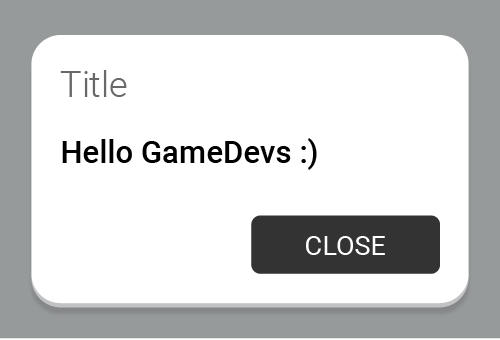
### 4- Now Simply write ```Popup.Show(..)```:
```c#
// Only Text :
Popup.Show ("Hello GameDevs") ;
// Title & Text :
Popup.Show ("Message", "Hello GameDevs") ;
```
## ■ Change text styling :
```c#
Popup.Show ("Custom text color", "Hello, This text is red");
```
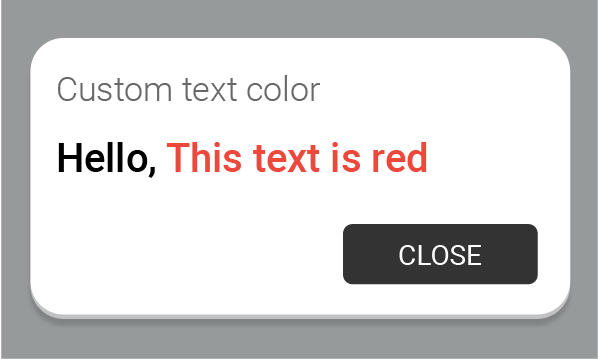
for more supported style tags : Text supported styles
## ■ All options popup :
```c#
void Start(){
Popup.Show ("Popup title", "With Unity we can do anything.", "Click Me", PopupColor.Red, OnClose);
}
void OnClose(){
Debug.Log("Red Popup closed");
}
```
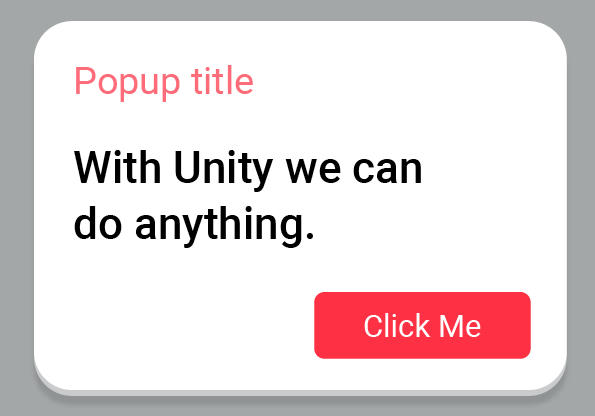
or you can use lambda expression **=>** for the event :
```c#
void Start(){
Popup.Show ("Popup title", "Hello world", "Click Me", PopupColor.Red,
() => {
Debug.Log("Red Popup closed");
}
);
// or remove {} since we have only one line:
// Popup.Show ("Popup title", "Hello world", "Click Me", PopupColor.Red, () => Debug.Log("Red Popup closed") );
}
```
## ■ Dismiss popup :
```c#
Popup.Dismiss();
```
## ■ All Show(..) versions :
```c#
Popup.Show (string text);
Popup.Show (string text, UnityAction onCloseAction);
Popup.Show (string title, string text);
Popup.Show (string title, string text, UnityAction onCloseAction);
Popup.Show (string title, string text, string buttonText);
Popup.Show (string title, string text, string buttonText, UnityAction onCloseAction);
Popup.Show (string title, string text, string buttonText, PopupColor buttonColor);
Popup.Show (string title, string text, string buttonText, PopupColor buttonColor, UnityAction onCloseAction);
```
## ❤️ Donate