https://github.com/hermesroot/hashcheck
HashCheck: Verifique a integridade de arquivos via checksums (MD5, SHA1, SHA256, SHA512) com interface gráfica.
https://github.com/hermesroot/hashcheck
checksum gui hash integridade md5 python seguranca sha1 sha256 sha512 verificacao wxpython
Last synced: over 1 year ago
JSON representation
HashCheck: Verifique a integridade de arquivos via checksums (MD5, SHA1, SHA256, SHA512) com interface gráfica.
- Host: GitHub
- URL: https://github.com/hermesroot/hashcheck
- Owner: HermesRoot
- License: mit
- Created: 2025-03-02T14:21:55.000Z (over 1 year ago)
- Default Branch: main
- Last Pushed: 2025-03-02T14:52:24.000Z (over 1 year ago)
- Last Synced: 2025-03-02T15:31:01.047Z (over 1 year ago)
- Topics: checksum, gui, hash, integridade, md5, python, seguranca, sha1, sha256, sha512, verificacao, wxpython
- Language: Python
- Homepage: https://github.com/HermesRoot/HashCheck
- Size: 39.1 KB
- Stars: 0
- Watchers: 1
- Forks: 0
- Open Issues: 0
-
Metadata Files:
- Readme: README.md
- License: LICENSE
Awesome Lists containing this project
README
# HashCheck
**HashCheck** é uma ferramenta gráfica simples e eficiente para verificação de integridade de arquivos por meio de algoritmos de hash. Com suporte a **MD5**, **SHA-1**, **SHA-256** e **SHA-512**, você pode comparar rapidamente o hash gerado de um arquivo com o esperado e garantir sua autenticidade.
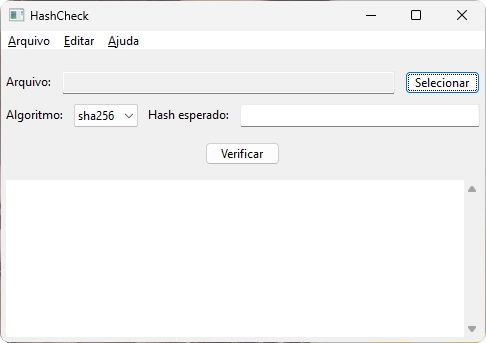
## 🖥️ Captura de Tela
## 🚀 Funcionalidades
✅ Seleção de arquivos para cálculo do hash.
✅ Suporte aos algoritmos: **MD5**, **SHA-1**, **SHA-256**, **SHA-512**.
✅ Verificação automática ao pressionar Enter ou ao clicar em **Verificar**.
✅ Log detalhado dos resultados com data/hora.
✅ Opção para salvar o log em arquivo `.txt`.
✅ Interface gráfica intuitiva com **wxPython**.
✅ Compatível com sistemas Windows, Linux e MacOS.
## ⚙️ Como usar
1. Execute o programa.
2. Clique em **Selecionar** e escolha o arquivo desejado.
3. Defina o algoritmo de hash no campo **Algoritmo**.
4. Insira o hash esperado no campo **Hash esperado**.
5. Pressione **Enter** ou clique no botão **Verificar**.
6. Veja o resultado com todas as informações detalhadas na área de log.
7. Opcionalmente, salve o log clicando em **Salvar Log Como...** no menu **Arquivo**.
## 📦 Instalação
### Pré-requisitos:
- Python 3.8 ou superior.
- wxPython instalado.
### Instalação do wxPython:
```bash
pip install wxPython
```
### Executando:
Clone o repositório e execute:
```bash
git clone https://github.com/HermesRoot/HashCheck.git
cd HashCheck
python hashcheck.py
```
## 📝 Licença
Este projeto está licenciado sob a licença **MIT** — veja o arquivo [LICENSE](LICENSE) para detalhes.
## 👤 Autor
Desenvolvido por **HermesRoot**.