https://github.com/hettiger/nativescript-plugin-regions
A NativeScript hook that allows setting the development region and known regions in the generated project.pbxproj file.
https://github.com/hettiger/nativescript-plugin-regions
Last synced: 9 months ago
JSON representation
A NativeScript hook that allows setting the development region and known regions in the generated project.pbxproj file.
- Host: GitHub
- URL: https://github.com/hettiger/nativescript-plugin-regions
- Owner: hettiger
- Created: 2018-03-07T22:07:39.000Z (over 8 years ago)
- Default Branch: master
- Last Pushed: 2023-04-23T17:56:03.000Z (about 3 years ago)
- Last Synced: 2025-09-27T16:54:18.308Z (9 months ago)
- Language: JavaScript
- Size: 256 KB
- Stars: 3
- Watchers: 1
- Forks: 0
- Open Issues: 6
-
Metadata Files:
- Readme: README.md
Awesome Lists containing this project
README
nativescript-plugin-regions
=======================================
This module installs a NativeScript after prepare hook that gives you full control about the development region and
known regions which are set in the auto generated `platforms/ios/app-name.xcodeproj/project.pbxproj` file.
How to use
----------
### Install
```bash
tns plugin install nativescript-plugin-regions
```
### Configuration
Create a file called `region.nativescript.json` in your project directory:
```json
{
"developmentRegion": "de",
"knownRegions": [
"de"
]
}
```
Apply your configuration. Multiple known regions are supported.
Please also make sure that you apply correct config inside your `app/App_Resources/iOS/Info.plist` file.
An example for the above region config would be:
```plist
CFBundleDevelopmentRegion
de
CFBundleLocalizations
de
```
### Usage
You will need to execute `tns platform clean ios` in the CLI and `tns prepare ios` for the changes to take effect.
#### Example workflow for a release build
```bash
tns platform clean ios
tns prepare ios --release
tns build ios --bundle --env.uglify --env.aot --release --forDevice
```
### Manual steps after project has been built
__This step is only required if you target a single language.__
In order to make iTunes Connect recognize a single language only you will need to open up your
`platforms/ios/app-name.xcodeproj` file, or `platforms/ios/app-name.xcworkspace` if available, with Xcode.
Within Xcode apply the changes described in the following graphic.
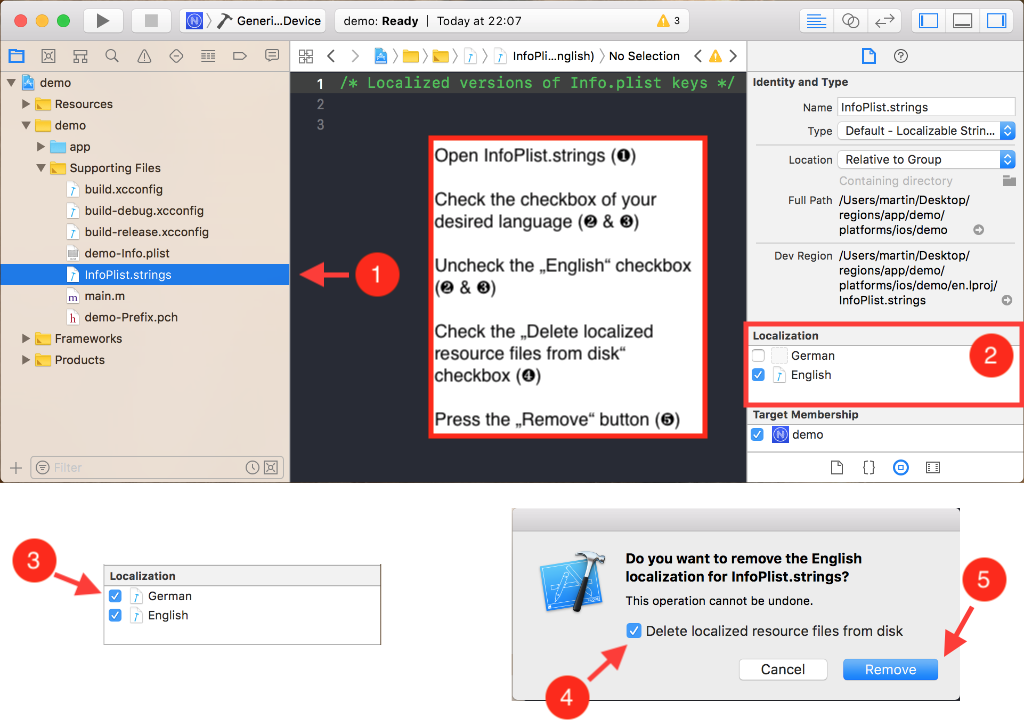
You will only have to make these manual changes when you are creating an archive for iTunes Connect.
It doesn't really matter during development.
### License
The NativeScript plugin nativescript-plugin-regions is open-sourced software licensed under the [MIT license](https://opensource.org/licenses/MIT).