https://github.com/hexagontk/hexagonal_starter
Starter project structured using the Hexagonal Architecture.
https://github.com/hexagontk/hexagonal_starter
gradle hacktoberfest hexagonal-architecture jvm kotlin template
Last synced: about 1 year ago
JSON representation
Starter project structured using the Hexagonal Architecture.
- Host: GitHub
- URL: https://github.com/hexagontk/hexagonal_starter
- Owner: hexagontk
- Created: 2023-03-23T12:47:57.000Z (over 3 years ago)
- Default Branch: master
- Last Pushed: 2025-06-28T15:21:51.000Z (about 1 year ago)
- Last Synced: 2025-06-28T16:40:15.237Z (about 1 year ago)
- Topics: gradle, hacktoberfest, hexagonal-architecture, jvm, kotlin, template
- Language: Kotlin
- Homepage: https://hexagontk.com
- Size: 226 KB
- Stars: 5
- Watchers: 2
- Forks: 2
- Open Issues: 0
-
Metadata Files:
- Readme: README.md
Awesome Lists containing this project
README
# Hexagonal Starter Application
This is a Hexagon service created from a template.
## Architecture
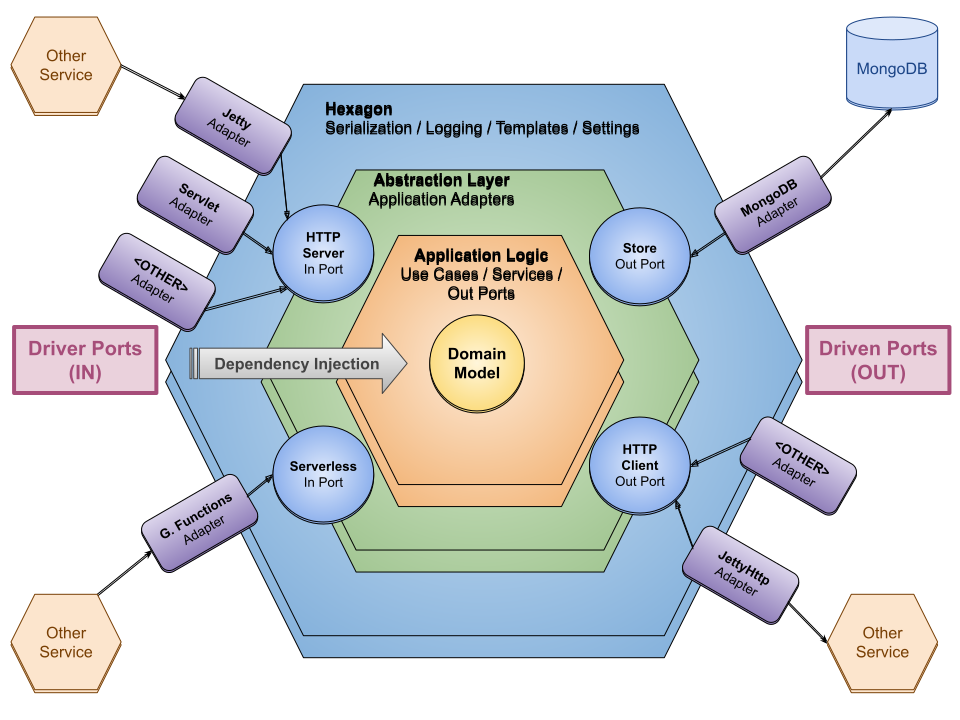
This starter project is a sample application structured using the [Hexagonal Architecture].
[Hexagonal Architecture]: https://fideloper.com/hexagonal-architecture
### Packages
This is the package structure and access rules for each package:
* *org.example.domain.model* : your application model, would be ok to access the *domain* package
* *org.example.domain* : application logic (use cases), holds the *driven* ports, outside access
forbidden
* *org.example.adapters* : implementation of the domain (driven) ports
* *org.example.rest* : REST API implementation, this is an input (or driver) adapter
* *org.example* : application main class, which builds the input drivers injecting the proper
adapters
There is only a big and only rule you must comply with, and that is:
> Don't use anything outside the standard library on the domain package (and its subpackages)
The rest are just details and can be bent to your needs on a great degree.
You don't even have to name ports as `*Port`, `AppointmentNotifier` or `AppointmentStore` would be
fine names without the `Port` suffix. Just discuss with your team, and pick whatever fits you all
the best.
This structure is not set on stone and will probably change when your application grows. I.e.:
splitting packages by concern (`domain.appointments`, `domain.users`, `adapters.store`,
`adapters.notifier`, etc.).
As an alternative, a more orthodox package structure could be:
* *org.example.domain.model*
* *org.example.domain*
* *org.example.(output|driven).adapters*
* *org.example.(input|driver).rest*
* *org.example.(input|driver).cli* (hypothetical extra input/driver adapter)
* *org.example*
Or a more flat structure could be:
* *org.example.domain.model*
* *org.example.domain*
* *org.example.store*
* *org.example.notifier*
* *org.example.rest*
* *org.example.cli* (hypothetical extra input/driver adapter)
* *org.example*
I would say it is ok to structure the adapter packages the way it makes more sense to you. And also,
there is not a lot of value on creating input ports (just the adapters would be fine).
### Architecture Diagram
## Software Requirements
To build the application you will need:
* JDK 11+ for compiling the sources.
* An Internet connection to download the dependencies.
To run the application:
* For the Gradle distribution: JRE 11+ is required (JDK is not required at runtime).
* For the jpackage bundle: any major OS will run it (Alpine Linux causes problems).
* To run the native executable there is no specific requirements.
## Development
* Build: `./gradlew build`
* Rebuild: `./gradlew clean build`
* Run: `./gradlew run`
* Test (*\*Test*): `./gradlew test`
* Integration Test (*\*IT*): `./gradlew verify`
* Test Coverage: `./gradlew jacocoTestReport`
The reports are located in the `build/reports` directory after building the project.
## Gradle Wrapper Setup
You can change the Gradle version in `gradle/wrapper/gradle-wrapper.properties`.
## Usage
After building the project (`./gradlew build`), archives with the application's distributions are
stored in `build/distributions`.
To install the application you just need to unpack one distribution file.
After installing the application, you can run the application executing the `bin/hexagonal_starter`
script.
Once the application is running, you can send a request using [httpie] executing:
`http :9090/api/appointments id='a' userIds:='["mike", "jena"]' start=$(isodate) end=$(isodate)`
assuming: `alias isodate='date +"%Y-%m-%dT%H:%M:%S"'`
[httpie]: https://httpie.io
## Native Image
```bash
./gradlew -P agent test
./gradlew metadataCopy
./gradlew nativeCompile
# Executable
build/native/nativeCompile/gradle_starter
# Memory
ps -o rss -C gradle_starter
```