https://github.com/hexters/hexa-lite
Effortless role and permission management plugin for Filament
https://github.com/hexters/hexa-lite
Last synced: about 1 year ago
JSON representation
Effortless role and permission management plugin for Filament
- Host: GitHub
- URL: https://github.com/hexters/hexa-lite
- Owner: hexters
- License: mit
- Created: 2024-07-01T05:10:00.000Z (almost 2 years ago)
- Default Branch: main
- Last Pushed: 2024-11-19T23:25:30.000Z (over 1 year ago)
- Last Synced: 2025-03-28T22:11:42.167Z (about 1 year ago)
- Language: PHP
- Size: 38.1 KB
- Stars: 80
- Watchers: 1
- Forks: 6
- Open Issues: 3
-
Metadata Files:
- Readme: README.md
- License: LICENSE.md
Awesome Lists containing this project
README
# Filament Hexa Lite
[](https://packagist.org/packages/hexters/hexa-lite)
[](https://packagist.org/packages/hexters/hexa-lite)
[](https://packagist.org/packages/hexters/hexa-lite)
Filament Hexa Lite is an effortless role & permission plugin for Filament, inspired by the concept of [hexters/ladmin](https://github.com/hexters/ladmin). This concept facilitates managing each role and permission inline with code and provides an easy-to-understand interface.
This plugin is intended only for Administrators, as it has a separate admin table from the user table provided by Laravel. Additionally, this plugin will replace the `auth.php` configuration file.
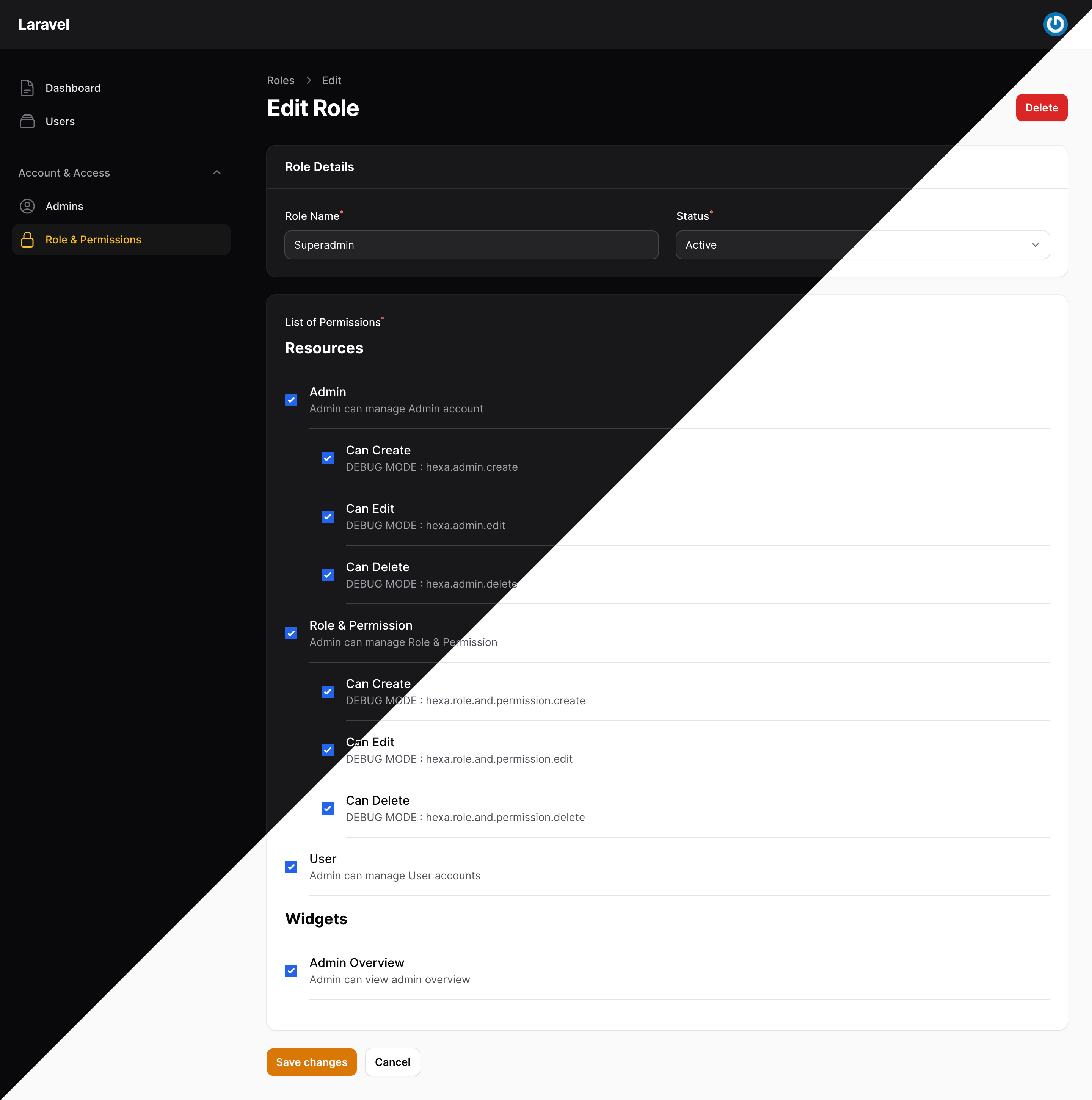
## About Filament
[FilamentPHP](https://filamentphp.com/) is a lightweight and flexible PHP framework designed for building web applications. It aims to simplify application development by providing a clear structure and high modularity. The framework emphasizes speed, efficiency, and comes with many built-in features that facilitate effective web application development.
## Installation
> **Note**
You need to install the filament package first. You can refer to the official site at [FilamentPHP](https://filamentphp.com)
You can install it by running the command below:
```bash
composer require hexters/hexa-lite
```
Then, proceed with the installation of the hexa plugin:
```bash
php artisan hexa:install
```
Install database migrations:
```bash
php artisan migrate
```
Create a superadmin account for admin login:
```bash
php artisan hexa:account --create
```
## Plugin Setup
Add the Filament `HexaLite` plugin to the created panel. If you haven't created one yet, see how to do it here [Creating a new panel](https://filamentphp.com/docs/3.x/panels/configuration#creating-a-new-panel).
```php
use Filament\Panel;
use Hexters\HexaLite\HexaLite;
public function panel(Panel $panel): Panel
{
return $panel
->plugins([
HexaLite::make(),
]);
}
```
## Declaring Access Permissions
### Resource & Page
To declare access permissions for Resources and Pages, for Clusters you need to upgrade to the [hexters/hexa](https://github.com/hexters/hexa-docs) package.
```php
use Hexters\HexaLite\Traits\HexAccess;
. . .
use HexAccess;
protected static ?string $permissionId = 'access.user';
protected static ?string $descriptionPermission = 'Admin can manage User accounts';
/**
* Additional permission (optional)
* You can add it or not depending on the needs of your application.
*/
protected static ?array $subPermissions = [
'access.user.create' => 'Can Create',
'access.user.edit' => 'Can Edit',
'access.user.delete' => 'Can Delete',
];
public static function canAccess(): bool
{
return hexa()->can(static::$permissionId);
}
. . .
```
### Actions, etc.
You can use the `visible()` method on several `Class Components`. For example, let's try it on a button.
```php
Tables\Actions\EditAction::make()
->visible(hexa()->can('access.user.edit')),
```
For giving access to classes extended to `Filament\Resources\Pages\EditRecord`, `Filament\Resources\Pages\CreateRecord`, `Filament\Resources\Pages\ListRecords`, `Filament\Resources\Pages\ViewRecords`, you can use:
```php
/**
* @param array $parameters
*/
public static function canAccess(array $parameters = []): bool
{
return hexa()->can('access.user.edit');
}
```
## Checking Access Permissions
Access can be granted to Resources, Pages, Widgets, Button Actions, etc. The access can be given as shown below.
Using the hexa utility function:
```php
hexa()->can('hexa.admin')
```
Using Laravel's auth can function:
```php
auth()->user()?->can('hexa.admin')
```
Using Laravel's Gate class:
```php
use Illuminate\Support\Facades\Gate;
. . .
Gate::allows('hexa.admin')
```
In a blade template, you can use it as shown below.
```html
@can('hexa.admin')
// Content here ...
@endcan
```
## License
This project is licensed under the MIT License - see the [LICENSE](https://github.com/hexters/hexa-lite/blob/main/LICENSE.md) file for details.
## Issue
If you encounter any issues with this plugin, you can submit them to the repository:
[Filament Hexa Lite Issue](https://github.com/hexters/hexa-lite/issues)
Thank you for using this plugin. We hope it speeds up your process in creating powerful applications.
Happy Coding 🧑💻 🧑💻 🧑💻