https://github.com/higlass/higlass-python
Python bindings to and Jupyter Notebook+Lab integration for the HiGlass viewer
https://github.com/higlass/higlass-python
jupyter-lab-extension jupyter-notebook-extension python
Last synced: about 1 year ago
JSON representation
Python bindings to and Jupyter Notebook+Lab integration for the HiGlass viewer
- Host: GitHub
- URL: https://github.com/higlass/higlass-python
- Owner: higlass
- License: mit
- Created: 2018-11-15T15:55:18.000Z (over 7 years ago)
- Default Branch: main
- Last Pushed: 2025-03-11T03:32:55.000Z (over 1 year ago)
- Last Synced: 2025-03-29T05:06:37.591Z (about 1 year ago)
- Topics: jupyter-lab-extension, jupyter-notebook-extension, python
- Language: Python
- Homepage: http://docs-python.higlass.io/
- Size: 3.38 MB
- Stars: 57
- Watchers: 5
- Forks: 12
- Open Issues: 11
-
Metadata Files:
- Readme: README.md
- Contributing: .github/CONTRIBUTING.md
- License: LICENSE
Awesome Lists containing this project
README
# higlass-python 🔎
A fresh Python library for [`higlass`](https://github.com/higlass/higlass) built
on top of [`higlass-schema`](https://github.com/higlass/higlass-schema) and
[anywidget](https://github.com/manzt/anywidget).
[](https://github.com/higlass/higlass-python/raw/main/LICENSE)
[](https://colab.research.google.com/github/higlass/higlass-python/blob/main/examples/Examples.ipynb)
## Installation
```sh
pip install higlass-python
```
## Usage
```python
import higlass as hg
# Remote data source (tileset)
tileset1 = hg.remote(
uid="CQMd6V_cRw6iCI_-Unl3PQ",
server="https://higlass.io/api/v1/",
name="Rao et al. (2014) GM12878 MboI (allreps) 1kb",
)
# Local tileset
tileset2 = hg.cooler("../data/dataset.mcool")
# Create a `hg.HeatmapTrack` for each tileset
track1 = tileset1.track("heatmap")
track2 = tileset2.track("heatmap")
# Create two independent `hg.View`s, one for each heatmap
view1 = hg.view(track1, width=6)
view2 = hg.view(track2, width=6)
# Lock zoom & location for each `View`
view_lock = hg.lock(view1, view2)
# Concatenate views horizontally and apply synchronization lock
(view1 | view2).locks(view_lock)
```
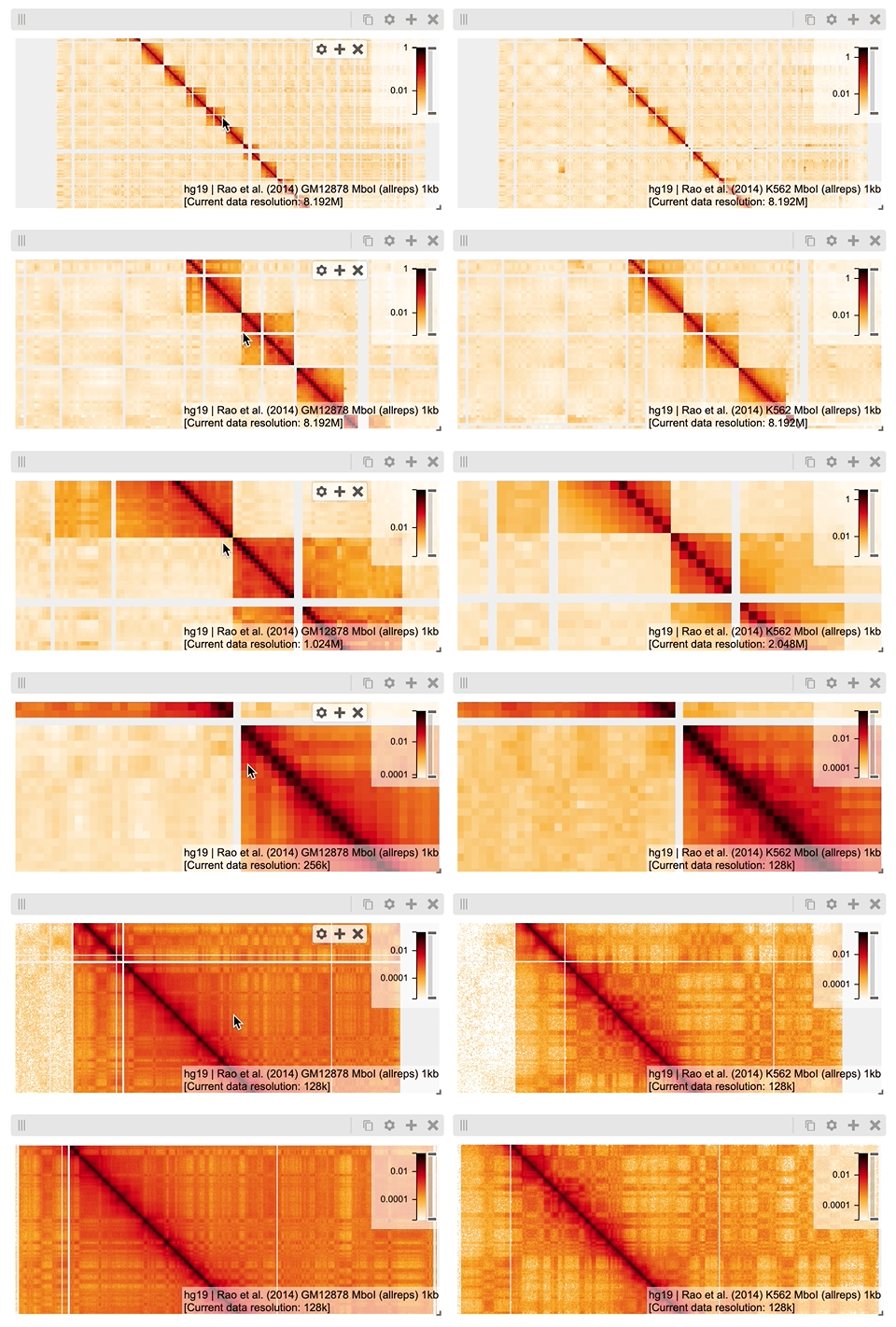
To learn more about the new API, check out the
[updated documentation](http://docs-python.higlass.io/).
## Upgrade Guide
**higlass-python** v1.0 is a total rewrite of our prior implementation, aimed to
offer a more ergonomic and flexible API. While this might present challenges
when upgrading existing code, we've prepared
[documentation](http://docs-python.higlass.io/) to guide you through the new API
usage.
If you find a missing feature, please open an issue – we're committed to
supporting your use cases with the new API.
Despite the large changes in v1.0, we will strive to avoid breaking changes
going forward. However, because of the complete rewrite, the v1.0 release
doesn't strictly adhere to semantic versioning. You can think of it as a pre-1.0
release, with breaking changes and new features included in minor releases, and
bug fixes in patch releases.
We will aim for strict semantic versioning with the v2.0 release. Your feedback
and understanding are greatly appreciated.
## Development
**higlass-python** is primarily a Python project, but it includes JavaScript for
the anywidget-based front-end code (`src/higlass/widget.js`). We use
[uv](https://github.com/astral-sh/uv) for Python development and
[deno](https://github.com/denoland/deno) for linting and type-checking
JavaScript.
All formatting, linting, and tests are enforced in CI.
### Commands Cheatsheet
All commands are run from the root of the project, from a terminal:
#### Python
| Command | Action |
| ----------------------------------------------- | --------------------------------------------- |
| `uv run ruff check --fix && uv run ruff format` | Lint and apply formatting |
| `uv run check` | Check linting rules |
| `uv run ruff format --check` | Check formatting |
| `uv run pytest` | Run unit tests |
| `uv run docs/build.py` | Build the documentation in `docs/_build/html` |
#### JavaScript
| Command | Action |
| ---------------------------------- | ----------------------------- |
| `deno fmt` | Format code |
| `deno lint --fix` | Lint and auto-fix issues |
| `deno check src/higlass/widget.js` | Typecheck .js with TypeScript |
## Changelog
Check the [GitHub Releases](https://github.com/higlass/higlass-python/releases)
for a detailed changelog.
## Release
Releases are managed via the GitHub UI.
[Draft a new release](https://github.com/higlass/higlass-python/releases/new):
1. **Create a tag**
- Click _"Choose a tag"_, then **type a new tag** in the format
`v[major].[minor].[patch]` to create it.
- _Note_: The UI is not obvious about this. You can create a tag here, not
just select one. Tag creation triggers a
[workflow](.github/workflows/ci.yml) to publish to PyPI.
2. **Generate release notes**
- Click _"Generate Release Notes"_ to auto-summarize changes from merged PRs.
- Edit to exclude irrelevant changes for end users (e.g., docs or CI).
3. **Document significant changes**
- Add migration steps or noteworthy updates.
- Ensure PR titles are clear and consistent.