https://github.com/hjh17/dbloy
Continuous Delivery tool for PySpark Notebooks based jobs on Databricks
https://github.com/hjh17/dbloy
ci-cd cli databricks databricks-notebooks pyspark pyspark-notebook python3
Last synced: 3 months ago
JSON representation
Continuous Delivery tool for PySpark Notebooks based jobs on Databricks
- Host: GitHub
- URL: https://github.com/hjh17/dbloy
- Owner: hjh17
- License: mit
- Created: 2019-08-28T08:16:01.000Z (almost 7 years ago)
- Default Branch: master
- Last Pushed: 2021-03-25T23:00:53.000Z (over 5 years ago)
- Last Synced: 2026-03-28T00:12:09.760Z (4 months ago)
- Topics: ci-cd, cli, databricks, databricks-notebooks, pyspark, pyspark-notebook, python3
- Language: Python
- Homepage:
- Size: 591 KB
- Stars: 2
- Watchers: 1
- Forks: 1
- Open Issues: 1
-
Metadata Files:
- Readme: README.md
- License: LICENSE
Awesome Lists containing this project
README
# DBloy
A Databricks deployment CLI tool to enable Continuous Delivery of PySpark Notebooks based jobs.
## Installation
````bash
$ pip install dbloy
````
## Usage
Authenticate with Databricks using authentication token:
```bash
$ dbloy configure
```
Update Databricks Job
```bash
$ dbloy apply --deploy-yml deploy.yml --configmap-yml configmap.yml --version
```
where `deploy.yml` and `configmap.yml` contain the Job specification. The Job version is specified in ``
## Workflow
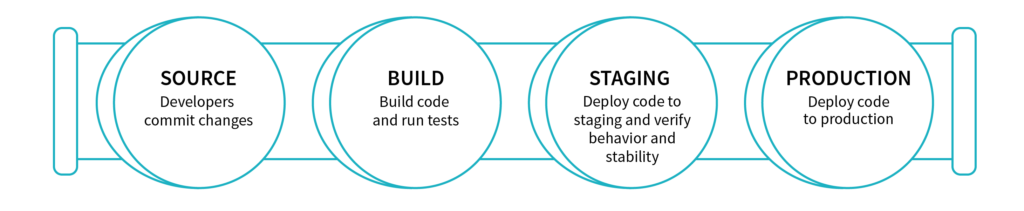
source: https://databricks.com/blog/2017/10/30/continuous-integration-continuous-delivery-databricks.html

## Example Usage
See [example/gitlab_my-etl-job](https://github.com/hjh17/dbloy/tree/master/example/gitlab_my-etl-job) for a example ETL repository using Gitlab's CI/CD.
A Deployment requires the following:
* Deployment manifest
* Configuration manifest
* A main Databricks Notebook source file available locally.
* (Optional) Attached python library containing the core logic. This allows easier unit testing of
### Creating a Deployment
deploy.yml
````yaml
kind: Deployment
metadata:
name: my-etl-job
workspace: Shared
template:
job:
name: My ETL Job
notifications:
email:
no_alert_for_skipped_runs: true
on_failure :
- my_email@my_org.com
base_notebook: main
notebooks:
- EPHEMERAL_NOTEBOOK_1: notebook_name1
- EPHEMERAL_NOTEBOOK_2: notebook_name2
libraries:
- egg_main: dbfs:/python35/my_python_lib/my_python_lib-VERSION-py3.5.egg
- egg: dbfs:/python35/static_python_lib.egg
- pypi:
package: scikit-learn==0.20.3
- pypi:
package: statsmodels==0.10.1
- pypi:
package: prometheus-client==0.7.1
- jar: dbfs:/FileStore/jars/e9b87e4c_c754_4707_a62a_44ef47535b39-azure_cosmosdb_spark_2_4_0_2_11_1_3_4_uber-38021.jar
run:
max_concurrent_runs: 1
max_retries: 1
min_retry_interval_millis: 600000
retry_on_timeout: true
timeout_seconds: 10800
````
configmap.yml
````yaml
kind: ConfigMap
metadata:
namespace: production
params:
DB_URL: production_db_url_1
DB_PASSWORD: production_password123
job:
id: 289
schedule:
quartz_cron_expression: "0 0 0 * * ?"
timezone_id: "Europe/Berlin"
max_retries: "1"
cluster:
spark_version: "5.3.x-scala2.11"
node_type_id: "Standard_DS3_v2"
driver_node_type_id: "Standard_DS3_v2"
autoscale:
min_workers: 1
max_workers: 2
spark_env_vars:
PYSPARK_PYTHON: "/databricks/python3/bin/python3"
````
In this example:
* Job id `289` on Databricks, indicated by the `.job.id` field in `configmap.yml`, will be updated with the name `My ETL Job`, indicated by the `.template.job.name` field in `deploy.yml`.
* A cluster will be created on demand which is specified by the field `.cluster` in `configmap.yml`. See https://docs.databricks.com/api/latest/clusters.html#request-structure for a complete list of cluster settings. **Note**: Setting `.cluster.existing_cluster_id` will use an existing cluster.
* Libraries specified by the field `.template.libraries` in `.deploy.yml` will be installed on the cluster. See https://docs.databricks.com/api/latest/libraries.html#library.
**Note**: The field `.template.libraries.egg_main` is reserved for python `.egg` file that is versioned with the ETL job.
For example when the main logic of the ETL job is put into a library. The `.egg` version number is expected to be the same as the ETL version number.
* The main task notebook that will be executed by the job is defined by the field `.template.base_notebook` in `deploy.yml`. Task parameters are specified by the field `.params` in `configmap.yml` which will be accessible in the Notebooks via `dbutils`.
* The notebook `main`, indicated by the field `.template.base_notebook` is the Task notebook. This notebook should be found in the workspace `/Shared/my-etl-job//main` specified by the fields `.metadata` and `.template.base_notebook` in `deploy.yml`. The version number `` will be specified in the CLI command.
* Two ephemeral notebooks are available under `/Shared/my-etl-job//notebook_name1` and `/Shared/my-etl-job//notebook_name2`. This allows the main task to execute nested Notebooks, e.g.
```
notebook_path_1 = dbutils.widgets.get("EPHEMERAL_NOTEBOOK_1")
dbutils.notebook.run(notebook_path_1)
```
Create the Deployment by running the following command:
```bash
$ dbloy apply --deploy-yml deploy.yml --configmap-yml configmap.yml --version
```