https://github.com/hkandala/tauri-plugin-liquid-glass
macOS 26+ Liquid Glass support for Tauri v2
https://github.com/hkandala/tauri-plugin-liquid-glass
liquid-glass macos26 tauri-apps tauri-plugin
Last synced: 7 months ago
JSON representation
macOS 26+ Liquid Glass support for Tauri v2
- Host: GitHub
- URL: https://github.com/hkandala/tauri-plugin-liquid-glass
- Owner: hkandala
- License: mit
- Created: 2025-12-17T00:49:14.000Z (7 months ago)
- Default Branch: main
- Last Pushed: 2025-12-18T10:55:00.000Z (7 months ago)
- Last Synced: 2026-01-13T22:55:42.548Z (7 months ago)
- Topics: liquid-glass, macos26, tauri-apps, tauri-plugin
- Language: Rust
- Homepage:
- Size: 11.6 MB
- Stars: 19
- Watchers: 1
- Forks: 1
- Open Issues: 1
-
Metadata Files:
- Readme: README.md
- License: LICENSE
- Agents: AGENTS.md
Awesome Lists containing this project
README
# tauri-plugin-liquid-glass
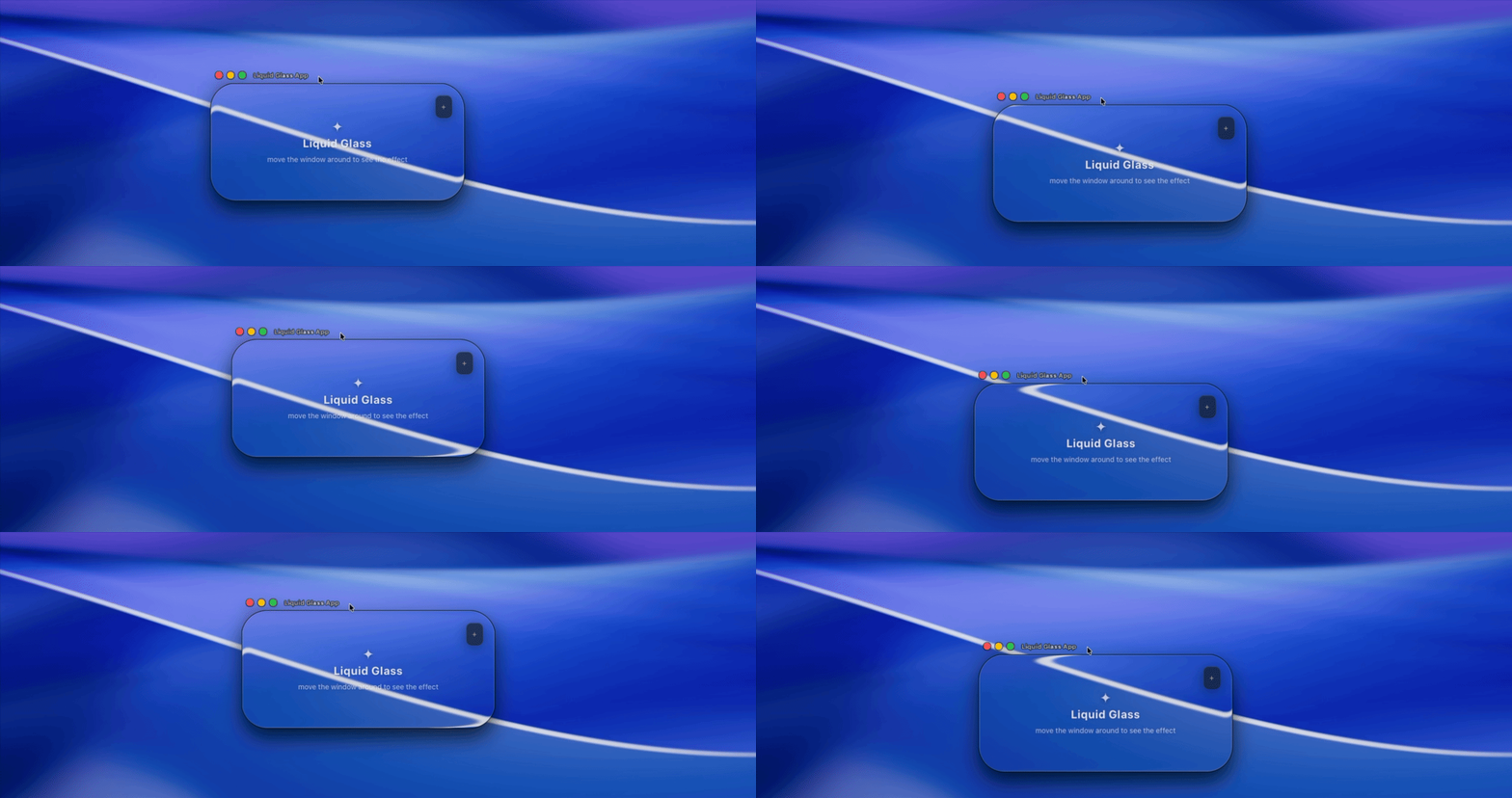
macOS 26+ Liquid Glass effect support for Tauri v2 applications.
This plugin provides native macOS Liquid Glass effects using the private `NSGlassEffectView` API available in macOS 26 (Tahoe) and later. On older macOS versions, it falls back to `NSVisualEffectView`.
## Features
- Native macOS 26+ Liquid Glass effect
- Graceful fallback to `NSVisualEffectView` on older macOS
- 24 material variants (experimental)
- Configurable corner radius and tint color
- Single unified API with automatic window state management
- Safe no-op on non-macOS platforms
## Requirements
- Tauri v2.0+
- macOS 26+ for Liquid Glass effect (falls back to vibrancy on older versions)
## Installation
### Rust
Add the plugin to your `Cargo.toml`:
```toml
[dependencies]
tauri-plugin-liquid-glass = "0.1"
```
### JavaScript/TypeScript
```bash
npm install tauri-plugin-liquid-glass-api
# or
yarn add tauri-plugin-liquid-glass-api
# or
pnpm add tauri-plugin-liquid-glass-api
```
## Setup
### 1. Register the plugin in your Tauri app
```rust
// src-tauri/src/lib.rs
pub fn run() {
tauri::Builder::default()
.plugin(tauri_plugin_liquid_glass::init())
.run(tauri::generate_context!())
.expect("error while running tauri application");
}
```
### 2. Configure permissions
Add the plugin permissions to your capability file:
```json
// src-tauri/capabilities/default.json
{
"identifier": "default",
"windows": ["main"],
"permissions": [
"core:default",
"liquid-glass:default"
]
}
```
### 3. Enable transparent window
In your `tauri.conf.json`, enable macOS private API and window transparency:
```json
{
"app": {
"macOSPrivateApi": true,
"windows": [
{
"transparent": true,
}
]
}
}
```
And in your HTML/CSS:
```css
html, body {
background: transparent;
}
```
## Usage
### TypeScript API
The current window is automatically detected using Tauri's `getCurrentWindow()`.
```typescript
import {
isGlassSupported,
setLiquidGlassEffect,
GlassMaterialVariant,
} from "tauri-plugin-liquid-glass-api";
// Check if liquid glass (NSGlassEffectView) is supported
const supported = await isGlassSupported();
// Enable with default settings
await setLiquidGlassEffect({});
// Enable with custom settings
await setLiquidGlassEffect({
cornerRadius: 24,
tintColor: "#ffffff20",
variant: GlassMaterialVariant.Sidebar,
});
// Disable glass effect
await setLiquidGlassEffect({ enabled: false });
```
### Rust API
The plugin exposes a Rust API via the `LiquidGlassExt` extension trait:
```rust
use tauri_plugin_liquid_glass::{LiquidGlassExt, LiquidGlassConfig, GlassMaterialVariant};
// In a Tauri command or setup hook:
#[tauri::command]
fn apply_glass(app: tauri::AppHandle, window: tauri::WebviewWindow) -> Result<(), String> {
// Check if liquid glass is supported
let supported = app.liquid_glass().is_supported();
// Enable with default settings
app.liquid_glass()
.set_effect(&window, LiquidGlassConfig::default())
.map_err(|e| e.to_string())?;
// Enable with custom settings
app.liquid_glass()
.set_effect(&window, LiquidGlassConfig {
corner_radius: 24.0,
tint_color: Some("#ffffff20".into()),
variant: GlassMaterialVariant::Sidebar,
..Default::default()
})
.map_err(|e| e.to_string())?;
// Disable glass effect
app.liquid_glass()
.set_effect(&window, LiquidGlassConfig {
enabled: false,
..Default::default()
})
.map_err(|e| e.to_string())?;
Ok(())
}
```
## API Reference
### Functions
| Function | Description |
|----------|-------------|
| `isGlassSupported()` | Returns `true` if running on macOS 26+ with NSGlassEffectView available |
| `setLiquidGlassEffect(config)` | Apply, update, or remove glass effect on the current window |
### LiquidGlassConfig
```typescript
interface LiquidGlassConfig {
/** Whether the glass effect is enabled (default: true) */
enabled?: boolean;
/** Corner radius for the glass view in pixels (default: 0) */
cornerRadius?: number;
/** Tint color in hex format (#RRGGBB or #RRGGBBAA) */
tintColor?: string;
/** Glass material variant - experimental, macOS 26+ only (default: Regular) */
variant?: GlassMaterialVariant;
}
```
### GlassMaterialVariant
24 available variants (macOS 26+ only, ignored on fallback):
| Value | Variant |
|-------|---------|
| 0 | `Regular` |
| 1 | `Clear` |
| 2 | `Dock` |
| 3 | `AppIcons` |
| 4 | `Widgets` |
| 5 | `Text` |
| 6 | `Avplayer` |
| 7 | `Facetime` |
| 8 | `ControlCenter` |
| 9 | `NotificationCenter` |
| 10 | `Monogram` |
| 11 | `Bubbles` |
| 12 | `Identity` |
| 13 | `FocusBorder` |
| 14 | `FocusPlatter` |
| 15 | `Keyboard` |
| 16 | `Sidebar` |
| 17 | `AbuttedSidebar` |
| 18 | `Inspector` |
| 19 | `Control` |
| 20 | `Loupe` |
| 21 | `Slider` |
| 22 | `Camera` |
| 23 | `CartouchePopover` |
## Example
See the [examples/liquid-glass-app](./examples/liquid-glass-app) directory for a complete example application.
To run the example:
```bash
cd examples/liquid-glass-app
pnpm install
pnpm tauri dev
```
## Platform Support
| Platform | Support |
|----------|---------|
| macOS 26+ | Full Liquid Glass effect with all variants |
| macOS 10.10-25 | Fallback to NSVisualEffectView (variants ignored) |
| Windows | No-op (safe to call) |
| Linux | No-op (safe to call) |
## How It Works
1. **macOS 26+**: Uses the private `NSGlassEffectView` API which provides the native Liquid Glass effect with material variants and tint color support.
2. **macOS 10.10-25**: Falls back to `NSVisualEffectView` with `UnderWindowBackground` material. Tint colors are simulated using an overlay subview. Variants are ignored.
3. **Other platforms**: All API calls are safe no-ops that succeed silently.
## Notes
- **Private API**: This plugin uses Apple's private `NSGlassEffectView` API, which is not officially documented and may change in future macOS versions.
- **App Store**: Using private APIs may affect App Store approval. Consider using only the fallback `NSVisualEffectView` for production apps.
- **Thread Safety**: All native operations are automatically dispatched to the main thread.
- **State Management**: The plugin automatically manages glass effect state per window. Calling `setLiquidGlassEffect` on a window that already has a glass effect will update the existing effect.
## Credits
Inspired by [electron-liquid-glass](https://github.com/Meridius-Labs/electron-liquid-glass/) by Meridius Labs.
## License
MIT License - see [LICENSE](./LICENSE) for details.