https://github.com/hktalent/dht
BitTorrent DHT Protocol && DHT Spider,faster than shiyanhui/dht
https://github.com/hktalent/dht
bittorrent dht golang golang-library protocol spider torrent
Last synced: 5 months ago
JSON representation
BitTorrent DHT Protocol && DHT Spider,faster than shiyanhui/dht
- Host: GitHub
- URL: https://github.com/hktalent/dht
- Owner: hktalent
- License: mit
- Fork: true (shiyanhui/dht)
- Created: 2022-03-28T07:16:55.000Z (about 4 years ago)
- Default Branch: master
- Last Pushed: 2022-06-01T00:54:25.000Z (about 4 years ago)
- Last Synced: 2023-07-28T12:56:35.902Z (almost 3 years ago)
- Topics: bittorrent, dht, golang, golang-library, protocol, spider, torrent
- Language: Go
- Homepage: http://51pwn.com
- Size: 10.8 MB
- Stars: 7
- Watchers: 1
- Forks: 0
- Open Issues: 0
-
Metadata Files:
- Readme: README.md
- License: LICENSE
Awesome Lists containing this project
README
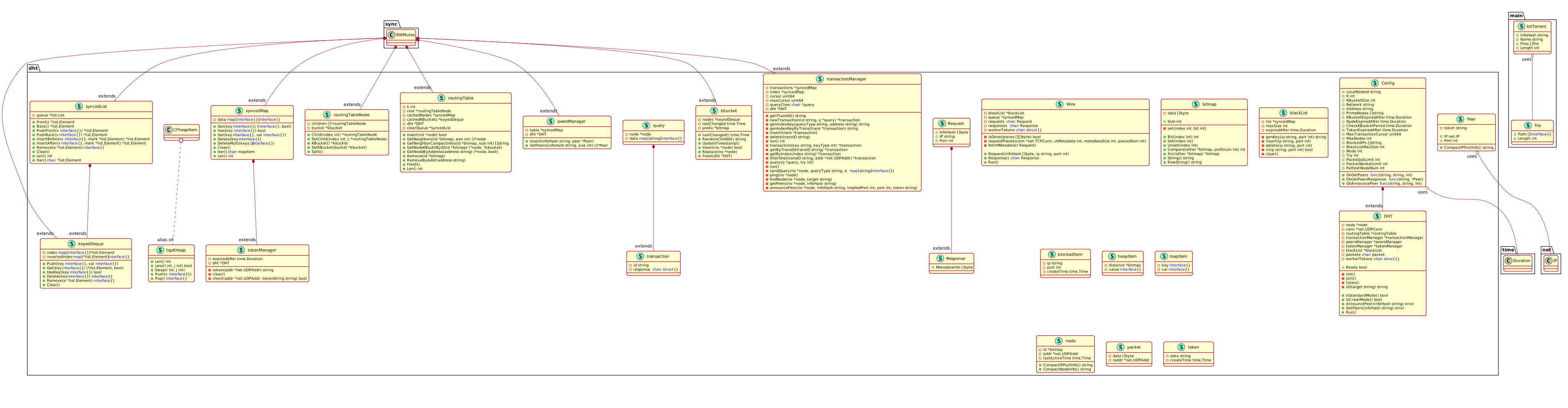


## what's the new
- :white_check_mark: update all depend mod to new
- :white_check_mark: update to go 1.18
- :white_check_mark: and config.LocalNodeId
- :white_check_mark: 45396 DHT tracker server ips,now,fly in at high speed to DHT network
- :white_check_mark: Rich annotations
- :white_check_mark: Friendly UML diagram rendering
- :white_check_mark: china,please use VPN over GWF
- :white_check_mark: fix Stuttering problem at startup
- :white_check_mark: fix do one time bug,now to tick 30 Second to do it
- :white_check_mark: fix public ip changed, cleanAll blackIp to do join
## Introduction
DHT implements the bittorrent DHT protocol in Go. Now it includes:
- [BEP-3 (part)](http://www.bittorrent.org/beps/bep_0003.html)
- [BEP-5](http://www.bittorrent.org/beps/bep_0005.html)
- [BEP-9](http://www.bittorrent.org/beps/bep_0009.html)
- [BEP-10](http://www.bittorrent.org/beps/bep_0010.html)
It contains two modes, the standard mode and the crawling mode. The standard
mode follows the BEPs, and you can use it as a standard dht server. The crawling
mode aims to crawl as more metadata info as possiple. It doesn't follow the
standard BEPs protocol. With the crawling mode, you can build another [BTDigg](http://btdigg.org/).
[bthub.io](http://bthub.io) is a BT search engine based on the crawling mode.
## Installation
```bash
go get -u github.com/hktalent/dht@latest
```
## Example
Below is a simple spider. You can move [here](https://github.com/hktalent/dht/blob/master/sample)
to see more samples.
$ cat $PWD/config/elasticsearch.yml
```
cluster.name: my-application
node.name: node-1
path.data: /usr/share/elasticsearch/data
path.logs: /usr/share/elasticsearch/logs
network.host: 0.0.0.0
transport.host: 0.0.0.0
network.publish_host: 192.168.0.107
http.port: 9200
discovery.seed_hosts: [ "192.168.0.112:9300","192.168.0.107:9301","192.168.0.107:9302", "192.168.0.107:9300"]
cluster.initial_master_nodes: [ "192.168.0.112:9300","192.168.0.107:9301","192.168.0.107:9302", "192.168.0.107:9300"]
cluster.routing.allocation.same_shard.host: true
discovery.zen.fd.ping_timeout: 1m
discovery.zen.fd.ping_retries: 5
http.cors.enabled: true
http.cors.allow-origin: "*"
http.cors.allow-methods : OPTIONS, HEAD, GET, POST, PUT, DELETE
http.cors.allow-headers : Authorization, X-Requested-With,X-Auth-Token,Content-Type, Content-Length
transport.tcp.port: 9300
http.max_content_length: 400mb
indices.query.bool.max_clause_count: 20000
cluster.routing.allocation.disk.threshold_enabled: false
```
```bash
cd sample/spider
go build spider.go
docker run --restart=always --ulimit nofile=65536:65536 -e "discovery.type=single-node" --net esnet -p 9200:9200 -p 9300:9300 -d --name es -v $PWD/logs:/usr/share/elasticsearch/logs -v $PWD/config/elasticsearch.yml:/usr/share/elasticsearch/config/elasticsearch.yml -v $PWD/config/jvm.options:/usr/share/elasticsearch/config/jvm.options -v $PWD/data:/usr/share/elasticsearch/data hktalent/elasticsearch:7.16.2
# your Elasticsearch is http://127.0.0.1:9200/dht_index
./spider -resUrl="http://127.0.0.1:9200/dht_index/_doc/" -address=":0"
open http://127.0.0.1:9200/dht_index/_search?q=GB%20and%20mp4&pretty=true
open http://127.0.0.1:9200/dht_index/_search?q=1080P%20GB%20and%20mp4&pretty=true
open http://127.0.0.1:9200/dht_index/_search?q=pentest%20pdf&pretty=true
```
```go
import (
"fmt"
"github.com/hktalent/dht"
)
func main() {
downloader := dht.NewWire(65535)
go func() {
// once we got the request result
for resp := range downloader.Response() {
fmt.Println(resp.InfoHash, resp.MetadataInfo)
}
}()
go downloader.Run()
config := dht.NewCrawlConfig()
config.OnAnnouncePeer = func(infoHash, ip string, port int) {
// request to download the metadata info
downloader.Request([]byte(infoHash), ip, port)
}
d := dht.New(config)
d.Run()
}
```
## Download
You can download the demo compiled binary file [here](https://github.com/hktalent/dht/tags).
## Note
- The default crawl mode configure costs about 300M RAM. Set **MaxNodes**
and **BlackListMaxSize** to fit yourself.
- Now it cant't run in LAN because of NAT.
## TODO
- :white_check_mark: NAT Traversal.
- :white_check_mark: Implements the full BEP-3.
- :white_check_mark: Optimization.
## FAQ
#### Why it is slow compared to other spiders ?
Well, maybe there are several reasons.
- DHT aims to implements the standard BitTorrent DHT protocol, not born for crawling the DHT network.
- NAT Traversal issue. You run the crawler in a local network.
- It will block ip which looks like bad and a good ip may be mis-judged.
## License
MIT, read more [here](https://github.com/hktalent/dht/blob/master/LICENSE)