https://github.com/hlfcoding/hlfmapviewcontroller
:round_pushpin: Map modal for searching and selecting a location
https://github.com/hlfcoding/hlfmapviewcontroller
ios location-picker mapkit searchable swift
Last synced: 11 months ago
JSON representation
:round_pushpin: Map modal for searching and selecting a location
- Host: GitHub
- URL: https://github.com/hlfcoding/hlfmapviewcontroller
- Owner: hlfcoding
- License: other
- Created: 2015-08-03T08:51:08.000Z (almost 11 years ago)
- Default Branch: master
- Last Pushed: 2023-12-27T11:33:47.000Z (over 2 years ago)
- Last Synced: 2025-06-27T09:17:54.669Z (about 1 year ago)
- Topics: ios, location-picker, mapkit, searchable, swift
- Language: Swift
- Homepage:
- Size: 146 KB
- Stars: 13
- Watchers: 3
- Forks: 3
- Open Issues: 2
-
Metadata Files:
- Readme: README.md
- License: LICENSE
Awesome Lists containing this project
README
# HLFMapViewController
[](http://cocoapods.org/pods/HLFMapViewController)
[](http://cocoapods.org/pods/HLFMapViewController)
[](http://cocoapods.org/pods/HLFMapViewController)
[](https://codeclimate.com/github/hlfcoding/HLFMapViewController)
> A generic implementation of a common feature: searching and selecting a nearby location from an `MKMapView`.
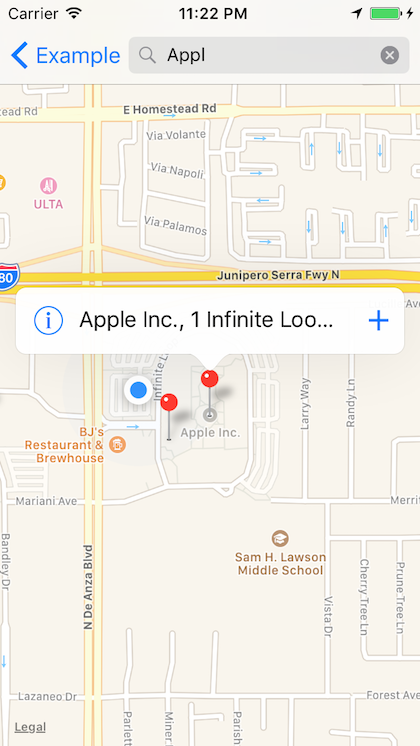 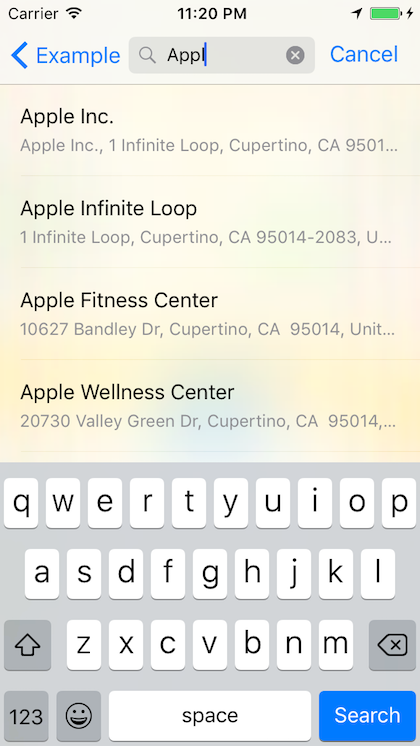
## Usage
This version uses Swift 3. The final Swift 2 version is 0.2.5.
To run the example project, clone the repo, and run `pod install` from the Example directory first.
In addition to turning on the 'Maps' capability, you'll need to add `location-services` to `UIRequiredDeviceCapabilities`and fill in `NSLocationAlwaysUsageDescription` in your Info.plist.
Other than that just set up the view controller and implement the delegate method:
```swift
// ...
let mapViewController = MapViewController(nibName: "MapViewController", bundle: MapViewController.bundle)
mapViewController.delegate = self
mapViewController.selectedMapItem = self.selectedMapItem // Optional.
// ...
func mapViewController(_ mapViewController: MapViewController, didSelectMapItem mapItem: MKMapItem) {
self.selectedMapItem = mapItem // Save, submit, etc.
mapViewController.dismissViewController(animated: true, completion: nil)
}
```
See [example app](//github.com/hlfcoding/HLFMapViewController/blob/master/Example/HLFMapViewController/ViewController.swift) for more details.
## Installation
HLFMapViewController is available through [CocoaPods](http://cocoapods.org). To install
it, simply add the following line to your Podfile:
```ruby
pod "HLFMapViewController"
```
## License
HLFMapViewController is available under the MIT license. See the LICENSE file for more info.