https://github.com/ho-cooh/winuiessentials
C++ programmer is not part of windows community therefore cannot use the windows community toolkit. So I made one for C++. QQ讨论群:479734355
https://github.com/ho-cooh/winuiessentials
cpp20 cppwinrt uwp winui2 winui3
Last synced: 14 days ago
JSON representation
C++ programmer is not part of windows community therefore cannot use the windows community toolkit. So I made one for C++. QQ讨论群:479734355
- Host: GitHub
- URL: https://github.com/ho-cooh/winuiessentials
- Owner: HO-COOH
- License: mit
- Created: 2024-06-22T06:37:22.000Z (about 2 years ago)
- Default Branch: master
- Last Pushed: 2026-06-05T12:29:19.000Z (24 days ago)
- Last Synced: 2026-06-05T14:15:01.329Z (24 days ago)
- Topics: cpp20, cppwinrt, uwp, winui2, winui3
- Language: C++
- Homepage:
- Size: 45.6 MB
- Stars: 46
- Watchers: 2
- Forks: 9
- Open Issues: 8
-
Metadata Files:
- Readme: README.md
- License: LICENSE.txt
Awesome Lists containing this project
README

# WinUI Essentials
A repo dedicated for simplifying C++ development with WinUI2 (Universal Windows Platform) and WinUI3 (Windows App SDK).
## Nuget
For UWP: [](https://www.nuget.org/packages/WinUIEssential.UWP)
For WinUI3 (Windows App SDK): [](https://www.nuget.org/packages/WinUIEssential.WinUI3)
WinUI3 Svg: [](https://www.nuget.org/packages/WinUIEssential.WinUI3.Svg)
## Example Gallery
[Download from Microsoft Store!](https://apps.microsoft.com/detail/9PCC690BCMT9?hl=en-us&gl=US&ocid=pdpshare)

---
Example project build status:
|Platform|Debug|Release|
|---|---|---|
|x86| [](https://github.com/HO-COOH/WinUIEssentials/actions/workflows/build-debug-x86.yml) | [](https://github.com/HO-COOH/WinUIEssentials/actions/workflows/build-release-x86.yml)
|x64| [](https://github.com/HO-COOH/WinUIEssentials/actions/workflows/build-debug-x64.yml) | [](https://github.com/HO-COOH/WinUIEssentials/actions/workflows/build-release-x64.yml)
|~~ARM~~| ~~[)](https://github.com/HO-COOH/WinUIEssentials/actions/workflows/build.yml)~~ | ~~[)](https://github.com/HO-COOH/WinUIEssentials/actions/workflows/build.yml)~~
|ARM64| [](https://github.com/HO-COOH/WinUIEssentials/actions/workflows/build-debug-arm64.yml) | [](https://github.com/HO-COOH/WinUIEssentials/actions/workflows/build-release-arm64.yml)
## Usage
> [!NOTE]
> Update since WinEssential.WinUI3 1.5, you do NOT need to add control resources in `Application.Resources`!
> [!WARNING]
> Make sure to set your C++ language version to C++20 first!
Open the `WinUIEssential.sln` containing 4 projects:
- UWPPackage (project for WinUIEssential.UWP nuget package)
- UWPExample (example gallery for using the above package)
- WinUI3Package (project for WinUIEssential.WinUI3 nuget package)
- WinUI3Example (example gallery for using the above package)
Build the `*Package` project will build the project and pack it with nuget, then install the nuget to your project and start using it.
To build the `*Example` project, do the same thing. They did not reference `*Package` for demo purposes.
> [!NOTE]
> Functionalities for UWP and WinUI3 should be exactly the same unless otherwise noted!
It should be useful until the [community toolkit](https://github.com/CommunityToolkit/WindowsCommunityToolkit) provides C++.
-----
## Build and contribute
### Build requirements
- You need to have [vcpkg](https://vcpkg.io/en/) installed and integrate setup for msbuild. See [this documentation for guide](https://learn.microsoft.com/en-us/vcpkg/get_started/get-started-msbuild?pivots=shell-powershell).
- You need to have Visual Studio **2026** with `Desktop development with C++` and `WinUI Application development` workload installed. (2022 will NOT work, as we are using the `v145` C++ tools)
- You need to build both `Debug` and `Release` build to successfully build and debug the example project (**this is intentional for not missing debug version of the package**)
- >= Windows 10 17763 (Actually I mostly use Windows 10 17763 to ensure compatibility that WinUI3 claims to support)
You can reference Github Action for detailed build steps.
### Contribute a new templated control
0. **DO NOT submit a PR that's purely AI written WITHOUT your reviewing.** I will **NOT** review it.
1. If it is a templated control, create a control with the `ViewModel` file template and a `ResourceDictionary` xaml file
2. Add an entry in the `WinUIEssential.WinU3.targets` so that the `.xbf` file is properly copied (see that file for example)
3. Please also consider adding a demo page for the control, and add it to `MainWindow.xaml.h` `MainWindow::s_page` (see the file for example)
-----
## Content
|Component|UWP|WinUI3|Type
|--|--|--|--|
|WinUIIncludes| :white_check_mark: | :x: | Header only
|TemplateControlHelper| :white_check_mark: | :white_check_mark: | Header only
|BadgeGlyphs| :white_check_mark: | :white_check_mark: | Header only
|ToastTemplates| :white_check_mark: | :white_check_mark: | Header only
|ToastBuilder | :white_check_mark: | :white_check_mark: | Header only
|TileTemplates| :white_check_mark: | :white_check_mark: | Header only
|TileBuilder | :white_check_mark: | :white_check_mark: | Header only
|CursorController | :white_check_mark: | :white_check_mark: | WinRT component
|PropertyChangeHelper | :white_check_mark: | :white_check_mark: | Header only
|NegateBoolConverter | :white_check_mark: | :white_check_mark: | WinRT component
|BoolToVisibilityConverter | :white_check_mark: | :white_check_mark: | WinRT component
|ContainerToBoolConverter | :white_check_mark: | :white_check_mark: | WinRT component
|StringToBoolConverter | :white_check_mark: | :white_check_mark: | WinRT component
|ReferenceToBoolConverter | :white_check_mark: | :white_check_mark: | WinRT component
|ConverterGroup | :white_check_mark: | :white_check_mark: | WinRT component
|Convert | :white_check_mark: | :white_check_mark: | WinRT component
|IsEqualStringTrigger| :white_check_mark: | :white_check_mark: | WinRT component
|IsNullOrEmptyStateTrigger | :white_check_mark: | :white_check_mark: | WinRT component
|ControlSizeTrigger | :white_check_mark: | :white_check_mark: | WinRT component
|CharmBar | :white_check_mark: | :x: | WinRT component
|GroupBox | :white_check_mark: | :white_check_mark: | Control
|SettingsCard | :white_check_mark: | :white_check_mark:* | Control
|SettingsExpander | :white_check_mark: | :white_check_mark:* | Control
|FontIconExtension | :white_check_mark: | :white_check_mark: | WinRT component
|DependentValue| :white_check_mark: | :white_check_mark: | WinRT component
|Taskbar| :x: | :white_check_mark: | Header only
|MarqueeText | :white_check_mark: | :white_check_mark: | Control
|ProgressBarEx | :white_check_mark: | :white_check_mark: | Control
|WindowEx | :x: | :white_check_mark: | Window
|TransparentBackdrop | :x: | :white_check_mark: | SystemBackdrop
|Segmented | :white_check_mark: | :white_check_mark: | Control
|CustomMicaBackdrop | :x: | :white_check_mark: | Backdrop
|CustomAcrylicBackdrop | :x: | :white_check_mark: | Backdrop
|Shimmer | :white_check_mark: | :white_check_mark: | Control
|ImageExtension | :white_check_mark: | :white_check_mark: | WinRT component
|SwitchPresenter | :white_check_mark: | :white_check_mark: | Control
|ModernStandardWindowContextMenu| :x: | * :white_check_mark: | WinRT component
|WindowContextMenu | :x: | :white_check_mark: | WinRT component
|NonResizableWindowWhiteBorderWorkaround | :x: | :white_check_mark: | WinRT component
|ComboBoxHelper | :x: | :white_check_mark: | WinRT component
|AutoSuggestBoxHelper | :x: | :white_check_mark: | WinRT component
|WrapPanel | :white_check_mark: | :white_check_mark: | Panel
|ToolTipHelper | :x: | :white_check_mark: | WinRT component
|CommandBarHelper | :x: | :white_check_mark: | WinRT component
|IInitializeWithWindowHelper | :x: | :white_check_mark: | Header only
|WindowCaptionButtonThemeWorkaround | :x: | :white_check_mark: | WinRT component
|MicaBackdropWithFallback | :x: | :white_check_mark: | WinRT component
|NonMaximizableWindowWorkaround | :x: | :white_check_mark: | WinRT component
|DatePickerHelper | :x: | :white_check_mark: | WinRT component
|TimePickerHelper | :x: | :white_check_mark: | WinRT component
|FlyoutHelper | :x: | :white_check_mark: | WinRT component
|CalendarDatePickerHelper | :x: | :white_check_mark: | WinRT component
|ModalWindow | :x: | :white_check_mark: | WinRT component
|NavigationViewHelper | :x: | :white_check_mark: | WinRT component
|SliderHelper | :x: | :white_check_mark: | WinRT component
|RevealFocusPanel | :x: | :white_check_mark: | Control
|TenMica | :x: | :white_check_mark: | WinRT component
|WindowedContentDialog | :x: | :white_check_mark: | Control
|SvgImageSource | :x: | :white_check_mark: | WinRT component
*means additional settings required, see the sections for info
---
## WinUIIncludes
Include the WinUI2 headers in your `pch.h`, so you don't waste your time figuring out where the compilation error comming from./
Usage:
Add this in your `pch.h`
```cpp
#include
```
## TemplateControlHelper
Automatically call `DefaultStyleKey()` for your templated control so you don't waste your time when you forget to include this line and get an empty control.
Usage: Inherit this class in your header file, make the template argument your **implementation type**.
```cpp
#include
...
struct MyControl : MyControlT, TemplateControlHelper
{
...
};
```
## ToastHelper
Helper for creating toast notifications.
### ToastTemplates --- *namespace `ToastTemplates`*
The [built-in templates](https://learn.microsoft.com/en-us/uwp/api/windows.ui.notifications.toasttemplatetype?view=winrt-22621) re-written to strongly-typed classes that derived from `winrt::Windows::UI::Notification::ToastNotification`, so that you can directly use them as arguments for`winrt::Windows::UI::Notifications::ToastNotificationManager`. Example usage:
```cpp
#include
winrt::Windows::UI::Notifications::ToastNotificationManager::CreateToastNotifier()
.Show(ToastTemplates::ImageWithHeaderAndBody{ L"ms-appx:///Assets/Windows 11.png", L"Header", L"body" });
//alternatively use Microsoft's template name
winrt::Windows::UI::Notifications::ToastNotificationManager::CreateToastNotifier()
.Show(ToastTemplates::ToastImageAndText02{ L"ms-appx:///Assets/Windows 11.png", L"Header", L"body" });
```
|Type|Template Name(which can also be used as type)|Sample|
|--|--|--|
|`BodyTextOnly`| `ToastText01` | 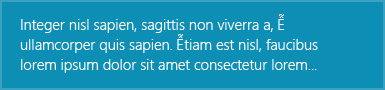
|`SingleLineHeaderWithBody`| `ToastText02`| 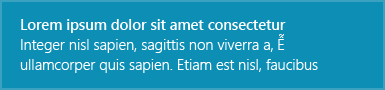
|`TwoLineHeaderWithBody`| `ToastText03`| 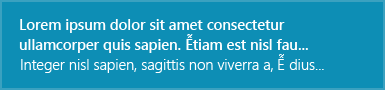
|`HeaderWithTwoSingleLineBody`| `ToastText04`| 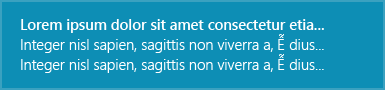
|`ImageWithBodyOnly`| `ToastImageAndText01`| 
|`ImageWithHeaderAndBody`| `ToastImageAndText02`| 
|`ImageWithTwoLineHeaderAndBody`| `ToastImageAndText03`| 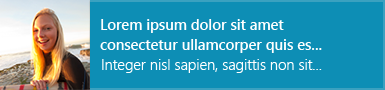
|`ImageWithHeaderAndTwoSingleLineBody`| `ToastImageAndText04`| 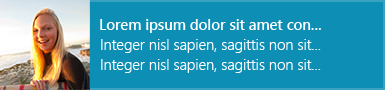
### ToastBuilder --- *namespace `ToastBuilder`*
Strongly-typed, declarative toast notification elements to quickly build toast notifications, as if you are writing XAML. [Schema here.](https://learn.microsoft.com/en-us/uwp/schemas/tiles/toastschema/root-elements)
Example usage:
XML C++
```xml
headline
body text1
body text2
```
```cpp
Toast().Duration(Long).Scenario(Reminder).UseButtonStyle(true)
(
Visual()
(
Binding().Template(L"ToastText04")
(
Text().Id(1)(L"headline"),
Text().Id(2)(L"body text1"),
Text().Id(3)(L"body text2")
)
),
Actions()
(
Action().Content(L"Accept").Arguments(L"accept")
)
)
```
`...content...`
`Tag()(...content...)`
`attribute="value"`
`.Attribute(value)`
Optionally add a handler to `Action` so you can handle toast notification button click right on site. For more info, see the comment documentation.
```cpp
Actions()
(
Action().Content(L"Accept").Arguments(L"accept")
.Click([this](winrt::Windows::ApplicationModel::Activation::ToastNotificationActivatedEventArgs args)
{
//Handle Accept button
}),
Action().Content(L"Cancel").Arguments(L"cancel")
.Click([this](winrt::Windows::ApplicationModel::Activation::ToastNotificationActivatedEventArgs args)
{
//Handle Cancel button
})
)
```
## TileTemplates --- *namespace `TileTemplates`*
Similar to [ToastTemplates](#ToastHelper), but for strongly-typed tile templates.
## TileBuilder --- *namespace `TileBuilder`*
Similar to [ToastBuilder](#ToastHelper), but for building tiles.
## Glphys --- *namespace `Glyphs`*
Font glyphs value for Segoe MDL2 Assets fonts. Usage:
```cpp
#include
FontIcon().Glyph(Glyphs::GlobalNavButton);
```
## CursorController --- *namespace `CursorController`*
Xaml helper for controlling the cursor type when mouse enters.
Value for `Type` is [CoreCursorType enum](https://learn.microsoft.com/en-us/uwp/api/windows.ui.core.corecursortype?view=winrt-22621). Usage:
```xml
xmlns:essential="using:WinUI3Package"
...
```
## PropertyChangeHelper --- *namespace `MvvmHelper`*
Helper for `OneWay` binding.
Usage:
1. Inherit `Windows.UI.Xaml.Data.INotifyPropertyChanged` in `idl`
```
[default_interface]
runtimeclass MyPage : Windows.UI.Xaml.Controls.Page, Windows.UI.Xaml.Data.INotifyPropertyChanged
{
...
};
```
2. Inherit from this class in the implementation class.
```cpp
/*MyPage.xaml.h*/
#include
namespace winrt::::implementation
{
struct MyPage : MyMusicT, MvvmHelper::PropertyChangeHelper
{
int m_value;
void Value(int newValue)
{
compareAndRaise(m_value, newValue, L"Value");
};
}
}
```
## Converters
- bool -> Visibility *namespace `BoolToVisibilityConverter`*
- bool negation *namespace `NegateBoolConverter`*
- container (IVector, IMap) -> bool *namespace `ContainerToBoolConverter`*
- reference (any WinRT runtime type) -> bool *namespace `ReferenceToBoolConverter`*
- String -> bool *namespace `StringToBoolConverter`*
- ConverterGroups *namespace `ConverterGroups`*:
+ define series of converters, that convert value from converter1 -> converter2 -> ...
+ usage:
```xml
```
And most of the time when you are NOT using `ConverterGroup`, you should consider using the static functions in `Convert` class.
All of the above converters have corresponding static functions in `Convert` that you can use with `x:Bind` directly. Here are the complete list.
```
runtimeclass Convert
{
static Single DoubleToSingle(Double value);
static Boolean ContainerToBool(Windows.Foundation.Collections.IVector container);
static Boolean ReferenceToBool(Object value);
static Boolean StringToBool(String value);
static Boolean VisibilityToBool(Microsoft.UI.Xaml.Visibility value);
static Boolean ContainerToBoolReverse(Windows.Foundation.Collections.IVector container);
static Boolean ReferenceToBoolReverse(Object value);
static Boolean StringToBoolReverse(String value);
static Boolean VisibilityToBoolReverse(Microsoft.UI.Xaml.Visibility value);
static Microsoft.UI.Xaml.Visibility ContainerToVisibility(Windows.Foundation.Collections.IVector container);
static Microsoft.UI.Xaml.Visibility ReferenceToVisibility(Object value);
static Microsoft.UI.Xaml.Visibility StringToVisibility(String value);
static Microsoft.UI.Xaml.Visibility BoolToVisibility(Boolean value);
static Microsoft.UI.Xaml.Visibility ContainerToVisibilityReverse(Windows.Foundation.Collections.IVector container);
static Microsoft.UI.Xaml.Visibility ReferenceToVisibilityReverse(Object value);
static Microsoft.UI.Xaml.Visibility StringToVisibilityReverse(String value);
static Microsoft.UI.Xaml.Visibility BoolToVisibilityReverse(Boolean value);
static Boolean ReverseBool(Boolean value);
static Microsoft.UI.Xaml.Visibility ReverseVisibility(Microsoft.UI.Xaml.Visibility value);
}
```
## BadgeGlyphs --- *namespace `BadgeGlyphs`*
Helpers for creating badge notification xml.
Usage:
```cpp
#include
//glyph badge
winrt::Windows::UI::Notifications::BadgeUpdateManager::CreateBadgeUpdaterForApplication()
.Update(BadgeGlyphs::MakeBadgeNotification(BadgeGlyphs::Alert));
//number badge
winrt::Windows::UI::Notifications::BadgeUpdateManager::CreateBadgeUpdaterForApplication()
.Update(BadgeGlyphs::MakeBadgeNotification(1));
```
## Triggers
See the same class in [Community Toolkit](https://github.com/CommunityToolkit/Windows) for documentation.
### ControlSizeTrigger --- *namespace `ControlSizeTrigger`*
### IsEqualStringTrigger --- *namespace `IsEqualStringTrigger`*
Note: For the reason of lacking reflection, we cannot implement `IsEqualStateTrigger
### IsNullOrEmptyStateTrigger --- *namespace `IsNullOrEmptyStateTrigger`*
## SettingsCard --- *namespace `SettingsCard`*
See the same class in [Community Tookit](https://github.com/CommunityToolkit/Windows) for documentation.
- Add this to `App.xaml` (UWP)
```xml
...
```
> [!NOTE]
> For WinUI3, add `#include #include ` to your `pch.h`
## SettingsExpander --- *namespace `SettingsExpander`*
See the same class in [Community Tookit](https://github.com/CommunityToolkit/Windows) for documentation.

Add this to `App.xaml` (UWP)
```xml
...
```
> [!NOTE]
> For WinUI3, add `#include #include ` to your `pch.h`
## CharmBar
Installing this nuget ~~will automatically add `Desktop Extension` to your UWP project~~
**then add a ` true` under `PropertyGroup` node in your `vcxproj` file**
so you can use the good-ol Windows 8 style charm bar. This package further simplifies it's usage by allowing you to directly define local and global settings, directly in XAML containing UI element.
- Define a global setting in resource section, with `SettingsPaneEx.Settings`
```xml
=
```

- Define local settings, where you put instance of `SettingsPaneEx` directly in UI as any other xaml controls.
```xml
...
```

Define keyboard shortcuts with `SettingsPaneEx.KeyboardAccelerator` property.
```
```
## DependentValue ---*namespace `DependentValue`*
A wrapper around a `double` which you can target to with a `Storyboard` and `DoubleAnimation`, and get value out of it. Value is accessed by `.Value` property, which is a `DependencyProperty`, so you can do a `OneWay` binding to it or listen for value change notification.
> [!NOTE]
> Remember to set `EnableDependentAnimation="True"` to make it work!
Usage:
```xml
Click to start storyboard
```
## Taskbar --- *namespace `Taskbar`*
Helper for setting taskbar status and progress. Usage:
```cpp
//Set taskbar status
Taskbar::SetProgressState(hwnd, Taskbar::ProgressState::Normal);
//Set taskbar progress value
Taskbar::SetProgressValue(hwnd, 50); //a third optional parameter for total, default -> 100
```
## MarqueeText --- *namespace `MarqueeText`*
Enhanced version of `MarqueeText` in the community toolkit.

## ProgressBarEx --- *namespace `ProgressBarEx`*
A progress bar with animated highlight colors (and animated progress). Default to vista-like styles but also allows you to customize its color.
|Property| DependencyProperty? | Description
|---|---|---|
|HighColor | :white_check_mark: | the shimmer highlight color
|BaseColor | :white_check_mark: | the base background color of the finish part
|Background | :white_check_mark: | the color of the rest part
|Percent | :white_check_mark: | range: 0~100
|Value | :white_check_mark: | normalized percent, range: 0.0~1.0

Add this to `App.xaml` (UWP)
```xml
...
```
## WindowEx --- *namespace `WindowEx`*
### Basic Property
|name|Description
|---|---|
|Int32 MinWidth;|Minimum width in DIP
|Int32 MaxWidth;|Maximum width in DIP
|Int32 MinHeight;|...
|Int32 MaxHeight;|...
|Int32 Width;|...
|Int32 Height;|...
|Int32 RawWidth;|Actual width in pixel
|Int32 RawHeight;|Actual height in pixel
|UInt32 Dpi{ get; };|Current window dpi
|Boolean IsMinimizable;|...
|Boolean IsMaximizable;|...
|Boolean HasBorder;|...
|Boolean HasTitleBar;|...
|Boolean IsResizable;|...
|Boolean IsAlwaysOnTop;|...
|Boolean IsShownInSwitcher;|...
|Boolean TitleBarDarkMode;| Set win32 titlebar to dark mode (support down to Windows 10 17763)
|Boolean TitleBarAutoDarkMode;| Enable automatic titlebar dark mode (support down to Windows 10 17763), works regardless of `ExtendContentIntoTitleBar`
|Microsoft.UI.Xaml.UIElement TitleBar;| Custom title bar, if set, automatically calls `ExtendContentIntoTitleBar` for you
|String Icon;| Set `.ico` icon used for win32 titlebar
### Extensions
`WindowEx.NonClientRegionKind`: is an attached `DependencyProperty` used when customizing a title bar, automatically calculate and update `InputNonClientPointerSource` for you when the control size changed.
Usage:
```xml
Button on titlebar
```
## TransparentBackdrop --- *namespace `TransparentBackdrop*
Make your `WindowEx` fully transparent.
```xml
```

- left: ExtendContentIntoTitleBar
- right: Win32 Titlebar
## UIElementExtension --- *namespace `UIElementExtension`*
See the same class in [Community Toolkit](https://github.com/CommunityToolkit/Windows) for documentation.
Usage:
```xml
```
## Segmented --- *namespace `Segmented`*
Almost like the `Segmented` control in [Community Toolkit](https://github.com/CommunityToolkit/Windows) but with more customizations.
- Animated selected-item transition

- Does not limited to `Icon + Text`. Use any UIElement
```xml
```
- Button style has 0 size margin
```xml
```

- Support vertical layout
```xml
```
- Allow reordering items
```xml
...
```
## CustomAcrylicBackdrop
A customizable acrylic backdrop with bindable properties, and can be set as active when the window is inactive.
|Property| Type | DependencyProperty? |
|---|---|---|
|FallbackColor| Color | :white_check_mark:
|TintColor| Color | :white_check_mark:
|Kind| DesktopAcrylicKind | :white_check_mark:
|LuminosityOpacity| Single | :white_check_mark:
|TintOpacity| Single | :white_check_mark:
|EnableWhenInactive| Boolean | :white_check_mark:
## CustomMicaBackdrop

A customizable mica backdrop with bindable properties, and can be set as active when the window is inactive.
|Property| Type | DependencyProperty? |
|---|---|---|
|FallbackColor| Color | :white_check_mark:
|TintColor| Color | :white_check_mark:
|Kind| MicaKind | :white_check_mark:
|LuminosityOpacity| Single | :white_check_mark:
|TintOpacity| Single | :white_check_mark:
|EnableWhenInactive| Boolean | :white_check_mark:
## Shimmer
Similar to the `Shimmer` in Community Toolkit, but it's a `ContentControl`, which allows you to directly put content into it, making it easier to use.
Also, the `ShimmerGradientStops` is a resource of type `Windows.UI.Xaml.Media.GradientStopCollection` which allows to be override.
|Property| Type | DependencyProperty? |
|---|---|---|
|IsLoading| Boolean | :white_check_mark:


## ScopedButtonDisabler
```cpp
#include
```
This is a simple header-only RAII-style class that disable a button in a scope.
When you attach a `Click` handler of a button and open a `FilePicker`, when user click fast enough, it will have 2 `FilePicker` opened at the same time, which is a source of logical bugs.
```cpp
winrt::Windows::Storage::Pickers::FileOpenPicker picker;
picker.FileTypeFilter().Append(L"*");
auto file = co_await picker.PickSingleFileAsync();
```
With `ScopedButtonDisabler`, it will disable the button inside this handler, preventing any logical bugs that might happens.
```cpp
ScopedButtonDisabler disabler{ sender };
winrt::Windows::Storage::Pickers::FileOpenPicker picker;
picker.FileTypeFilter().Append(L"*");
auto file = co_await picker.PickSingleFileAsync();
```

## ImageExtension
Automatically display a fallback image when `Image` failed to load.
Usage:
```xml
```
## SwitchPresenter
Almost the same as community's `SwitchPresenter`. But lacking reflection in C++ means you need to explicitly write out the value type in xaml in `Case.Value` property.
For example, if you binding the `SwitchPresenter.Value` to a `Boolean`, you need to write the `Case.Value` to `True`:
```xml
True
```
You should most likely use `Binding` instead of `x:Bind`, because when `{x:Bind}` is evaluated the controls are not finished loading, causing a crash
## ModernStandardWindowContextMenu
A modern XAML-based window context menu to replace the traditional win32 menu when you right-click the window titlebar.
It supports uses on both `Essential:WindowEx` and a normal `Microsoft.UI.Xaml.Window`.
The icons are hard-coded glyphs so you get the same appearance on both Windows 10 & Windows 11.
It also listens to window style changes, so it shows the correct menu item in whatever window styles your window have.
- To use with a `essential:Window`, simply set it to `WindowEx.ContextMenu`
```xml
```
- To use with a `Microsoft.UI.Xaml.Window`, declare it as a `Resource` with a `x:Name` and `{x:Bind}` to `ModernStandardWindowContextMenu.Window` property
under **the first element in the window context**
```xml
```

## WindowContextMenu
A customized version of `ModernStandardWindowContextMenu` that allows you to use a custom `MenuFlyout` with any items you'd like.
Usage are largely the same to `ModernStandardWindowContextMenu`, that you still bind a `Window` with `{x:Bind}`,
but you do not need to add a resource to `Application.Resources`
```xml
```
## NonResizableWindowWhiteBorderWorkaround
WASDK 1.6 has [this issue](https://github.com/microsoft/microsoft-ui-xaml/issues/9978) that window has a white border when you `SetBorderAndTitleBar(false, false)`.
This controls helps to workaround it by providing a simple syntax you declare right in your window's first element's `Resource`
```xml
```
Before:

After:

## ComboBoxHelper
The WinUI3's built-in `ComboBox` does not have [Acrylic background](https://github.com/microsoft/microsoft-ui-xaml/issues/9523). We fixed it for you. To use it, simply add `ComboBoxHelper.AcrylicWorkaround="True"` as an attached property on your `ComboBox`.
```xml
Blue
Green
Red
Yellow
```
|Before|After|
|------|-----|
|||
## AutoSuggestBoxHelper
The WinUI3's built-in `AutoSuggestBox` does not have [Acrylic background](https://github.com/microsoft/microsoft-ui-xaml/issues/10590). We fixed it for you. To use it, simply add `AutoSuggestBoxHelper.AcrylicWorkaround="True"` as an attached property on your `AutoSuggestBox`.
```xml
```
|Before|After|
|------|-----|
|||
## WrapPanel
A panel that position child elements from left to right first then wrap to new row when the width is not enough.
Switching orientation to position child elements from top to bottom first then wrap to new column when the height is not enough.
A better implementation to community toolkit that does NOT crash!
Usage:
```xml
```

## ToolTipHelper
The WinUI3's built-in `ToolTip` does not have Acrylic background. We fixed it for you. To use it, simply add `ToolTipHelper.AcrylicWorkaround="True"` as an attached property on your `ToolTip`.
```xml
```
|Before|After|
|------|-----|
|||
## CommandBarHelper
The WinUI3's built-in `CommandBar` does not have Acrylic background. We fixed it for you. To use it, simply add `CommandBarHelper.AcrylicWorkaround="True"` as an attached property on your `CommandBar`.
```xml
```
|Before|After|
|------|-----|
|||
## IInitializeWithWindowHelper
A header-only helper for [initializing](https://learn.microsoft.com/en-us/windows/apps/develop/ui-input/display-ui-objects) WinRT objects that requires a `hwnd`.
To use, simply change the namespace `winrt` to `WinUIEssentials` of your objects that needs to be initialized, and pass either a `HWND` or a `Microsoft.UI.Xaml.Window` to the constructor.
Take `FileOpenPicker` as an example:
```cpp
#include
WinUIEssentials::Windows::Storage::Pickers::FileOpenPicker picker{ MainWindow::Hwnd };
//or
WinUIEssentials::Windows::Storage::Pickers::FileOpenPicker picker{ MainWindow::Instance };
//...
picker.PickSingleFileAsync();
```
## WindowCaptionButtonThemeWorkaround
When you have `Window.ExtendsContentIntoTitleBar(true)`, the caption buttons often comes out with broken color regarding to theme.
This helper fixed it by working as a hidden control and listens to theme change message, and make corresponding changes to caption buttons.
To use, simply put it under a Xaml control (such as `Grid`) that can accept child contents.
```xml
...
<-- Other contents -->
```
|Before|After|
|------|-----|
|||
## MicaBackdropWithFallback
The default mica backdrop, but with automatic fallback to any other kind of backdrop (mainly `DesktopAcrylicBackdrop` from WASDK).
Usage:
```xml
```
## NonMaximizableWindowWorkaround
Helper for workaround setting `IsMaximizable=false` but you are still able to maximize the window but double-tapping on the title bar.
Simply delcare it under any `Resource` under a control that is inside a `Window`. Usage:
```xml
...
```
## DatePickerHelper
The WinUI3's built-in `DatePicker` does not have Acrylic background. We fixed it for you. To use it, simply add `DatePickerHelper.AcrylicWorkaround="True"` as an attached property on your `DatePicker`.
```xml
```
|Before|After|
|------|-----|
|||
## TimePickerHelper
The WinUI3's built-in `TimePicker` does not have Acrylic background. We fixed it for you. To use it, simply add `TimePickerHelper.AcrylicWorkaround="True"` as an attached property on your `TimePicker`.
```xml
```
|Before|After|
|------|-----|
|||
## FlyoutHelper
The WinUI3's built-in `Flyout` does not have Acrylic background. We fixed it for you. To use it, simply add `Flyout.AcrylicWorkaround="True"` as an attached property on your `Flyout`.
```xml
```
|Before|After|
|------|-----|
|||
## CalendarDatePickerHelper
The WinUI3's built-in `TimePickerHelper` does not have Acrylic background. We fixed it for you. To use it, simply add `TimePickerHelper.AcrylicWorkaround="True"` as an attached property on your `TimePickerHelper`.
```xml
```
|Before|After|
|------|-----|
|||
## ModalWindow
A WinUI3 modal window (meaning that it has an owner window, and take its focus) that you can directly use in xaml, just like the good-ol `Window`.
```xml
```
## NavigationViewHelper
The WinUI3's built-in `NavigationView` does not have Acrylic background with the dropdown menu and the overflow menu when it's at top. We fixed it for you. To use it, simply add `TimePickerHelper.AcrylicWorkaround="True"` as an attached property on your `NavigationView` when it has `PaneDisplayMode="Top"`.
```xml
...Other contents...
```
|Before|After|
|------|-----|
|||
## SliderHelper
The WinUI3's built-in `Slider` does not have Acrylic background on its tooltip. We fixed it for you. To use it, simply add `SliderHelper.AcrylicWorkaround="True"` as an attached property on your `Slider`.
```xml
```
|Before|After|
|------|-----|
|||
## RevealFocusPanel
Missing the good-ol Reveal Focus effect from UWP? We bring it back to you! For detailed usage, please download the [Example Gallery](https://apps.microsoft.com/detail/9PCC690BCMT9?hl=en-us&gl=US&ocid=pdpshare) and see for yourself!
|Light|Dark|
|-----|----|
|||
|||
|||
## TenMica
Simulated [Mica effect](https://learn.microsoft.com/en-us/windows/apps/design/style/mica) for Windows 10 (that also works on Windows 11 if you want to force the effect even when the user disabled it in system settings).
This is a drop-in replacement for WinUI3's built-in `MicaBackdrop`, and it automatically handles:
- Cross-screen window moving with different dpi
- Wallpaper changes
- Theme changes
- Monitor changes
- GPU driver reset / GPU changes
- Works with software (no GPU) and hardware rendering
```xml
...
```
|Light|Dark|
|-----|----|
|||
## WindowedContentDialog
`ContentDialog` but shown inside a window that has exactly the same `ShowAsync()` api that you are familiar with.
- If you `ShowAsync()` with a parent window, it automatically center (but clamped to visible monitor area) inside the parent, theme synced with the parent, and you can also specify the underlay (with a nice animation)
- If you `ShowAsync()` without a parent window, it shows as a free top-level window.
```idl
Windows.Foundation.IAsyncOperation ShowAsync();
Windows.Foundation.IAsyncOperation ShowAsync(Microsoft.UI.Xaml.Window parentWindow);
Windows.Foundation.IAsyncOperation ShowAsync(
Microsoft.UI.Xaml.Window parentWindow,
UnderlayMode underlay
);
```
|UnderlayMode|
|------------|
|None|
|Blur|
|Smoke|
|Smoke|Blur|
|-----|----|
||
## SvgImageSource
**This component is in a dedicated `WinUIEssential.WinUI3.Svg` package.**
This component is based on [the great resvg project](https://github.com/linebender/resvg).
It is meant to be a drop-in replacement for the WinUI3's built-in `SvgImageSource`, but offers much better rendering capabilities.
The WinUI3's built-in `SvgImageSource` has these [known limitations](https://learn.microsoft.com/en-us/windows/win32/direct2d/svg-support), one of the most limiting one being:
**unable to render ``**.
Using this component, you get the majority of svg1.1 features supported (download the WinEssentials.WinUI3Example app from the store and see for yourself), plus easier sizing control,
supporting binding the rasterization size directly with the `Image` control.
Example usage:
```xml
```


|Property| DependencyProperty? | Description
|---|---|---|
|UriSource | :white_check_mark: | Set the svg source by `Uri`
|StringSource | :white_check_mark: | Set the svg source by the svg content string
|RasterizePixelWidth | :white_check_mark: | The pixel width of the svg rasterized, not compatible with `BindSizeTo`
|RasterizePixelHeight | :white_check_mark: | The pixel height of the svg rasterized, not compatible with `BindSizeTo`
|BindSizeTo | :white_check_mark: | The `Image` control to bind to automatically adjust rasterized size. Not compatible with `RasterizedPixelWidth` and `RasterizedPixelHeight`