https://github.com/hoblin/omarchy-cobalt2-theme
A vibrant Cobalt2 theme for Omarchy featuring deep blue aesthetics with golden accents, perfect for developers who love the iconic VSCode Cobalt2 experience
https://github.com/hoblin/omarchy-cobalt2-theme
cobalt2 cobalt2-theme dark-theme omarchy omarchy-theme
Last synced: 11 months ago
JSON representation
A vibrant Cobalt2 theme for Omarchy featuring deep blue aesthetics with golden accents, perfect for developers who love the iconic VSCode Cobalt2 experience
- Host: GitHub
- URL: https://github.com/hoblin/omarchy-cobalt2-theme
- Owner: hoblin
- Created: 2025-08-17T07:59:19.000Z (11 months ago)
- Default Branch: main
- Last Pushed: 2025-08-17T09:44:39.000Z (11 months ago)
- Last Synced: 2025-08-17T10:06:12.425Z (11 months ago)
- Topics: cobalt2, cobalt2-theme, dark-theme, omarchy, omarchy-theme
- Language: CSS
- Homepage: https://omarchy.org
- Size: 9.97 MB
- Stars: 0
- Watchers: 0
- Forks: 0
- Open Issues: 0
-
Metadata Files:
- Readme: README.md
Awesome Lists containing this project
- awesome-omarchy - omarchy-cobalt2-theme - Cobalt2 theme inspired by the iconic VSCode theme. (Themes)
README
# Cobalt2 Theme for Omarchy
This is the **Cobalt2** Theme for [Omarchy.org](https://omarchy.org), providing a vibrant, developer-focused configuration set for your Linux desktop environment.
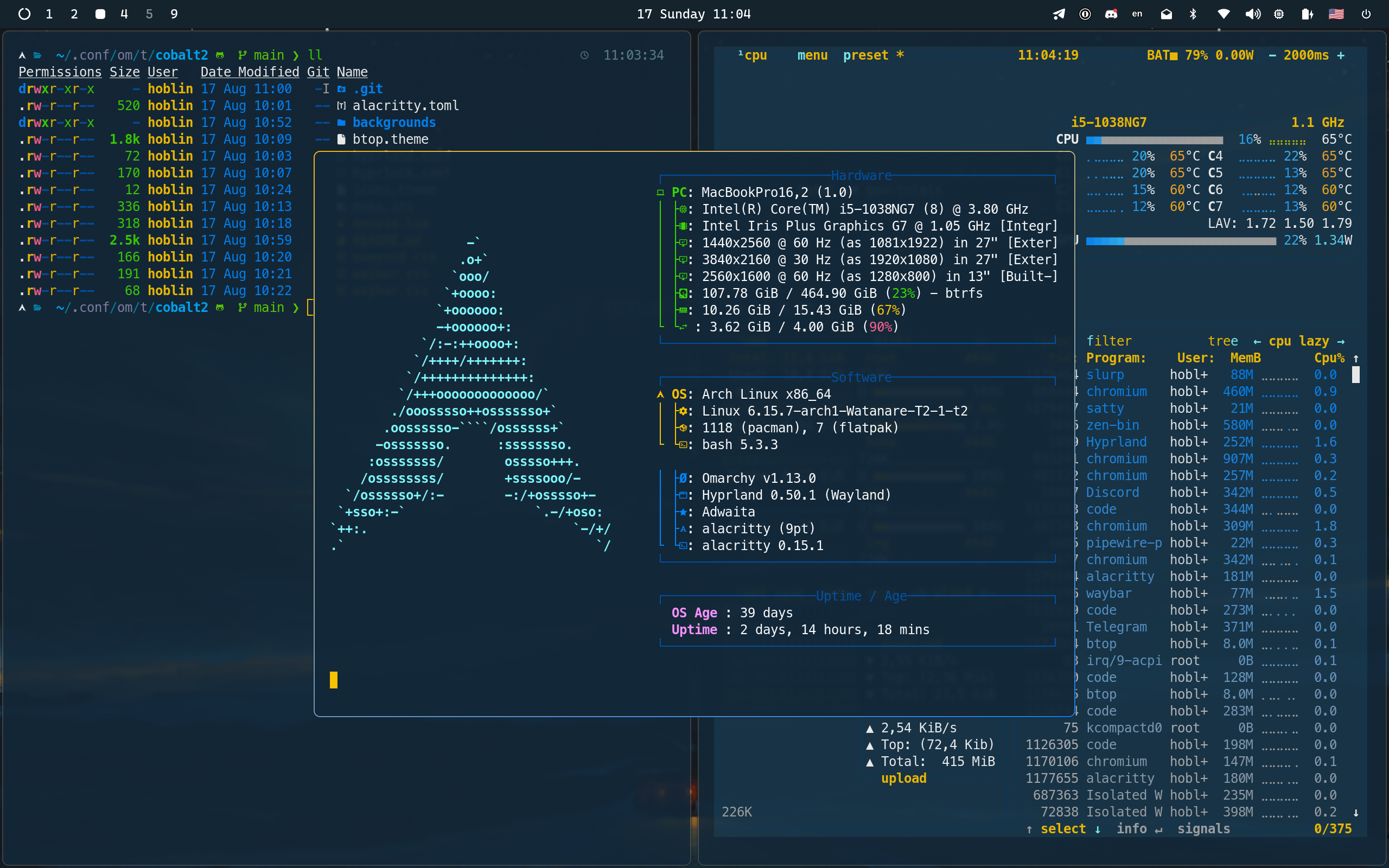
> Deep blue depths where code comes alive,
> Golden highlights make syntax thrive.
> In shadows of cobalt, thoughts take flight—
> Where darkness meets brilliance, day turns to night.
> The coder's canvas, both bold and true,
> Where yellow sparks dance in oceans of blue.
## Installation
To install this theme, simply use the `omarchy-theme-install` command:
```bash
omarchy-theme-install https://github.com/hoblin/omarchy-cobalt2-theme
```
Alternatively, you can install it via the Omarchy TUI:
1. Press `Super + Alt + Space` to open the Omarchy menu
2. Select `Install > Style > Theme`
3. Paste the repository URL: `https://github.com/hoblin/omarchy-cobalt2-theme`
Once installed, press `Super + Ctrl + Shift + Space`, select "Cobalt2" and everything should refresh automatically.
## What's Included
This theme provides cohesive styling for all Omarchy components:
- **Alacritty** (`alacritty.toml`) - Terminal with deep blue background and golden cursor
- **btop** (`btop.theme`) - System monitor with vibrant Cobalt2 color gradients
- **Hyprland** (`hyprland.conf`, `hyprlock.conf`) - Window manager and lock screen styling
- **Mako** (`mako.ini`) - Notification daemon with signature yellow borders
- **Neovim** (`neovim.lua`) - Full Cobalt2 colorscheme integration via cobalt2.nvim
- **Waybar** (`waybar.css`) - Status bar theming
- **Walker** (`walker.css`) - Application launcher styling
- **SwayOSD** (`swayosd.css`) - On-screen display overlays
- **Chromium** (`chromium.theme`) - Browser theming with deep blue frame (requires Omarchy dev branch)
- **Icon Theme** (`icons.theme`) - Yaru-yellow icon set for file manager
- **Backgrounds** - Curated wallpapers that complement the Cobalt2 aesthetic
## Theme Colors
The Cobalt2 theme is built around these signature colors:
- **Primary Background**: `#193549` (Deep Blue)
- **Secondary Background**: `#122738` (Darker Blue)
- **Accent**: `#ffc600` (Bright Yellow/Gold)
- **Text**: `#ffffff` (Pure White)
- **Syntax Highlights**: Various blues, cyans, oranges, and pinks for rich code highlighting
## Credits
This theme is inspired by the iconic [Cobalt2 theme](https://github.com/wesbos/cobalt2-vscode) originally created by Wes Bos for VSCode. The Neovim integration uses the [cobalt2.nvim](https://github.com/lalitmee/cobalt2.nvim) plugin. Background wallpapers are sourced from the curated collection at [dharmx/walls](https://github.com/dharmx/walls).
Created with ❤️ by hoblin for the Omarchy community.
## License
This theme is open-source and available under the MIT License.