https://github.com/holoflash/oxlint-tui
A lightweight, dependency-free Node.js Terminal User Interface (TUI) for browsing and visualizing oxlint rules.
https://github.com/holoflash/oxlint-tui
config node oxlint tui ui
Last synced: 4 months ago
JSON representation
A lightweight, dependency-free Node.js Terminal User Interface (TUI) for browsing and visualizing oxlint rules.
- Host: GitHub
- URL: https://github.com/holoflash/oxlint-tui
- Owner: holoflash
- Created: 2025-10-14T07:06:41.000Z (9 months ago)
- Default Branch: main
- Last Pushed: 2026-01-31T09:51:59.000Z (5 months ago)
- Last Synced: 2026-01-31T22:28:18.648Z (5 months ago)
- Topics: config, node, oxlint, tui, ui
- Language: TypeScript
- Homepage: https://www.npmjs.com/package/oxlint-tui
- Size: 8.62 MB
- Stars: 5
- Watchers: 0
- Forks: 4
- Open Issues: 6
-
Metadata Files:
- Readme: README.md
- Contributing: CONTRIBUTING.md
- License: LICENSE
Awesome Lists containing this project
README
# oxlint-tui
A lightweight, dependency-free Node.js TUI for browsing and running all available [oxlint](https://www.npmjs.com/package/oxlint) rules.
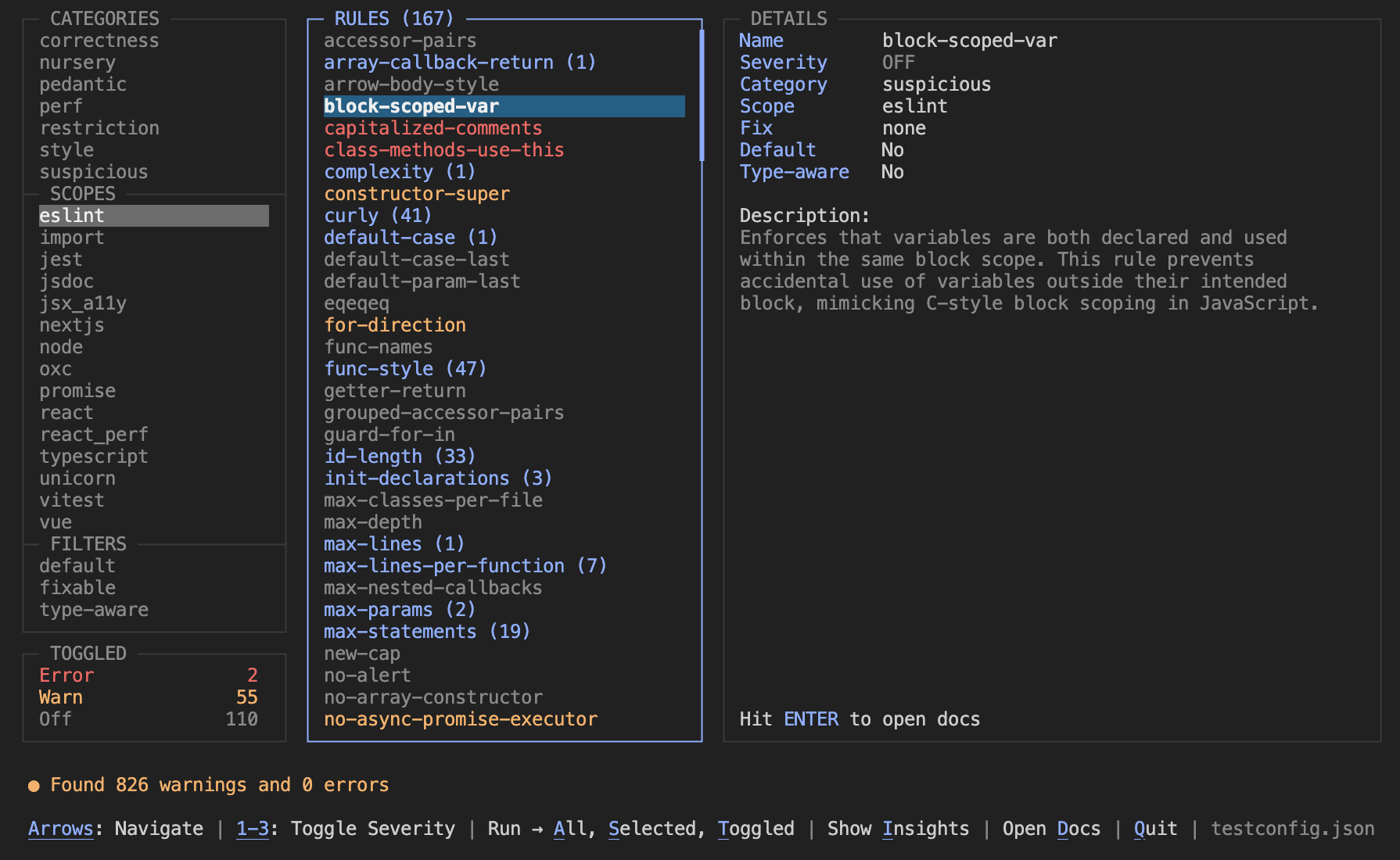
It automatically loads your local configuration (if one exists) to show you the current status of your project. You can then toggle rules on the fly to see how they affect your codebase without altering your actual configuration file.
## Features
- **Rule Discovery**: Explore the full catalog of Oxlint rules, categorized by scope and severity, to discover new linting opportunities for your project.
- **Non-Destructive**: Toggling rules happens entirely in memory. No changes are written to disk, making it safe to experiment without messing up your config or comments.
- **Config Aware**: Reads `.oxlintrc.json` or your provided config file to initialize the state, but works even if no config file exists.
- **Details**: View description, category, scope, fix, default, and type-aware rule parameters at a glance.
- **Hit Counts**: See exactly how many violations each rule triggers in your codebase. Hits are displayed next to the rule name (e.g., `no-debugger (3)`).
- **Run All**: Quickly run every available rule (even those toggled off) to see what else might be lurking in your code.
- **View Docs**: Press ENTER on any rule to open its official documentation in your browser.
- **Zero Dependencies**: Written in pure Node.js without any heavy TUI libraries.
### Insights
Press i to view diagnostic insights about your codebase:
- **Violations by Category**: See which rule categories are triggering the most violations, with counts and percentages.
- **Fixability Stats**: Understand how many violations can be auto-fixed with `oxlint --fix` vs. requiring manual changes.
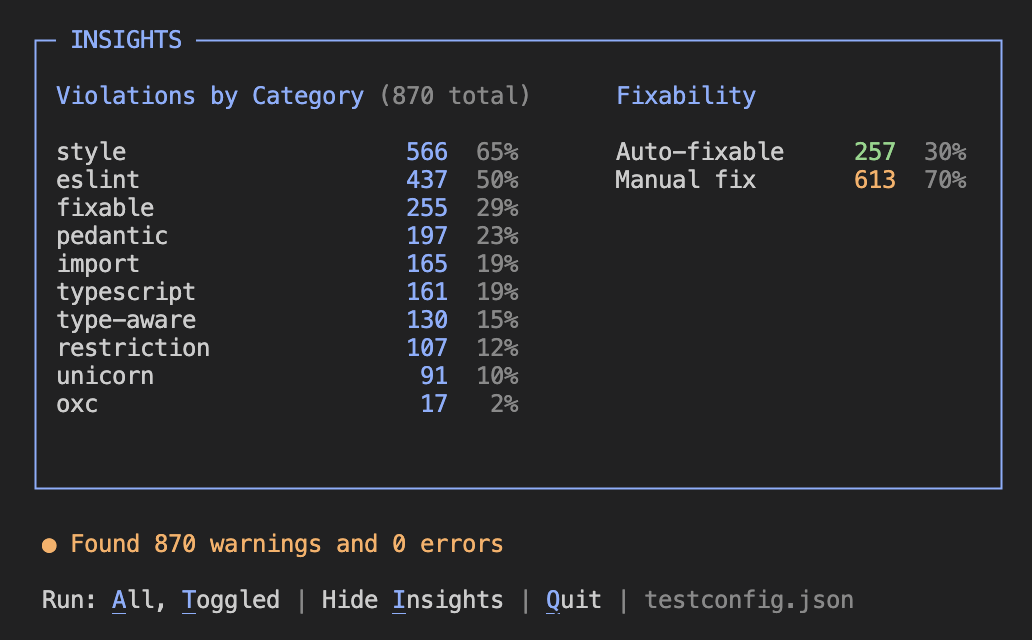
This helps you prioritize which issues to tackle first and understand the potential impact of running auto-fix.
## Usage
### Quick Start (via npx)
Run it directly in your project folder (where your `.oxlintrc.json` is located):
```bash
npx oxlint-tui
```
### Custom Config Path
If you want to load an initial state from a specific config file:
```bash
npx oxlint-tui your-oxlint-config.json
```
### Global Install
If you use oxlint frequently, you can install it globally:
```bash
npm install -g oxlint-tui
oxlint-tui
```
## Keyboard Controls
| Key | Action |
| :-------------------- | :------------------------------------------------- |
| **Arrows** | Navigate between Categories, Rules, and Details |
| **1** / **2** / **3** | Set severity (**Off** / **Warn** / **Error**) |
| **a** | **A**ll: Run all available rules |
| **s** | **S**elected: Run selected rule or category |
| **t** | **T**oggled: Run only active/toggled rules |
| **i** | **I**nsights: Toggle the summary distribution view |
| **d** | **D**ocs: Open documentation in browser |
| **q** | **Q**uit: Exit application |
## Requirements
- Node.js >= 20
- The tool runs `npx oxlint` and `npx oxlint-tsgolint` internally.
## Contributing
If you have any feature requests, want to report a bug, or want to contribute to this project, please open an issue or submit a pull request on [GitHub](https://github.com/holoflash/oxlint-tui).
## License
MIT