https://github.com/holynova/gushi_namer
Chinese baby name generator from classical poems and ancient texts
https://github.com/holynova/gushi_namer
chinese classical-poetry funny github-pages name name-generator poem react typescript
Last synced: about 1 month ago
JSON representation
Chinese baby name generator from classical poems and ancient texts
- Host: GitHub
- URL: https://github.com/holynova/gushi_namer
- Owner: holynova
- Created: 2017-01-22T05:31:18.000Z (almost 10 years ago)
- Default Branch: master
- Last Pushed: 2026-09-16T12:11:58.000Z (2 months ago)
- Last Synced: 2026-10-04T06:33:26.650Z (about 2 months ago)
- Topics: chinese, classical-poetry, funny, github-pages, name, name-generator, poem, react, typescript
- Language: TypeScript
- Homepage: https://holynova.github.io/gushi_namer/
- Size: 1.42 MB
- Stars: 2,258
- Watchers: 30
- Forks: 393
- Open Issues: 27
-
Metadata Files:
- Readme: README.md
Awesome Lists containing this project
- awesome-repository - holynova / gushi_namer
README
# 古诗文起名
翻阅经典,与一个好名字不期而遇。
古诗文起名从《诗经》《楚辞》、唐诗、宋词等典籍中取字组合名字,并保留诗句出处。v3.0 版本重新设计了桌面端与移动端体验,支持本地收藏、JSON 导入导出和名字分享卡片。
## Demo
- [https://holynova.github.io/gushi_namer/](https://holynova.github.io/gushi_namer/)
- [http://xiaosang.net/gushi_namer/](http://xiaosang.net/gushi_namer/)
## 截图预览
### 桌面端
| 起名首页 | 收藏与 JSON 导入导出 | 分享卡片 |
| --- | --- | --- |
|  |  |  |
### 移动端
| 起名首页 | 收藏与 JSON 导入导出 | 分享卡片 |
| --- | --- | --- |
|  |  |  |
## 主要功能
- 启动后自动生成 6 个候选名字,切换典籍后立即刷新。
- 收藏数据保存在当前浏览器,无需登录。
- 支持收藏记录 JSON 导出和导入,方便备份迁移。
- 支持生成名字分享卡片,包含原诗句、出处、项目链接和二维码。
- 移动端滚动时头部自动收起,保留换一组、收藏、关于三个快捷入口。
## 支持的典籍
1. 诗经
2. 楚辞
3. 唐诗
4. 宋词
5. 乐府诗集
6. 古诗三百首
7. 著名辞赋
## 本地运行
```bash
git clone https://github.com/holynova/gushi_namer.git
cd gushi_namer
pnpm install
pnpm dev
```
构建:
```bash
pnpm build
```
## 开源
- [GitHub 仓库](https://github.com/holynova/gushi_namer)
- 作者:[holynova](https://github.com/holynova)
## Star History
[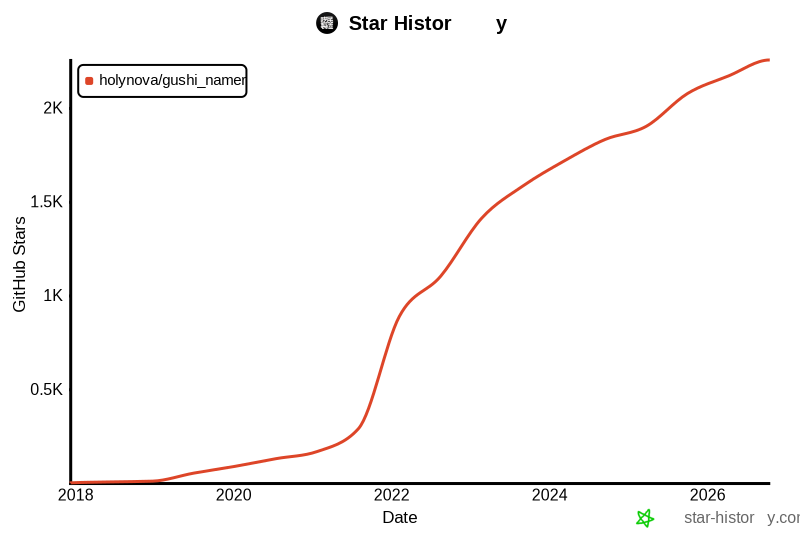](https://www.star-history.com/#holynova/gushi_namer&Date)
## Demo 分享卡片
[](https://holynova.github.io/gushi_namer/)
移动端友好的在线 Demo:Chinese baby name generator from classical poems and ancient texts 扫码或点击卡片打开: