https://github.com/holyshared/file-fixture
Simple file fixture loader for unittest
https://github.com/holyshared/file-fixture
Last synced: about 1 month ago
JSON representation
Simple file fixture loader for unittest
- Host: GitHub
- URL: https://github.com/holyshared/file-fixture
- Owner: holyshared
- License: mit
- Created: 2015-04-15T03:24:26.000Z (about 11 years ago)
- Default Branch: master
- Last Pushed: 2017-01-20T01:47:53.000Z (over 9 years ago)
- Last Synced: 2025-02-17T13:45:17.255Z (over 1 year ago)
- Language: PHP
- Homepage:
- Size: 115 KB
- Stars: 0
- Watchers: 1
- Forks: 1
- Open Issues: 1
-
Metadata Files:
- Readme: README.md
- License: LICENSE
Awesome Lists containing this project
README
file-fixture
==================================
[](https://travis-ci.org/holyshared/file-fixture)
[](http://hhvm.h4cc.de/package/holyshared/file-fixture)
[](https://coveralls.io/r/holyshared/file-fixture?branch=develop)
[](https://scrutinizer-ci.com/g/holyshared/file-fixture/?branch=master)
[](https://www.versioneye.com/user/projects/552efada10e7149066000804)
[](https://waffle.io/holyshared/file-fixture)
Simple file fixture loader for unittest.
You can easily load the test-based fixture.
Table of contents
----------------------------------
* [Basic usage](#basic-usage)
* [Output fixture of terminal](#output-fixture-of-terminal)
* [Configuration file](#configuration-file)
Basic usage
----------------------------------
Will be able to load the fixture in four steps.
1. Create a loader of container
2. Create a fixture of container
3. Create a FileFixture
4. Load fixture from the container.
```php
$loaders = new LoaderContainer([
new TextLoader()
]);
$fixtures = new FixtureContainer([
'text:default:readme' => __DIR__ . '/README.md'
]);
$fixture = new FileFixture($fixtures, $loaders);
$content = $fixture->load('text:default:readme');
print $content;
```
Loader is compatible with text data, [mustache](https://github.com/bobthecow/mustache.php) template, ASCII art.
* TextLoader - Load the text data.
* MustacheLoader - Load the [mustache](https://github.com/bobthecow/mustache.php) template
* ArtLoader - Load the ASCII art.
Output fixture of terminal
----------------------------------
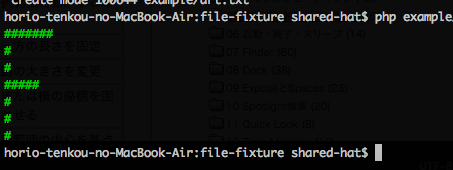
With **ArtLoader**, you can load the coloring text data.
### Create a fixture file
Create a fixture file.
Mark the text to apply the color in the tag.
```text
#######
#
#
#####
#
#
#
```
### Load of Output fixture
```php
$loaders = new LoaderContainer([
new ArtLoader(new MustacheLoader(new TextLoader()))
]);
$fixtures = new FixtureContainer([
'art:default:header' => __DIR__ . '/art.txt'
]);
$fixture = new FileFixture($fixtures, $loaders);
$content = $fixture->load('art:default:header');
print $content;
```
Configuration file
----------------------------------
Using the configuration file, you will be able to easily load the fixture.
Example of the fixture to load the [mustache](https://github.com/bobthecow/mustache.php) of template.
### Create a fixture template
```mustache
{{name}} task was successful.
```
### Create a configuration file of fixture
The name of the fixture, you must begin with the name of the **loader**.
```toml
[mustache.default]
successMessage = "template.ms"
```
The name of this fixture will be **mustache:default:successMessage**.
### Load of fixture
Load the fixture by specifying the name.
When the load is successful, will return the results of template of [mustache](https://github.com/bobthecow/mustache.php) has been processed.
```php
$textLoader = new TextLoader();
$loaders = new LoaderContainer([
$textLoader,
new MustacheLoader($textLoader)
]);
$factory = new FixtureContainerFactory();
$fixtures = $factory->createFromFile(__DIR__ . '/fixtures.toml');
$fixture = new FileFixture($fixtures, $loaders);
$content = $fixture->load('mustache:default:successMessage', [
'name' => 'build'
]);
print $content;
```
Contributors
----------------------------------
* Jérémy Marodon ([@Th3Mouk](https://github.com/Th3Mouk))