https://github.com/homemade-software-inc/completion-kit
Your prompts need tests too. Run prompts against real datasets, score outputs with LLM judges, version everything, and compare runs to see what got better.
https://github.com/homemade-software-inc/completion-kit
anthropic evaluation-framework evaluation-metrics llm llm-as-judge llm-eval llm-evaluation llm-evaluation-framework llm-evaluation-metrics llmops mcp ollama openai prompt-engineering prompt-testing rails rails-engine ruby ruby-on-rails
Last synced: 14 days ago
JSON representation
Your prompts need tests too. Run prompts against real datasets, score outputs with LLM judges, version everything, and compare runs to see what got better.
- Host: GitHub
- URL: https://github.com/homemade-software-inc/completion-kit
- Owner: homemade-software-inc
- License: other
- Created: 2026-03-09T04:19:29.000Z (5 months ago)
- Default Branch: main
- Last Pushed: 2026-07-04T17:18:24.000Z (19 days ago)
- Last Synced: 2026-07-04T19:06:14.920Z (18 days ago)
- Topics: anthropic, evaluation-framework, evaluation-metrics, llm, llm-as-judge, llm-eval, llm-evaluation, llm-evaluation-framework, llm-evaluation-metrics, llmops, mcp, ollama, openai, prompt-engineering, prompt-testing, rails, rails-engine, ruby, ruby-on-rails
- Language: Ruby
- Homepage: https://completionkit.com
- Size: 54 MB
- Stars: 1
- Watchers: 0
- Forks: 1
- Open Issues: 9
-
Metadata Files:
- Readme: README.md
- Changelog: CHANGELOG.md
- Contributing: CONTRIBUTING.md
- License: LICENSE
- Code of conduct: CODE_OF_CONDUCT.md
Awesome Lists containing this project
README




Your prompts need tests too.
Run every prompt against real data. Score each output with an LLM judge against criteria you define. Change anything: the prompt, the model, the temperature, the dataset. Re-run and see exactly what got better and what broke. When the scores tell you something's off, CompletionKit suggests an improved prompt based on the judge's actual feedback on your runs. You inspect the diff, apply it as a new version, and verify the improvement.
It's the difference between "this prompt seems to work" and "this prompt scores 4.3 out of 5 across 200 inputs, up from 3.8 last version."
**[Start on completionkit.com →](https://completionkit.com)** | **[RubyGems](https://rubygems.org/gems/completion-kit)**
> **Just want to use it?** [CompletionKit Cloud](https://completionkit.com) is the same engine, fully hosted — zero install, no Rails ops, plans at [completionkit.com/pricing](https://completionkit.com/pricing).
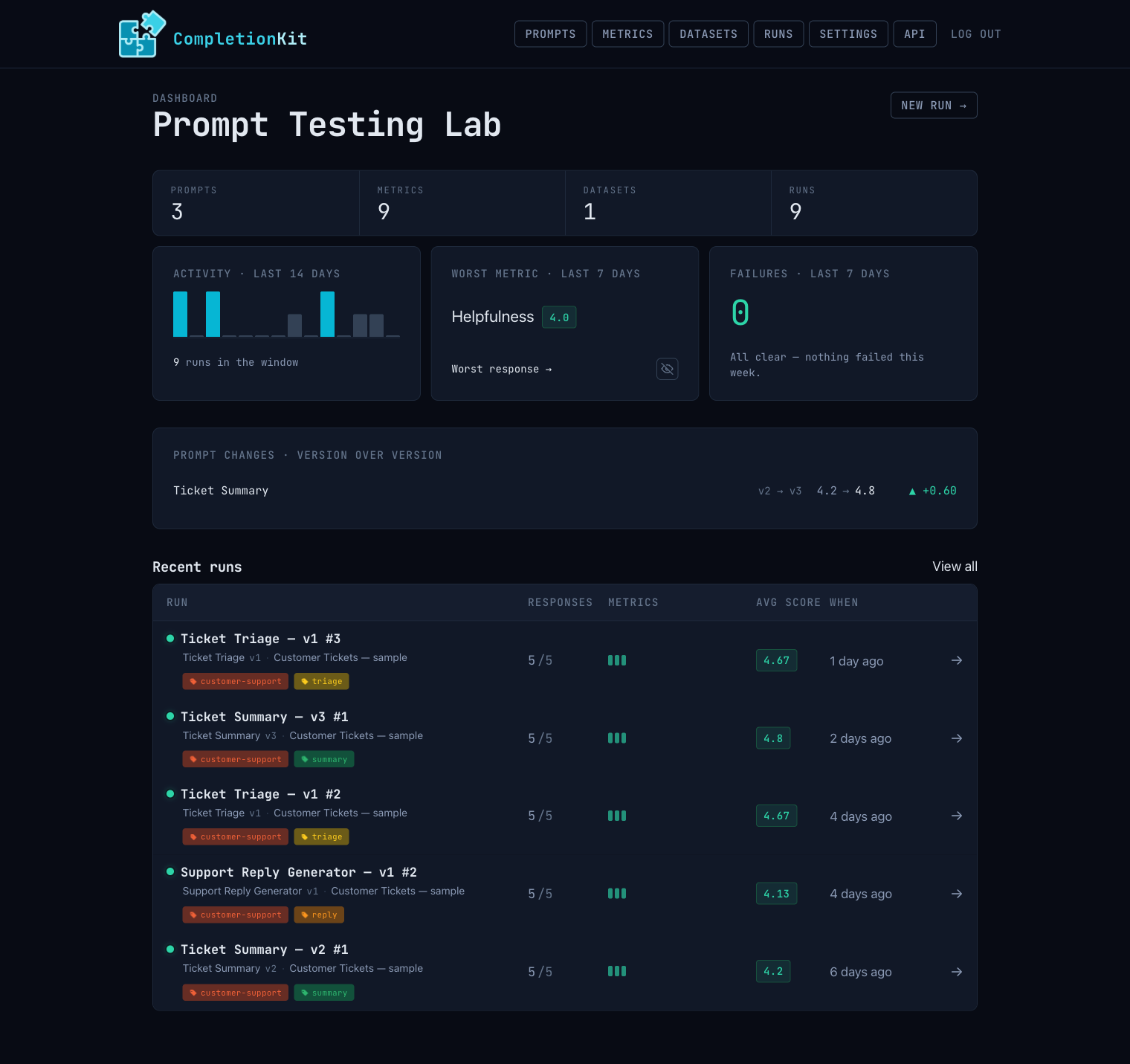
## Three ways to run it
Same engine, same UI, same REST API and MCP server — pick the deployment that fits. The first two are stack-agnostic: you run CompletionKit as a product and talk to it over HTTP and MCP, whatever language your own app is written in. The third is for teams already building on Rails.
### 1. Hosted — [completionkit.com](https://completionkit.com) (recommended)
The fastest path. Sign up and you're running on the same engine you'd self-host, without touching a Rails app. No `db:migrate`, no Puma, no Solid Queue, no provider key management — multi-tenant workspaces, your team logs in, you go. Plans at [completionkit.com/pricing](https://completionkit.com/pricing).
### 2. Self-hosted — the bundled standalone app
Run it on your own infra as a self-contained product. There's nothing to integrate and no Ruby to write — once it's up, you drive everything through the web UI, the REST API, and the MCP server, from whatever stack your own app is built in. It needs Postgres and a host that can run the app (Fly, Render, Heroku, Docker, …).
```bash
git clone https://github.com/homemade-software-inc/completion-kit.git
cd completion-kit/standalone
bundle install
bin/rails completion_kit:install:migrations
bin/rails db:migrate
```
Run **both** a web server and a Solid Queue worker. In two terminals:
```bash
bin/rails server
```
```bash
bin/jobs
```
Or with [foreman](https://github.com/ddollar/foreman) in one terminal: `foreman start -f Procfile.dev`.
Visit `http://localhost:3000`. Add a provider credential (Settings), create a prompt, upload a CSV dataset, and run it. See [Deploying self-hosted](#deploying-self-hosted) for the production-env setup.
### 3. Rails engine — mount into your existing Rails app
```ruby
gem "completion-kit"
```
```bash
bin/rails generate completion_kit:install
bin/rails db:migrate
```
The engine mounts at `/completion_kit`. Generate / judge flows enqueue Active Job jobs (`CompletionKit::GenerateRowJob`, `CompletionKit::JudgeReviewJob`, `CompletionKit::RunCompletionCheckJob`), so your host app needs an Active Job adapter that actually processes them — Solid Queue, Sidekiq, GoodJob, etc. The `:async` adapter is **not** suitable for production: it runs jobs in the web Puma's thread pool with no durability and no retry, and a long LLM call will block request handling.
**Host-app layout integration.** If your host app overrides the engine layout (e.g. `layout "application"` on engine controllers, or rendering engine views inside your own shell), include both the engine's stylesheet and JavaScript in that layout:
```erb
<%= stylesheet_link_tag "completion_kit/application", media: "all" %>
<%= javascript_include_tag "completion_kit/application", defer: true %>
```
Without the JavaScript include, in-page behaviours silently fail: live tag-breadcrumb updates, relative-time ticking, CSV row hover-expand, model-refresh progress, focus-first-error, and local-time formatting.
## Providers
CompletionKit discovers available models from each provider's API automatically.
| Provider | Env vars | What it covers |
|----------|----------|----------------|
| **OpenAI** | `OPENAI_API_KEY` | GPT-5, GPT-4.1, GPT-4o, etc. |
| **Anthropic** | `ANTHROPIC_API_KEY` | Claude Opus, Sonnet, Haiku |
| **Ollama / local endpoint** | `OLLAMA_API_ENDPOINT` (default: `http://localhost:11434/v1`) | Any model you've `ollama pull`-ed, or any OpenAI-compatible local server (vLLM, LM Studio, llama.cpp) |
| **OpenRouter** | `OPENROUTER_API_KEY` | 100+ models from 30+ providers through one API key |
Set these as environment variables or configure them in the generated initializer. You can also add provider credentials through the web UI under Settings.
### Encryption
Provider API keys are encrypted at rest using [Active Record encryption](https://guides.rubyonrails.org/active_record_encryption.html). You need three encryption keys configured before the app will boot in production.
Generate them:
```bash
bin/rails db:encryption:init
```
Then set them as environment variables:
```bash
COMPLETION_KIT_ENCRYPTION_PRIMARY_KEY=
COMPLETION_KIT_ENCRYPTION_DETERMINISTIC_KEY=
COMPLETION_KIT_ENCRYPTION_KEY_DERIVATION_SALT=
```
Or add them to `config/credentials.yml.enc` under `active_record_encryption`. In development, the standalone app uses built-in fallback values so you can skip this step locally.
## Authentication
CompletionKit requires authentication in any deployed environment. In development and test, routes are open by default (with a log warning); every other environment returns 403 until auth is configured.
### Basic Auth (recommended for simple setups)
```ruby
CompletionKit.configure do |c|
c.username = "admin"
c.password = ENV["COMPLETION_KIT_PASSWORD"]
end
```
### Custom Auth (Devise, etc.)
```ruby
CompletionKit.configure do |c|
c.auth_strategy = ->(controller) { controller.authenticate_user! }
end
```
Only one mode can be active.
## Rate limiting
The REST API, the MCP endpoint, and the web UI are rate limited per IP, per minute. The defaults are generous; tune them in the initializer:
```ruby
CompletionKit.configure do |c|
c.api_rate_limit = 120 # REST API + MCP, requests per minute (default 120)
c.web_rate_limit = 300 # web UI, requests per minute (default 300)
end
```
Limiting uses `Rails.cache`. A shared cache store (Solid Cache, Redis) throttles accurately across multiple app instances; a per-process store still throttles each instance independently.
## How it works
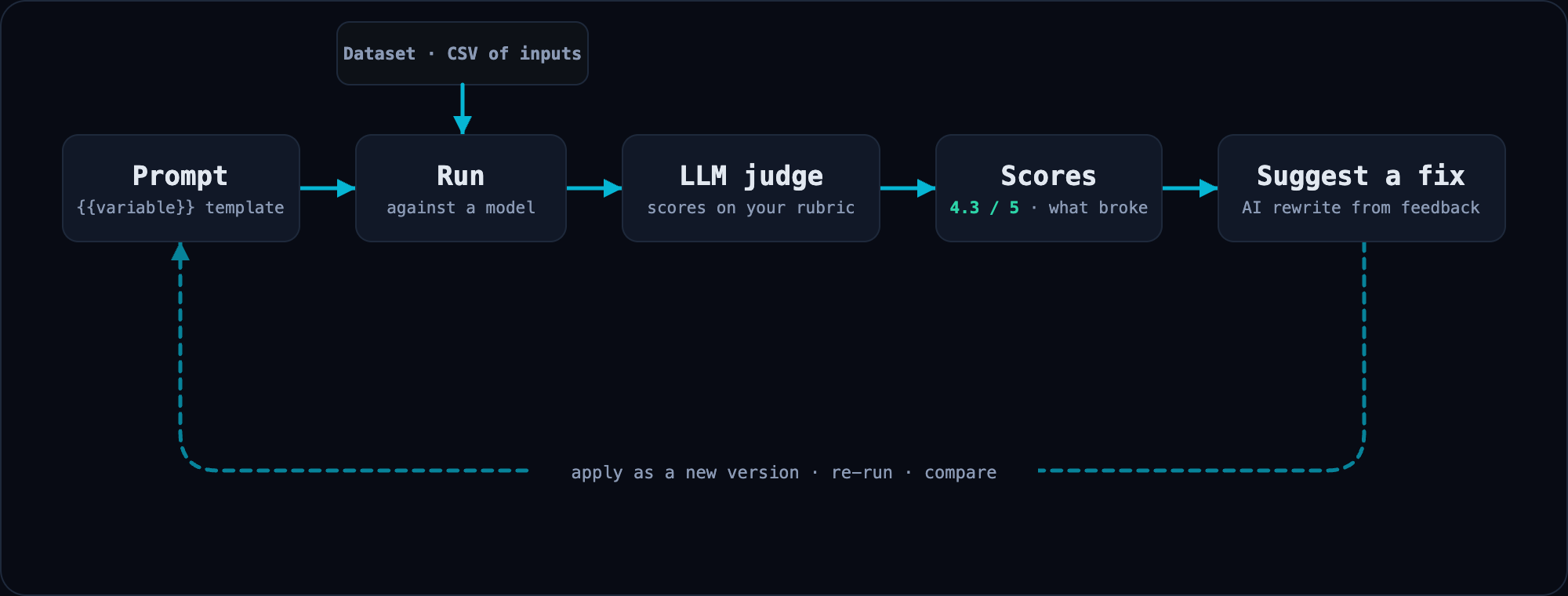
It's a loop. Each pass leaves you with a score you can compare against the last one.
1. **Create a prompt** with `{{variable}}` placeholders
2. **Upload a dataset.** A CSV where column headers match the variable names.
3. **Run it** against a model and score outputs with an LLM judge against criteria you define.
4. **Iterate.** Change the prompt, the model, the temperature, or the dataset and re-run. CompletionKit versions your prompts so you can always compare against previous results.
5. **Get suggestions.** When scores drop, ask CompletionKit for an AI-generated improvement. The suggestion is based on the judge's actual per-response feedback, not generic prompt-engineering advice. Inspect the diff and apply it as a new version.
## Concepts
- **Prompt.** A versioned template with `{{variable}}` placeholders. Editing a prompt that's already been run creates a new version, so earlier results stay reproducible.
- **Dataset.** A CSV of real inputs. Each row becomes one test case.
- **Run.** One execution of a prompt against a dataset. Captures every input (model, temperature, metrics) and stores all outputs and scores.
- **Response.** The model's output for one dataset row, with reviews attached.
- **Metric.** An evaluation dimension with a name, instruction, evaluation steps, and a 1-5 star scoring scale. The LLM judge uses this to score each response.
- **Metric Group.** A reusable group of metrics you can apply to a run as a set.
- **Tag.** A domain label you can attach to prompts, runs, metrics, and datasets. Auto-assigned from a 10-color palette. Filter any index page by tag (`?tag[]=...`).
- **Provider Credential.** An API key for a model provider. Encrypted at rest, never returned through the API.
## REST API
Every resource is accessible via a bearer-token JSON API:
```ruby
CompletionKit.configure { |c| c.api_token = ENV["COMPLETION_KIT_API_TOKEN"] }
```
```bash
curl -H "Authorization: Bearer $TOKEN" \
http://localhost:3000/completion_kit/api/v1/prompts
```
Visit `/completion_kit/api_reference` in your running app for per-endpoint docs with copy-to-clipboard curl examples.
## MCP server
CompletionKit runs a [Model Context Protocol](https://modelcontextprotocol.io) server at `/completion_kit/mcp`, exposing every resource as tools that MCP-aware clients (Claude Code, Cursor, etc.) can drive directly:
```json
{
"mcpServers": {
"completion-kit": {
"url": "https://your-app.com/completion_kit/mcp",
"headers": { "Authorization": "Bearer YOUR_TOKEN" }
}
}
}
```
The in-app API reference page has install snippets you can copy straight into your MCP client config.
## Deploying self-hosted
Any Rails-friendly host works (Fly, Heroku, Render, Docker, etc.). Point it at a Postgres instance via `DATABASE_URL`, set your provider env vars, and run `cd standalone && bin/rails db:migrate` on each deploy.
| Variable | Purpose | Default |
|----------|---------|---------|
| `COMPLETION_KIT_API_TOKEN` | Bearer token for REST API and MCP | (none, API disabled) |
| `COMPLETION_KIT_USERNAME` | Web UI login username | `admin` |
| `COMPLETION_KIT_PASSWORD` | Web UI login password | (none, open in dev) |
You also need the three `COMPLETION_KIT_ENCRYPTION_*` keys from the [Encryption](#encryption) section above.
When the gem ships a new migration, install it locally and commit before pushing:
```bash
cd standalone
bin/rails completion_kit:install:migrations
bin/rails db:migrate
git add db/migrate/ && git commit -m "install new engine migration"
```
### Docker
The standalone app ships a `Dockerfile`, so you can self-host it without a Ruby toolchain on the host. Build with the **repository root** as the context — the app depends on the engine source alongside it:
```bash
docker build -f standalone/Dockerfile -t completion-kit .
```
CompletionKit needs a Rails secret (`SECRET_KEY_BASE`) and three Active Record encryption keys. With Docker there's no Rails toolchain on the host to run `bin/rails db:encryption:init`, so generate them with `openssl`. Generate them **once** and keep them stable — if the encryption keys change, provider credentials already stored in the database can no longer be decrypted. Write everything to an env file:
```bash
cat > completion-kit.env < {
org = Current.organization&.id
org ? where(organization_id: org) : where("1=0")
}
config.tenant_scope_columns = [:organization_id]
end
```
`tenant_scope` runs as each engine model's `default_scope` (use `unscoped` to bypass). `tenant_scope_columns` is appended to every engine uniqueness validation. Adding the tenant columns and composite unique indexes lives in your host migrations. Both defaults (`nil`, `[]`) are no-ops.
One hook lets a host apply run-history retention everywhere the engine lists, counts, or traverses runs, without overriding controllers or views:
```ruby
CompletionKit.configure do |config|
config.runs_display_scope = -> { where(created_at: 90.days.ago..) }
config.runs_display_footer_partial = "runs/retention_notice"
end
```
`runs_display_scope` is a callable evaluated against a `Run` relation, in the same bare-`where` style as `tenant_scope` (it runs via `instance_exec`, so write it zero-arg with the relation as `self`, like a Rails `scope` lambda). It must return a relation: a callable that returns `nil` or anything non-chainable raises when a list renders. The engine applies it through `Run.display_scoped` at every run list and count it owns (the runs index, prompt and dataset show pages, the compare picker, new-run tag defaults, the v1 API index and its `X-Total-Count`, the MCP `runs_list` tool, the dashboard and API reference recent-runs panels, the dashboard "Runs" stat-card count, and provider-credential usage stats) and through `Run.visible_run_ids` for child records that traverse runs (the metric trust-panel sample and the agreement examples shown on a metric page). Use it for list-only retention rather than a global `default_scope`, which would null `Run` associations everywhere they are traversed.
Deliberately exempt, because they must still see every run: id-addressed single-run lookups (`runs#show`, the MCP `runs_get` tool, the v1 API show), delete-confirmation cascade counts, the auto-generated run-name counter, the dashboard's stat-card gate (it keys off the unscoped run total so a long-tenured workspace whose runs have all aged past retention still sees its activity cards rather than a blank dashboard), and the judge few-shot seeding that learns from corrected examples even on hidden runs.
`runs_display_footer_partial` names a partial rendered below the runs list on the dashboard, the index, and the prompt and dataset show pages; it receives the shown runs as a `runs` local. Use it for a notice like "older runs are hidden, upgrade to see them" — your host owns the retention rule in `runs_display_scope`, so it computes the hidden count itself. Both default to `nil` (no-ops), leaving standalone behaviour unchanged.
## Contributing
See [CONTRIBUTING.md](CONTRIBUTING.md) for development setup, testing, and pull request guidelines.
## License
CompletionKit 0.3.0 and later are licensed under the [Business Source License 1.1](LICENSE). You may use CompletionKit freely for any purpose, including production, except to offer it (or a derivative) to third parties as a hosted or managed service whose primary value is CompletionKit itself. Three years after each release, that version automatically re-licenses to GPL-3.
CompletionKit 0.2.x and earlier remain available under the [MIT License](https://github.com/homemade-software-inc/completion-kit/blob/v0.2.0/MIT-LICENSE).
For alternative licensing, contact hello@homemade.software.