https://github.com/homoluctus/ecranner
Scan the vulnerability of Docker images stored in ECR
https://github.com/homoluctus/ecranner
aws docker ecr python security trivy
Last synced: 8 months ago
JSON representation
Scan the vulnerability of Docker images stored in ECR
- Host: GitHub
- URL: https://github.com/homoluctus/ecranner
- Owner: homoluctus
- License: mit
- Created: 2019-09-24T17:06:48.000Z (almost 7 years ago)
- Default Branch: master
- Last Pushed: 2019-10-07T04:33:43.000Z (over 6 years ago)
- Last Synced: 2025-02-12T03:37:13.034Z (over 1 year ago)
- Topics: aws, docker, ecr, python, security, trivy
- Language: Python
- Size: 1.35 MB
- Stars: 3
- Watchers: 3
- Forks: 1
- Open Issues: 0
-
Metadata Files:
- Readme: README.md
- License: LICENSE
Awesome Lists containing this project
README
# ECRanner


This is that scan the vulnerability of Docker images stored in ECR.
# Table of contents
- [Feature](#feature)
- [Get Started](#get-started)
- [Install Prerequirements](#install-prerequirements)
- [Install ECRanner](#install-ecranner)
- [Write ecranner.yml](#write-ecranner.yml)
- [Execute](#execute)
- [Command options](#command-options)
- [Configuration Parameter](#configuration-parameter)
- [v1.0](#v10)
# Feature
- Pull Docker Image From ECR
- Support multi account
- Vulnerability Scan
- [Trivy](https://github.com/aquasecurity/trivy) detects software (OS package and application library) vulnerabilities in Docker Image
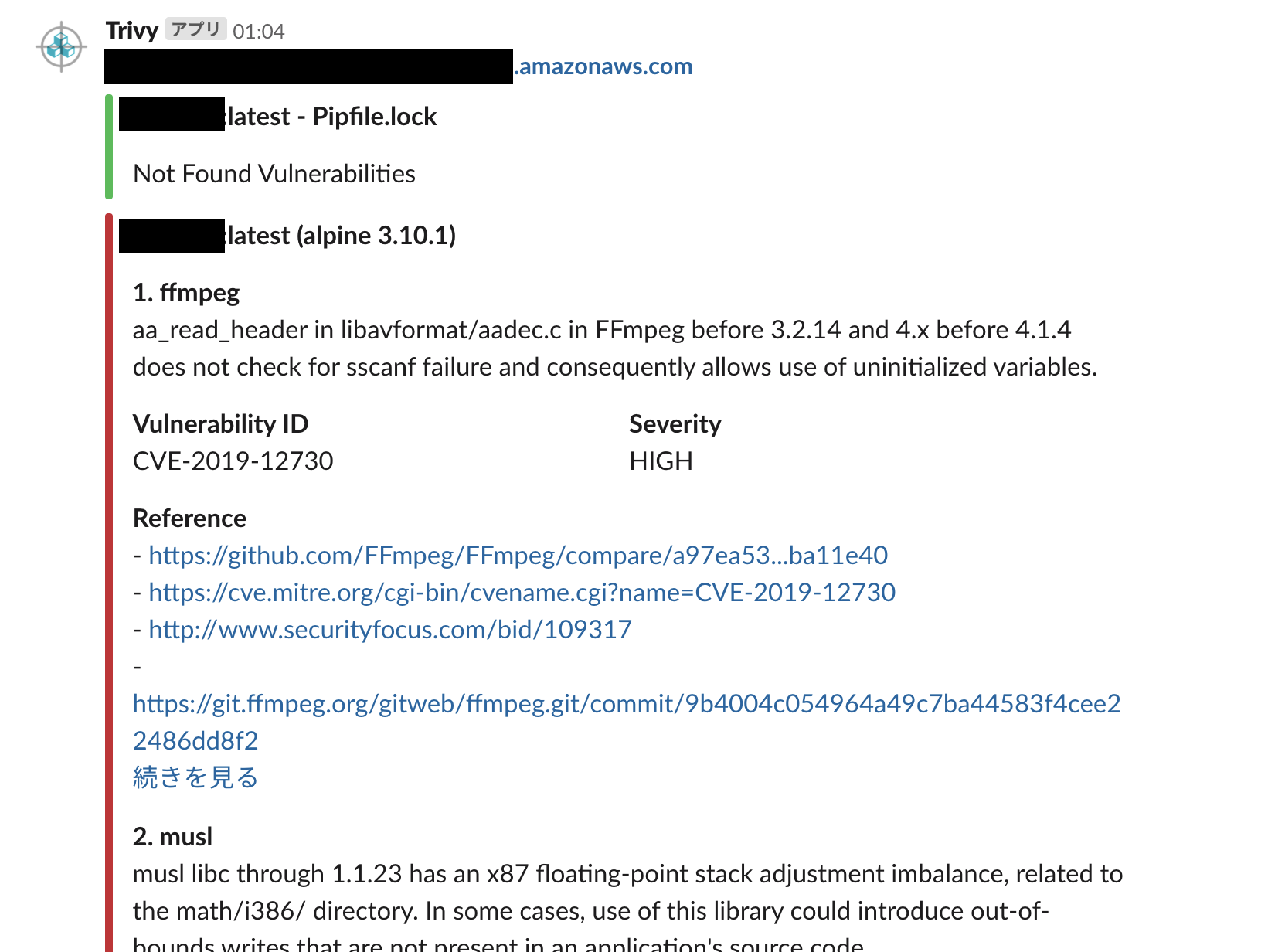
- Slack Integration
- Push vulnerability information to Slack. Slack UI is as following:
# Get Started
## Install Prerequirements
- [Trivy](https://github.com/aquasecurity/trivy)
- Git (Used with Trivy)
## Install ECRanner
```
pip install ecranner
```
## Write ecranner.yml
A `ecranner.yml` looks like this:
```
aws:
stg:
account_id: xxxxxxxxx
region: us-east-1
aws_access_key_id: xxxxxxxxx
aws_secret_access_key: xxxxxxxxx
images:
- image:latest
- image:1.0-dev
prod:
account_id: xxxxxxxxx
region: us-east-1
aws_access_key_id: xxxxxxxxx
aws_secret_access_key: xxxxxxxxx
images:
- image:1.4
- image:5.3
trivy:
path: ~/user/.local/bin/trivy
options: --severity CRITICAL -q
```
## Execute
```
ecranner
```
You execute the above and then output the scan result to the console as follows:
```
[ { 'Target': 'image_name:latest'
'(alpine 3.10.1)',
'Vulnerabilities': [ { 'Description': 'aa_read_header in '
'libavformat/aadec.c in FFmpeg '
'before 3.2.14 and 4.x before 4.1.4 '
'does not check for sscanf failure '
'and consequently allows use of '
'uninitialized variables.',
'FixedVersion': '4.1.4-r0',
'InstalledVersion': '4.1.3-r1',
'PkgName': 'ffmpeg',
'References': [ 'https://git.ffmpeg.org/gitweb/ffmpeg.git/shortlog/n4.1.4',
'https://github.com/FFmpeg/FFmpeg/commit/ed188f6dcdf0935c939ed813cf8745d50742014b',
'https://github.com/FFmpeg/FFmpeg/compare/a97ea53...ba11e40',
'https://cve.mitre.org/cgi-bin/cvename.cgi?name=CVE-2019-12730',
'http://www.securityfocus.com/bid/109317',
'https://git.ffmpeg.org/gitweb/ffmpeg.git/commit/9b4004c054964a49c7ba44583f4cee22486dd8f2'],
'Severity': 'HIGH',
'Title': '',
'VulnerabilityID': 'CVE-2019-12730'}
```
# Command options
|option|required|default|description|
|:--:|:--:|:--:|:--|
|-f, --file|false|`./ecranner.yml`|Filepath to configuration in YAML.
Specify this option if you change configuration filename.|
|--env-file|false|`./.env`|Specify .env file path.
Automatically load .env file if this file is found in current directory.|
|--slack|false|N/A|Send the scan result to Slack.
If you use this option, set incoming webhooks url as system environment variable like this:
`export SLACK_WEBHOOK=https://xxxxxxxxxx`|
|--rm|false|N/A|Remove images after scan with Trivy.|
|-q, --quiet|false|N/A|Suppress logging message.|
|--no-cache|false|N/A|***Implement in the future, so you can not use this option***
Disable to store cache.
This command does not use cache, but Trivy command use cache.|
|-h, --help|false|N/A|Show command option usage.|
# Configuration Parameter
Specify to use parameter in `ecranner.yml`.
## v1.0
Version 1.0 configuration parameters
# ToC
- [version](#version)
- [aws](#aws)
- [aws.\](#awsid)
- [aws.\.account_id](#awsidaccount_id)
- [aws.\.region](#awsidregion)
- [aws.\.aws_access_key_id](#awsidaws_access_key_id)
- [aws.\.aws_secret_access_key](#awsidaws_secret_access_key)
- [aws.\.images](#awsidimages)
- [trivy](#trivy)
- [trivy.path](#trivypath)
- [trivy.options](#trivyoptions)
# Configuration Parameter
## `version`
Spefify version `1.0` as follows:
```yaml
version: '1.0'
```
## `aws`
First, declare that this configuration is for AWS.
## `aws.`
`` must be unique.
You are free to decide which word is ``.
## `aws..account_id`
Your AWS account ID.
## `aws..region`
Specify the region where docker images to be pulled is stored.
## `aws..aws_access_key_id`
Your IAM user's AWS access key ID.
Absolutely, you should not use AWS Root account for ECRanner.
## `aws..aws_secret_access_key`
Your IAM user's AWS secret access key.
## `aws..images`
Specify docker images that you want to pull.
Pull docker image with `latest` tag if not specify tag.
```yaml
aws:
# omit
images:
- alpine:3.10
- ubuntu:18.04
```
## `trivy`
Set configuration for Trivy command.
## `trivy.path`
Specify the path of trivy command.
You does not need to specify the path if trivy is installed in $PATH.
## `trivy.options`
Set trivy command options as a one line string.
To send the scan result to Slack, the `-f json` option is already set.
You can specify all options except this option.
Please see [Trivy documentation](https://github.com/aquasecurity/trivy#examples) in details.
```yaml
trivy:
options: --severity HIGH,CRITICAL -q --clear-cache
```