https://github.com/hongjr03/typst-zebraw
Displaying code blocks with line numbers and line highlighting.
https://github.com/hongjr03/typst-zebraw
typst typst-package
Last synced: 5 months ago
JSON representation
Displaying code blocks with line numbers and line highlighting.
- Host: GitHub
- URL: https://github.com/hongjr03/typst-zebraw
- Owner: hongjr03
- License: mit
- Created: 2024-12-21T05:16:07.000Z (over 1 year ago)
- Default Branch: main
- Last Pushed: 2025-11-24T04:42:36.000Z (8 months ago)
- Last Synced: 2025-11-24T06:59:44.614Z (8 months ago)
- Topics: typst, typst-package
- Language: Typst
- Homepage: https://hongjr03.github.io/typst-zebraw/
- Size: 14.9 MB
- Stars: 91
- Watchers: 1
- Forks: 9
- Open Issues: 8
-
Metadata Files:
- Readme: README.md
- License: LICENSE
Awesome Lists containing this project
README
## 🦓 Zebraw





Zebraw is a lightweight and fast package for displaying code blocks with line numbers in Typst, supporting code line highlighting. The term _**zebraw**_ is a combination of _**zebra**_ and _**raw**_, as the highlighted lines display in the code block with a zebra-striped pattern.
### Quick Start
Import the `zebraw` package with `#import "@preview/zebraw:0.6.0": *` then add `#show: zebraw` to start using zebraw in the simplest way.
````typ
#import "@preview/zebraw:0.6.0": *
#show: zebraw
```typ
#grid(
columns: (1fr, 1fr),
[Hello], [world!],
)
```
````

To manually render specific code blocks with zebraw, use the `#zebraw()` function:
````typ
#zebraw(
```typ
#grid(
columns: (1fr, 1fr),
[Hello], [world!],
)
```
)
````

### Features
The `zebraw` function provides a variety of parameters to customize the appearance and behavior of code blocks. The following sections describe these parameters in detail:
- **Core Features**
- Customizable line numbering and range slicing
- Line highlighting and explanatory comments for code
- Headers and footers
- Language identifier tabs
- The indentation guide line and hanging indentation (and fast preview mode for better performance)
- **Customization Options**
- Custom colors for background, highlights, and comments
- Custom fonts for different elements
- Customizable insets
- Custom themes
- **Export Options**
- Experimental HTML export
#### Line Numbering
Line numbers appear on the left side of the code block. Change the starting line number by passing an integer to the `numbering-offset` parameter. The default value is `0`.
````typ
#zebraw(
// The first line number will be 2.
numbering-offset: 1,
```typ
#grid(
columns: (1fr, 1fr),
[Hello], [world!],
)
```
)
````

To disable line numbering, pass `false` to the `numbering` parameter:
````typ
#zebraw(
numbering: false,
```typ
#grid(
columns: (1fr, 1fr),
[Hello], [world!],
)
```
)
````

For more advanced numbering control, pass an array of arrays to the numbering parameter. Each inner array represents a column of markers that will be displayed instead of standard line numbers. This allows displaying multiple line numbers, markers or custom identifiers for each line.
````typ
#zebraw(
numbering: (
([\+], [\*], [\#], [\-]),
),
```typ
#grid(
columns: (1fr, 1fr),
[Hello], [world!],
)
```
)
````

#### Numbering Separator
You can add a separator line between line numbers and code content by setting the `numbering-separator` parameter to `true`:
````typ
#zebraw(
numbering-separator: true,
```typ
#grid(
columns: (1fr, 1fr),
[Hello], [world!],
)
```
)
````

#### Line Slicing
Slice code blocks by passing the `line-range` parameter to the `zebraw` function. The `line-range` parameter can be either:
- An array of 2 integers representing the range
(
can be `none` as this feature is based on Typst array slicing)
- A dictionary with `range` and `keep-offset` keys
When `keep-offset` is set to `true`, line numbers maintain their original values. Otherwise, they reset to start from 1. By default, `keep-offset` is set to `true`.
````typ
#let code = ```typ
#grid(
columns: (1fr, 1fr),
[Hello],
[world!],
)
```
#zebraw(code)
#zebraw(line-range: (2, 4), code)
#zebraw(
line-range: (range: (2, 4), keep-offset: false),
code
)
#zebraw(
numbering-offset: 30,
line-range: (range: (2, 4), keep-offset: false),
code
)
#zebraw(
numbering-offset: 30,
line-range: (range: (2, 4), keep-offset: true),
code
)
````

#### Line Highlighting
Highlight specific lines in the code block by passing the `highlight-lines` parameter to the `zebraw` function. The `highlight-lines` parameter accepts either a single line number or an array of line numbers.
````typ
#zebraw(
// Single line number:
highlight-lines: 2,
```typ
#grid(
columns: (1fr, 1fr),
[Hello], [world!],
)
```
)
#zebraw(
// Array of line numbers:
highlight-lines: (6, 7) + range(9, 15),
```typ
= Fibonacci sequence
The Fibonacci sequence is defined through the
recurrence relation $F_n = F_(n-1) + F_(n-2)$.
It can also be expressed in _closed form:_
$ F_n = round(1 / sqrt(5) phi.alt^n), quad
phi.alt = (1 + sqrt(5)) / 2 $
#let count = 8
#let nums = range(1, count + 1)
#let fib(n) = (
if n <= 2 { 1 }
else { fib(n - 1) + fib(n - 2) }
)
The first #count numbers of the sequence are:
#align(center, table(
columns: count,
..nums.map(n => $F_#n$),
..nums.map(n => str(fib(n))),
))
```
)
````

#### Comments
Add explanatory comments to highlighted lines by passing an array of line numbers and comments to the `highlight-lines` parameter.
````typ
#zebraw(
highlight-lines: (
(1, [The Fibonacci sequence is defined through the recurrence relation $F_n = F_(n-1) + F_(n-2)$\
It can also be expressed in _closed form:_ $ F_n = round(1 / sqrt(5) phi.alt^n), quad
phi.alt = (1 + sqrt(5)) / 2 $]),
// Passing a range of line numbers in the array should begin with `..`
..range(9, 14),
(13, [The first \#count numbers of the sequence.]),
),
```typ
= Fibonacci sequence
#let count = 8
#let nums = range(1, count + 1)
#let fib(n) = (
if n <= 2 { 1 }
else { fib(n - 1) + fib(n - 2) }
)
#align(center, table(
columns: count,
..nums.map(n => $F_#n$),
..nums.map(n => str(fib(n))),
))
```
)
````

Comments begin with a flag character, which is `">"` by default. Change this flag by setting the `comment-flag` parameter:
````typ
#zebraw(
highlight-lines: (
// Comments can only be passed when highlight-lines is an array, so a comma is needed at the end of a single-element array
(6, [The Fibonacci sequence is defined through the recurrence relation $F_n = F_(n-1) + F_(n-2)$]),
),
comment-flag: "~~>",
```typ
= Fibonacci sequence
#let count = 8
#let nums = range(1, count + 1)
#let fib(n) = (
if n <= 2 { 1 }
else { fib(n - 1) + fib(n - 2) }
)
#align(center, table(
columns: count,
..nums.map(n => $F_#n$),
..nums.map(n => str(fib(n))),
))
```
)
````

To disable the flag feature entirely, pass an empty string `""` to the `comment-flag` parameter (this also disables comment indentation):
````typ
#zebraw(
highlight-lines: (
(6, [The Fibonacci sequence is defined through the recurrence relation $F_n = F_(n-1) + F_(n-2)$]),
),
comment-flag: "",
```typ
= Fibonacci sequence
#let count = 8
#let nums = range(1, count + 1)
#let fib(n) = (
if n <= 2 { 1 }
else { fib(n - 1) + fib(n - 2) }
)
#align(center, table(
columns: count,
..nums.map(n => $F_#n$),
..nums.map(n => str(fib(n))),
))
```
)
````

#### Multiple Highlight Colors
You can assign different colors to specific highlighted lines. There are two ways to achieve this:
1. **Per-line colors**: Specify colors directly in the `highlight-lines` array by adding a color as the second element in each tuple:
````typ
#zebraw(
highlight-lines: (
(1, rgb("#edb4b0").lighten(50%)),
(2, rgb("#a4c9a6").lighten(50%)),
),
```python
- device = "cuda"
+ device = accelerator.device
model.to(device)
```,
)
````
2. **Cyclic colors**: Pass an array of colors to `highlight-color`, which will be applied cyclically to the highlighted lines:
````typ
#zebraw(
highlight-lines: (1, 2, 3),
highlight-color: (
rgb("#edb4b0"),
rgb("#a4c9a6"),
rgb("#94e2d5")
).map(c => c.lighten(70%)),
```python
line 1
line 2
line 3
```,
)
````
You can also mix per-line colors with a default `highlight-color`. Lines without specific colors will use the default:
````typ
#zebraw(
highlight-lines: (
("1": rgb("#ff0000").lighten(80%)),
2, // Uses default color
(3, rgb("#00ff00").lighten(80%)),
),
highlight-color: rgb("#0000ff").lighten(80%),
```python
line 1
line 2
line 3
```,
)
````

When combining colors with comments, the color should come before the comment in the tuple:
````typ
#zebraw(
highlight-lines: (
(1, rgb("#edb4b0").lighten(50%), [Removed line]),
(2, rgb("#a4c9a6").lighten(50%), [Added line]),
),
```python
- device = "cuda"
+ device = accelerator.device
model.to(device)
```,
)
````

#### Headers and Footers
You can add headers and footers to code blocks. One approach is to use special keys in the `highlight-lines` parameter:
````typ
#zebraw(
highlight-lines: (
(header: [*Fibonacci sequence*]),
..range(8, 13),
// Numbers can be passed as strings in the dictionary, though this approach is less elegant
("12": [The first \#count numbers of the sequence.]),
(footer: [The fibonacci sequence is defined through the recurrence relation $F_n = F_(n-1) + F_(n-2)$]),
),
```typ
#let count = 8
#let nums = range(1, count + 1)
#let fib(n) = (
if n <= 2 { 1 }
else { fib(n - 1) + fib(n - 2) }
)
#align(center, table(
columns: count,
..nums.map(n => $F_#n$),
..nums.map(n => str(fib(n))),
))
```
)
````

Alternatively, use the dedicated `header` and `footer` parameters for cleaner code:
````typ
#zebraw(
highlight-lines: (
..range(8, 13),
(12, [The first \#count numbers of the sequence.]),
),
header: [*Fibonacci sequence*],
```typ
#let count = 8
#let nums = range(1, count + 1)
#let fib(n) = (
if n <= 2 { 1 }
else { fib(n - 1) + fib(n - 2) }
)
#align(center, table(
columns: count,
..nums.map(n => $F_#n$),
..nums.map(n => str(fib(n))),
))
```,
footer: [The fibonacci sequence is defined through the recurrence relation $F_n = F_(n-1) + F_(n-2)$],
)
````

#### Language Tab
Display a floating language identifier tab in the top-right corner of the code block by setting `lang` to `true`:
````typ
#zebraw(
lang: true,
```typst
#grid(
columns: (1fr, 1fr),
[Hello], [world!],
)
```
)
````

Customize the language display by passing a string or content to the `lang` parameter:
````typ
#zebraw(
lang: strong[Typst],
```typst
#grid(
columns: (1fr, 1fr),
[Hello], [world!],
)
```
)
````

#### Indentation Lines, Hanging Indentation and Fast Preview
Display indentation guides by passing a positive integer to the `indentation` parameter, representing the number of spaces per indentation level:
````typ
#zebraw(
indentation: 2,
```typ
#let forecast(day) = block[
#box(square(
width: 2cm,
inset: 8pt,
fill: if day.weather == "sunny" {
yellow
} else {
aqua
},
align(
bottom + right,
strong(day.weather),
),
))
#h(6pt)
#set text(22pt, baseline: -8pt)
#day.temperature °#day.unit
]
```
)
````

Enable hanging indentation by setting `hanging-indent` to `true`:
````typ
#zebraw(
hanging-indent: true,
```typ
#let forecast(day) = block[
#box(square(
width: 2cm,
inset: 8pt,
fill: if day.weather == "sunny" {
yellow
} else {
aqua
},
align(
bottom + right,
strong(day.weather),
),
))
#h(6pt)
#set text(22pt, baseline: -8pt)
#day.temperature °#day.unit
]
```
)
````

Indentation lines can slow down preview performance. For faster previews, enable fast preview mode by passing `true` to the `fast-preview` parameter in `zebraw-init` or by using `zebraw-fast-preview` in the CLI. This renders indentation lines as simple `|` characters:
````typ
#zebraw(
hanging-indent: true,
```typ
#let forecast(day) = block[
#box(square(
width: 2cm,
inset: 8pt,
fill: if day.weather == "sunny" {
yellow
} else {
aqua
},
align(
bottom + right,
strong(day.weather),
),
))
#h(6pt)
#set text(22pt, baseline: -8pt)
#day.temperature °#day.unit
]
```
)
````

#### Themes
Zebraw includes built-in themes. PRs for additional themes are welcome!
````typ
#show: zebraw.with(..zebraw-themes.zebra)
```rust
pub fn fibonacci_reccursive(n: i32) -> u64 {
if n < 0 {
panic!("{} is negative!", n);
}
match n {
0 => panic!("zero is not a right argument to fibonacci_reccursive()!"),
1 | 2 => 1,
3 => 2,
_ => fibonacci_reccursive(n - 1) + fibonacci_reccursive(n - 2),
}
}
```
````

````typ
#show: zebraw.with(..zebraw-themes.zebra-reverse)
```rust
pub fn fibonacci_reccursive(n: i32) -> u64 {
if n < 0 {
panic!("{} is negative!", n);
}
match n {
0 => panic!("zero is not a right argument to fibonacci_reccursive()!"),
1 | 2 => 1,
3 => 2,
_ => fibonacci_reccursive(n - 1) + fibonacci_reccursive(n - 2),
}
}
```
````

#### (Experimental) HTML Export
See [example-html.typ](example-html.typ) or [GitHub Pages](https://hongjr03.github.io/typst-zebraw/) for more information.
### Customization
There are three ways to customize code blocks in your document:
1. **Per-block customization**: Manually style specific blocks using the `#zebraw()` function with parameters.
2. **Local customization**: Apply styling to all subsequent raw blocks with `#show: zebraw.with()`. This affects all raw blocks after the `#show` rule, **except** those created manually with `#zebraw()`.
3. **Global customization**: Use `#show: zebraw-init.with()` to affect **all** raw blocks after the rule, **including** those created manually with `#zebraw()`. Reset to defaults by using `zebraw-init` without parameters.
#### Inset
Customize the padding around each code line(numberings are not affected) by passing a dictionary to the `inset` parameter:
````typ
#zebraw(
inset: (top: 6pt, bottom: 6pt),
```typ
#grid(
columns: (1fr, 1fr),
[Hello], [world!],
)
```
)
````

#### Radius
Customize the corner radius of code blocks independently from the inset by passing a length to the `radius` parameter. The default value is `0.34em`.
````typ
#zebraw(
radius: 10pt,
```typ
#grid(
columns: (1fr, 1fr),
[Hello], [world!],
)
```
)
````

You can also set `radius: 0pt` for sharp corners:
````typ
#zebraw(
radius: 0pt,
```typ
#grid(
columns: (1fr, 1fr),
[Hello], [world!],
)
```
)
````

#### Colors
Customize the background color with a single color or an array of alternating colors:
````typ
#zebraw(
background-color: luma(250),
```typ
#grid(
columns: (1fr, 1fr),
[Hello], [world!],
)
```,
)
#zebraw(
background-color: (luma(235), luma(245), luma(255), luma(245)),
```typ
#grid(
columns: (1fr, 1fr),
[Hello], [world!],
)
```,
)
````

Set the highlight color for marked lines with the `highlight-color` parameter:
````typ
#zebraw(
highlight-lines: 1,
highlight-color: blue.lighten(90%),
```text
I'm so blue!
-- George III
```,
)
````

Change the comment background color with the `comment-color` parameter:
````typ
#zebraw(
highlight-lines: (
(2, "auto indent!"),
),
comment-color: yellow.lighten(90%),
```text
I'm so blue!
-- George III
I'm not.
-- Hamilton
```,
)
````

Set the language tab background color with the `lang-color` parameter:
````typ
#zebraw(
lang: true,
lang-color: teal,
```typst
#grid(
columns: (1fr, 1fr),
[Hello], [world!],
)
```
)
````

#### Font
Customize font properties for comments, language tabs, and line numbers by passing a dictionary to the `comment-font-args`, `lang-font-args`, or `numbering-font-args` parameters respectively.
If no custom `lang-font-args` are provided, language tabs inherit the comment font styling:
````typ
#zebraw(
highlight-lines: (
(2, "columns..."),
),
lang: true,
comment-color: white,
comment-font-args: (
font: "IBM Plex Sans",
style: "italic"
),
```typst
#grid(
columns: (1fr, 1fr),
[Hello], [world!],
)
```
)
````

Example with custom language tab styling:
````typ
#zebraw(
highlight-lines: (
(2, "columns..."),
),
lang: true,
lang-color: eastern,
lang-font-args: (
font: "Buenard",
weight: "bold",
fill: white,
),
comment-font-args: (
font: "IBM Plex Sans",
style: "italic"
),
```typst
#grid(
columns: (1fr, 1fr),
[Hello], [world!],
)
```
)
````

#### Extend
Extend at vertical is enabled at default. When there's header or footer it will be automatically disabled.
````typ
#zebraw(
extend: false,
```typst
#grid(
columns: (1fr, 1fr),
[Hello], [world!],
)
```
)
````

### License
Zebraw is licensed under the MIT License. See the [LICENSE](LICENSE) file for more information.
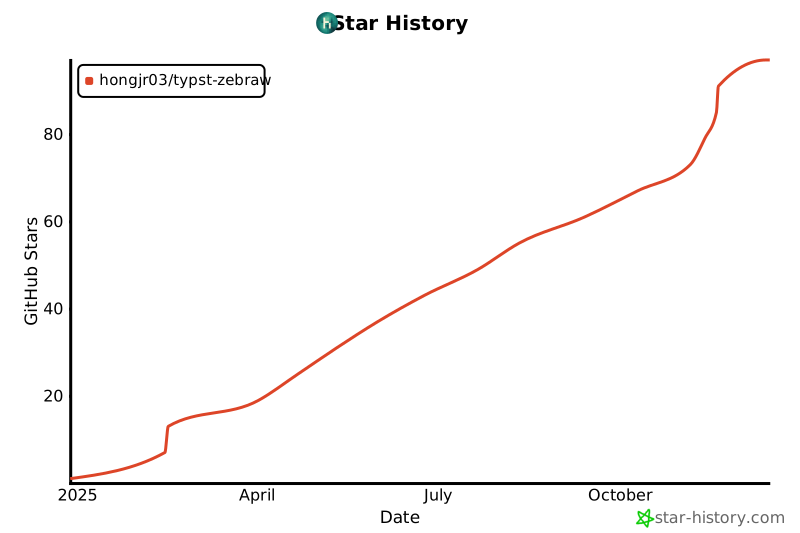
### Star History