https://github.com/hrussellzfac023/yomu-reader
JPDB/Yomitan popup reader with audio, OCR, and subtitle mining
https://github.com/hrussellzfac023/yomu-reader
japanese jpdb ocr subtitles tampermonkey userscript yomitan
Last synced: 8 days ago
JSON representation
JPDB/Yomitan popup reader with audio, OCR, and subtitle mining
- Host: GitHub
- URL: https://github.com/hrussellzfac023/yomu-reader
- Owner: HRussellZFAC023
- License: gpl-3.0
- Created: 2026-05-06T21:22:06.000Z (about 1 month ago)
- Default Branch: main
- Last Pushed: 2026-05-31T00:57:16.000Z (8 days ago)
- Last Synced: 2026-05-31T01:11:25.231Z (8 days ago)
- Topics: japanese, jpdb, ocr, subtitles, tampermonkey, userscript, yomitan
- Language: TypeScript
- Homepage: https://hrussellzfac023.github.io/yomu-reader/
- Size: 36.8 MB
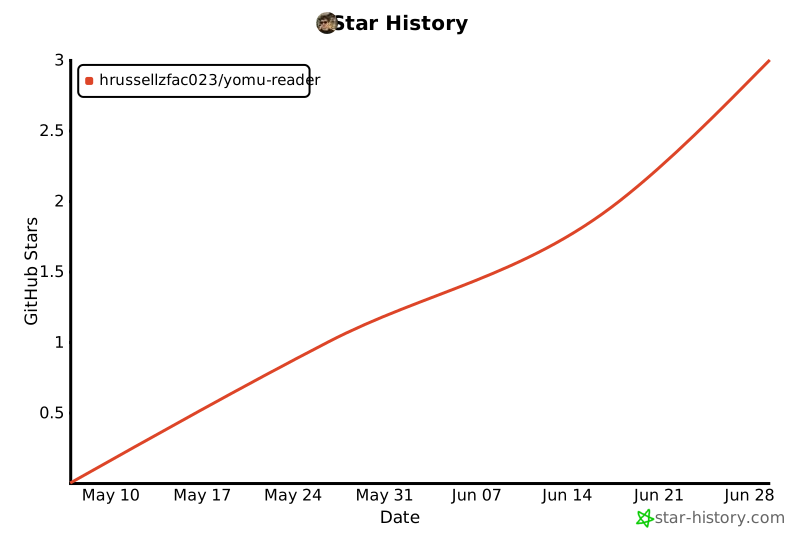
- Stars: 1
- Watchers: 0
- Forks: 0
- Open Issues: 0
-
Metadata Files:
- Readme: README.md
- Changelog: CHANGELOG.md
- License: LICENSE
- Support: docs/support.md
- Agents: AGENTS.md
Awesome Lists containing this project
README
# よむ
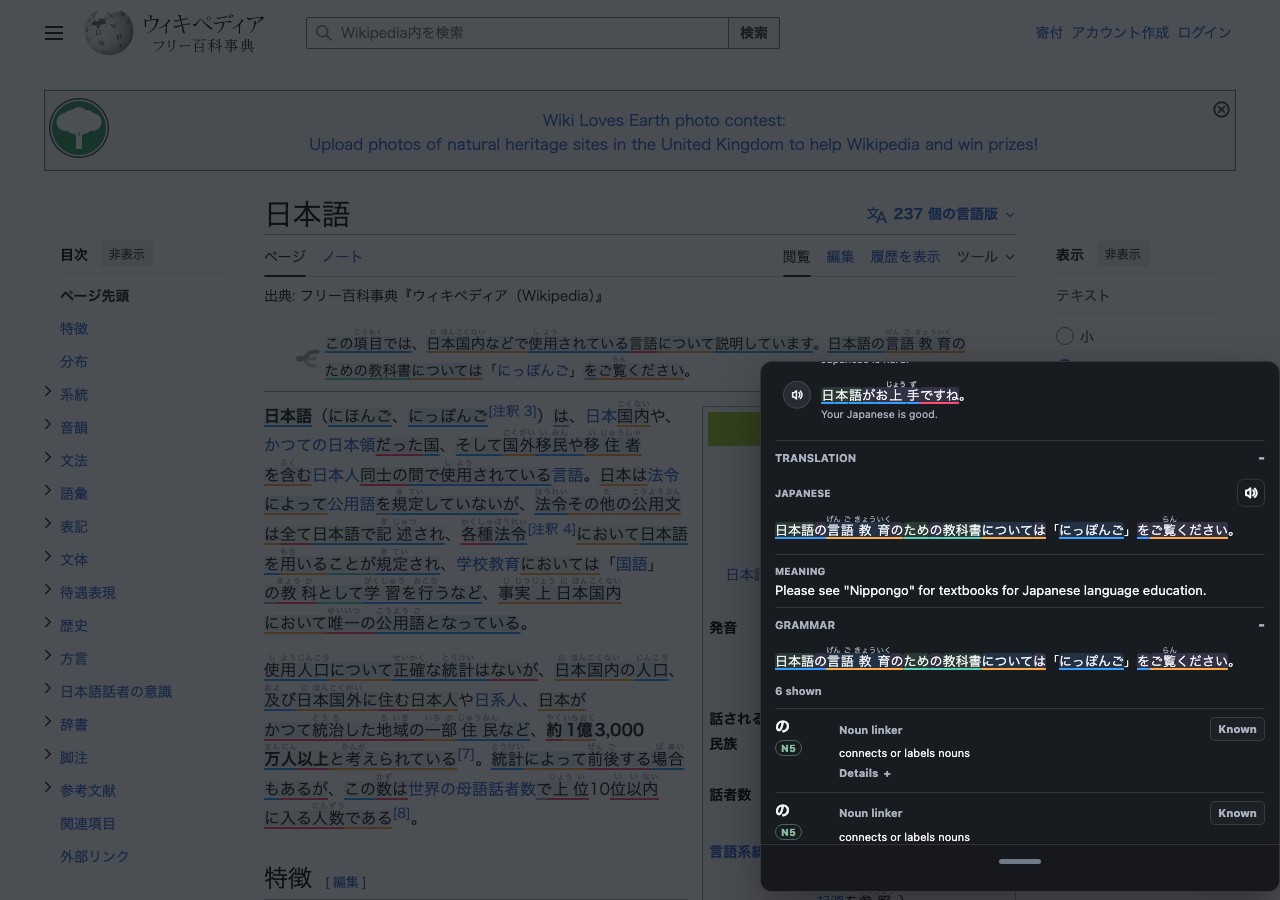
JPDB/Yomitan popup reader for Japanese text, audio, manga OCR, and video subtitles on any website.
[](https://github.com/HRussellZFAC023/yomu-reader/actions/workflows/ci.yml)
## Install
Friendly guide: https://hrussellzfac023.github.io/yomu-reader/getting-started
The built userscript is:
```text
https://raw.githubusercontent.com/HRussellZFAC023/yomu-reader/main/dist/yomu.user.js
```
After the GreasyFork page is live, install from GreasyFork so normal users get the friendlier install/update path.
## Features
- JPDB popup dictionary on selected text, scanned page text, OCR text, and subtitles.
- JPDB popup lookup can be used with or without JPDB mining actions; add, Never Forget, blacklist, and review grades are configurable.
- JPDB kanji drilldown from popup headwords, with study facts, a compact 2D origin/component map, radical images, stroke-order tracing, a drawing pad, Uchisen mnemonic images, RTK keywords, stories, components, local kanji dictionaries, and related words.
- Optional Anki mining through AnkiConnect on desktop and mobile Anki handoff on iPhone, iPad, and Android, with a customizable よむ note type created automatically where the bridge supports it.
- Yomitan dictionary imports: JMdict download from Settings, settings JSON, dictionary ZIPs, and Dexie exports.
- Local dictionary cards for terms, kanji, frequency, pitch, and structured glossary content.
- Drag/drop dictionary source order, so JPDB definitions can be first, lower priority, or disabled while imported native-language dictionaries stay visible.
- Furigana and word-color modes for all parsed text: difficult-kanji furigana, all parsed words, hide known-word furigana, status colors, pitch colors, or no highlight colors.
- Bounded JPDB public-page extras in the JPDB source, including related "used in vocabulary" rows and example sentences with JPDB-provided audio buttons when available.
- Immersion Kit or Nadeshiko example sentences inside word popups, with optional thumbnails, translations, length filters, source filters, one-time hover audio on desktop, manual replay, and tappable Japanese inside each example. Immersion Kit works without a key; Nadeshiko and combined mode use your Nadeshiko API key, and combined mode blends both sources with a deterministic shuffle.
- Yomitan-compatible audio sources, including JapanesePod101, LanguagePod101, Jisho.org, JPDB word audio, browser text-to-speech, and custom URLs.
- iOS-friendly Blob audio playback and optional audio autoplay.
- Manga/image OCR from embedded page metadata or a local OCR app/server for MangaOCR, PaddleOCR, Apple Vision, and YomiNinja-style results.
- ASB-style video subtitle overlay with Japanese and native subtitle tracks, plus a transcript panel that can sit left, right, or below the video and keeps visible lines lookup-ready.
- Hosted local video player at `https://hrussellzfac023.github.io/yomu-reader/video-player/index.html` for opening browser-supported local video and subtitle files without a desktop bridge.
- Tap subtitle words or OCR text directly to mine; no keyboard required.
- Optional new-tab study page at `https://hrussellzfac023.github.io/yomu-reader/newtab/`, with accessible accent-color theming and Anki, JPDB, or local dictionary words.
- YouTube immersion mode hides non-Japanese-looking video cards on YouTube by default. It checks original YouTube titles when available, has an `Alt+Y` toggle shortcut, and includes temporary reveal and notice-hiding controls.
- First-run welcome screen explains the core workflow once, then stays out of the way.
- Configurable accent color and word highlight mode, including pitch-accent colors when JPDB/Anki mining status is not being used.
## GreasyFork Summary
**Name:** よむ
**Description:** JPDB and Yomitan popup reader for Japanese text, with iOS-friendly audio playback, local dictionary import, manga/image OCR, and subtitle mining on videos.
**Short pitch:** A small Japanese reader for the whole web: tap words, mine to JPDB, import Yomitan dictionaries, read manga OCR text, and mine video subtitles.
## Privacy
Selected Japanese text is sent to JPDB only when parsing, showing JPDB results, mining, or opening kanji details. Example searches send the looked-up term to the enabled example provider: Immersion Kit needs no key, while Nadeshiko requests include your saved Nadeshiko API key and do not use public proxy fallbacks. Example media is fetched only when examples are enabled. RTK details are fetched from the configured static RTK data source when enabled. Kanji origin details can fetch public per-kanji data from The Kanji Map on GitHub when enabled. Custom audio sources receive the term, reading, and language placeholders you configure. Image text uses embedded OCR metadata first when a page provides it; local OCR app mode sends image pixels only to the endpoint you configure. Imported Yomitan dictionaries stay local in IndexedDB; settings live in userscript storage. Anki mining talks only to your local AnkiConnect endpoint.
## Audio
Audio sources follow Yomitan’s source model and fallback order. Custom JSON sources should return an `audioSourceList` with `audioSources`, matching Yomitan’s format. The Audio settings include the shared cross-origin proxy URL used by hosted-page audio and public lookup requests. **Shuffle audio** behaves like a shuffled deck: よむ tries every available candidate for a word before reshuffling, instead of independently picking a random clip each time. By default, JPDB and browser text-to-speech stay as fallbacks after recorded sources miss; switch **Text-to-speech handling** to **Follow source order / shuffle** if you want those rows to participate in your configured order or shuffled audio pool.
Local setup guide: https://hrussellzfac023.github.io/yomu-reader/local-audio
Hosted Ultimate Yomitan Audio guide: https://animecards.site/yomitan_audio/
Self-hosted audio files: https://nyaa.si/view/1957972
Guide: https://yomitan.wiki/advanced/#audio
The default sources are JapanesePod101, LanguagePod101, Jisho.org, JPDB word audio, and browser text-to-speech. Add a custom URL only if you already use a local audio server.
## Mining
JPDB mining is the default path. The JPDB pill in a popup opens the matching JPDB page; clicking kanji inside the headword opens kanji details with JPDB data, RTK information, local kanji dictionaries, components, and words that use the same kanji.
Kanji details are modular. The **Kanji facts and origins map** setting adds compact facts such as type, JLPT, school grade, stroke count, frequency, Kanken, RTK frame, old forms, and radical data when those values are available from JPDB, KanjiVG, RTK, imported local dictionaries, or optional public kanji sources. The 2D map stays lightweight and uses per-kanji components instead of bundling a large etymology dataset. The Kanji Alive / Kanji Map, component graph, and radical-image sections can each be turned off. Source research and follow-up decisions live in [`docs/kanji-source-research.md`](docs/kanji-source-research.md).
Anki mining is optional. Enable it in settings, open Anki with the AnkiConnect add-on installed, then use **Add to Anki** from a popup. The default よむ note type includes the word, reading, meaning, imported dictionary definitions, local kanji dictionary cards, pitch and frequency metadata, the source sentence, page link, JPDB link, optional context images, and Immersion Kit audio when that example is used as context. Settings can hide the reading, sentence, or image from the word-first card front. If a term already exists anywhere in your Anki collection, よむ hides **Add to Anki**, shows **Edit in Anki** inside the Anki preview, colors matching words with the Anki state, and sends popup review grades to Anki when a matching card is available. If both JPDB and Anki are enabled, JPDB actions keep mining to JPDB; the setting **Also add to Anki when adding to JPDB** mirrors those cards into Anki.
Context selection is metadata-first: よむ remembers the last useful sentence/source for a term without storing media blobs in localStorage. Immersion Kit mining uses the exact example currently selected in the popup, including its sentence, thumbnail, and audio clip when available. Subtitle and video cards can include a best-effort still image from the active video, and OCR/image cards can include the source image when browser security allows it. This is intentionally modest because a userscript cannot reliably capture every protected or cross-origin media source the way a full browser extension can.
Anki mobile note: AnkiConnect is an Anki desktop add-on, so desktop mining still works best with Anki reachable at a local or LAN/Tailscale URL. On iPad, よむ can hand a note to AnkiMobile through the `anki://x-callback-url/addnote` flow. On Android, よむ uses the browser intent path for AnkiDroid where the browser permits it.
## Video Player
Open the hosted video player from the userscript menu or this URL:
```text
https://hrussellzfac023.github.io/yomu-reader/video-player/index.html
```
Drop a local video file into the page, add Japanese or native subtitle files, and よむ can read the resulting browser video/text tracks with the same overlay and transcript workflow used on streaming pages. The files stay local to the browser tab.
## New Tab
Use this address as a browser new-tab/home-page URL or add it to the iPad Home Screen:
```text
https://hrussellzfac023.github.io/yomu-reader/newtab/
```
The page uses your accent color as the background, adjusts foreground colors for contrast, and shows words from Anki when AnkiConnect or mobile handoff is enabled, otherwise from the configured JPDB deck, otherwise from imported dictionary words. If no local dictionary exists yet, よむ sends you to Settings > Dictionaries to download JMdict or import a Yomitan ZIP into local browser storage. Tapping a word opens the same popup dictionary used on normal pages. On the hosted page, the installed よむ userscript can bridge local AnkiConnect requests. Browsers that allow direct local requests without the bridge also need `https://hrussellzfac023.github.io` in AnkiConnect's `webCorsOriginList`.
## OCR
OCR is designed for manga and image-heavy pages on iPhone/iPad:
- Images near the viewport are detected and queued quietly when auto-scan is enabled.
- Embedded image OCR metadata is available instantly when a site provides it.
- Local OCR app/server mode supports simple line output plus MangaOCR, PaddleOCR, Apple Vision, and YomiNinja-style structured outputs.
- OCR results are cached per image for the current page.
- Recognized Japanese lines become transparent touch targets, so the image is not covered.
- Tapping or hovering recognized text opens the normal JPDB/Yomitan popup and mining flow.
A local OCR app can be selected in settings for users who want server-side or native OCR. It receives JSON like:
```json
{
"id": "image-url-and-size",
"language_code": "ja-JP",
"base64_image": "...",
"image": "...",
"image_bytes": "...",
"ocr_engine": "MangaOCR",
"ocr_adapter_name": "MangaOCR",
"detection_only": false
}
```
The response can use either a simple line format:
```json
{
"width": 900,
"height": 1240,
"lines": [
{ "text": "今日は学校へ行きます。", "box": { "left": 630, "top": 160, "width": 120, "height": 760 }, "vertical": true }
]
}
```
or YomiNinja-style structured result shapes with `context_resolution`, `results`, `ocr_regions`, `text`, `text_lines`, and percentage boxes.
## Development
```bash
npm install
npm run check
```
Run the reproducible browser QA audit:
```bash
npm run qa
```
This builds the userscript, runs deterministic Playwright regression checks for settings, new tab, JPDB pages, recursive Immersion Kit examples, OCR touch targets, YouTube filtering, and subtitle mining, then runs axe/WCAG-style checks and the complexity audit. Evidence is written to `qa-artifacts/`.
Check current bundle size evidence:
```bash
npm run size:bundle
```
The release budget is 2,000,000 raw bytes for `dist/yomu.user.js`. The current built userscript is below that limit at 1905.2 KiB raw, with JavaScript and CSS minification disabled.
Copy `.env.example` to `.env` for local secrets. `.env` is ignored by Git. Set `YOMU_TEST_API_KEY=YOUR_JPDB_API_KEY` when you want the secret-leak guard and live JPDB smoke path. Real screenshot capture also reads `.env`; set `YOMU_CAPTURE_API_KEY` when subtitle/store screenshots need JPDB mining status colors:
```bash
npm run qa:live
```
Store and documentation screenshots must be captured from the real running product with Playwright before refreshing anything under `docs/public/screenshots/`.
List the maintained real-screenshot scenarios:
```bash
node scripts/capture-real-screenshots.mjs --list
```
Run the local development server:
```bash
npm run dev
```
Then install the local userscript or open the local app. If 5174 is busy, use the port printed by Vite:
```text
http://127.0.0.1:5174/
http://127.0.0.1:5174/newtab/
```
For iPad testing over Tailscale, run:
```bash
npm run dev:ipad
```
That command lets Vite choose a free port when `5174` is already busy, publishes the chosen localhost port with Tailscale Serve, and prints the exact iPad links to open. Use the root URL it prints, not `/yomu-reader/`; that path is for the production GitHub Pages site.
`npm run dev` is the normal Vite dev server, like the ASMR.one harness. Vite handles reloads, the root page gives the vite-plugin-monkey install link, and `/newtab/` is served from the TypeScript entry. Dev builds enable console logging automatically; production builds still follow the Settings toggle. Chrome may require Tampermonkey's user scripts permission to be enabled before local dev installs can run.
The production userscript is written to:
```text
dist/yomu.user.js
```
Build browser extension packages from the same userscript and the real `/newtab` bundle:
```bash
npm run build:extension
```
The output goes to `dist/extension/` with Chrome, Firefox, Safari, standalone, audit, review, and release folders. In this workspace, `UserScript-Compiler` lives at `../../tools/UserScript-Compiler`; set `USERSCRIPT_COMPILER_CLI` when using a different checkout path.
Compiler-generated review drafts live in `dist/extension/review/`; machine-readable audit evidence lives in `dist/extension/audit/`.
## Deployment
GitHub Actions cover CI, userscript bundling, docs deployment, and release publishing:
- `CI` runs typecheck, tests, build, and userscript metadata verification.
- `Build Userscript` builds `dist/yomu.user.js` and commits it back to `main` when the bundle changes.
- `Build Browser Extensions` builds Chrome, Firefox, and Safari extension artifacts and uploads them as a workflow artifact.
- `Deploy Docs` builds the VitePress docs and publishes GitHub Pages when docs-related files change.
- `Release` publishes the compiled userscript, Chrome ZIP, Firefox XPI, Safari Web Extension ZIP, compiler project ZIP, and consolidated submission guide when a `v*` tag is pushed or the workflow is run manually.
GreasyFork does not provide a general write API for unattended publishing. Its supported update paths are the logged-in prefill form and GitHub/GitLab/Bitbucket webhook/update checks. For the initial GreasyFork publish, use the built code from `dist/yomu.user.js`, then configure GreasyFork to sync from:
```text
https://raw.githubusercontent.com/HRussellZFAC023/yomu-reader/main/dist/yomu.user.js
```
After that, pushes to `main` rebuild the userscript and GreasyFork can pick up the new raw file through its sync/webhook flow.
GreasyFork requires posted code to stay readable and non-minified. The release build disables JavaScript and CSS minification, formats the embedded CSS literal back into readable lines, and keeps the verifier checking for one-line/minified-looking output. Do not re-enable minifiers to fit the 2 MB limit; remove duplication or move non-code data out of the userscript instead. Official rule: https://greasyfork.org/en/help/code-rules
For the first manual publish, this helper opens a local page that posts the current built script to GreasyFork's official prefill form:
```bash
npm run publish:greasyfork
```
## Notes
- Yomitan dictionary ZIPs and Dexie exports are supported for term, kanji, frequency, pitch, and dictionary-priority lookup. Once imported, they remain in IndexedDB and do not need to be imported again.
- JMdict is available as a recommended dictionary download in settings for dictionary-backed new-tab cards. If a browser blocks the remote release ZIP, enable the userscript on the hosted page or import any Yomitan ZIP, Dexie export, or settings export manually.
- Definition sources can be reordered in settings. When a JPDB API key is missing or parsing fails, imported Yomitan dictionaries are used for local parsing with common deinflection rules; JPDB-only mining and kanji pages still require JPDB access.
- RTK information is enabled by default and can be turned off in settings.
- Stroke-order tracing and the drawing pad are enabled by default and can be turned off in settings.
- Kanji origin sources are modular: The Kanji Map / Kanji Alive facts, component graph, and radical images can be toggled separately.
- The userscript runs on `jpdb.io` too. よむ UI is scoped to its own root so popup controls do not stretch or inherit JPDB's page styles, and the JPDB review bridge feeds live review cards to the new-tab study page.
- OCR reads likely images near the viewport in the background, caches results, and makes recognized text tappable without covering the image.
- OCR engine coverage mirrors YomiNinja response shapes where it can in a userscript: native engines such as MangaOCR, PaddleOCR, and Apple Vision are supported through local OCR app/server responses.
- YouTube subtitle detection uses page caption metadata when available and falls back to visible DOM captions when needed. Local `.srt`, `.vtt`, `.ass`, and `.ssa` subtitle files can also be loaded manually.
- iPhone/iPad limits: Safari userscript apps can run the reader, local dictionaries, JPDB lookup, OCR, subtitle taps, the hosted video player, and the new-tab study page. Desktop helpers such as AnkiConnect, self-hosted audio, and local OCR servers must be reachable over the network. Hover does not exist on touch screens, and autoplay plus protected/cross-origin media capture are browser-limited on iOS, so よむ keeps manual speaker buttons, copy, JPDB, and dictionary fallbacks visible.
- Support links live in settings: open GitHub issues for bugs/feature requests, join the Discord server for chat, donate via PayPal, or use Factory Reset to clear よむ settings, API keys, cached data, and imported dictionaries back to defaults. よむ aims to offer the same broad reading/mining workflow as paid study suites for free; donations are optional and help keep it sustainable. Realistically, I have already spent far more on AI/API tokens building よむ than donations are ever likely to make back, but support still helps soften that cost and keep the project moving. If you donate and leave a よむ feature request in the PayPal message, I will personally read it and implement it when it is feasible, legal, and within project scope.
## Support
- Documentation: https://hrussellzfac023.github.io/yomu-reader/
- Issues and source: https://github.com/HRussellZFAC023/yomu-reader/issues
- Discord: https://discord.gg/WvDt57uk5
- Donate: https://paypal.me/HenryRussell163
Donation note: よむ has already cost more in AI/API tokens than donations are likely to repay, so every bit of support helps. Feature requests left in the PayPal message get personal attention and will be implemented when they are feasible for よむ.
## Credits and References
よむ is its own userscript, but several open projects shaped the design and edge-case coverage:
- [anki-jpdb.reader](https://github.com/Kagu-chan/anki-jpdb.reader) for the main JPDB reader inspiration, parser edge cases, mining flow, and ASB-style integration ideas.
- [Yomitan](https://github.com/yomidevs/yomitan) for dictionary import formats, structured glossary handling, audio-source conventions, and scanning UX references.
- [JPDB Custom Dictionary Mod](https://gitlab.com/nakura/jpdb_cdm) for the JPDB-side idea of importing and displaying Yomitan-style dictionary entries on JPDB pages; used as product inspiration only, with no code copied.
- [JMdict for Yomitan](https://github.com/yomidevs/jmdict-yomitan) and EDRDG/JMdict for the recommended dictionary package that users can download into local browser storage.
- [asbplayer](https://github.com/asbplayer/asbplayer) for subtitle mining concepts and video-reader interaction patterns.
- [YomiNinja](https://github.com/matt-m-o/YomiNinja) for OCR response shapes and image text interaction references.
- [KanjiVG](https://github.com/KanjiVG/kanjivg) for kanji stroke-order SVG data.
- [Kanji Canvas](https://github.com/asdfjkl/kanjicanvas) for the client-side stroke normalization and sampled-distance matching approach adapted for kanji drawing autograde.
- [Kanji Alive data/media](https://github.com/kanjialive/kanji-data-media) for radical images and structured kanji facts, used through runtime lookups and credited under CC BY 4.0.
- [The Kanji Map](https://thekanjimap.com/) ([source](https://github.com/gabor-kovacs/the-kanji-map)) for the per-kanji JSON bridge and graph/presentation reference; its docs credit KanjiVG, Kanji Alive, Jisho-derived data, animCJK, and other upstreams.
- [Uchisen](https://uchisen.com/) for optional runtime kanji mnemonic images, component cues, and user-published mnemonic generation.
- [NihongoTube](https://www.nihongotube.app/) for the Japanese-only YouTube immersion idea as a reference only; no NihongoTube code or data is copied.
- [JPDB RTK Information Inserter](https://greasyfork.org/en/scripts/546314-jpdb-rtk-information-inserter) and the original [hanhpp/rtk search engine](https://github.com/hanhpp/rtk) for the RTK data source and presentation cues.
- [JPDB Immersion Kit Examples](https://github.com/AwooDesu/JPDB-Immersion-Kit-Examples) for copied/adapted JPDB-side Immersion Kit userscript behavior.
- [JPDB Nadeshiko Examples](https://greasyfork.org/en/scripts/529745-jpdb-nadeshiko-examples) for the Nadeshiko API request shape and JPDB-side examples behavior reference.
- [Yomikiri](https://github.com/BlueGreenMagick/yomikiri) for mobile Anki handoff, card template, translation, and grammar workflow ideas.
- [Tofugu grammar guides](https://www.tofugu.com/japanese-grammar/) for the grammar-hint reference links shown in study tools.
- [Ultimate Yomitan Audio](https://animecards.site/yomitan_audio/) and [aramrw/yomichan_audio_server](https://github.com/aramrw/yomichan_audio_server) for local/hosted audio setup patterns.
- [Immersion Kit](https://www.immersionkit.com/) for searchable example sentences, audio, and stills used at runtime in the examples section.
- [Nadeshiko](https://nadeshiko.co/) for optional searchable Japanese sentence examples, audio, and stills used at runtime when enabled with a user API key.
- [AnkiConnect](https://foosoft.net/projects/anki-connect/) for local Anki card creation.
- [JPDB](https://jpdb.io), Immersion Kit, Nadeshiko, RTK, and user-configured local OCR/audio services for the external services users can connect to or use through the reader.
## Source Licenses
| Source | License / terms used by よむ |
| --- | --- |
| [よむ source code](https://github.com/HRussellZFAC023/yomu-reader) | GPL-3.0-or-later |
| [KanjiVG](https://github.com/KanjiVG/kanjivg) | Creative Commons Attribution-ShareAlike 3.0 |
| [Kanji Canvas](https://github.com/asdfjkl/kanjicanvas) | MIT; stroke normalization and distance matching approach adapted with attribution |
| [JMdict / JMdict for Yomitan](https://github.com/yomidevs/jmdict-yomitan) | JMdict data is EDRDG CC BY-SA 4.0; yomidevs packaging code is MIT; よむ downloads the ZIP into user browser storage rather than bundling it |
| [Kanji Alive data/media](https://github.com/kanjialive/kanji-data-media) | Creative Commons Attribution 4.0, with project-documented exceptions; よむ avoids mnemonic-hint text and does not bundle media |
| [The Kanji Map](https://thekanjimap.com/) / [source](https://github.com/gabor-kovacs/the-kanji-map) | MIT for the app; underlying data/media keep their upstream terms. よむ uses it as inspiration and fetches compact public per-kanji data at runtime when enabled. |
| [Uchisen](https://uchisen.com/) | Optional external runtime service for kanji mnemonic images, component cues, and user-published mnemonic generation; よむ does not bundle its image/story content |
| [Yomitan](https://github.com/yomidevs/yomitan) | GPL-3.0-or-later; used for interoperable dictionary formats, structured glossary behavior, audio-source conventions, and UX reference |
| [fflate](https://github.com/101arrowz/fflate) | MIT; bundled for compressed ZIP dictionary import fallback when browser-native decompression is unavailable |
| [JPDB Custom Dictionary Mod](https://gitlab.com/nakura/jpdb_cdm) | MIT license file; JPDB/Yomitan dictionary-on-JPDB UX reference only, with no code copied |
| [asbplayer](https://github.com/asbplayer/asbplayer) | MIT; used as a subtitle-mining and video-reader UX reference |
| [anki-jpdb.reader](https://github.com/Kagu-chan/anki-jpdb.reader) | MIT; used as a JPDB reader behavior and parser-edge-case reference |
| [JPDB Immersion Kit Examples](https://github.com/AwooDesu/JPDB-Immersion-Kit-Examples) | MIT; copied/adapted JPDB-side Immersion Kit userscript behavior |
| [JPDB Nadeshiko Examples](https://greasyfork.org/en/scripts/529745-jpdb-nadeshiko-examples) | MIT; used as the Nadeshiko API and JPDB-side examples behavior reference |
| [AnkiConnect](https://foosoft.net/projects/anki-connect/) / [source](https://github.com/FooSoft/anki-connect) | GPL-3.0-or-later; よむ talks to the local HTTP API and does not bundle AnkiConnect |
| [YomiNinja](https://github.com/matt-m-o/YomiNinja) | GPL-3.0; used for OCR response-shape compatibility and UX reference only |
| [NihongoTube](https://www.nihongotube.app/) | Reference only for Japanese-only YouTube filtering; no public project license found, and the website footer says all rights reserved |
| [Immersion Kit](https://www.immersionkit.com/) | External runtime service for examples and media; よむ does not bundle its corpus |
| [Nadeshiko](https://nadeshiko.co/) | Optional external runtime service for examples and media; よむ does not bundle its corpus |
| [JPDB RTK Information Inserter](https://greasyfork.org/en/scripts/546314-jpdb-rtk-information-inserter) / [hanhpp/rtk](https://github.com/hanhpp/rtk) | RTK presentation/data-source references; the original search repo does not provide a clean redistributable data license, so よむ treats RTK data as an optional attributed runtime source |
| [Yomikiri](https://github.com/BlueGreenMagick/yomikiri), [Tofugu grammar guides](https://www.tofugu.com/japanese-grammar/), Ultimate Yomitan Audio, and local audio server references | Reference/inspiration or user-configured external services only; よむ does not bundle their content |