https://github.com/htanh2003/ai-agent
This repository implements a simple Python-based ReAct (Reason + Act) model for Large Language Models (LLMs).
https://github.com/htanh2003/ai-agent
agent aiagent llms
Last synced: about 1 month ago
JSON representation
This repository implements a simple Python-based ReAct (Reason + Act) model for Large Language Models (LLMs).
- Host: GitHub
- URL: https://github.com/htanh2003/ai-agent
- Owner: HTAnh2003
- Created: 2025-03-23T14:27:03.000Z (over 1 year ago)
- Default Branch: main
- Last Pushed: 2025-04-18T10:07:32.000Z (over 1 year ago)
- Last Synced: 2025-04-23T23:56:33.830Z (over 1 year ago)
- Topics: agent, aiagent, llms
- Language: Jupyter Notebook
- Homepage:
- Size: 3.51 MB
- Stars: 1
- Watchers: 1
- Forks: 0
- Open Issues: 0
-
Metadata Files:
- Readme: Readme.md
Awesome Lists containing this project
README
## Overview
This repository implements a simple Python-based **ReAct (Reason + Act)** model for Large Language Models (LLMs). The goal is to extend the capabilities of LLMs by allowing them to access external tools, perform API calls, and execute code. This setup breaks free from the initial environment constraints and enables LLMs to interact with the world outside the original prompt.
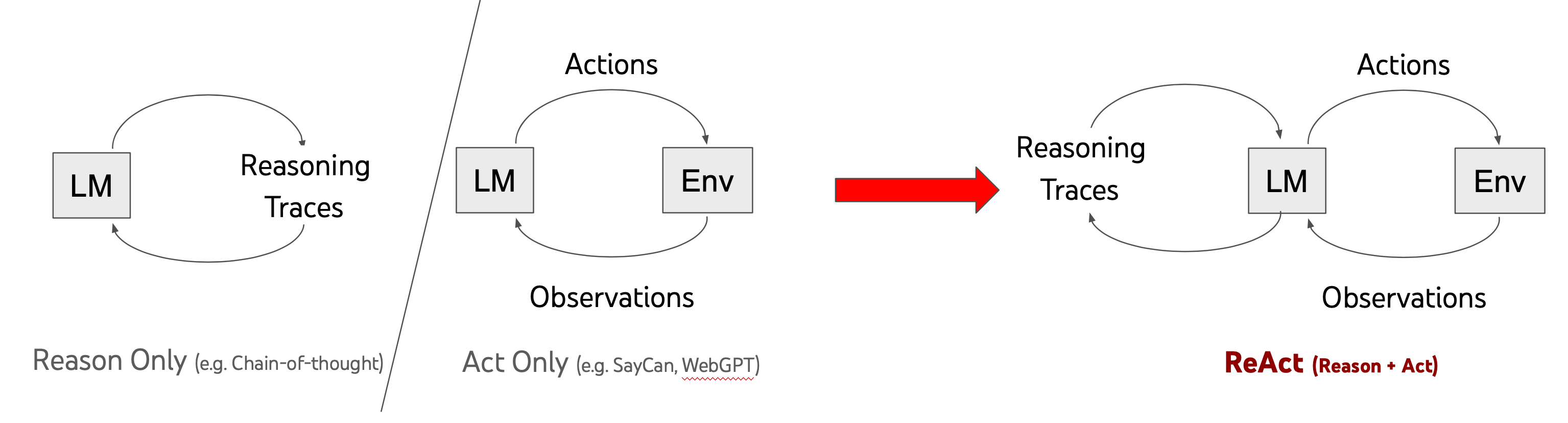
The ReAct model is described in the [ReAct Paper](https://react-lm.github.io/), which outlines how a language model can be enhanced by enabling it to reason and perform actions. Actions such as web searching, calculations, and more are integrated into the LLM's reasoning cycle.
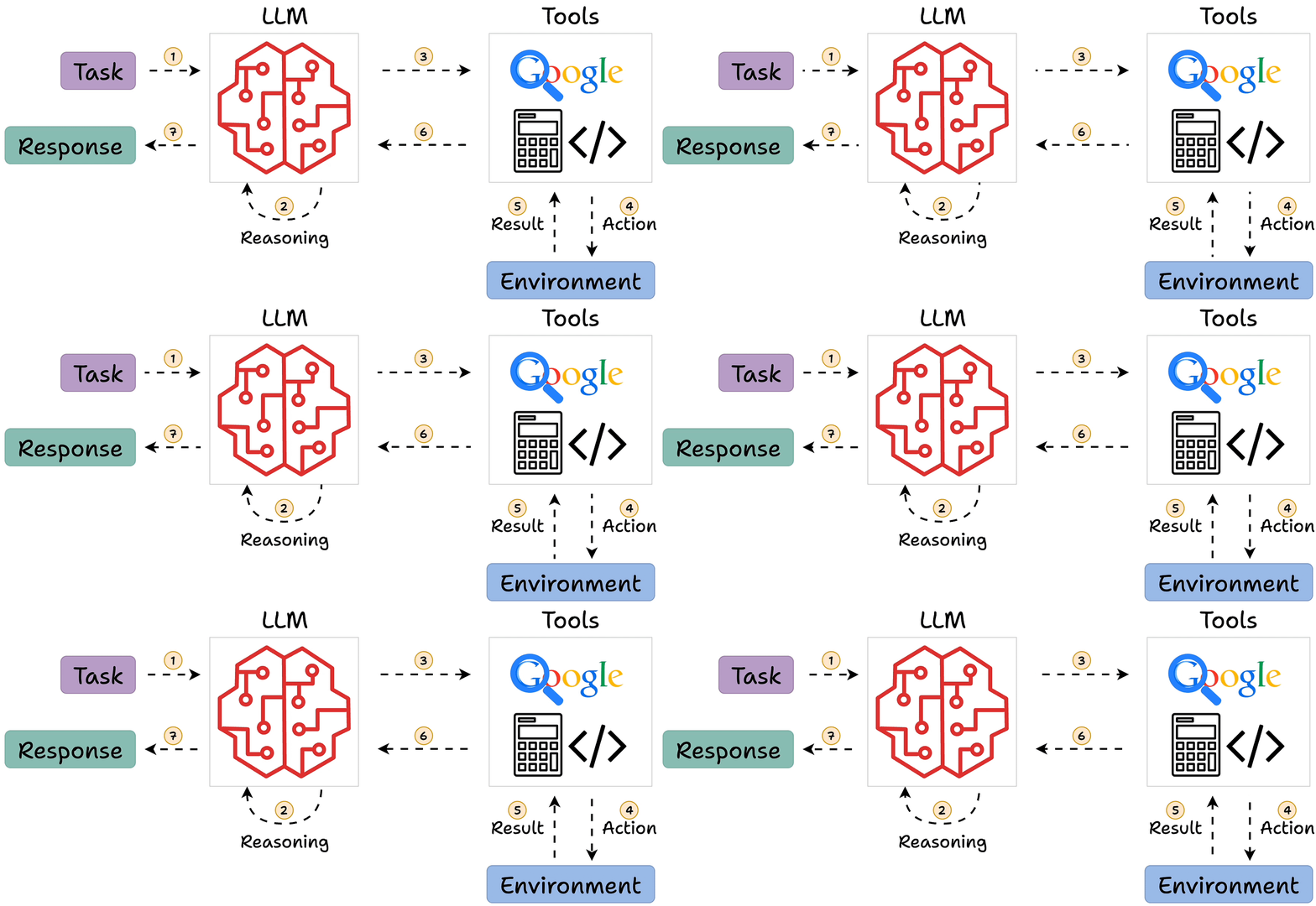
This notebook leverages the **Gemini chat completion API** to implement the ReAct framework, enabling advanced reasoning and interaction with external tools.
## Features
The notebook provides a set of **simple actions** that the model can perform, including:
- **Wikipedia Search (`wikipedia: `)**: Searches Wikipedia and returns the summary of the first result.
- **Calculate (`calculate: `)**: Evaluates a mathematical expression using Python's `eval()` function (note: be cautious when using `eval()` with untrusted input).
- **Advanced Search (`search_advanced: `)**: Performs a Google search using the Tavily API.
These actions are designed to help the model access external data sources, perform calculations, and interact with the environment, making it more dynamic and capable of handling diverse queries.
### Example Actions:
- **wikipedia:** `wikipedia: Django`
Retrieves a summary of the Wikipedia page for "Django."
- **calculate:** `calculate: 4 * 7 / 3`
Performs the calculation and returns the result.
- **search_advanced:** `search_advanced: New news update about Messi`
Searches the web for news about Lionel Messi and returns a summary.
## Setup
### Prerequisites
- Python 3.8+
- Install the necessary Python packages:
```bash
pip install openai httpx tavily
```
### API Configuration
1. **Google API Key**: If using the Gemini model, set the environment variable `GOOGLE_API_KEY` to your API key.
2. **Model Configuration**: By default, the code uses the Gemini API for the model (`gemini-2.0-flash`). If you'd prefer to use OpenAI, modify the `BASE_URL` and `MODEL` values accordingly.
```python
API_KEY = os.getenv("GOOGLE_API_KEY") # Replace with OpenAI_API_KEY if using OpenAI
BASE_URL = "https://generativelanguage.googleapis.com/v1beta/openai/" # Set to None if using OpenAI
MODEL = "gemini-2.0-flash" # Replace with your OpenAI model name
```
### Running the Code
To start querying the model, use the `query()` function:
```python
question = "What is the capital of France?"
query(question)
```
The model will reason about the question, select the appropriate action, perform it, and output the results.
### Actions Implementation
The available actions are implemented as functions that the model can invoke:
- **wikipedia(q)**: Retrieves a summary from Wikipedia in both English and Vietnamese.
- **calculate(what)**: Evaluates a Python expression.
- **search_advanced(query)**: Performs a web search using the Tavily API and returns the top result.
These actions are executed by the `ChatBot_ReAct` class, which maintains the conversation context and orchestrates the reasoning process.
## Example Interaction
1. **User Input**: "What is the capital of France?"
2. **Thought**: "I should look up France on Wikipedia."
3. **Action**: `wikipedia: France`
4. **Observation**: "France is a country. The capital is Paris."
5. **Final Answer**: "The capital of France is Paris."
## Notes
- The `eval()` function used in the `calculate` action can be dangerous if used with untrusted input, so be cautious when handling input from users.
- The `search_advanced` function uses the Tavily API to perform web searches. You may want to adjust the search query or results handling as needed.
- The `base_url` parameter can be modified to use OpenAI's models instead of the Gemini API. Check the comments in the code for how to make this switch.
_______________________________
# Tiếng Việt
## Tổng quan
Kho lưu trữ này triển khai một mô hình **ReAct (Reason + Act)** dựa trên Python cho **Mô hình Ngôn ngữ Lớn (LLMs)**. Mục tiêu là mở rộng khả năng của LLMs bằng cách cho phép chúng truy cập các công cụ bên ngoài, thực hiện các cuộc gọi API và chạy mã. Cấu hình này giúp phá vỡ các ràng buộc của môi trường ban đầu và cho phép LLM tương tác với thế giới bên ngoài.

Mô hình ReAct được mô tả trong [ReAct Paper](https://react-lm.github.io/), trong đó giải thích cách mà một mô hình ngôn ngữ có thể được nâng cao bằng cách cho phép nó lý luận và thực hiện các hành động. Các hành động như tìm kiếm web, tính toán và nhiều hơn nữa đã được tích hợp vào chu trình lý luận của LLM.

Notebook này sử dụng **Gemini chat completion API** để triển khai mô hình ReAct, giúp lý luận và tương tác với các công cụ bên ngoài một cách mạnh mẽ.
## Các tính năng
Notebook cung cấp một bộ **hành động đơn giản** mà mô hình có thể thực hiện, bao gồm:
- **Tìm kiếm Wikipedia (`wikipedia: `)**: Tìm kiếm trên Wikipedia và trả về đoạn trích từ kết quả đầu tiên.
- **Tính toán (`calculate: `)**: Đánh giá biểu thức toán học sử dụng hàm `eval()` của Python (lưu ý: hãy cẩn thận khi sử dụng `eval()` với đầu vào không đáng tin cậy).
- **Tìm kiếm nâng cao (`search_advanced: `)**: Thực hiện tìm kiếm trên Google sử dụng API Tavily.
Các hành động này giúp mô hình truy cập nguồn dữ liệu bên ngoài, thực hiện tính toán và tương tác với môi trường, làm cho mô hình trở nên năng động và có khả năng xử lý các câu hỏi đa dạng.
### Các ví dụ về hành động:
- **wikipedia:** `wikipedia: Django`
Tìm kiếm và lấy đoạn trích của trang Wikipedia "Django."
- **calculate:** `calculate: 4 * 7 / 3`
Thực hiện phép tính và trả về kết quả.
- **search_advanced:** `search_advanced: New news update about Messi`
Tìm kiếm trên web về tin tức liên quan đến Lionel Messi và trả về kết quả tóm tắt.
## Cài đặt
### Yêu cầu
- Python 3.8+
- Cài đặt các gói Python cần thiết:
```bash
pip install openai httpx tavily
```
### Cấu hình API
1. **Khóa API Google**: Nếu sử dụng mô hình Gemini, thiết lập biến môi trường `GOOGLE_API_KEY` với khóa API của bạn.
2. **Cấu hình mô hình**: Mặc định, mã sử dụng API Gemini cho mô hình (`gemini-2.0-flash`). Nếu bạn muốn sử dụng OpenAI, hãy sửa đổi giá trị `BASE_URL` và `MODEL` cho phù hợp.
```python
API_KEY = os.getenv("GOOGLE_API_KEY") # Thay bằng OPENAI_API_KEY nếu dùng OpenAI
BASE_URL = "https://generativelanguage.googleapis.com/v1beta/openai/" # Đặt None hoặc không truyền tham số này nếu dùng OpenAI
MODEL = "gemini-2.0-flash" # Thay bằng tên mô hình OpenAI của bạn
```
### Chạy mã
Để bắt đầu truy vấn mô hình, sử dụng hàm `query()`:
```python
question = "What is the capital of France?"
query(question)
```
Mô hình sẽ lý luận về câu hỏi, chọn hành động phù hợp, thực hiện hành động và đưa ra kết quả.
### Triển khai các hành động
Các hành động có sẵn được triển khai dưới dạng các hàm mà mô hình có thể gọi:
- **wikipedia(q)**: Lấy đoạn trích từ Wikipedia bằng tiếng Anh và tiếng Việt.
- **calculate(what)**: Đánh giá biểu thức toán học bằng Python.
- **search_advanced(query)**: Thực hiện tìm kiếm web sử dụng API Tavily và trả về kết quả đầu tiên.
Các hành động này được thực thi bởi lớp `ChatBot_ReAct`, lớp này duy trì bối cảnh cuộc trò chuyện và điều phối quá trình lý luận.
## Ví dụ tương tác
1. **Người dùng nhập**: "What is the capital of France?"
2. **Suy nghĩ**: "Tôi nên tìm kiếm về Pháp trên Wikipedia."
3. **Hành động**: `wikipedia: France`
4. **Quan sát**: "Pháp là một quốc gia. Thủ đô là Paris."
5. **Câu trả lời cuối cùng**: "Thủ đô của Pháp là Paris."
## Lưu ý
- Hàm `eval()` được sử dụng trong hành động `calculate` có thể nguy hiểm nếu sử dụng với đầu vào không đáng tin cậy. Hãy cẩn thận khi xử lý đầu vào từ người dùng.
- Hàm `search_advanced` sử dụng API Tavily để tìm kiếm trên web. Bạn có thể điều chỉnh truy vấn tìm kiếm hoặc cách xử lý kết quả nếu cần.
- Tham số `base_url` có thể được thay đổi để sử dụng mô hình của OpenAI thay vì Gemini API. Xem chú thích trong mã để biết cách thực hiện thay đổi này.