https://github.com/httptoolkit/ios-ssl-pinning-demo
A tiny demo iOS app using SSL pinning to block HTTPS MitM interception
https://github.com/httptoolkit/ios-ssl-pinning-demo
Last synced: 5 months ago
JSON representation
A tiny demo iOS app using SSL pinning to block HTTPS MitM interception
- Host: GitHub
- URL: https://github.com/httptoolkit/ios-ssl-pinning-demo
- Owner: httptoolkit
- License: apache-2.0
- Created: 2023-10-24T18:36:41.000Z (almost 3 years ago)
- Default Branch: main
- Last Pushed: 2024-01-23T17:15:16.000Z (over 2 years ago)
- Last Synced: 2025-10-06T16:40:53.095Z (10 months ago)
- Language: Swift
- Size: 234 KB
- Stars: 16
- Watchers: 1
- Forks: 2
- Open Issues: 0
-
Metadata Files:
- Readme: README.md
- License: LICENSE
Awesome Lists containing this project
README
          # ios-ssl-pinning-demo

> _Part of [HTTP Toolkit](https://httptoolkit.com): powerful tools for building, testing & debugging HTTP(S)_

A tiny demo iOS app using SSL pinning to block HTTPS MitM interception.

## Try it out

To test this out, clone this repo and build it yourself in XCode, then install it on your simulator or device.

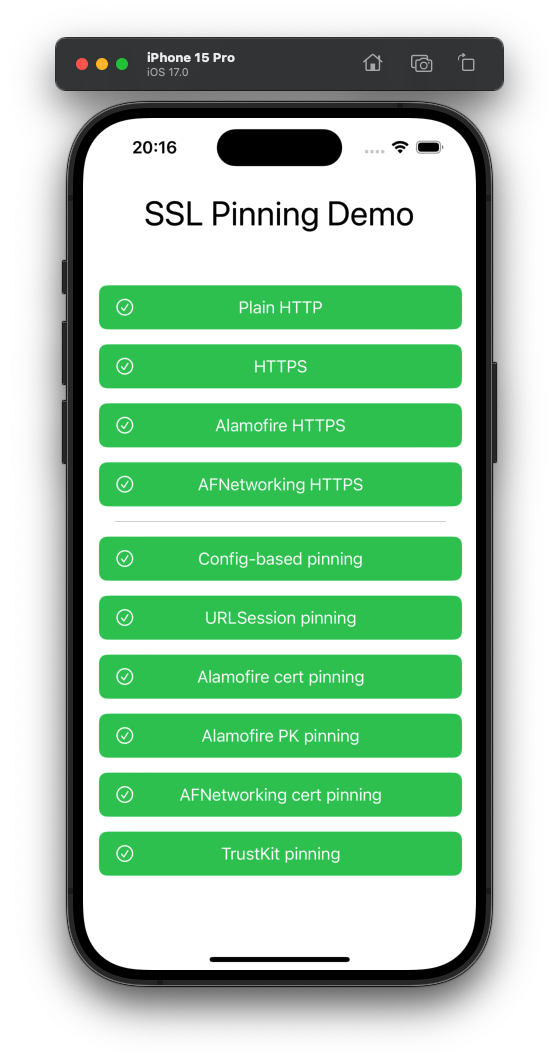
Pressing each button will send an HTTP request with the corresponding configuration. The buttons are purple initially or while a request is in flight, and then turn green or red (with corresponding icons) when the request succeeds/fails. Error details for failures are available in the console.

On a normal unintercepted device, every button should always immediately go green. On a device whose HTTPS is being intercepted (e.g. by [HTTP Toolkit](https://httptoolkit.com/)) all 'pinning' buttons will go red and fail, unless you've used Frida or similar to successfully disable certificate pinning.