https://github.com/huan/docker-wxwork
DoWork is a Dockerized WeChat Work (盒装企业微信) PC Windows Client for Linux
https://github.com/huan/docker-wxwork
docker wechat wxwork
Last synced: about 1 year ago
JSON representation
DoWork is a Dockerized WeChat Work (盒装企业微信) PC Windows Client for Linux
- Host: GitHub
- URL: https://github.com/huan/docker-wxwork
- Owner: huan
- License: apache-2.0
- Created: 2020-02-26T12:28:21.000Z (over 6 years ago)
- Default Branch: master
- Last Pushed: 2022-04-25T13:17:50.000Z (about 4 years ago)
- Last Synced: 2025-03-12T05:03:02.652Z (over 1 year ago)
- Topics: docker, wechat, wxwork
- Language: Shell
- Homepage: https://hub.docker.com/r/zixia/wxwork
- Size: 429 KB
- Stars: 127
- Watchers: 5
- Forks: 15
- Open Issues: 12
-
Metadata Files:
- Readme: README.md
- License: LICENSE
Awesome Lists containing this project
README
# DoWork /dɑɑˈwɜːk/ 盒装企业微信 [](https://github.com/huan/docker-wxwork/actions?query=workflow%3ADocker)
[](https://hub.docker.com/r/zixia/wxwork/)
DoWork (盒装企业微信) is a Dockerized WeChat Work (企业微信) PC Windows Client for Linux.

> Image Credit: [Docker 101](https://www.docker.com/blog/docker-101-introduction-docker-webinar-recap/) + [Icon Finder](https://www.iconfinder.com/icons/4539886/application_chat_communication_wxwork_wxwork_logo_icon), and Ps-ed by Ruoxin Song
## Usage 
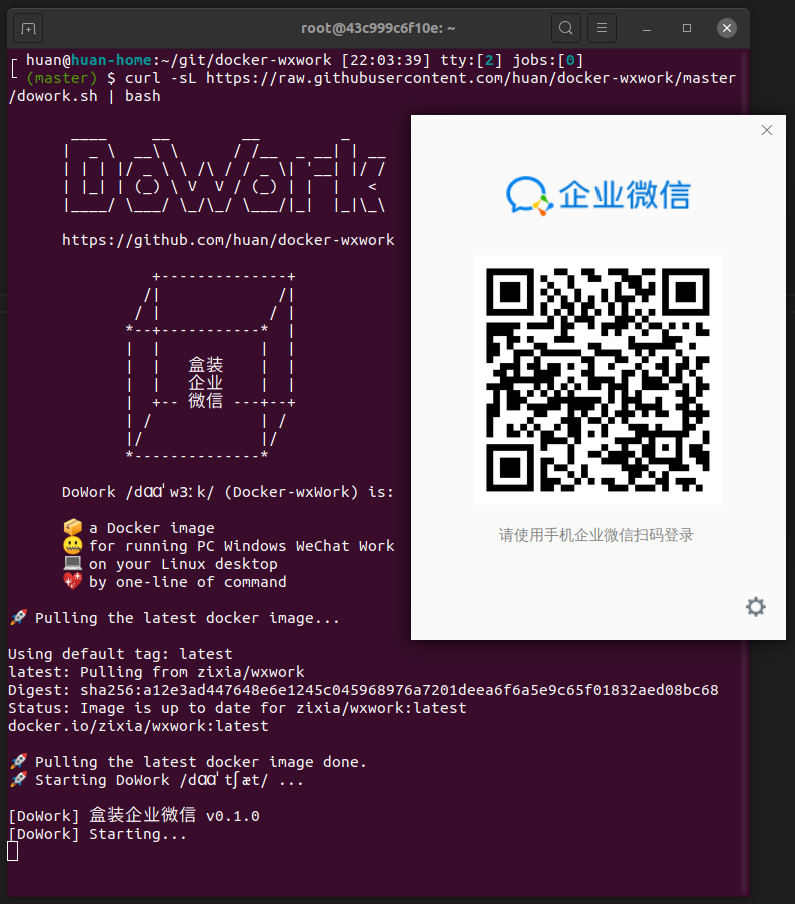
WeChat Work PC will be started on your Linux desktop by running the following one-line command:
```sh
curl -sL https://raw.githubusercontent.com/huan/docker-wxwork/master/dowork.sh | bash
```
Just copy/paste the above one-line command to your terminal and press Enter. Then the WeChat Work PC should appear in your XWindows desktop shortly.
## Features
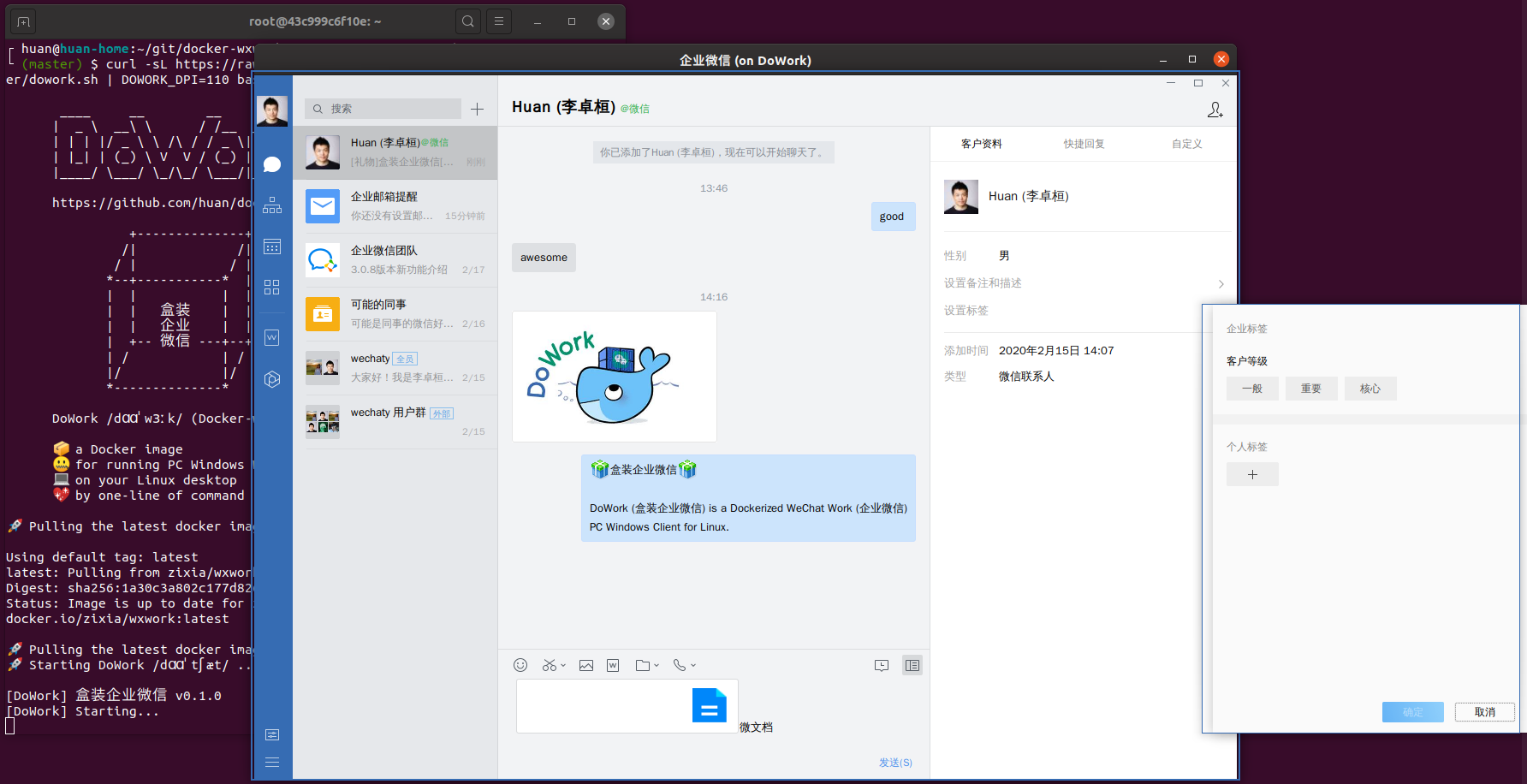
It just works out-of-the-box with one-line of shell command!
1. Input/Display Chinese characters perfectly.
## Requirements
1. Ubuntu is recommended. DoWork was developed with the Ubuntu Desktop 19.10.
1. Other Linux distributions: might be able to support
1. Docker (run `sudo apt update && apt install docker.io` to install Docker for Ubuntu users)
## Environment Variables
### `DOWORK_DPI`
DPI Scale Factors for graphic screen resolution.
| DPI | Scale factor % |
| ---: | :---: |
| 96 | 100 |
| 120 | 125 |
| 144 | 150 |
| 192 | 200 |
Default: `120`
### `DOWORK_SKIP_PULL`
If you do not want to pull docker image for the latest version at startup everytime, you can set `DOWORK_SKIP_PULL` environment variable.
```sh
curl -sL https://raw.githubusercontent.com/huan/docker-wxwork/master/dowork.sh \
| DOWORK_SKIP_PULL=true bash
```
In case you have downloaded `dowork.sh`:
```sh
DOWORK_SKIP_PULL=true ./dowork.sh
```
### `DOWORK_DEBUG`
Show more debug log messages.
```sh
curl -sL https://raw.githubusercontent.com/huan/docker-wxwork/master/dowork.sh \
| DOWORK_DEBUG=true bash
```
## For Hackers
If you want to control everything by yourself, for example, open multiple WeChat Work PC client on your desktop; then, you might want to inspect the [dowork.sh](https://github.com/huan/docker-wxwork/blob/master/dowork.sh) in our repository and try the following docker command:
```sh
docker run \
--name DoWork \
--rm \
-i \
\
-v "$HOME/DoWork/WXWork/":'/home/user/WXWork/' \
-v "$HOME/DoWork/Applcation Data":'/home/user/.wine/drive_c/users/user/Application Data/' \
-v /tmp/.X11-unix:/tmp/.X11-unix \
\
-e DISPLAY \
\
-e XMODIFIERS=@im=fcitx \
-e GTK_IM_MODULE=fcitx \
-e QT_IM_MODULE=fcitx \
-e GID="$(id -g)" \
-e UID="$(id -u)" \
\
--ipc=host \
--privileged \
\
zixia/wxwork
```
Modify it whatever you want to fulfill your needs.
## Known Issues
- [ ] In-WeChat Browser does not work
## To-do List
- [ ] Automatically install WeChat Work from .EXE installer when building the Dockerfile. (Test Automation tools might be needed)
- [ ] Monitor WeChat Work version publications so that we can publish the same version number of the docker image with it.
## FAQ
### 1 System Tray Icon with Gnome Desktop
Install Gnome Extension: [Top Icons Plus Git](https://extensions.gnome.org/extension/2311/topicons-plus/)
## Links
- [DoChat - a Dockerized WeChat (盒装微信) PC Windows Client for Linux](https://github.com/huan/docker-wechat)
## History
### master
### v0.1 (Feb 17, 2020)
Project created.
## Thanks
- [Request for 'Wechat Enterprise' (企业微信) #8](https://github.com/huan/docker-wechat/issues/8) from [@c4pt0r](https://github.com/c4pt0r)
## See Also
- [DoChat /dɑɑˈtʃæt/ 盒装微信](https://github.com/huan/docker-wechat): Dockerized WeChat(微信) PC Windows Client for Linux
- 同类项目:[用docker跑企业微信](https://github.com/BoringCat/docker-WXWork#entrypointsh)
## Author
[Huan LI](https://github.com/huan) ([李卓桓](http://linkedin.com/in/zixia)) zixia@zixia.net
[](https://stackexchange.com/users/265499)
## Copyright & License
- Code & Docs © 2020-now Huan LI \
- Code released under the Apache-2.0 License
- Docs released under Creative Commons