https://github.com/huangbinjie/react-scroll
Effortless to get the twitter level infinite scroll implementation by only a bit of props
https://github.com/huangbinjie/react-scroll
infinite-scroll virtual-scroll
Last synced: over 1 year ago
JSON representation
Effortless to get the twitter level infinite scroll implementation by only a bit of props
- Host: GitHub
- URL: https://github.com/huangbinjie/react-scroll
- Owner: huangbinjie
- License: mit
- Created: 2016-10-26T09:53:59.000Z (almost 10 years ago)
- Default Branch: master
- Last Pushed: 2018-07-02T05:50:24.000Z (about 8 years ago)
- Last Synced: 2025-04-03T06:04:07.991Z (over 1 year ago)
- Topics: infinite-scroll, virtual-scroll
- Language: TypeScript
- Homepage:
- Size: 921 KB
- Stars: 72
- Watchers: 5
- Forks: 11
- Open Issues: 0
-
Metadata Files:
- Readme: README.md
- Changelog: CHANGELOG.md
- License: LICENSE
Awesome Lists containing this project
README
# react-iscroller
An effective react infinite scroll container. inspired by twitter's [blog](http://itsze.ro/blog/2017/04/09/infinite-list-and-react.html).
## Motivation
As the pwa(progressive web app) becoming more popular, the performance and user experience are more and more important. And infinite scroll is almost the most important part within a pwa project. But i found the results by searching `react infinite scroller` on github are not my needs. Fortunately, I found this article of [twitter](https://medium.com/@paularmstrong/twitter-lite-and-high-performance-react-progressive-web-apps-at-scale-d28a00e780a3) on medium by chance. That's i want. So I tried to make my own one.
## Install
```sh
npm i react-iscroller
```
## Example
It's simple to use as follow:
```ts
import { InfiniteScroller } from "react-iscroller"
return
```
## Feature
+ infinite load
+ lazy load
+ dynamic height
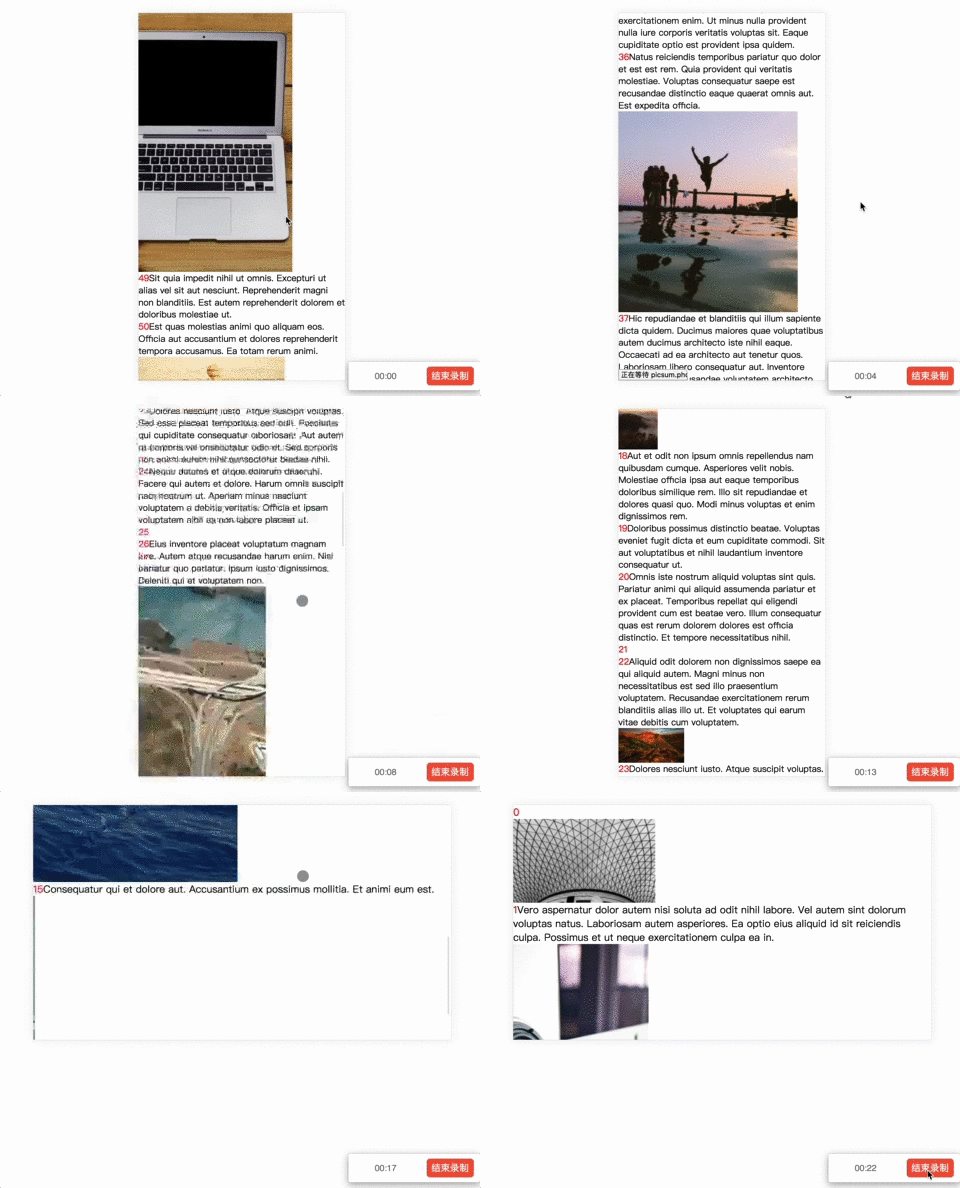
+ pure component
+ cache
+ resize
## Online Demo
[image_and_text](https://codesandbox.io/s/kmowxk6w83)
## Props
### containerHeight(required): number
the height of the wrapper of the infinite scroller
### className(optional): string
className attatched to scroller.
### items(required): object[]
your data
### itemKey(required): string
identity of your data. help scroller implements `pure component`.
### itemAverageHeight(required): number
As the twitter blog mentioned, averageHeight can help scroller to guesstimate the buffer height. Usually your item height.
### onRenderCell(required): (item: any, itemIndex: number) => ReactNode
called when trying to render an item. if you want to force scroller to update cache(eg. after image loaded), you can call this method.
### cache(optional): Cache[]
cache the position of rendered item. your might need provide this prop when you want go back to the last place.
### initialScrollTop(optional): number
set scroller's scrollTop to `initialScrollTop` after first render. if you had provied `cache` and `initialScrollTop`, you can get the last interface before unmount of scroller component.
### onScroll(optional): (scrollerDom: HTMLDivElement) => void
called when scroller is scrolling.
### onEnd?: () => void
called after anchor had arrived bottom.
## Caveat
+ Your item which returned by `onRenderCell` will be wrapped by a div that used for calculation.
+ Because of the `getBoundingClientRect`, I can't get the margin size. So you should not use `margin` in your
item css.
+ Because of the [scroll bug](https://popmotion.io/blog/20170704-manually-set-scroll-while-ios-momentum-scroll-bounces/) in ios, if you suffered this problem, it's normally! However, I did some optimization for ios--avoid change scrollTop.
+ 2.x version is a bit heavy for dynamic height. If you can give your dynamic content a certain height, please use the version of 1.1.7.