https://github.com/huangwb8/m2w
Automatically upload and update local markdown to WordPress via Python
https://github.com/huangwb8/m2w
markdown python vscode wordpress
Last synced: 6 months ago
JSON representation
Automatically upload and update local markdown to WordPress via Python
- Host: GitHub
- URL: https://github.com/huangwb8/m2w
- Owner: huangwb8
- License: mit
- Created: 2022-04-23T15:06:27.000Z (about 4 years ago)
- Default Branch: main
- Last Pushed: 2025-12-21T08:26:55.000Z (7 months ago)
- Last Synced: 2026-01-16T11:34:09.358Z (6 months ago)
- Topics: markdown, python, vscode, wordpress
- Language: Python
- Homepage: https://pypi.org/project/m2w/
- Size: 201 KB
- Stars: 44
- Watchers: 1
- Forks: 18
- Open Issues: 2
-
Metadata Files:
- Readme: README.md
- Changelog: CHANGELOG.MD
- License: license.txt
- Agents: AGENTS.md
Awesome Lists containing this project
README
### [English](README.md) | [简体中文](README.zh-CN.md)
# m2w: Markdown to WordPress





Automatically upload and update local markdown to WordPress based on REST API/Password via Python
:star2::star2::star2: Welcome m2w 2.7.2! LaTeX math rendering, tables, and GFM Admonition support now available. Current v2.7.2 also features rate limiting, resumable uploads, and batch processing for safe mass uploads of 1000+ articles!
Chinese tutorial: [Docker系列 WordPress系列 WordPress上传或更新Markdown的最佳实践-m2w 2.0](https://blognas.hwb0307.com/linux/docker/2813)
## Table of Contents
- [m2w: Markdown to WordPress](#m2w-markdown-to-wordpress)
- [Table of Contents](#table-of-contents)
- [Background](#background)
- [Install](#install)
- [Usage](#usage)
- [Enable REST API](#enable-rest-api)
- [Use m2w](#use-m2w)
- [Demo](#demo)
- [LOG](#log)
- [Related Efforts](#related-efforts)
- [Maintainers](#maintainers)
- [Contributing](#contributing)
- [License](#license)
- [More](#more)
## Background
`m2w` is a tool for automatically uploading or updating local Markdown to WordPress via Python, based on REST API (`2.5+`) or Password.
`m2w` has these features:
+ **Support REST API**, which is safer then conventional password!
+ Use `config/user.json` to maintain the user information in a little different way comparing with `m2w 1.0`.
+ You can just keep your file structures locally as you like.
+ You can manage lots of websites at the same time via multiple `legacy_*.json`.
+ All you need to deal with is a single python script `myblog.py` instead of two (`update.py` and `upload.py` in `m2w 1.0`).
+ Ignore repeated new markdown files for uploading (`v2.2.4+`)
+ **LaTeX math rendering** (`v2.7.2+`): Support for inline math (`$...$`) and display math (`$$...$$`, `\begin...\end{}`) formulas
+ **Markdown tables** (`v2.7.2+`): Native table support for better content formatting
+ **GFM Admonition** (`v2.7.2+`, optional): GitHub-style callout boxes (`> [!NOTE]`, `> [!TIP]`, etc.) - requires `pip install m2w[admonition]`
+ **Rate limiting & batch processing** (`v2.7+`): Prevent server bans with configurable delays, batch processing, and exponential backoff for HTTP 429 errors
+ **Resumable uploads** (`v2.7+`): Progress tracking saves your work—interrupt and resume without losing progress
## Install
> [Miniconda](https://docs.conda.io/en/latest/miniconda.html) is recommended to manage Python version and related dependencies.
- Python >= 3.7.6
- Runtime dependencies: `python-frontmatter>=1.0.0`, `markdown>=3.3.6`, `python-wordpress-xmlrpc>=2.3`, `httpx>=0.24.0` (see `requirements.txt`)
- Packaging now follows PEP 621 in `pyproject.toml` (setuptools); `setup.py` remains only for compatibility.
After 2022-12-10, `m2w` was uploaded onto [PyPi](https://pypi.org/project/m2w/). Install it via:
```bash
pip install m2w
# or pin a version
pip install -i https://pypi.org/simple m2w==2.7.2
# For GFM Admonition support (optional)
pip install m2w[admonition]
```
From source, you can use the modern build flow:
```bash
python -m pip install --upgrade build
python -m build # generate wheel + sdist under dist/
python -m pip install dist/m2w-*.whl # install the built artifact
# editable install for development
python -m pip install -e .
```
## Usage
### Enable REST API
> This step is needed only **when you want to use the REST API mode**.
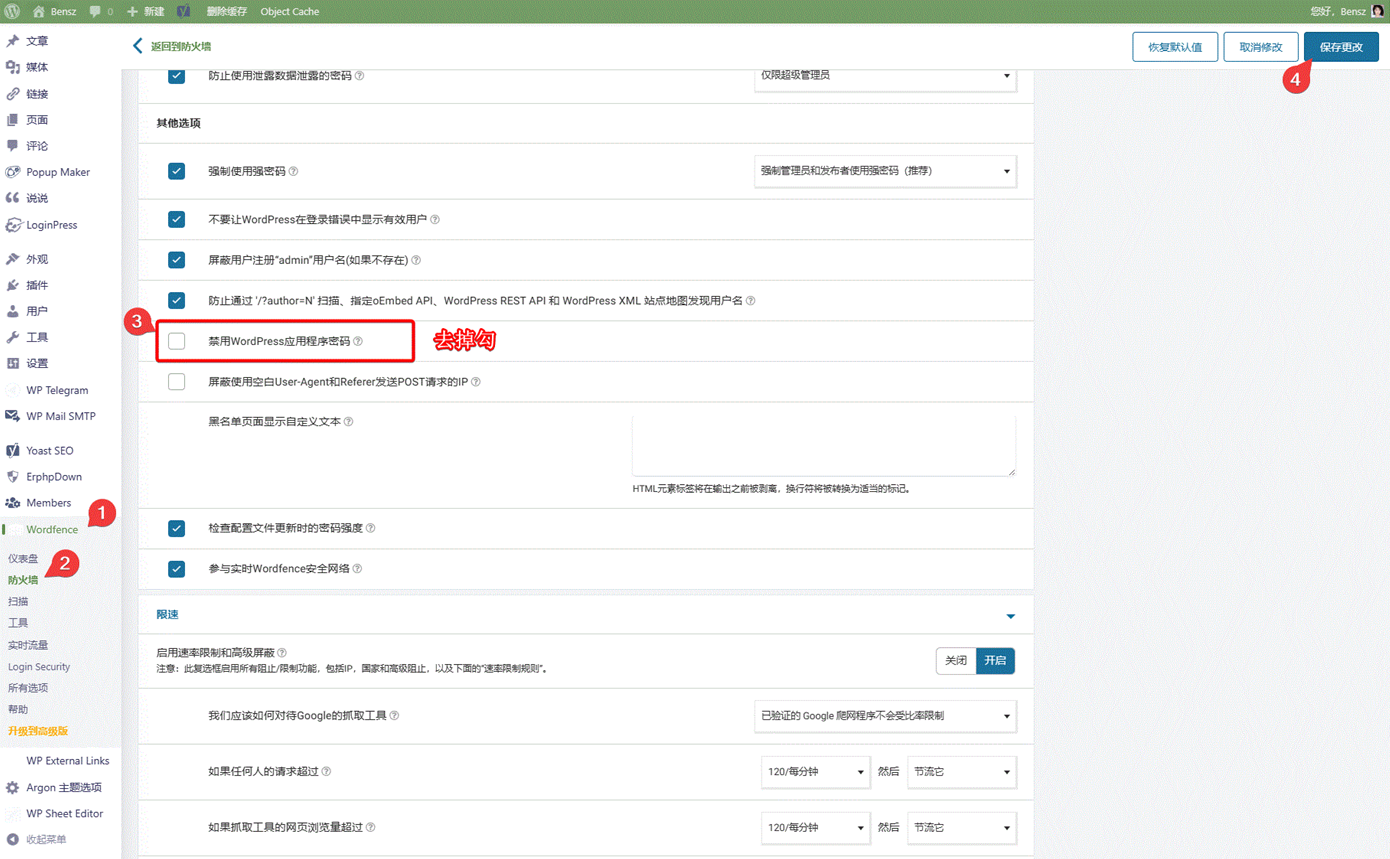
+ If any, please allow Application password of WordPress in Wordfence:
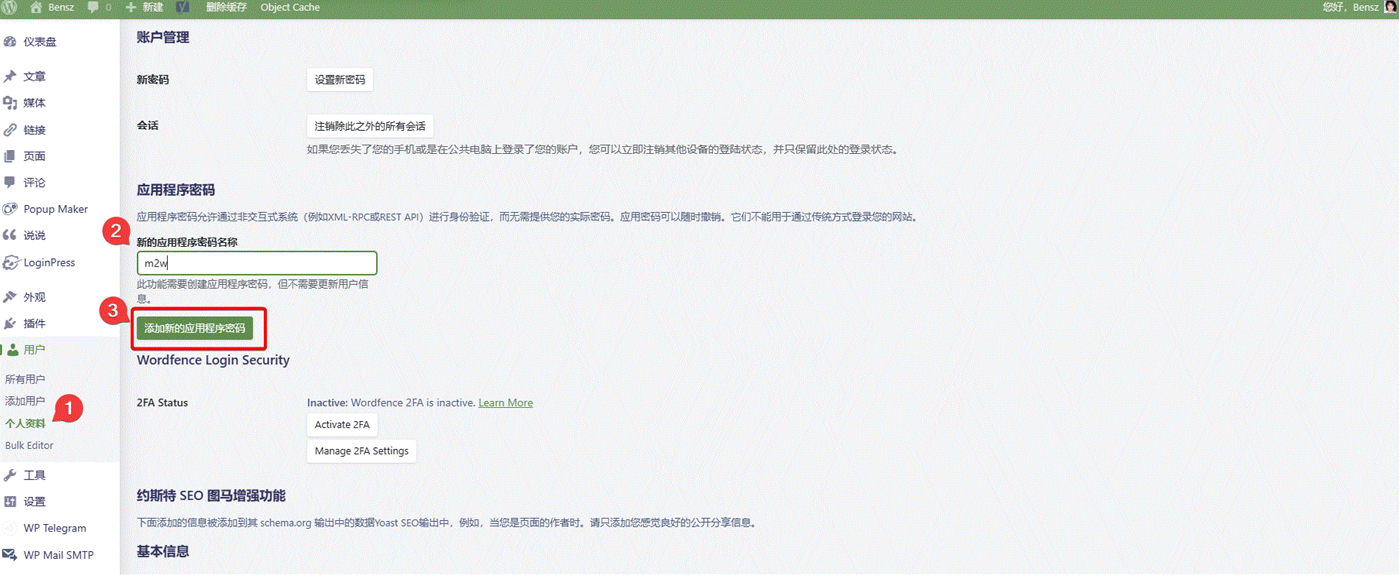
+ Go to personal settings and add a new REST API:
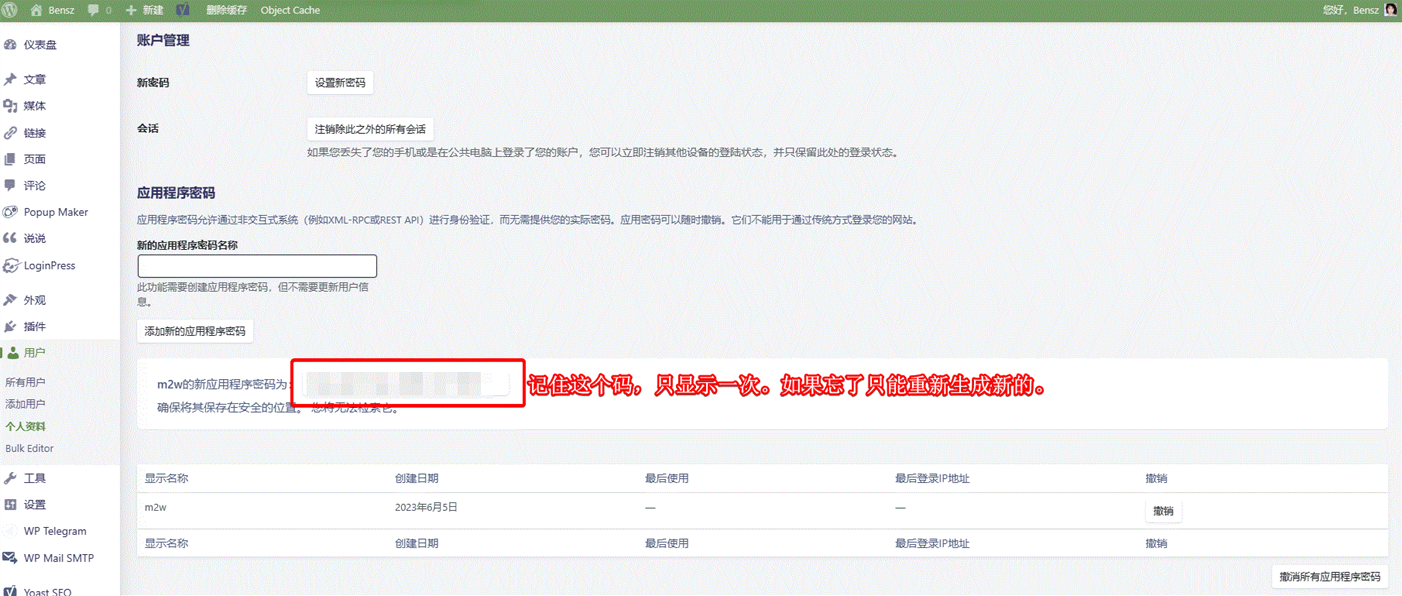
+ Please record the new REST API in a safe place. If you forget it or suspect its safety, please remove the old API and create a new one:
### Use m2w
1. Install m2w from PyPi or this Github repotory.
2. Build a `myblog.py` file (or other names you like) in ``. Here is the [demo](https://github.com/huangwb8/m2w/blob/main/myblog.py). Create `/config/user.json` and set `path_m2w` as `` in `myblog.py`:
```python
path_m2w = '' # Absolute path of m2w config folder
```
3. Define `/config/user.json`. You can add many websites like `web01`! Please go to the [demo](https://github.com/huangwb8/m2w/blob/main/config/user.json) for more details. Here are some interpretations:
+ **user.json** for REST API mode:
```json
"web01": {
"domain": "https://domain-01.com",
"username": "username-01",
"application_password": "password-01",
"path_markdown": [
"E:/Github/m2w/@test/main",
"E:/Github/m2w/@test/main2"
],
"post_metadata": {
"category": ["test"],
"tag": ["test"],
"status": "publish"
},
"path_legacy_json": "/config/legacy"
}
```
+ **user.json** for Password mode:
```json
"web01": {
"domain": "https://domain-01.com",
"username": "username-01",
"password": "password-01",
"path_markdown": [
"E:/Github/m2w/@test/main",
"E:/Github/m2w/@test/main2"
],
"post_metadata": {
"category": ["test"],
"tag": ["test"],
"status": "publish"
},
"path_legacy_json": "/config/legacy"
}
```
+ **domain, username, application_password/password**: The information of your WordPress site and account. `application_password` is REST API, and `password` is the conventional password of your account. If both `application_password` and `password` exist, only `application_password` is available for m2w.
+ **path_markdown**: Add as much top folders as you want!
+ **post_metadata/path_legacy_json**: Set default if you don't know what they are.
4. Run `myblog.py` like:
```bash
python /myblog.py
```
> Need to ignore local helper files? In `myblog.py` set `ignore_files = ["AGENTS.md", "CLAUDE.md"]` (globs and `re:` regex supported). No user.json edits required.
### Ignore unwanted files
- Default ignore list in `myblog.py`: `["AGENTS.md", "CLAUDE.md"]` (avoid uploading AI helper docs).
- You can add globs (e.g., `"**/draft-*.md"`, `"notes/**"`) or regex prefixed with `re:` (e.g., `"re:.*/temp-.*\\.md$"`).
- Leave `ignore_files` empty/remove it to scan all markdown files (backward compatible for older scripts).
### Rate limiting and resumable uploads (v2.7+)
When uploading a large number of articles (e.g., 1000+), you may want to enable rate limiting to avoid server bans:
```python
# In myblog.py
rate_limit_enabled = True # Enable rate limiting
request_delay = 1.0 # Delay between requests (seconds)
batch_size = 10 # Files per batch
batch_delay = 5.0 # Delay between batches (seconds)
max_429_retries = 5 # Max retries on HTTP 429
initial_backoff = 2.0 # Initial backoff time (seconds)
progress_enabled = True # Enable progress saving
progress_file = None # None = same dir as legacy.json
```
**Recommended configurations:**
- **Conservative** (strict servers): `request_delay=2.0`, `batch_size=5`, `batch_delay=10.0`
- **Balanced** (recommended): `request_delay=1.0`, `batch_size=10`, `batch_delay=5.0`
- **Aggressive** (lenient servers): `request_delay=0.5`, `batch_size=20`, `batch_delay=3.0`
### Frontmatter options
You can use frontmatter in your Markdown files to control article behavior:
```yaml
---
title: Your Article Title
slug: custom-url-alias
status: publish
post_type: post
category: [Technology]
tag: [python, wordpress]
---
```
**Available fields:**
| Field | Description | Example |
|-------|-------------|---------|
| `title` | Article title (used for matching existing articles) | `title: My First Post` |
| `slug` | Custom URL alias | `slug: my-custom-url` |
| `status` | Article status: `publish`, `draft`, `delete` | `status: publish` |
| `post_type` | Content type: `post`, `page`, or custom types like `shuoshuo` | `post_type: shuoshuo` |
| `category` | Article categories | `category: [Tech, Python]` |
| `tag` | Article tags | `tag: [code, tutorial]` |
**Examples:**
Create a shuoshuo (status update):
```yaml
---
title: Today's weather is nice!
post_type: shuoshuo
slug: shuoshuo-2025-01-24
status: publish
---
```
Set custom URL alias:
```yaml
---
title: My Article
slug: my-custom-url
status: publish
---
```
Delete an article:
```yaml
---
title: Old Article
status: delete
---
```
> **Note**: When `status: delete` is set, the article will be deleted from WordPress and the local Markdown file will be removed. Use with caution!`
## Demo
> This demo is conducted in Win10 with [VScode](https://code.visualstudio.com/).
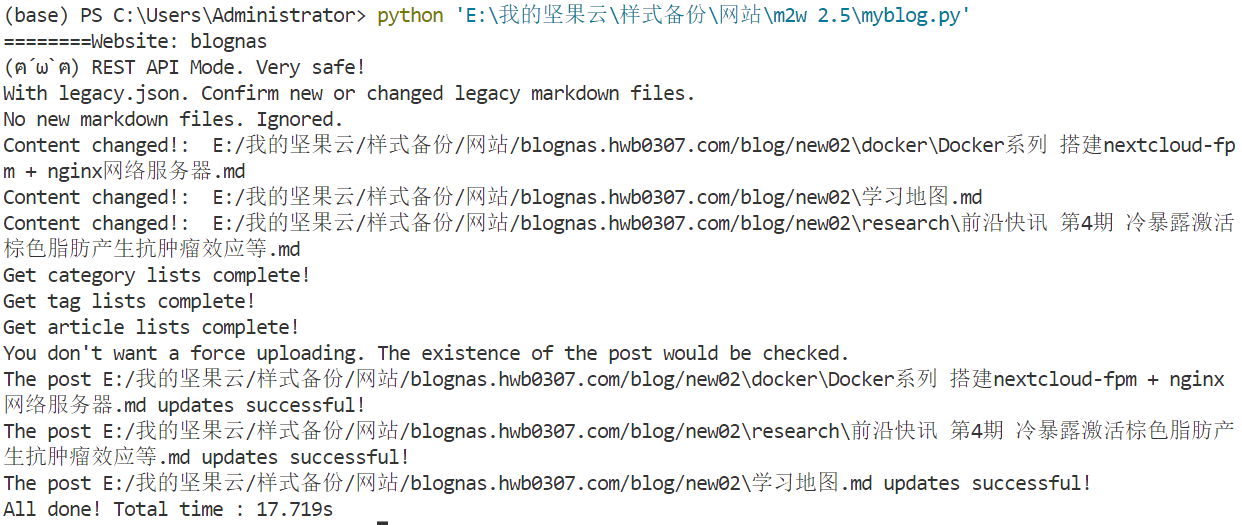
As shown in the following GIF, all changed or brand-new markdowns can be automatically updated/upload via just a simple command `python myblog.py`!
## Changelog
See [CHANGELOG.MD](CHANGELOG.MD) for the complete version history.
**Current release: v2.7.2** (2026-01-24)
- LaTeX math rendering support ($...$ and $$...$$ / \begin...\end{})
- Markdown tables support
- GFM Admonition support (optional, requires `pip install m2w[admonition]`)
- Thanks to [@Mareep-YANG](https://github.com/Mareep-YANG) for contributing via [PR #20](https://github.com/huangwb8/m2w/pull/20)!
## Related Efforts
- [nefu-ljw/python-markdown-to-wordpress](https://github.com/nefu-ljw/python-markdown-to-wordpress)
## Maintainers
+ [@huangwb8](https://t.me/hwb0307) - Project founder
+ [@FoxSuzuran](https://github.com/FoxSuzuran) - Core maintainer
+ [@Mareep-YANG](https://github.com/Mareep-YANG) - LaTeX math, tables, and GFM Admonition support ([PR #20](https://github.com/huangwb8/m2w/pull/20))
+ [@Shulelk](https://github.com/Shulelk) - Custom post types, URL aliases, and status control features ([PR #21](https://github.com/huangwb8/m2w/pull/21))
## Contributing
> Feel free to dive in! [Open an issue](https://github.com/huangwb8/m2w/issues/new) or submit PRs. m2w follows the [Contributor Covenant](http://contributor-covenant.org/version/1/3/0/) Code of Conduct.

## License
This software depends on other packages that may be licensed under different open source licenses.
m2w is released under the MIT license. See [LICENSE](https://github.com/huangwb8/m2w/blob/main/license.txt) for details.
[](https://app.fossa.com/projects/git%2Bgithub.com%2Fhuangwb8%2Fm2w?ref=badge_large)
## More
> Applications similar to m2w
+ [nefu-ljw/python-markdown-to-wordpress](https://github.com/nefu-ljw/python-markdown-to-wordpress): The root project of m2w!
+ [WordPressXMLRPCTools](https://github.com/zhaoolee/WordPressXMLRPCTools): Manage WordPress posts in Hexo way.
+ [markpress](https://github.com/skywind3000/markpress): Write WordPress in Markdown in Your Favorite Text Editor
+ [wordpress-markdown-blog-loader](https://pypi.org/project/wordpress-markdown-blog-loader/): This utility loads markdown blogs into WordPress as a post. It allows you to work on your blog in your favorite editor and keeps all your blogs in git.