https://github.com/hugohe3/ppt-master
AI generates editable, beautifully designed PPTX from any document — no design skills needed | 15 examples, 229 pages
https://github.com/hugohe3/ppt-master
ai ai-agent document-to-slides pdf-to-ppt powerpoint pptx presentation s-v-g slide-generation slides svg
Last synced: 4 months ago
JSON representation
AI generates editable, beautifully designed PPTX from any document — no design skills needed | 15 examples, 229 pages
- Host: GitHub
- URL: https://github.com/hugohe3/ppt-master
- Owner: hugohe3
- License: mit
- Created: 2025-12-10T06:54:33.000Z (8 months ago)
- Default Branch: main
- Last Pushed: 2026-04-11T09:44:48.000Z (4 months ago)
- Last Synced: 2026-04-11T10:23:57.957Z (4 months ago)
- Topics: ai, ai-agent, document-to-slides, pdf-to-ppt, powerpoint, pptx, presentation, s-v-g, slide-generation, slides, svg
- Language: Python
- Homepage: https://hugohe3.github.io/ppt-master/
- Size: 164 MB
- Stars: 4,449
- Watchers: 15
- Forks: 510
- Open Issues: 4
-
Metadata Files:
- Readme: README.md
- Contributing: CONTRIBUTING.md
- License: LICENSE
- Code of conduct: CODE_OF_CONDUCT.md
- Security: SECURITY.md
- Agents: AGENTS.md
Awesome Lists containing this project
- ai-awesome - hugohe3/ppt-master - backed charts and tables on demand, audio narration from speaker notes, and support for your own .pptx templates. · by Hugo He (🤖 AI, ML & Deep Learning)
- Awesome-GitHub-Repo - ppt-master - AI 文档转 PPT 工具。 (开源工具 / 好用工具)
- awesome-claude-code-config - **ppt-master** - master | Editable PPTX from PDF/DOCX/URL/Markdown — real shapes & animations (run `pip install -r requirements.txt` post-install) | off | (Quick Start)
- awesome-ai-agents - hugohe3/ppt-master - AI-powered tool that generates natively editable PowerPoint presentations, complete with animations and audio narration, from any document, supporting custom .pptx templates. (AI Agent Frameworks & SDKs / Multi-Agent Collaboration Systems)
- StarryDivineSky - hugohe3/ppt-master - master` 是一个基于 AI 的开源工具,能够将任意格式的文档(如 Markdown、Word 或纯文本)自动转换为**原生可编辑的 PowerPoint 文件(PPTX)**,直接生成真实的 PowerPoint 形状对象和动画效果,而非简单的图片嵌入。它解决了传统文档转 PPT 工具的两大痛点:一是输出结果多为静态图像或排版错位的伪 PPT,无法二次编辑;二是缺乏对 PowerPoint 原生动画和设计元素(如 SmartArt、图表)的支持,导致用户仍需手动调整。该项目的突出优势在于其**“原生兼容性”**。首先,它生成的 PPTX 文件完全遵循 Microsoft Office 的 OpenXML 标准,所有文字、形状和动画均以 PowerPoint 原生对象形式存在,用户可直接在 PowerPoint 中修改细节,无需重做。其次,它支持**智能布局适配**,通过分析文档结构(如标题层级、列表项)自动匹配 PPT 的版式设计,避免手动调整占位符的繁琐操作。第三,其动画系统能根据语义自动添加**上下文相关的过渡效果**(如逐条飞入列表项),而同类工具通常只能生成静态页面或固定动画模板。 项目的工作原理类似于“翻译官+设计师”的组合。当用户输入文档时,AI 首先像翻译官一样解析文本的语义结构(识别标题、段落、列表等),然后将其映射为 PowerPoint 的**逻辑树**(如幻灯片母版、占位符层级)。接着,系统像设计师一样,根据 Office OpenXML 的底层规范,用代码“捏出”真实的 PPT 形状对象(如文本框、矩形框),而非导出为图片。例如,一个 Markdown 的二级标题会被转化为 PowerPoint 的“标题 2”样式,并附带“淡入”动画的 XML 定义。这种直接操作 OpenXML 的方式,类似于用乐高积木拼装模型——每个积木块(XML 节点)都是 PowerPoint 原生支持的零件,最终拼出的成品自然能被 PowerPoint 完美识别和编辑。 `ppt-master` 通过深度整合 AI 语义分析与 OpenXML 编程,实现了从文档到专业级 PPT 的“零损耗转换”,尤其适合需要高频制作标准化幻灯片的用户(如教育、企业汇报场景)。其技术路径避开了传统方案的“截图式生成”陷阱,为自动化办公工具提供了新的设计范式。 (A01_文本生成_文本对话 / 大语言对话模型及数据)
- awesome-opensource-ai - PPT Master - AI-driven multi-role agent skill for converting documents into editable PowerPoint presentations via SVG and DrawingML workflows. MIT licensed.  (4. Agentic AI & Multi-Agent Systems)
- awesome-local-llms - ppt-master
- awesome-github-projects - ppt-master - AI turns documents or topics into real, native PowerPoint decks—with native shapes, transitions and animations, data-backed charts and tables on demand, audio narration from speaker notes, and support for your own .pptx templates. · by Hugo He ⭐40,973 `Python` 🔥 (🤖 AI & Machine Learning)
- awesome-ai-200 - hugohe3/ppt-master
README
# PPT Master — AI generates natively editable PPTX from any document
[](https://github.com/hugohe3/ppt-master/releases)
[](https://opensource.org/licenses/MIT)
[](https://github.com/hugohe3/ppt-master/stargazers)
[](https://atomgit.com/hugohe3/ppt-master)
English | [中文](./README_CN.md)
Live Demo ·
About Hugo He ·
Examples ·
FAQ ·
Contact
> **Official channels —** this project is published **only** on [GitHub](https://github.com/hugohe3/ppt-master) (primary) and [AtomGit](https://atomgit.com/hugohe3/ppt-master) (auto-synced mirror). Redistributions on any other platform are unofficial and not maintained by the author. Licensed under MIT — attribution required.
---
Drop in a PDF, DOCX, URL, or Markdown — get back a **natively editable PowerPoint** with real shapes, real text boxes, and real charts. Not images. Click anything and edit it.
**What makes it different:**
- Every element is a real PowerPoint object (DrawingML) — no "Convert to Shape" needed
- Works with Claude Code, Cursor, VS Code Copilot, and other AI editors
- 10+ output formats: PPT 16:9, social media cards, marketing posters, and more
- Low cost — as little as **$0.08 per presentation** with VS Code Copilot; even non-Opus models produce decent results
**[See live examples →](https://hugohe3.github.io/ppt-master/)** · [`examples/`](./examples/) — 15 projects, 229 pages
## Gallery

Magazine — warm earthy tones, photo-rich layout

Academic — structured research format, data-driven

Dark Art — cinematic dark background, gallery aesthetic

Nature Documentary — immersive photography, minimal UI

Tech / SaaS — clean white cards, pricing table layout

Product Launch — high contrast, bold specs highlight
---
## Built by Hugo He
I'm a finance professional (CPA · CPV · Consulting Engineer) who got tired of spending hours on presentations that could be automated. So I built this.
PPT Master started from a simple frustration: existing AI slide tools export images, not editable shapes. As someone who reviews and edits hundreds of slides in investment and consulting work, that was unacceptable. I wanted real DrawingML — click on any element and change it, just like you built it by hand.
This project is my attempt to bridge the gap between **domain expertise** and **product engineering** — turning a complex professional pain point into an open-source tool that anyone can use.
🌐 [Personal website](https://www.hehugo.com/) · 📧 [heyug3@gmail.com](mailto:heyug3@gmail.com) · 🐙 [@hugohe3](https://github.com/hugohe3)
---
## Quick Start
### 1. Prerequisites
**Required:** [Python](https://www.python.org/downloads/) 3.10+ · **Optional:** [Node.js](https://nodejs.org/) 18+ (for WeChat page conversion) · [Pandoc](https://pandoc.org/) (for DOCX/EPUB conversion)
```bash
# macOS
brew install python
brew install node # optional — for WeChat page conversion
brew install pandoc # optional — for DOCX/EPUB conversion
# Ubuntu/Debian
sudo apt install python3 python3-pip
sudo apt install nodejs npm # optional
sudo apt install pandoc # optional
# Windows — download from python.org, nodejs.org, pandoc.org
```
### 2. Pick an AI Editor
| Tool | Rating | Notes |
|------|:------:|-------|
| **[Claude Code](https://claude.ai/)** | ⭐⭐⭐ | Best results — native Opus, largest context |
| [Cursor](https://cursor.sh/) / [VS Code + Copilot](https://code.visualstudio.com/) | ⭐⭐ | Good alternatives |
| Codebuddy IDE | ⭐⭐ | Best for Chinese models (Kimi 2.5, MiniMax 2.7) |
### 3. Set Up
```bash
git clone https://github.com/hugohe3/ppt-master.git
cd ppt-master
pip install -r requirements.txt
```
To update later: `python3 skills/ppt-master/scripts/update_repo.py`
### 4. Create
Open the AI chat panel and describe what you want:
```
You: I have a Q3 quarterly report that needs to be made into a PPT
AI: Sure. Let's confirm the design spec:
[Template] B) No template
[Format] PPT 16:9
[Pages] 8-10 pages
...
```
The AI handles everything — content analysis, visual design, SVG generation, and PPTX export.
> **Output:** Two timestamped files are saved to `exports/` — a native-shapes `.pptx` (directly editable) and an `_svg.pptx` snapshot for visual reference. Requires Office 2016+.
> **AI lost context?** Ask it to read `skills/ppt-master/SKILL.md`.
> **Something went wrong?** Check the **[FAQ](./docs/faq.md)** — it covers model selection, layout issues, export problems, and more. Continuously updated from real user reports.
### 5. AI Image Generation (Optional)
```bash
cp .env.example .env # then edit with your API key
```
```env
IMAGE_BACKEND=gemini # required — must be set explicitly
GEMINI_API_KEY=your-api-key
GEMINI_MODEL=gemini-3.1-flash-image-preview
```
Supported backends: `gemini` · `openai` · `qwen` · `zhipu` · `volcengine` · `stability` · `bfl` · `ideogram` · `siliconflow` · `fal` · `replicate`
Run `python3 skills/ppt-master/scripts/image_gen.py --list-backends` to see tiers. Environment variables override `.env`. Use provider-specific keys (`GEMINI_API_KEY`, `OPENAI_API_KEY`, etc.) — global `IMAGE_API_KEY` is not supported.
> **Tip:** For best quality, generate images in [Gemini](https://gemini.google.com/) and select **Download full size**. Remove the watermark with `scripts/gemini_watermark_remover.py`.
---
## Documentation
| | Document | Description |
|---|----------|-------------|
| 📖 | [SKILL.md](./skills/ppt-master/SKILL.md) | Core workflow and rules |
| 📐 | [Canvas Formats](./skills/ppt-master/references/canvas-formats.md) | PPT 16:9, Xiaohongshu, WeChat, and 10+ formats |
| 🛠️ | [Scripts & Tools](./skills/ppt-master/scripts/README.md) | All scripts and commands |
| 💼 | [Examples](./examples/README.md) | 15 projects, 229 pages |
| 🏗️ | [Technical Design](./docs/technical-design.md) | Architecture, design philosophy, why SVG |
| ❓ | [FAQ](./docs/faq.md) | Model selection, cost, layout troubleshooting, custom templates |
---
## Contributing
See [CONTRIBUTING.md](./CONTRIBUTING.md) for how to get involved.
## License
[MIT](LICENSE)
## Acknowledgments
[SVG Repo](https://www.svgrepo.com/) · [Tabler Icons](https://github.com/tabler/tabler-icons) · [Robin Williams](https://en.wikipedia.org/wiki/Robin_Williams_(author)) (CRAP principles) · McKinsey, BCG, Bain
## Contact & Collaboration
Looking to collaborate, integrate PPT Master into your workflow, or just have questions?
- 💬 **Questions & sharing** — [GitHub Discussions](https://github.com/hugohe3/ppt-master/discussions)
- 🐛 **Bug reports & feature requests** — [GitHub Issues](https://github.com/hugohe3/ppt-master/issues)
- 📧 **Business & consulting inquiries** — [heyug3@gmail.com](mailto:heyug3@gmail.com)
- 🌐 **Learn more about the author** — [www.hehugo.com](https://www.hehugo.com/)
---
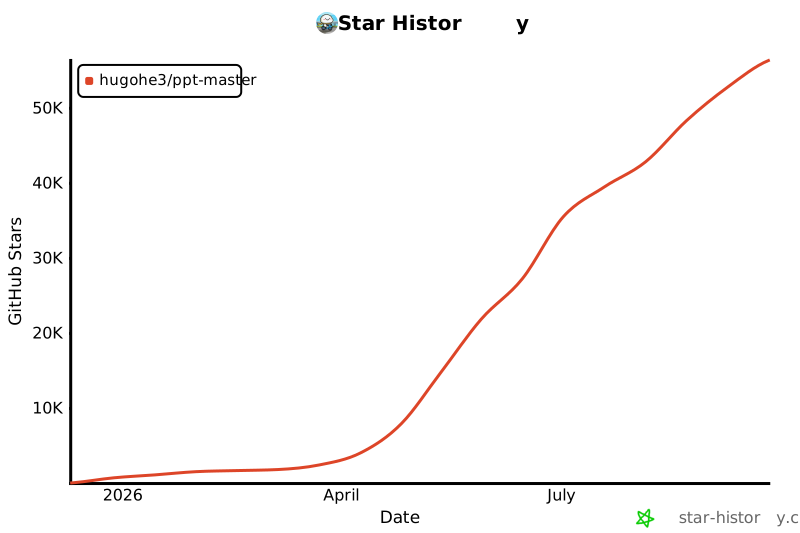
## Star History
If this project helps you, please give it a ⭐!
---
## Supported by DigitalOcean
This project is supported by:

---
## Sponsor
If this project saves you time, consider buying me a coffee!
**Alipay / 支付宝**

---
Made with ❤️ by [Hugo He](https://www.hehugo.com/)
[⬆ Back to Top](#ppt-master--ai-generates-natively-editable-pptx-from-any-document)