https://github.com/hunteroi/discord-mailbox
A simple framework to easily add a mailbox inside your bot with DiscordJS.
https://github.com/hunteroi/discord-mailbox
bot discordjs mailbox modmail
Last synced: 4 months ago
JSON representation
A simple framework to easily add a mailbox inside your bot with DiscordJS.
- Host: GitHub
- URL: https://github.com/hunteroi/discord-mailbox
- Owner: HunteRoi
- License: mit
- Created: 2021-01-07T16:19:53.000Z (over 5 years ago)
- Default Branch: master
- Last Pushed: 2024-06-20T02:52:21.000Z (about 2 years ago)
- Last Synced: 2025-05-07T05:49:28.864Z (about 1 year ago)
- Topics: bot, discordjs, mailbox, modmail
- Language: TypeScript
- Homepage: https://hunteroi.github.io/discord-mailbox
- Size: 14.2 MB
- Stars: 2
- Watchers: 1
- Forks: 0
- Open Issues: 0
-
Metadata Files:
- Readme: README.md
- Funding: .github/FUNDING.yml
- License: LICENSE
Awesome Lists containing this project
README


# Discord Mailbox
Discord Mailbox is a framework to easily add a mailbox inside your bot. The feature is also fully customizable.
- Supports multiple tickets per users
- Logs everything like you want it
- Emits events like `ticketCreate`, `ticketUpdate` and **8 more**
- Allow full customization of the embed (you can add image, thumbnail, etc)
- And much more!
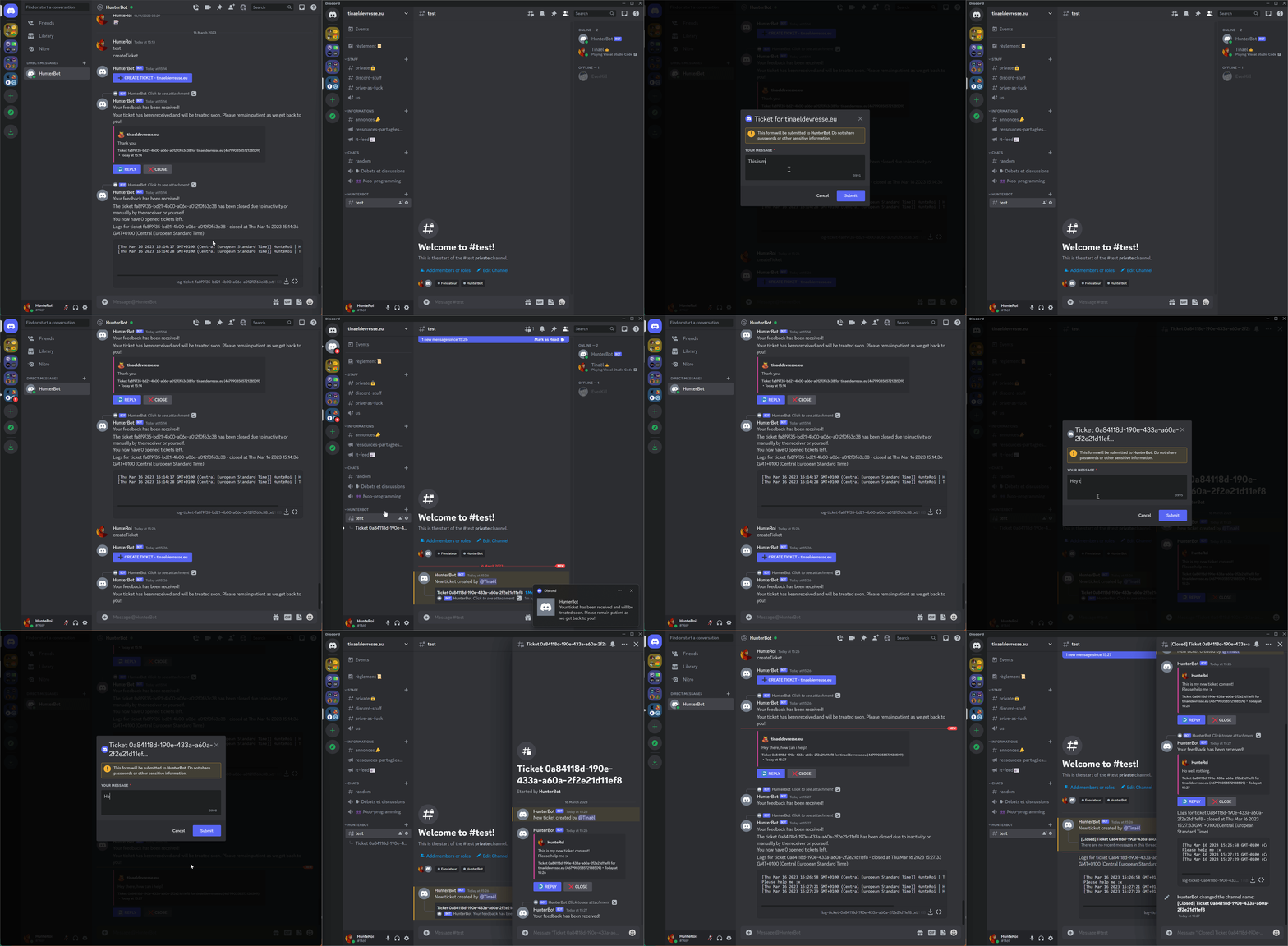
See [./examples/index.js](https://github.com/hunteroi/discord-mailbox/tree/master/examples/index.js). If you want to try this example, you need to send `createTicket` in your bot's DM.
## Prerequisites ⚠️
Starting at **v2.0.0**, you must use **NodeJS v16.6.0 or higher** to run a bot with this library.
You also must not forget to include [mandatory intents and partials](#mandatory-intents-and-partials) as well as give your bot the rights to read messages.
### Mandatory intents and partials
- GUILDS: used to access guild content such as channels.
- GUILD_MESSAGES: used to read guild messages.
- GUILD_MESSAGE_REACTIONS: used to access guild messages reactions.
- DIRECT_MESSAGES: used to access direct messages to the bot.
- CHANNEL: used to receive events when the bot is DMed.
- MESSAGE: used to read the messages even if incomplete.
## Installation
```sh
npm install --save @hunteroi/discord-mailbox
```
## Events
```ts
manager.on(MailboxManagerEvents.ticketCreate, (ticket: Ticket) => {});
manager.on(MailboxManagerEvents.ticketUpdate, (ticket: Ticket) => {});
manager.on(MailboxManagerEvents.ticketLog, (ticket: Ticket) => {});
manager.on(MailboxManagerEvents.ticketClose, (ticket: Ticket) => {});
manager.on(MailboxManagerEvents.ticketForceClose, (ticket: Ticket, user: User | PartialUser) => {});
manager.on(MailboxManagerEvents.ticketDelete, (ticket: Ticket) => {});
manager.on(MailboxManagerEvents.replySent, (message: Message, answer: Message) => {});
manager.on(MailboxManagerEvents.replyDelete, (message: Message) => {});
manager.on(MailboxManagerEvents.threadCreate, (ticket: Ticket, thread: ThreadChannel) => {});
manager.on(MailboxManagerEvents.threadArchive, (ticket: Ticket, thread: ThreadChannel) => {});
```
## Contribution
Contributions are what make the open source community such an amazing place to be learn, inspire, and create. Any contributions you make are greatly appreciated.
1. Fork the Project
2. Create your Branch: `git checkout -b patch/YourAmazingWork`
3. Commit your Changes: `git commit -m 'Add some amazing work'`
4. Push to the Branch: `git push origin patch/YourAmazingWork`
5. Open a Pull Request