https://github.com/huridocs/pdf-document-layout-analysis
A Docker-powered service for PDF document layout analysis. This service provides a powerful and flexible PDF analysis service. The service allows for the segmentation and classification of different parts of PDF pages, identifying the elements such as texts, titles, pictures, tables and so on.
https://github.com/huridocs/pdf-document-layout-analysis
Last synced: 6 months ago
JSON representation
A Docker-powered service for PDF document layout analysis. This service provides a powerful and flexible PDF analysis service. The service allows for the segmentation and classification of different parts of PDF pages, identifying the elements such as texts, titles, pictures, tables and so on.
- Host: GitHub
- URL: https://github.com/huridocs/pdf-document-layout-analysis
- Owner: huridocs
- License: apache-2.0
- Created: 2024-05-06T09:36:50.000Z (about 2 years ago)
- Default Branch: main
- Last Pushed: 2025-12-15T14:54:45.000Z (8 months ago)
- Last Synced: 2025-12-18T19:43:22.353Z (7 months ago)
- Language: Python
- Homepage:
- Size: 4.18 MB
- Stars: 1,015
- Watchers: 11
- Forks: 116
- Open Issues: 12
-
Metadata Files:
- Readme: README.md
- Funding: .github/FUNDING.yml
- License: LICENSE
Awesome Lists containing this project
- StarryDivineSky - huridocs/pdf-document-layout-analysis
- awesome-pdf - huridocs/pdf-document-layout-analysis - A Docker-based service for analyzing PDF document layouts, enabling segmentation and classification of elements like text, titles, images, and tables. (Parsers, OCR and extraction)
README
PDF Document Layout Analysis
A Docker-powered microservice for intelligent PDF document layout analysis, OCR, and content extraction




---
## 🚀 Overview
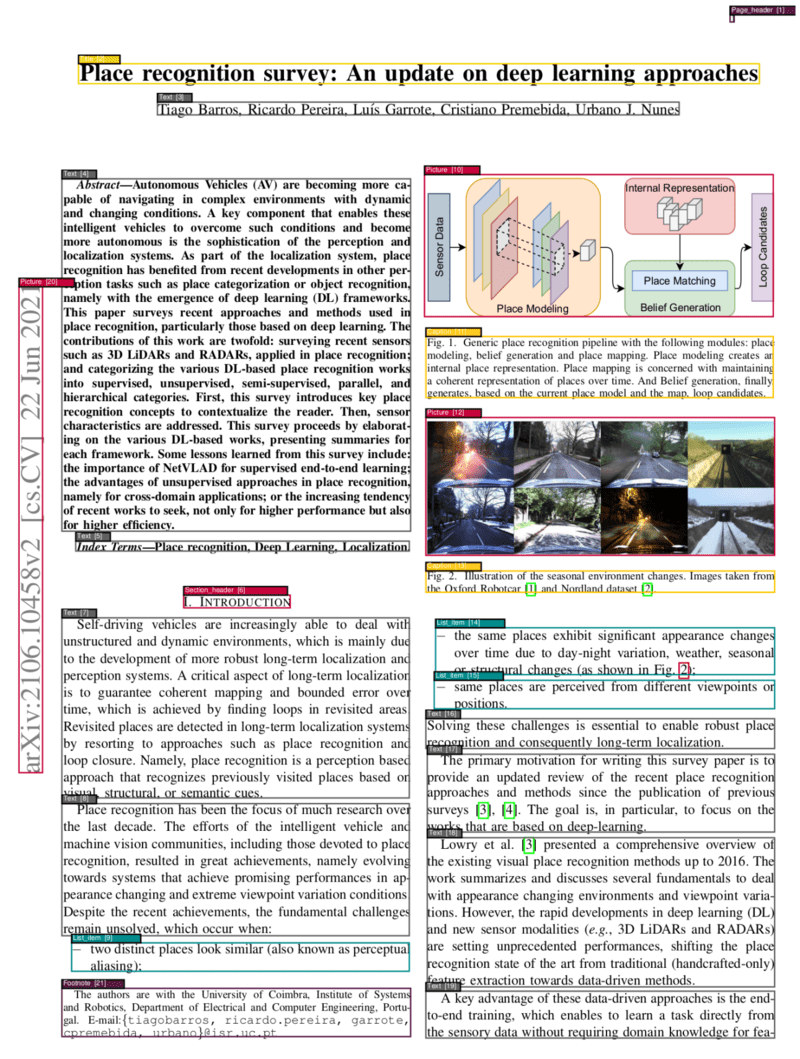
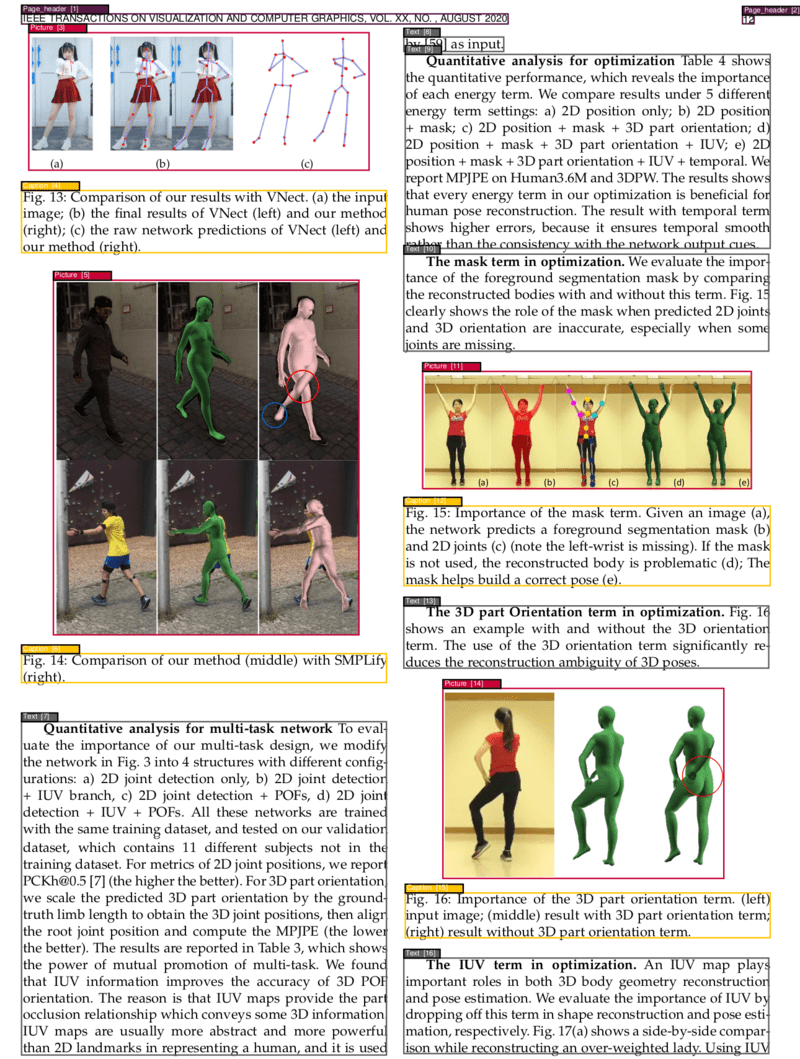
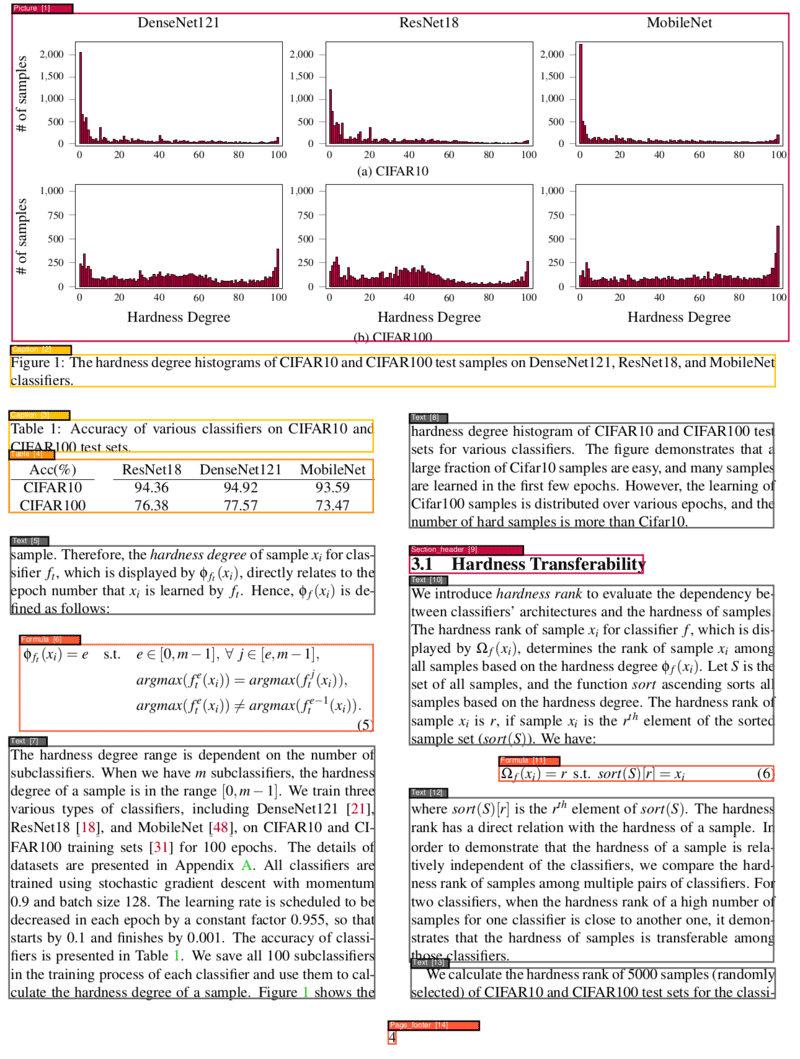
This project provides a powerful and flexible PDF analysis microservice built with **Clean Architecture** principles. The service enables OCR, segmentation, and classification of different parts of PDF pages, identifying elements such as texts, titles, pictures, tables, formulas, and more. Additionally, it determines the correct reading order of these identified elements and can convert PDFs to various formats including Markdown and HTML with **automatic translation support** powered by Ollama.
The service offers both a **user-friendly Gradio web interface** for interactive use and a **comprehensive REST API** for programmatic access and integration.
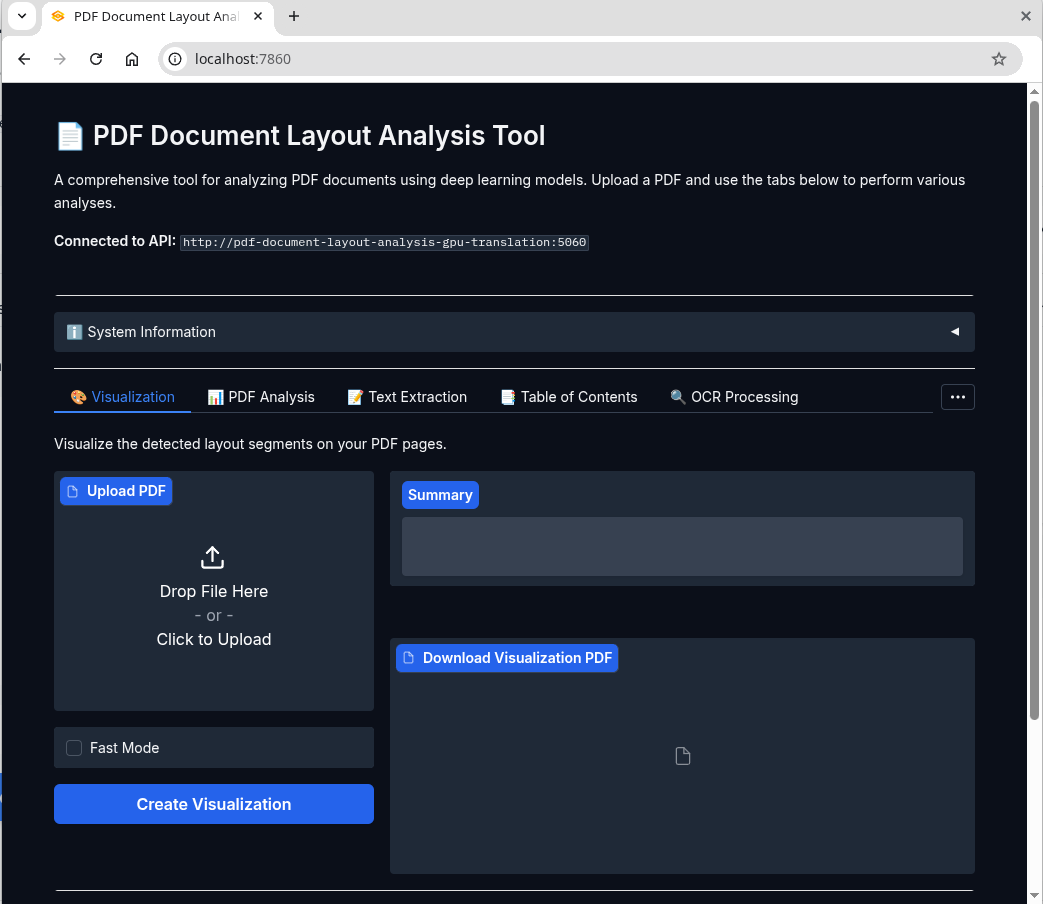
Gradio Web Interface - Easy-to-use UI for PDF analysis, conversion, and translation
---
## 🚀 Quick Start
### 1. Start the Service
```bash
make start # or `just start` (https://github.com/casey/just)
```
The service provides two interfaces:
- **🎨 Web UI (Gradio)**: `http://localhost:7860` - User-friendly interface for all features
- **🔌 REST API**: `http://localhost:5060` - Programmatic access for integrations
**See all available commands:**
```bash
make --list
```
**Check service status:**
```bash
curl http://localhost:5060/info
```
### 2. Using the Web UI
Simply open your browser and navigate to `http://localhost:7860` to access the intuitive web interface. The UI provides:
- 📄 **PDF Analysis** - Upload and analyze PDFs with visual results
- 🔄 **Format Conversion** - Convert to Markdown or HTML
- 🌍 **Translation** - Translate documents to multiple languages
- 👁️ **Visualization** - View segmentation overlays on your PDFs
- 🔍 **OCR Processing** - Apply OCR to scanned documents
- 📑 **TOC Extraction** - Extract table of contents
### 3. Using the REST API
**Analyze a PDF document (VGT model - high accuracy):**
```bash
curl -X POST -F 'file=@/path/to/your/document.pdf' http://localhost:5060
```
**Fast analysis (LightGBM models - faster processing):**
```bash
curl -X POST -F 'file=@/path/to/your/document.pdf' -F "fast=true" http://localhost:5060
```
### 4. Stop the Service
```bash
make stop
```
> 💡 **Tip**: The Web UI at `http://localhost:7860` is the easiest way to get started. For automation and integration, use the REST API at `http://localhost:5060`.
---
## ✨ Key Features
- 🎨 **User-Friendly Web UI** - Intuitive Gradio interface for easy PDF processing
- 🔍 **Advanced PDF Layout Analysis** - Segment and classify PDF content with high accuracy
- 🖼️ **Visual & Fast Models** - Choose between VGT (Vision Grid Transformer) for accuracy or LightGBM for speed
- 📝 **Multi-format Output** - Export to JSON, Markdown, HTML, and visualize PDF segmentations
- 🌍 **Automatic Translation** - Translate documents to multiple languages using Ollama models
- 🌐 **OCR Support** - 150+ language support with Tesseract OCR
- 📊 **Table & Formula Extraction** - Extract tables as HTML and formulas as LaTeX
- 🏗️ **Clean Architecture** - Modular, testable, and maintainable codebase
- 🐳 **Docker-Ready** - Easy deployment with GPU support
- ⚡ **RESTful API** - Comprehensive API with 10+ endpoints
### 📸 Example Results
### 🔗 Project Links
- **GitHub**: [pdf-document-layout-analysis](https://github.com/huridocs/pdf-document-layout-analysis)
- **HuggingFace**: [pdf-document-layout-analysis](https://huggingface.co/HURIDOCS/pdf-document-layout-analysis)
- **DockerHub**: [pdf-document-layout-analysis](https://hub.docker.com/r/huridocs/pdf-document-layout-analysis/)
---
## 📋 Table of Contents
- [🚀 Overview](#-overview)
- [🚀 Quick Start](#-quick-start)
- [✨ Key Features](#-key-features)
- [⚙️ Dependencies](#-dependencies)
- [📋 Requirements](#-requirements)
- [📚 API Reference](#-api-reference)
- [💡 Usage Examples](#-usage-examples)
- [Translation Features](#translation-features)
- [🏗️ Architecture](#-architecture)
- [🤖 Models](#-models)
- [📊 Data](#-data)
- [🔧 Development](#-development)
- [📈 Benchmarks](#-benchmarks)
- [Performance](#performance)
- [Speed](#speed)
- [🌐 Installation of More Languages for OCR](#-installation-of-more-languages-for-ocr)
- [🔗 Related Services](#-related-services)
- [🤝 Contributing](#-contributing)
## ⚙️ Dependencies
### Required
- **Docker Desktop 4.25.0+** - [Installation Guide](https://www.docker.com/products/docker-desktop/)
- **Python 3.10+** (for local development)
### Optional
- **NVIDIA Container Toolkit** - [Installation Guide](https://docs.nvidia.com/datacenter/cloud-native/container-toolkit/latest/install-guide.html) (for GPU support)
## 📋 Requirements
### System Requirements
- **RAM**: 2 GB minimum
- **GPU Memory**: 5 GB (optional, will fallback to CPU if unavailable)
- **Disk Space**: 10 GB for models and dependencies
- **CPU**: Multi-core recommended for better performance
### Docker Requirements
- Docker Engine 20.10+
- Docker Compose 2.0+
## 📚 API Reference
The service provides a comprehensive RESTful API with the following endpoints:
### Core Analysis Endpoints
| Endpoint | Method | Description | Parameters |
|----------|--------|-------------|------------|
| `/` | POST | Analyze PDF layout and extract segments | `file`, `fast`, `parse_tables_and_math` |
| `/save_xml/{filename}` | POST | Analyze PDF and save XML output | `file`, `xml_file_name`, `fast` |
| `/get_xml/{filename}` | GET | Retrieve saved XML analysis | `xml_file_name` |
### Content Extraction Endpoints
| Endpoint | Method | Description | Parameters |
|----------|--------|-------------|------------|
| `/text` | POST | Extract text by content types | `file`, `fast`, `types` |
| `/toc` | POST | Extract table of contents | `file`, `fast` |
| `/toc_legacy_uwazi_compatible` | POST | Extract TOC (Uwazi compatible) | `file` |
### Format Conversion Endpoints
| Endpoint | Method | Description | Parameters |
|----------|--------|-------------|------------|
| `/markdown` | POST | Convert PDF to Markdown (includes segmentation data in zip) | `file`, `fast`, `extract_toc`, `dpi`, `output_file`, `target_languages`, `translation_model` |
| `/html` | POST | Convert PDF to HTML (includes segmentation data in zip) | `file`, `fast`, `extract_toc`, `dpi`, `output_file`, `target_languages`, `translation_model` |
| `/visualize` | POST | Visualize segmentation results on the PDF | `file`, `fast` |
### OCR & Utility Endpoints
| Endpoint | Method | Description | Parameters |
|----------|--------|-------------|------------|
| `/ocr` | POST | Apply OCR to PDF | `file`, `language` |
| `/info` | GET | Get service information | - |
| `/` | GET | Health check and system info | - |
| `/error` | GET | Test error handling | - |
### Common Parameters
- **`file`**: PDF file to process (multipart/form-data)
- **`fast`**: Use LightGBM models instead of VGT (boolean, default: false)
- **`parse_tables_and_math`**: Apply OCR to table regions (boolean, default: false) and convert formulas to LaTeX
- **`language`**: OCR language code (string, default: "en")
- **`types`**: Comma-separated content types to extract (string, default: "all")
- **`extract_toc`**: Include table of contents at the beginning of the output (boolean, default: false)
- **`dpi`**: Image resolution for conversion (integer, default: 120)
- **`target_languages`**: Comma-separated list of target languages for translation (e.g. "Turkish, Spanish, French")
- **`translation_model`**: Ollama model to use for translation (string, default: "gpt-oss")
## 💡 Usage Examples
### Basic PDF Analysis
**Standard analysis with VGT model:**
```bash
curl -X POST \
-F 'file=@document.pdf' \
http://localhost:5060
```
**Fast analysis with LightGBM models:**
```bash
curl -X POST \
-F 'file=@document.pdf' \
-F 'fast=true' \
http://localhost:5060
```
**Analysis with table and math parsing:**
```bash
curl -X POST \
-F 'file=@document.pdf' \
-F 'parse_tables_and_math=true' \
http://localhost:5060
```
### Text Extraction
**Extract all text:**
```bash
curl -X POST \
-F 'file=@document.pdf' \
-F 'types=all' \
http://localhost:5060/text
```
**Extract specific content types:**
```bash
curl -X POST \
-F 'file=@document.pdf' \
-F 'types=title,text,table' \
http://localhost:5060/text
```
### Format Conversion
**Convert to Markdown:**
```bash
curl -X POST http://localhost:5060/markdown \
-F 'file=@document.pdf' \
-F 'extract_toc=true' \
-F 'output_file=document.md' \
--output 'document.zip'
```
**Convert to HTML:**
```bash
curl -X POST http://localhost:5060/html \
-F 'file=@document.pdf' \
-F 'extract_toc=true' \
-F 'output_file=document.md' \
--output 'document.zip'
```
**Convert to Markdown with Translation:**
```bash
curl -X POST http://localhost:5060/markdown \
-F 'file=@document.pdf' \
-F 'output_file=document.md' \
-F 'target_languages=Turkish, Spanish' \
-F 'translation_model=gpt-oss' \
--output 'document.zip'
```
**Convert to HTML with Translation:**
```bash
curl -X POST http://localhost:5060/html \
-F 'file=@document.pdf' \
-F 'output_file=document.md' \
-F 'target_languages=French, Russian' \
-F 'translation_model=huihui_ai/hunyuan-mt-abliterated' \
--output 'document.zip'
```
> **📋 Segmentation Data & Translations**: Format conversion endpoints automatically include detailed segmentation data in the zip output. The resulting zip file contains:
> - **Original file**: The converted document in the requested format
> - **Segmentation data**: `{filename}_segmentation.json` file with information about each detected document segment:
> - **Coordinates**: `left`, `top`, `width`, `height`
> - **Page information**: `page_number`, `page_width`, `page_height`
> - **Content**: `text` content and segment `type` (e.g., "Title", "Text", "Table", "Picture")
> - **Translated files** (if `target_languages` specified): `{filename}_{language}.{extension}` for each target language
> - **Images** (if present): `{filename}_pictures/` directory containing extracted images
### Translation Features
The `/markdown` and `/html` endpoints support automatic translation of the converted content into multiple languages using Ollama models.
**Translation Requirements:**
- The specified translation model must be available in Ollama
- An `output_file` must be specified (translations are only included in zip responses)
**Supported Translation Models:**
- Any Ollama-compatible model (e.g., `gpt-oss`, `llama2`, `mistral`, etc.)
- Models are automatically downloaded if not present locally
**Translation Process:**
1. The service checks if the specified model is available in Ollama
2. If not available, it attempts to download the model using `ollama pull`
3. For each target language, the content is translated while preserving:
- Original formatting and structure
- Markdown/HTML syntax
- Links and references
- Image references and tables
4. Translated files are named: `{filename}_{language}.{extension}`
_**Note that the quality of translations mostly depends on the models used. When using smaller models, the output may contain many unexpected or undesired elements. For regular users, we aimed for a balance between performance and quality, so we tested with different models with a reasonable size. The results for `gpt-oss` were satisfactory, which is why we set it as the default model. If you need something smaller you can also try `huihui_ai/hunyuan-mt-abliterated`, we saw it gives decent results especially if the text does not have much styling.**_
**Example Translation Output:**
```
document.zip
├── document.md # Source text with markdown/html styling
├── document_Spanish.md # Spanish translation
├── document_French.md # French translation
├── document_Turkish.md # Turkish translation
├── document_segmentation.json # Segmentation information
└── document_pictures/ # (if images present)
├── document_1_1.png
└── document_1_2.png
```
### OCR Processing
**OCR in English:**
```bash
curl -X POST \
-F 'file=@scanned_document.pdf' \
-F 'language=en' \
http://localhost:5060/ocr \
--output ocr_processed.pdf
```
**OCR in other languages:**
```bash
# French
curl -X POST \
-F 'file=@document_french.pdf' \
-F 'language=fr' \
http://localhost:5060/ocr \
--output ocr_french.pdf
# Spanish
curl -X POST \
-F 'file=@document_spanish.pdf' \
-F 'language=es' \
http://localhost:5060/ocr \
--output ocr_spanish.pdf
```
### Visualization
**Generate visualization PDF:**
```bash
curl -X POST \
-F 'file=@document.pdf' \
http://localhost:5060/visualize \
--output visualization.pdf
```
### Table of Contents Extraction
**Extract structured TOC:**
```bash
curl -X POST \
-F 'file=@document.pdf' \
http://localhost:5060/toc
```
### XML Storage and Retrieval
**Analyze and save XML:**
```bash
curl -X POST \
-F 'file=@document.pdf' \
http://localhost:5060/save_xml/my_analysis
```
**Retrieve saved XML:**
```bash
curl http://localhost:5060/get_xml/my_analysis.xml
```
### Service Information
**Get service info and supported languages:**
```bash
curl http://localhost:5060/info
```
**Health check:**
```bash
curl http://localhost:5060/
```
### Response Format
Most endpoints return JSON with segment information:
```json
[
{
"left": 72.0,
"top": 84.0,
"width": 451.2,
"height": 23.04,
"page_number": 1,
"page_width": 595.32,
"page_height": 841.92,
"text": "Document Title",
"type": "Title"
},
{
"left": 72.0,
"top": 120.0,
"width": 451.2,
"height": 200.0,
"page_number": 1,
"page_width": 595.32,
"page_height": 841.92,
"text": "This is the main text content...",
"type": "Text"
}
]
```
### Supported Content Types
- `Caption` - Image and table captions
- `Footnote` - Footnote text
- `Formula` - Mathematical formulas
- `List item` - List items and bullet points
- `Page footer` - Footer content
- `Page header` - Header content
- `Picture` - Images and figures
- `Section header` - Section headings
- `Table` - Table content
- `Text` - Regular text paragraphs
- `Title` - Document and section titles
## 🏗️ Architecture
This project follows **Clean Architecture** principles, ensuring separation of concerns, testability, and maintainability. The codebase is organized into distinct layers:
### Directory Structure
```
src/
├── domain/ # Enterprise Business Rules
│ ├── PdfImages.py # PDF image handling domain logic
│ ├── PdfSegment.py # PDF segment entity
│ ├── Prediction.py # ML prediction entity
│ └── SegmentBox.py # Core segment box entity
├── use_cases/ # Application Business Rules
│ ├── pdf_analysis/ # PDF analysis use case
│ ├── text_extraction/ # Text extraction use case
│ ├── toc_extraction/ # Table of contents extraction
│ ├── visualization/ # PDF visualization use case
│ ├── ocr/ # OCR processing use case
│ ├── markdown_conversion/ # Markdown conversion use case (with translation)
│ └── html_conversion/ # HTML conversion use case (with translation)
├── adapters/ # Interface Adapters
│ ├── infrastructure/ # External service adapters
│ ├── ml/ # Machine learning model adapters
│ ├── storage/ # File storage adapters
│ └── web/ # Web framework adapters
├── ports/ # Interface definitions
│ ├── services/ # Service interfaces
│ └── repositories/ # Repository interfaces
└── drivers/ # Frameworks & Drivers
└── web/ # FastAPI application setup
```
### Layer Responsibilities
- **Domain Layer**: Contains core business entities and rules independent of external concerns
- **Use Cases Layer**: Orchestrates domain entities to fulfill specific application requirements
- **Adapters Layer**: Implements interfaces defined by inner layers and adapts external frameworks
- **Drivers Layer**: Contains frameworks, databases, and external agency configurations
### Key Benefits
- 🔄 **Dependency Inversion**: High-level modules don't depend on low-level modules
- 🧪 **Testability**: Easy to unit test business logic in isolation
- 🔧 **Maintainability**: Changes to external frameworks don't affect business rules
- 📈 **Scalability**: Easy to add new features without modifying existing code
## 🤖 Models
The service offers two complementary model approaches, each optimized for different use cases:
### 1. Vision Grid Transformer (VGT) - High Accuracy Model
**Overview**: A state-of-the-art visual model developed by Alibaba Research Group that "sees" the entire page layout.
**Key Features**:
- 🎯 **High Accuracy**: Best-in-class performance on document layout analysis
- 👁️ **Visual Understanding**: Analyzes the entire page context including spatial relationships
- 📊 **Trained on DocLayNet**: Uses the comprehensive [DocLayNet dataset](https://github.com/DS4SD/DocLayNet)
- 🔬 **Research-Backed**: Based on [Advanced Literate Machinery](https://github.com/AlibabaResearch/AdvancedLiterateMachinery)
**Resource Requirements**:
- GPU: 5GB+ VRAM (recommended)
- CPU: Falls back automatically if GPU unavailable
- Processing Speed: ~1.75 seconds/page (GPU [GTX 1070]) or ~13.5 seconds/page (CPU [i7-8700])
### 2. LightGBM Models - Fast & Efficient
**Overview**: Lightweight ensemble of two specialized models using XML-based features from Poppler.
**Key Features**:
- ⚡ **High Speed**: ~0.42 seconds per page on CPU (i7-8700)
- 💾 **Low Resource Usage**: CPU-only, minimal memory footprint
- 🔄 **Dual Model Approach**:
- **Token Type Classifier**: Identifies content types (title, text, table, etc.)
- **Segmentation Model**: Determines proper content boundaries
- 📄 **XML-Based**: Uses Poppler's PDF-to-XML conversion for feature extraction
**Trade-offs**:
- Slightly lower accuracy compared to VGT
- No visual context understanding
- Excellent for batch processing and resource-constrained environments
### OCR Integration
Both models integrate seamlessly with OCR capabilities:
- **Engine**: [Tesseract OCR](https://github.com/tesseract-ocr/tesseract)
- **Processing**: [ocrmypdf](https://ocrmypdf.readthedocs.io/en/latest/index.html)
- **Languages**: 150+ supported languages
- **Output**: Searchable PDFs with preserved layout
### Model Selection Guide
| Use Case | Recommended Model | Reason |
|----------|------------------|---------|
| High accuracy requirements | VGT | Superior visual understanding |
| Batch processing | LightGBM | Faster processing, lower resources |
| GPU available | VGT | Leverages GPU acceleration |
| CPU-only environment | LightGBM | Optimized for CPU processing |
| Real-time applications | LightGBM | Consistent fast response times |
| Research/analysis | VGT | Best accuracy for detailed analysis |
## 📊 Data
### Training Dataset
Both model types are trained on the comprehensive [DocLayNet dataset](https://github.com/DS4SD/DocLayNet), a large-scale document layout analysis dataset containing over 80,000 document pages.
### Document Categories
The models can identify and classify 11 distinct content types:
| ID | Category | Description |
|----|----------|-------------|
| 1 | **Caption** | Image and table captions |
| 2 | **Footnote** | Footnote references and text |
| 3 | **Formula** | Mathematical equations and formulas |
| 4 | **List item** | Bulleted and numbered list items |
| 5 | **Page footer** | Footer content and page numbers |
| 6 | **Page header** | Header content and titles |
| 7 | **Picture** | Images, figures, and graphics |
| 8 | **Section header** | Section and subsection headings |
| 9 | **Table** | Tabular data and structures |
| 10 | **Text** | Regular paragraph text |
| 11 | **Title** | Document and chapter titles |
### Dataset Characteristics
- **Domain Coverage**: Academic papers, technical documents, reports
- **Language**: Primarily English with multilingual support
- **Quality**: High-quality annotations with bounding boxes and labels
- **Diversity**: Various document layouts, fonts, and formatting styles
For detailed information about the dataset, visit the [DocLayNet repository](https://github.com/DS4SD/DocLayNet).
## 🔧 Development
### Local Development Setup
1. **Clone the repository:**
```bash
git clone https://github.com/huridocs/pdf-document-layout-analysis.git
cd pdf-document-layout-analysis
```
2. **Create virtual environment:**
```bash
make install_venv
```
3. **Activate environment:**
```bash
source .venv/bin/activate
```
4. **Install dependencies:**
```bash
make install
```
### Code Quality
**Format code:**
```bash
make formatter
```
**Check formatting:**
```bash
make check_format
```
### Testing
**Run tests:**
```bash
make test
```
**Integration tests:**
```bash
# Tests are located in src/tests/integration/
python -m pytest src/tests/integration/test_end_to_end.py
```
### Docker Development
**Build and start:**
```bash
# Standard start (includes translation features)
make start
# Start without translation support
make start_no_translation
# Start in detached mode (API only, no UI)
make start_detached
# Start in detached mode with GPU (API only, no UI)
make start_detached_gpu
# Force CPU mode with translation
make start_no_gpu
```
**Clean up Docker resources:**
```bash
# Stop all services
make stop
# Remove containers
make remove_docker_containers
# Remove images
make remove_docker_images
```
### Project Structure
```
pdf-document-layout-analysis/
├── src/ # Source code
│ ├── domain/ # Business entities
│ ├── use_cases/ # Application logic
│ ├── adapters/ # External integrations
│ ├── ports/ # Interface definitions
│ ├── drivers/ # Framework configurations
│ ├── app.py # FastAPI application
│ └── gradio_app.py # Gradio web interface
├── test_pdfs/ # Test PDF files
├── models/ # ML model storage
├── docker-compose.yml # Docker configuration
├── Dockerfile # FastAPI container definition
├── Dockerfile.gradio # Gradio container definition
├── justfile # Development commands (just)
├── pyproject.toml # Python project configuration
└── requirements.txt # Python dependencies
```
### Environment Variables
Key configuration options:
```bash
# OCR configuration
OCR_SOURCE=/tmp/ocr_source
# Model paths (auto-configured)
MODELS_PATH=./models
# Service configuration
HOST=0.0.0.0
PORT=5060
# Translation configuration (when using translation features)
OLLAMA_HOST=http://ollama:11434 # Ollama service endpoint
```
### Adding New Features
1. **Domain Logic**: Add entities in `src/domain/`
2. **Use Cases**: Implement business logic in `src/use_cases/`
3. **Adapters**: Create integrations in `src/adapters/`
4. **Ports**: Define interfaces in `src/ports/`
5. **Controllers**: Add endpoints in `src/adapters/web/`
### Debugging
**View logs:**
```bash
docker compose logs -f
```
**Access container:**
```bash
docker exec -it pdf-document-layout-analysis /bin/bash
```
**Free up disk space:**
```bash
make free_up_space
```
### Order of Output Elements
The service returns SegmentBox elements in a carefully determined reading order:
#### Reading Order Algorithm
1. **Poppler Integration**: Uses [Poppler](https://poppler.freedesktop.org) PDF-to-XML conversion to establish initial token reading order
2. **Segment Averaging**: Calculates average reading order for multi-token segments
3. **Type-Based Sorting**: Prioritizes content types:
- **Headers** placed first
- **Main content** in reading order
- **Footers and footnotes** placed last
#### Non-Text Elements
For segments without text (e.g., images):
- Processed after text-based sorting
- Positioned based on nearest text segment proximity
- Uses spatial distance as the primary criterion
### Advanced Table and Formula Extraction
#### Default Behavior
- **Formulas**: Automatically extracted as LaTeX format in the `text` property
- **Tables**: Basic text extraction included by default
#### Enhanced Table Extraction
Parse tables and extract them in HTML format by setting `parse_tables_and_math=true`:
```bash
curl -X POST -F 'file=@document.pdf' -F 'parse_tables_and_math=true' http://localhost:5060
```
#### Extraction Engines
- **Formulas**: [LaTeX-OCR](https://github.com/lukas-blecher/LaTeX-OCR)
- **Tables**: [RapidTable](https://github.com/RapidAI/RapidTable)
## 📈 Benchmarks
### Performance
VGT model performance on PubLayNet dataset:
| Metric | Overall | Text | Title | List | Table | Figure |
|--------|---------|------|-------|------|-------|--------|
| **F1 Score** | **0.962** | 0.950 | 0.939 | 0.968 | 0.981 | 0.971 |
> 📊 **Comparison**: View comprehensive model comparisons at [Papers With Code](https://paperswithcode.com/sota/document-layout-analysis-on-publaynet-val)
### Speed
Performance benchmarks on 15-page academic documents:
| Model | Hardware | Speed (sec/page) | Use Case |
|-------|----------|------------------|----------|
| **LightGBM** | CPU (i7-8700 3.2GHz) | **0.42** | Fast processing |
| **VGT** | GPU (GTX 1070) | **1.75** | High accuracy |
| **VGT** | CPU (i7-8700 3.2GHz) | 13.5 | CPU fallback |
### Performance Recommendations
- **GPU Available**: Use VGT for best accuracy-speed balance
- **CPU Only**: Use LightGBM for optimal performance
- **Batch Processing**: LightGBM for consistent throughput
- **High Accuracy**: VGT with GPU for best results
## 🌐 Installation of More Languages for OCR
The service uses Tesseract OCR with support for 150+ languages. The Docker image includes only common languages to minimize image size.
### Installing Additional Languages
#### 1. Access the Container
```bash
docker exec -it --user root pdf-document-layout-analysis /bin/bash
```
#### 2. Install Language Packs
```bash
# Install specific language
apt-get update
apt-get install tesseract-ocr-[LANGCODE]
```
#### 3. Common Language Examples
```bash
# Korean
apt-get install tesseract-ocr-kor
# German
apt-get install tesseract-ocr-deu
# French
apt-get install tesseract-ocr-fra
# Spanish
apt-get install tesseract-ocr-spa
# Chinese Simplified
apt-get install tesseract-ocr-chi-sim
# Arabic
apt-get install tesseract-ocr-ara
# Japanese
apt-get install tesseract-ocr-jpn
```
#### 4. Verify Installation
```bash
curl http://localhost:5060/info
```
### Language Code Reference
Find Tesseract language codes in the [ISO to Tesseract mapping](https://github.com/huridocs/pdf-document-layout-analysis/blob/main/src/adapters/infrastructure/ocr/languages.py).
### Supported Languages
Common language codes:
- `eng` - English
- `fra` - French
- `deu` - German
- `spa` - Spanish
- `ita` - Italian
- `por` - Portuguese
- `rus` - Russian
- `chi-sim` - Chinese Simplified
- `chi-tra` - Chinese Traditional
- `jpn` - Japanese
- `kor` - Korean
- `ara` - Arabic
- `hin` - Hindi
### Usage with Multiple Languages
```bash
# OCR with specific language
curl -X POST \
-F 'file=@document.pdf' \
-F 'language=fr' \
http://localhost:5060/ocr \
--output french_ocr.pdf
```
## 🔗 Related Services
Explore our ecosystem of PDF processing services built on this foundation:
### [PDF Table of Contents Extractor](https://github.com/huridocs/pdf-table-of-contents-extractor)
🔍 **Purpose**: Intelligent extraction of structured table of contents from PDF documents
**Key Features**:
- Leverages layout analysis for accurate TOC identification
- Hierarchical structure recognition
- Multiple output formats supported
- Integration-ready API
### [PDF Text Extraction](https://github.com/huridocs/pdf-text-extraction)
📝 **Purpose**: Advanced text extraction with layout awareness
**Key Features**:
- Content-type aware extraction
- Preserves document structure
- Reading order optimization
- Clean text output with metadata
### Integration Benefits
These services work seamlessly together:
- **Shared Analysis**: Reuse layout analysis results across services
- **Consistent Output**: Standardized JSON format for easy integration
- **Scalable Architecture**: Deploy services independently or together
- **Docker Ready**: All services containerized for easy deployment
## 🤝 Contributing
We welcome contributions to improve the PDF Document Layout Analysis service!
### How to Contribute
1. **Fork the Repository**
```bash
git clone https://github.com/your-username/pdf-document-layout-analysis.git
```
2. **Create a Feature Branch**
```bash
git checkout -b feature/your-feature-name
```
3. **Set Up Development Environment**
```bash
make install_venv
make install
```
4. **Make Your Changes**
- Follow the Clean Architecture principles
- Add tests for new features
- Update documentation as needed
5. **Run Tests and Quality Checks**
```bash
make test
make check_format
```
6. **Submit a Pull Request**
- Provide clear description of changes
- Include test results
- Reference any related issues
### Contribution Guidelines
#### Code Standards
- **Python**: Follow PEP 8 with 125-character line length
- **Architecture**: Maintain Clean Architecture boundaries
- **Testing**: Include unit tests for new functionality
- **Documentation**: Update README and docstrings
#### Areas for Contribution
- 🐛 **Bug Fixes**: Report and fix issues
- ✨ **New Features**: Add new endpoints or functionality
- 📚 **Documentation**: Improve guides and examples
- 🧪 **Testing**: Expand test coverage
- 🚀 **Performance**: Optimize processing speed
- 🌐 **Internationalization**: Add language support
#### Development Workflow
1. **Issue First**: Create or comment on relevant issues
2. **Small PRs**: Keep pull requests focused and manageable
3. **Clean Commits**: Use descriptive commit messages
4. **Documentation**: Update relevant documentation
5. **Testing**: Ensure all tests pass
### Getting Help
- 📚 **Documentation**: Check this README and inline docs
- 💬 **Issues**: Search existing issues or create new ones
- 🔍 **Code**: Explore the codebase structure
- 📧 **Contact**: Reach out to maintainers for guidance
---
### License
This project is licensed under the terms specified in the [LICENSE](LICENSE) file.