https://github.com/huseynovvusal/gitai
🤖 AI-powered Git CLI assistant built with Go. Automate commit messages, enforce pre-commit policies, detect secrets, and improve code quality with LLM-based suggestions.
https://github.com/huseynovvusal/gitai
ai assistant cli gemini git golang gpt hacktoberfest llm ollama open-source openai pre-commit tool tui
Last synced: 4 months ago
JSON representation
🤖 AI-powered Git CLI assistant built with Go. Automate commit messages, enforce pre-commit policies, detect secrets, and improve code quality with LLM-based suggestions.
- Host: GitHub
- URL: https://github.com/huseynovvusal/gitai
- Owner: huseynovvusal
- License: mit
- Created: 2025-09-24T07:00:02.000Z (10 months ago)
- Default Branch: main
- Last Pushed: 2025-10-12T18:49:45.000Z (9 months ago)
- Last Synced: 2025-10-18T21:45:49.426Z (9 months ago)
- Topics: ai, assistant, cli, gemini, git, golang, gpt, hacktoberfest, llm, ollama, open-source, openai, pre-commit, tool, tui
- Language: Go
- Homepage:
- Size: 14.1 MB
- Stars: 15
- Watchers: 0
- Forks: 3
- Open Issues: 9
-
Metadata Files:
- Readme: README.md
- Contributing: CONTRIBUTING.md
- License: LICENSE
Awesome Lists containing this project
README
# 🤖 **Gitai** — AI-powered Git Assistant
Gitai is an open-source CLI tool that helps developers generate **high-quality git commit messages** using AI. It inspects repository changes (diff + status) and provides concise, actionable suggestions via an interactive TUI.
Below is a quick animated demo of gitai running in a terminal:

The project supports multiple AI backends (OpenAI, Google Gemini via genai, and local models via Ollama) and is intended to be used as a developer helper (interactive CLI, pre-commit hooks, CI helpers).
## ✨ Key features
- **AI-generated commit message suggestions** based on repo diffs
- _Interactive TUI_ to select files and review suggestions 🖱️
- **Edit & Regenerate**: Tweak suggestions in-place or regenerate them with a keystroke 🔄
- Pluggable AI backends: OpenAI, Google GenAI, Ollama (local)
- Small single-binary distribution (Go) ⚙️
## ⚡️ Quick start
### 🛠️ Prerequisites
- Go 1.20+ (Go modules are used; CONTRIBUTING recommends Go 1.24+ for development)
- One of the supported AI providers (optional):
- OpenAI API key (OPENAI_API_KEY)
- Google API key for genai (GOOGLE_API_KEY)
- Ollama binary available and OLLAMA_API_PATH set (for local models)
- Gemini cli installed
### 📦 Build and install
1. Clone the repository and build:
```sh
git clone https://github.com/yourusername/gitai.git
cd gitai
make build
```
1. Install (**recommended**)
```sh
make install
# or if you want to personalize the keywords for the safety check of your diff
make install-personalized-keys "comma,separated,keys"
```
The `make install` target builds the `gitai` binary and moves it to `/usr/local/bin/` (may prompt for sudo). Alternatively copy `./bin/gitai` to a directory in your PATH.
### ▶️ Run (example)
Generate commit message suggestions using the _interactive TUI_:
```sh
gitai suggest
```
Selecting AI provider (flag or env)
You can choose which AI backend to use with a flag or environment variable. The `--provider` flag overrides the env var for that run.
```sh
# use local Ollama via flag
gitai suggest --provider=ollama
# use OpenAI GPT
gitai suggest --provider=gpt
# use Gemini
gitai suggest --provider=gemini
# use Gemini cli
gitai suggest --provider=gemini_cli
```
`gitai suggest` will:
- list changed files (using `git status --porcelain`)
- allow selecting files via an interactive file selector
- fetch diffs for selected files and call the configured AI backend to produce suggestions
- allow editing the suggestion (press `e`) or regenerating it (press `r`)
See `internal/tui/suggest` for the implementation of the flow.
## 🔧 Configuration
Configuration is managed with Viper and can be provided from, in order of precedence (highest first):
1. CLI flags
2. Environment variables
3. Config files
4. Built-in defaults
You can mix and match; higher‑precedence sources override lower ones.
Supported keys
- ai.provider: Which backend to use. Options: gpt, gemini, ollama, geminicli
- Flag: --provider or -p
- Env: GITAI_AI_PROVIDER
- Config key: ai.provider
- ai.api_key: API key for the chosen backend
- Flag: --api_key or -k
- Env: GITAI_AI_API_KEY or GITAI_API_KEY
- Provider fallbacks (legacy):
- OpenAI: OPENAI_API_KEY
- Gemini: GOOGLE_API_KEY
- ollama.path: Path to the Ollama binary when provider=ollama
- Env: OLLAMA_API_PATH
- Config key: ollama.path
- suggest.editor: Which editor to use for editing commit messages. Options: system, internal, or a command (e.g. "nano", "code -w")
- Flag: --editor or -e
- Config key: suggest.editor
- Default: system (uses $EDITOR/$VISUAL)
Config files
- Base name: gitai (no extension in code). Viper will load any supported format found (e.g., gitai.yaml, gitai.yml, gitai.json, etc.).
- Search paths (in this order):
1) /etc/gitai/
2) $HOME/.config/gitai/
3) $HOME/.gitai/
4) Current Git root directory
5) Current working directory (.)
Example gitai.yaml
```yaml
ai:
provider: gpt # gpt | gemini | ollama | geminicli
api_key: "sk-..." # Optional here; can be provided via env/flag
# Only needed if you use provider=ollama
ollama:
path: "/usr/local/bin/ollama"
suggest:
editor: builtin # Use the built-in TUI editor
```
Example gitai.json
```json
{
"ai": {
"provider": "gpt",
"api_key": "sk-..."
},
"ollama": {
"path": "/usr/local/bin/ollama"
},
"suggest": {
"editor": "builtin"
}
}
```
Examples
- Use local Ollama via flag:
- `gitai suggest --provider=ollama`
- Use OpenAI with env var:
- ```export GITAI_AI_API_KEY="sk-..."```
- ```gitai suggest --provider=gpt```
- Use builtin editor:
- `gitai suggest --editor=builtin`
- Use custom editor command:
- `gitai suggest --editor="code -w"`
- Use config file only:
- Create the gitai file in any of the supported search paths
- `gitai suggest`
Notes
- If multiple sources set the same key, flags win over env; env wins over config files.
- For CI, prefer environment variables (GITAI_AI_PROVIDER, GITAI_AI_API_KEY) to avoid committing secrets.
- OPENAI_API_KEY and GOOGLE_API_KEY are respected as fallbacks when using those providers.
## 🧩 How it works (internals)
Core components live under `internal/`:
- `internal/ai` — adapters for AI backends and the main prompt (`GenerateCommitMessage`)
- `internal/git` — helpers that run git commands and parse diffs/status (helpers used by the TUI)
- `internal/tui/suggest` — TUI flow (file selector → AI message view)
The entrypoint is `main.go` which dispatches to the Cobra-based CLI under `cmd/`.
## 🧑💻 Development
To run locally while developing:
1. Ensure Go is installed and `GOPATH`/`GOMOD` are configured (this repo uses Go modules).
2. Run the CLI directly from source:
```sh
go run ./main.go suggest
```
### 🧪 Running unit tests
If tests are added, run them with:
```sh
go test ./...
```
### ➕ Adding a new AI backend
1. Add a new adapter under `internal/ai` that implements a function returning (string, error).
2. Wire it into `GenerateCommitMessage` or create a configuration switch.
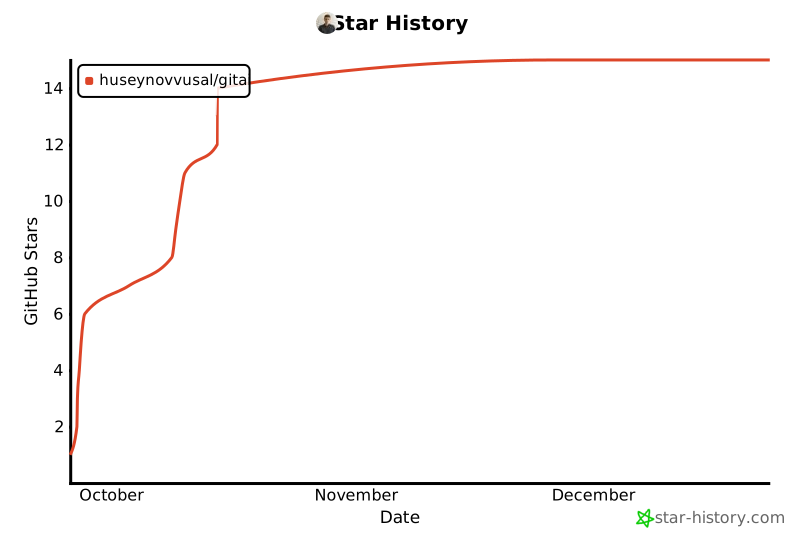
## Star History
## 🤝 Contributing
Contributions are welcome. Please follow the guidelines in [CONTRIBUTING.md](CONTRIBUTING.md).
Suggested contribution workflow:
1. Fork the repo and create a topic branch
2. Implement your feature or fix
3. Add/adjust tests where appropriate
4. Open a pull request describing the change and rationale
If you'd like help designing an enhancement (hooks, CI integrations, new backends), open an issue first to discuss.
## 🔒 Security & Privacy
- The tool may send diffs and repository content to third-party AI providers when generating messages — treat this like any other service that may upload code. Do not send secrets or sensitive data to remote AI providers.
- If you need an offline-only workflow, prefer running local models via Ollama and keep `OLLAMA_API_PATH` configured.
## 📜 License
This project is released under the MIT License. See [LICENSE](LICENSE) for details.
## 👤 Authors
Vusal Huseynov — original author