https://github.com/husseinAbdElaziz/angular-scan
Automatically detects and highlights Angular components that are re-rendering
https://github.com/husseinAbdElaziz/angular-scan
angular change-detection performance rendering ui
Last synced: about 2 months ago
JSON representation
Automatically detects and highlights Angular components that are re-rendering
- Host: GitHub
- URL: https://github.com/husseinAbdElaziz/angular-scan
- Owner: husseinAbdElaziz
- License: mit
- Created: 2026-03-08T18:37:28.000Z (5 months ago)
- Default Branch: main
- Last Pushed: 2026-03-31T17:49:51.000Z (4 months ago)
- Last Synced: 2026-04-22T00:17:29.930Z (3 months ago)
- Topics: angular, change-detection, performance, rendering, ui
- Language: TypeScript
- Homepage: https://www.npmjs.com/package/angular-scan
- Size: 2.07 MB
- Stars: 5
- Watchers: 0
- Forks: 0
- Open Issues: 5
-
Metadata Files:
- Readme: README.md
- Agents: AGENTS.md
Awesome Lists containing this project
- fucking-awesome-angular - angular-scan - Automatically detects and highlights Angular components that are re-rendering. (Development Utilities / Debugging)
- awesome-angular - angular-scan - Automatically detects and highlights Angular components that are re-rendering. (Development Utilities / Debugging)
README
# angular-scan
Automatically detects and highlights Angular components that are re-rendering — the Angular equivalent of [react-scan](https://github.com/aidenybai/react-scan).
- **Yellow flash** — component was checked and its DOM changed (normal re-render)
- **Red flash** — component was checked but its DOM did **not** change (unnecessary render)
- **Counter badge** — cumulative render count on each component host element
- **Toolbar HUD** — draggable floating panel with live stats, runtime toggles, flash-duration slider, reset, and a per-component inspector
Zero overhead in production — the entire library is tree-shaken when `isDevMode()` returns `false`.
Works with both **zone.js** and **zoneless** Angular applications.
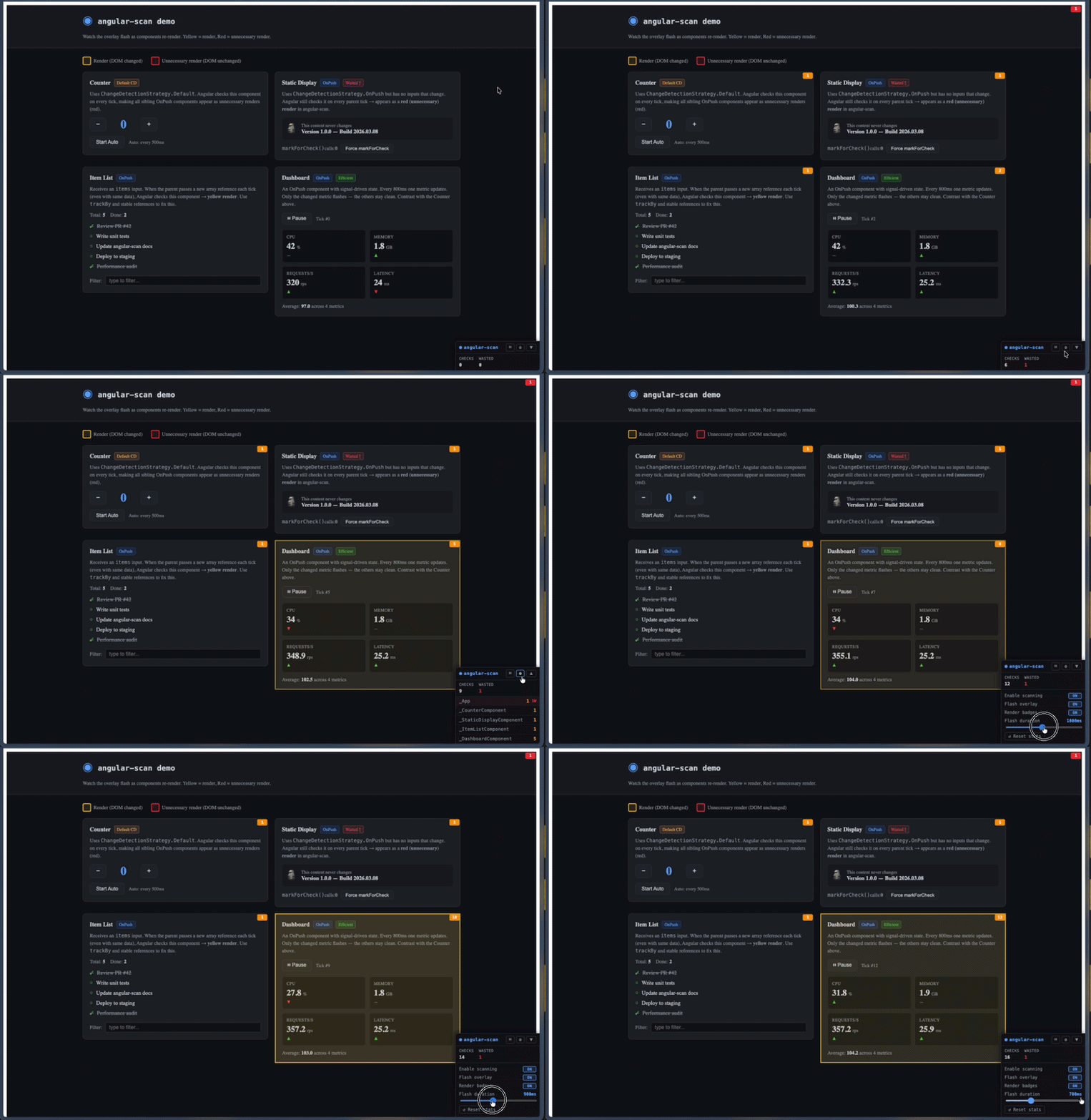
👉 **[Live Demo](https://husseinabdelaziz.github.io/angular-scan)**
---
## Installation
```bash
npm install angular-scan --save-dev
```
---
## Usage
### Provider-based (recommended)
Add `provideAngularScan()` to your application providers:
```ts
// app.config.ts
import { ApplicationConfig } from '@angular/core';
import { provideAngularScan } from 'angular-scan';
export const appConfig: ApplicationConfig = {
providers: [
provideAngularScan(),
],
};
```
### Imperative API
For micro-frontends or apps where you can't modify providers, call `scan()` before `bootstrapApplication`:
```ts
// main.ts
import { bootstrapApplication } from '@angular/platform-browser';
import { scan } from 'angular-scan';
import { AppComponent } from './app/app.component';
import { appConfig } from './app/app.config';
scan();
bootstrapApplication(AppComponent, appConfig);
```
`scan()` returns a teardown function:
```ts
const stop = scan();
// later...
stop(); // removes overlay and stops tracking
```
---
## Options
```ts
provideAngularScan({
enabled: true, // set false to disable entirely (default: true)
flashDurationMs: 500, // how long the flash animation lasts in ms (default: 500)
showBadges: true, // show render count badges on host elements (default: true)
showToolbar: true, // show the floating toolbar HUD (default: true)
});
```
The same options are accepted by `scan()`.
---
## How it works
Angular exposes `window.ng.ɵsetProfiler()` in development mode — the same hook used by Angular DevTools in Chrome. `angular-scan` registers a profiler callback to intercept every change detection cycle:
1. **`ChangeDetectionStart`** — a `MutationObserver` begins recording all DOM mutations
2. **`ChangeDetectionSyncStart/End`** — gates which `TemplateUpdateStart` events count as real renders (excludes the dev-mode `checkNoChanges` pass)
3. **`TemplateUpdateStart`** — the exact component instance being checked is captured
4. **`ChangeDetectionEnd`** — `MutationObserver.takeRecords()` flushes synchronously; each captured instance is mapped to its host element via `ng.getHostElement()`; components whose subtree had DOM mutations are marked as **renders**, the rest as **unnecessary renders**
All Angular signal writes are deferred via `queueMicrotask()` to avoid triggering a new CD cycle from inside the profiler callback.
The canvas overlay (`position: fixed`, full viewport, `pointer-events: none`) uses a `requestAnimationFrame` loop to draw and fade rectangles over component host elements. The toolbar is created via `createComponent()` and attached to `ApplicationRef` outside the normal component tree, so its own renders are excluded from tracking.
---
## Interpreting the output
| Signal | Meaning | Common cause |
|--------|---------|-------------|
| Yellow flash | Component re-rendered (DOM changed) | Normal update — signal/input changed |
| Red flash | Component checked but DOM unchanged | Parent uses `Default` CD strategy; child is `OnPush` with no changed inputs |
| High wasted count on a component | It's being checked unnecessarily on every tick | Wrap it in `OnPush`; ensure parent isn't `Default` CD |
| Counter badge turns red | More unnecessary than necessary renders | Same as above — component is `OnPush` but still gets walked |
---
## Toolbar HUD
The floating toolbar mounts in the bottom-right corner and can be dragged anywhere on screen. The panel is clamped inside the viewport on drag, resize, and when expanding sections near a screen edge.
**Header**
| Button | Action |
|--------|--------|
| ⏸ / ▶ | Pause or resume scanning |
| ⚙ | Open the settings panel |
| ▲ / ▼ | Expand or collapse the per-component inspector |
The header itself is the drag handle — grab anywhere outside the buttons to move the panel.
**Stats**
- **CHECKS** — total components checked since the last reset
- **WASTED** — total unnecessary renders (turns red when > 0)
**Settings panel** (⚙)
- **Enable scanning** — mirrors the header pause button
- **Flash overlay** — show/hide the canvas flashes
- **Render badges** — show/hide the counter badges on host elements
- **Flash duration** — slider, 100 ms – 2000 ms
- **↺ Reset stats** — clears all render counts and the inspector list
**Inspector** (▲) lists each tracked component with its name, total render count, and a `nW` wasted suffix. Rows whose most recent render was "unnecessary" are highlighted red.
Pass `showToolbar: false` to disable the HUD entirely while keeping flashes and badges.
---
## Requirements
- Angular **≥ 20**
- Must be used in **development mode** (`ng serve` / `ng build --configuration development`)
- The Angular debug APIs (`window.ng`) are only available in dev mode — `angular-scan` is silently disabled otherwise