https://github.com/huytdps13400/react-native-ssl-manager
React Native SSL Pinning provides seamless SSL certificate pinning integration for enhanced network security in React Native apps. This module enables developers to easily implement and manage certificate pinning, protecting applications against man-in-the-middle (MITM) attacks. With dynamic configuration options and the ability to toggle SSL
https://github.com/huytdps13400/react-native-ssl-manager
react-native react-native-app react-native-ssl-manager ssl-certificates ssl-manager ssl-pinning ssl-proxy
Last synced: about 3 hours ago
JSON representation
React Native SSL Pinning provides seamless SSL certificate pinning integration for enhanced network security in React Native apps. This module enables developers to easily implement and manage certificate pinning, protecting applications against man-in-the-middle (MITM) attacks. With dynamic configuration options and the ability to toggle SSL
- Host: GitHub
- URL: https://github.com/huytdps13400/react-native-ssl-manager
- Owner: huytdps13400
- License: mit
- Created: 2024-08-09T06:26:11.000Z (almost 2 years ago)
- Default Branch: main
- Last Pushed: 2026-07-03T05:04:37.000Z (6 days ago)
- Last Synced: 2026-07-03T05:05:53.497Z (6 days ago)
- Topics: react-native, react-native-app, react-native-ssl-manager, ssl-certificates, ssl-manager, ssl-pinning, ssl-proxy
- Language: JavaScript
- Homepage: https://www.npmjs.com/package/react-native-ssl-manager
- Size: 36.4 MB
- Stars: 34
- Watchers: 1
- Forks: 3
- Open Issues: 1
-
Metadata Files:
- Readme: README.md
- Changelog: CHANGELOG.md
- Contributing: CONTRIBUTING.md
- License: LICENSE
- Code of conduct: CODE_OF_CONDUCT.md
- Agents: AGENTS.md
Awesome Lists containing this project
README
# react-native-ssl-manager
[](https://www.npmjs.com/package/react-native-ssl-manager)
[](https://www.npmjs.com/package/react-native-ssl-manager)
[](./LICENSE)
Production-ready SSL certificate pinning for React Native and Expo. Protects against MITM attacks with platform-native enforcement on both iOS and Android.
## Features
- **Platform-native pinning** — TrustKit (iOS) + Network Security Config (Android)
- **Single config** — one `ssl_config.json` drives both platforms
- **Runtime toggle** — enable/disable pinning without rebuilding
- **Expo + RN CLI** — built-in Expo plugin, auto-setup for bare projects
- **Nitro Module** — native code generated by `nitrogen`; requires the New Architecture (RN 0.75+) and the `react-native-nitro-modules` peer dependency
- **Android NSC generation** — auto-generates `network_security_config.xml` at build time, covering OkHttp, WebView, Coil, Glide, and HttpURLConnection
## Installation
> **v2 is a [Nitro Module](https://nitro.margelo.com).** It requires
> **React Native 0.75+** (New Architecture) and the `react-native-nitro-modules`
> peer dependency. Upgrading from v1? See [`MIGRATION.md`](./MIGRATION.md).
```bash
npm install react-native-ssl-manager react-native-nitro-modules
# or
yarn add react-native-ssl-manager react-native-nitro-modules
```
iOS:
```bash
cd ios && pod install
```
### Expo
```bash
npx expo install react-native-ssl-manager
```
Add to `app.json`:
```json
{
"expo": {
"plugins": [
["react-native-ssl-manager", { "sslConfigPath": "./ssl_config.json" }]
]
}
}
```
Expo plugin options:
| Option | Default | Description |
|--------|---------|-------------|
| `sslConfigPath` | `"ssl_config.json"` | Path to config relative to project root |
| `enableAndroid` | `true` | Enable Android NSC generation + manifest patching |
| `enableIOS` | `true` | Enable iOS asset bundling |
## Quick Start
### 1. Create `ssl_config.json` in your project root
```json
{
"sha256Keys": {
"api.example.com": [
"sha256/AAAAAAAAAAAAAAAAAAAAAAAAAAAAAAAAAAAAAAAAAAA=",
"sha256/BBBBBBBBBBBBBBBBBBBBBBBBBBBBBBBBBBBBBBBBBBB="
]
}
}
```
> Always include at least 2 pins per domain (primary + backup) to avoid lockout during certificate rotation.
### 2. That's it — pinning is active at launch
Once `ssl_config.json` is bundled (via the Expo plugin or the CLI build
scripts), **SSL pinning is enforced automatically at app launch — no JavaScript
call is required.** On iOS this is wired up through an Objective-C `+load`
bootstrap; on Android through an `androidx.startup` initializer that installs the
pinned `OkHttpClientFactory` before React Native's networking stack initializes.
> Earlier versions only initialized pinning inside the native module
> constructor, which React Native instantiates lazily. That meant pinning did
> not take effect until JS first touched the module (e.g. calling
> `getUseSSLPinning()`). This is no longer necessary.
### 3. (Optional) Control pinning from JavaScript
```typescript
import {
setUseSSLPinning,
getUseSSLPinning,
setSSLConfig,
getPinnedDomains,
isSSLManagerAvailable,
} from 'react-native-ssl-manager';
// Confirm the native module is linked (false ⇒ pinning is NOT active)
isSSLManagerAvailable();
// Toggle pinning (see note below about iOS)
await setUseSSLPinning(false);
const isEnabled = await getUseSSLPinning();
// Update pins at runtime
await setSSLConfig({
sha256Keys: {
'api.example.com': ['sha256/AAAA...=', 'sha256/BBBB...='],
},
});
// Inspect the active configuration
const domains = await getPinnedDomains();
```
**Important:** Disabling/changing pinning at runtime requires an app restart to
fully take effect on **iOS**, because TrustKit can only be initialized once per
process. On **Android** changes apply to subsequent requests immediately. See
[Runtime Toggle](#runtime-toggle) below.
## How It Works
### iOS — TrustKit Swizzling
TrustKit is initialized with `kTSKSwizzleNetworkDelegates: true`, which swizzles `URLSession` delegates at the OS level. Most libraries using `URLSession` under the hood are automatically covered — no per-library configuration needed.
Each domain is configured with:
```swift
pinnedDomains[domain] = [
kTSKIncludeSubdomains: true,
kTSKEnforcePinning: true,
kTSKPublicKeyHashes: pins // SHA-256 base64
]
```
### Android — Network Security Config + OkHttp CertificatePinner
Two layers of enforcement:
1. **OkHttpClientFactory** — Intercepts React Native's HTTP client creation, applies `CertificatePinner` from `ssl_config.json`. Covers `fetch`/`axios` calls from JS.
2. **Network Security Config (NSC)** — Auto-generated `network_security_config.xml` at build time from `ssl_config.json`. Enforced at OS level for all stacks using the platform default `TrustManager`.
Generated XML format:
```xml
localhost
10.0.2.2
10.0.3.2
api.example.com
AAAAAAAAAAAAAAAAAAAAAAAAAAAAAAAAAAAAAAAAAAA=
```
The first `domain-config` keeps local dev hosts (`localhost`, and the emulator
loopbacks `10.0.2.2` / `10.0.3.2`) reachable over cleartext so the Metro bundler
still connects in debug builds — without it, referencing this config from the
manifest would override React Native's default debug config and break the JS
bundle connection. Pins carry no expiration (an expired `pin-set` would silently
stop enforcing). If your app already has a `network_security_config.xml`, the
library **merges** pin-set entries — existing configs (debug-overrides,
base-config, an existing localhost cleartext block) are preserved.
## Supported Networking Stacks
| Stack | Platform | Covered | Mechanism |
|-------|----------|---------|-----------|
| `fetch` / `axios` | iOS | Yes | TrustKit swizzling |
| `URLSession` | iOS | Yes | TrustKit swizzling |
| `SDWebImage` | iOS | Yes | TrustKit swizzling (uses URLSession) |
| `Alamofire` | iOS | Yes | TrustKit swizzling (uses URLSession) |
| Other URLSession-based libs | iOS | Yes* | TrustKit swizzling |
| `fetch` / `axios` | Android | Yes | OkHttpClientFactory + NSC |
| OkHttp (direct) | Android | Yes | NSC + CertificatePinner |
| Android WebView | Android | Yes | NSC |
| Coil / Ktor OkHttp engine | Android | Yes | NSC |
| Glide / OkHttp3 | Android | Yes | NSC |
| `HttpURLConnection` | Android | Yes | NSC |
| Cronet | Android | Best-effort* | NSC (if using platform TrustManager) |
### Known limitations
- **iOS URLSession**: Apps with complex custom `URLSessionDelegate` implementations or other method-swizzling libraries may conflict with TrustKit. TrustKit docs note swizzling is designed for simple delegate setups.
- **Android Cronet**: No authoritative docs confirm Cronet always respects NSC ``. Cronet may use its own TLS stack / custom TrustManager that bypasses NSC, so coverage is best-effort. For guaranteed enforcement use Cronet's own pinning API — `CronetEngine.Builder.addPublicKeyPins()`.
- **Custom TrustManager**: Any library (OkHttp, Cronet, etc.) that builds its own `TrustManager` bypassing the system default will not be covered by NSC.
- **Custom TLS stacks**: iOS libraries not using `URLSession` (e.g., OpenSSL bindings) and Android Ktor CIO engine are not covered. See [Ktor CIO](#ktor-cio-engine) below.
## PinnedOkHttpClient (Android)
For native module authors who need a pinned OkHttp client outside React Native's networking layer:
```kotlin
import com.usesslpinning.PinnedOkHttpClient
val client = PinnedOkHttpClient.getInstance(context)
```
- Singleton with double-checked locking
- Reads `ssl_config.json` and configures `CertificatePinner` when pinning is enabled
- Returns plain `OkHttpClient` when pinning is disabled
- Auto-invalidates when pinning state changes via `setUseSSLPinning`
### Glide Integration
```kotlin
@GlideModule
class MyAppGlideModule : AppGlideModule() {
override fun registerComponents(context: Context, glide: Glide, registry: Registry) {
val client = PinnedOkHttpClient.getInstance(context)
registry.replace(
GlideUrl::class.java,
InputStream::class.java,
OkHttpUrlLoader.Factory(client)
)
}
}
```
### Coil Integration
```kotlin
val imageLoader = ImageLoader.Builder(context)
.okHttpClient { PinnedOkHttpClient.getInstance(context) }
.build()
```
### Ktor OkHttp Engine
```kotlin
val httpClient = HttpClient(OkHttp) {
engine {
preconfigured = PinnedOkHttpClient.getInstance(context)
}
}
```
### Ktor CIO Engine
CIO uses its own TLS stack — **not covered** by NSC or `PinnedOkHttpClient`. Manual `TrustManager` required:
```kotlin
import io.ktor.client.*
import io.ktor.client.engine.cio.*
import java.security.MessageDigest
import java.security.cert.X509Certificate
import javax.net.ssl.X509TrustManager
val httpClient = HttpClient(CIO) {
engine {
https {
trustManager = object : X509TrustManager {
override fun checkClientTrusted(chain: Array, authType: String) {}
override fun checkServerTrusted(chain: Array, authType: String) {
val leafCert = chain[0]
val publicKeyHash = MessageDigest.getInstance("SHA-256")
.digest(leafCert.publicKey.encoded)
val pin = android.util.Base64.encodeToString(publicKeyHash, android.util.Base64.NO_WRAP)
val expectedPins = listOf("YOUR_PIN_HERE") // from ssl_config.json
if (pin !in expectedPins) {
throw javax.net.ssl.SSLPeerUnverifiedException("Certificate pin mismatch")
}
}
override fun getAcceptedIssuers(): Array = arrayOf()
}
}
}
}
```
## Runtime Toggle
- **Android:** `setUseSSLPinning(...)` and `setSSLConfig(...)` rebuild the
`OkHttpClientFactory` and take effect on subsequent requests immediately.
- **iOS:** TrustKit can only be initialized once per process, so disabling or
changing pinning is persisted and applied on the **next app launch**. Restart
the app to apply.
```typescript
import { setUseSSLPinning } from 'react-native-ssl-manager';
import RNRestart from 'react-native-restart'; // optional
await setUseSSLPinning(false);
RNRestart.Restart(); // apply change (required on iOS)
```
Default state is **enabled** (`true`). State is persisted in:
- iOS: `UserDefaults`
- Android: `SharedPreferences` (context: `AppSettings`, key: `useSSLPinning`)
## Disabling for e2e tests (Detox, mocked backends)
On iOS, TrustKit is installed at app launch via an Objective-C `+load` hook —
**before any JavaScript runs** — and swizzles `NSURLSession` process-wide.
Because it cannot be deinitialized within a running process, calling
`setUseSSLPinning(false)` from JS is **too late** for an e2e run: the swizzle is
already in place, so a mocked backend whose certificate doesn't match your pins
gets its connection blocked (requests appear to hang / never respond).
Use one of these **before-launch** off-switches to skip TrustKit entirely for a
test build or a single test launch. Each also prevents the swizzling, so mocked
traffic flows normally. They have **no effect on your production build** unless
you set them there.
**Detox — per-launch (no separate build):**
```js
await device.launchApp({
newInstance: true,
launchArgs: { RNSSLManagerDisabled: true },
});
```
**Build-time exclude (a dedicated test/e2e configuration):** set a boolean
`RNSSLManagerDisabled = YES` in that configuration's `Info.plist`.
**Other channels** (all equivalent):
- Launch argument `--disable-ssl-pinning` (e.g. `xcodebuild` test args)
- Environment variable `RN_SSL_MANAGER_DISABLED=1` (Xcode scheme / CI)
The Info.plist / `NSUserDefaults` flag accepts a real boolean (``) or a
truthy string (`YES` / `true` / `1`).
**Verify it took effect (iOS):** the native layer logs to the device console at
launch (filter for `RNSSLManager`, e.g. in Console.app or
`xcrun simctl spawn booted log stream --predicate 'eventMessage CONTAINS "RNSSLManager"'`):
- `SSL pinning DISABLED for this launch via ` — pinning was skipped
- `SSL pinning ACTIVE — TrustKit installed … for domains: …` — pinning is on
- `BLOCKED connection to …` — a request failed pin validation
> Android does not have this problem: pinning applies per-request, so
> `setUseSSLPinning(false)` takes effect immediately without relaunching. For
> connecting to a local mock/dev server over cleartext, the generated Network
> Security Config already permits `localhost`, `10.0.2.2` and `10.0.3.2`.
## API Reference
### `setUseSSLPinning(usePinning: boolean): Promise`
Enable or disable SSL pinning. On iOS, disabling takes effect on the next app
launch (TrustKit cannot be un-initialized within a running process).
### `getUseSSLPinning(): Promise`
Returns current pinning state. Defaults to `true` if never explicitly set.
### `setSSLConfig(config: SslPinningConfig | string): Promise`
Update the pinning configuration at runtime. Accepts a config object or a
pre-serialized JSON string. Rejects with an error code on malformed input.
Android applies changes to subsequent requests immediately; iOS applies them on
the next app launch.
### `getPinnedDomains(): Promise`
Resolves with the domains in the active configuration (runtime config if set,
otherwise the bundled `ssl_config.json`).
### `isSSLManagerAvailable(): boolean`
Returns whether the native module is linked. When `false`, all functions are
no-ops and pinning is **not** enforced — rebuild the app so the native module is
linked.
### Types
```typescript
interface SslPinningConfig {
sha256Keys: {
[domain: string]: string[];
};
}
interface SslPinningError extends Error {
code?: string;
message: string;
}
```
## Configuration Details
### `ssl_config.json`
Must be named exactly `ssl_config.json` and placed in the project root.
```json
{
"sha256Keys": {
"api.example.com": [
"sha256/primary-cert-hash=",
"sha256/backup-cert-hash="
]
}
}
```
Pin format: `sha256/` prefix + base64-encoded SHA-256 hash of the certificate's Subject Public Key Info (SPKI). The `sha256/` prefix is stripped automatically when generating NSC XML.
### How the config reaches each platform
| Platform | RN CLI | Expo |
|----------|--------|------|
| **iOS** | Podspec script phase copies to app bundle | Plugin copies to `ios/` + adds to Xcode project |
| **Android (OkHttp)** | Postinstall copies to `assets/` | Plugin copies to `app/src/main/assets/` |
| **Android (NSC)** | Gradle task generates XML in `res/xml/` | Plugin generates XML in `res/xml/` |
| **Android (Manifest)** | Gradle task patches manifest | Plugin patches manifest |
### Verifying your setup
**Android** (RN CLI): After building, run:
```bash
./gradlew checkSslConfig
```
**Testing with Proxyman/Charles**: Enable pinning, then attempt to intercept traffic. Requests should fail with SSL handshake errors. Disable pinning to inspect traffic during development.
## Platform Requirements
| | Minimum |
|---|---------|
| iOS | 13.0 |
| Android | API 21 (5.0) |
| React Native | 0.60+ (AutoLinking), 0.68+ (New Architecture) |
| Expo | SDK 47+ |
| Node | 16+ |
## Roadmap
- Certificate rotation support and expiry notifications
- `react-native-ssl-manager-glide` — optional artifact with pre-configured `AppGlideModule`
- React Native Web support
## Demo
| iOS | Android |
|-----|---------|
| [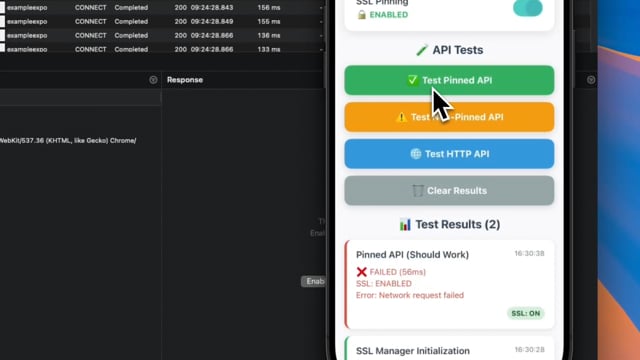](https://vimeo.com/1109299210) | [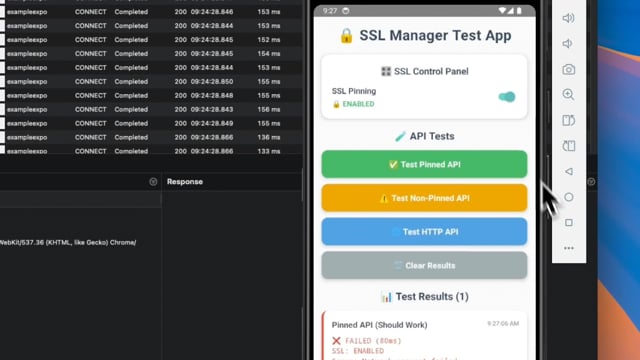](https://vimeo.com/1109299632) |
## Contributing
```bash
git clone https://github.com/huytdps13400/react-native-ssl-manager.git
cd react-native-ssl-manager
yarn install
npm run build
# Example apps
npm run example:ios
npm run example:android
npm run example-expo:ios
npm run example-expo:android
```
See [CONTRIBUTING.md](CONTRIBUTING.md) for details.
## License
MIT