https://github.com/hydrabus/hydratool
HydraBus host tool with GUI (Qt)
https://github.com/hydrabus/hydratool
hardware hydrabus hydrabus-board hydrafw hydranfc-shield linux nfc qt5 qt5-gui qtcreator terminal-emulator
Last synced: 11 months ago
JSON representation
HydraBus host tool with GUI (Qt)
- Host: GitHub
- URL: https://github.com/hydrabus/hydratool
- Owner: hydrabus
- Created: 2017-07-25T17:07:08.000Z (almost 9 years ago)
- Default Branch: master
- Last Pushed: 2020-06-11T11:15:50.000Z (about 6 years ago)
- Last Synced: 2025-04-04T21:40:17.459Z (about 1 year ago)
- Topics: hardware, hydrabus, hydrabus-board, hydrafw, hydranfc-shield, linux, nfc, qt5, qt5-gui, qtcreator, terminal-emulator
- Language: C++
- Size: 327 KB
- Stars: 33
- Watchers: 5
- Forks: 3
- Open Issues: 0
-
Metadata Files:
- Readme: README.md
- Changelog: history_line_edit.cpp
Awesome Lists containing this project
README
HydraTool
======
This repository contains host software (Linux/Windows) for HydraBus with HydraFW firmware, a project to
produce a low cost, open source multi-tool hardware for anyone interested in Learning/Developping/Debugging/Hacking/Penetration Testing
for basic or advanced embedded hardware.
HydraBus: https://www.hydrabus.com & https://github.com/hydrabus
HydraFW: https://github.com/hydrabus/hydrafw
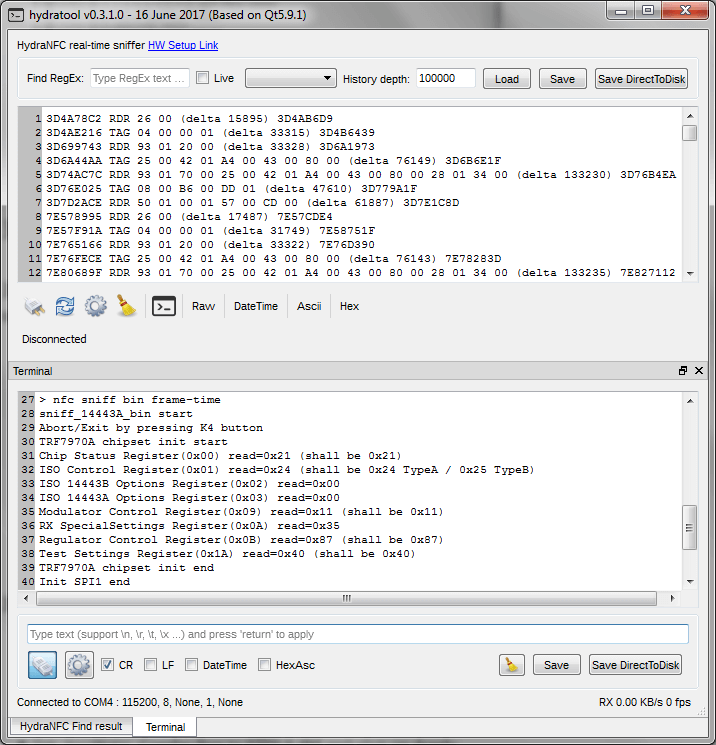
For more details on HydraTool see the [HydraTool Wiki](https://github.com/hydrabus/hydratool/wiki)
## How to build host software on Windows, GNU/LINUX:
### Prerequisites Windows, GNU/Linux:
* Qt5.6.x or more (with QtCreator)
* See Qt5.x Online Installer http://download.qt.io/official_releases/online_installers/qt-unified-windows-x86-online.exe
* See also http://download.qt.io/official_releases/qt/
* Tested with success on Qt5.6/5.7/5.9.1 (using Qt Static Build) on Ubuntu 16.x LTS & Windows7 SP1(MSVC2013)
### Build the project with QtCreator on Windows, GNU/Linux:
* Import hydratool.pro project in Qt Creator
* Configure the Project for GCC/MinGW/MSVC2013 ...
* Build the project
## How to build Qt5.x as static build on Windows, GNU/LINUX:
http://wohlsoft.ru/pgewiki/Building_static_Qt_5
### How to build Qt5.9.1 as static build on Windows MSCV2013:
```
Download and extract qt-everywhere-opensource-src-5.9.1 from http://download.qt.io/official_releases/qt/5.9/5.9.1/single/qt-everywhere-opensource-src-5.9.1.zip
In this example extract it to D:\Qt\Qt5_9_1-msvc2013_static_build\qt-everywhere-opensource-src-5.9.1
Download and extract jom from https://download.qt.io/official_releases/jom/
copy jom.exe to D:\Qt\Qt5_9_1-msvc2013_static_build\qt-everywhere-opensource-src-5.9.1
Go to D:\Qt\Qt5_9_1-msvc2013_static_build\qt-everywhere-opensource-src-5.9.1\qtbase\mkspecs\common
and change msvc-desktop.conf like this (change all MD to MT to remove dependency on msvc dlls)
initial values:
QMAKE_CFLAGS_RELEASE = $$QMAKE_CFLAGS_OPTIMIZE -MD
QMAKE_CFLAGS_RELEASE_WITH_DEBUGINFO += $$QMAKE_CFLAGS_OPTIMIZE -MD -Zi
QMAKE_CFLAGS_DEBUG = -Zi -MDd
should be changed to:
QMAKE_CFLAGS_RELEASE = $$QMAKE_CFLAGS_OPTIMIZE -MT
QMAKE_CFLAGS_RELEASE_WITH_DEBUGINFO += $$QMAKE_CFLAGS_OPTIMIZE -MT -Zi
QMAKE_CFLAGS_DEBUG = -Zi -MTd
cd D:
d:
REM Set up \Microsoft Visual Studio 2013, where is \c amd64, \c x86, etc.
CALL "D:\Microsoft Visual Studio 12.0\VC\vcvarsall.bat" x86
SET _ROOT=D:\Qt\Qt5_9_1-msvc2013_static_build\qt-everywhere-opensource-src-5.9.1
SET PATH=%_ROOT%\qtbase\bin;%_ROOT%\gnuwin32\bin;%PATH%
REM Uncomment the below line when using a git checkout of the source repository
REM SET PATH=%_ROOT%\qtrepotools\bin;%PATH%
SET _ROOT=
cd D:\Qt\Qt5_9_1-msvc2013_static_build\qt-everywhere-opensource-src-5.9.1
configure.bat -static -release -prefix "D:\Qt\Qt5.9.1_msvc2013_static" -platform win32-msvc2013 -opensource -confirm-license -qt-zlib -qt-pcre -qt-libpng -qt-libjpeg -qt-freetype -opengl desktop -no-openssl -make libs -nomake tools -nomake examples -nomake tests -skip wayland -skip purchasing -skip serialbus -skip script -skip scxml -skip speech -skip qtwebengine
jom
jom install
```
### How to build Qt5.9.1 as static build on GNU/LINUX:
```
cd ~
wget http://download.qt.io/official_releases/qt/5.9/5.9.1/single/qt-everywhere-opensource-src-5.9.1.tar.xz
tar --xz -xvf qt-everywhere-opensource-src-5.9.1.tar.xz
cd qt-everywhere-opensource-src-5.9.1
sudo ./configure -static -release -prefix ~/Qt591static -opensource -confirm-license -qt-zlib -qt-pcre -qt-libpng -qt-libjpeg -qt-freetype -qt-xcb -opengl desktop -make libs -nomake tools -nomake examples -nomake tests -skip wayland -skip purchasing -skip serialbus -skip script -skip scxml -skip speech -skip qtwebengine
sudo make -r -j 4
sudo make install
```