https://github.com/hydroshare/django_docker_processes
Run complex processes as Docker containers using Django and Celery
https://github.com/hydroshare/django_docker_processes
Last synced: about 1 month ago
JSON representation
Run complex processes as Docker containers using Django and Celery
- Host: GitHub
- URL: https://github.com/hydroshare/django_docker_processes
- Owner: hydroshare
- License: bsd-3-clause
- Created: 2014-09-24T15:03:29.000Z (over 11 years ago)
- Default Branch: master
- Last Pushed: 2015-05-13T01:56:47.000Z (about 11 years ago)
- Last Synced: 2025-01-27T22:48:00.920Z (over 1 year ago)
- Language: Python
- Size: 844 KB
- Stars: 3
- Watchers: 50
- Forks: 1
- Open Issues: 0
-
Metadata Files:
- Readme: README.md
- License: LICENSE
Awesome Lists containing this project
README
# Django Docker Processes
## Why do I need this?
Django Docker Processes is for when you want to run arbitrary processes in Django while keeping them separate and secure from the main Django process and from each other. Docker Processes allows an administrator to point at a GitHub repository with a Dockerfile, then build and run that Dockerfile from within Django. It can scale across any number of machines and it can operate asynchronously.
## How to use it
In the Django admin site:
The admin site will get an entry for `Django_Docker_Processes`. In there you can set up DockerProfiles and ContainerOverrides. DockerProfiles are the basis for making containers. You can specify the codebase for the container by setting a name, a git repo, a commit ID for the git repo or a branch. You can then link to other containers, expose ports and bind volumes as well as bind environment variables.
Container overrides allow you to further control the way the container is created. These provide things like memory and CPU constraints and allow you to override settings on the base image.
#### In your Django app, define a signal handler:
```python
from django_docker_processes import signals
#
# set up code to handle the results
#
def when_my_process_ends(sender, instance, result_text=None, result_data=None, files=None, logs=None, **kw):
# make something out of the result data - result_data is a dict, result_text is plaintext
# files are UploadedFile instances
# logs are plain text stdout and stderr from the finished container
def when_my_process_fails(sender, instance, error_text=None, error_data=None, logs=None, **kw):
# do something out of the error data
# error_data is a dict
# error_text is plain text
# logs are plain text stdout and stderr from the dead container
finished = signals.process_finished.connect(when_my_process_ends, weak=False)
error_handler = signals.process_aborted.connect(when_my_process_fails, weak=False)
```
#### Now, somewhere else in IPython or your Django app, call the task
```python
#
# Interactively pull a profile and execute the task
#
from django_docker_processes.models import DockerProfile
from django_docker_processes import tasks
my_profile = get_object_or_404(DockerProfile, name='My Process')
process = models.DockerProcess.objects.create(profile=my_profile) # creates a unique ID
promise = tasks.run_process.apply_async(process, env={ ... })
logs = promise.get()
print logs
process.delete() # no reason to leave it hanging around in the database
```
You can also post any files as multipart/form-data and they will get passed along to the signal handler. See tasks.py for more documentation on the individual tasks.
Now, in your Docker container, you will want a script that scrapes the environment looking for any parameters and the special environment variables: `RESPONSE_URL` and `ABORT_URL`. For example your container's init script could look exactly like this:
```python
#!/usr/bin/python
import requests
import os
import json
requests.post(os.environ['RESPONSE_URL'], data={
'result_text': "result text",
'result_data': json.dumps(os.environ)
})
```
Or check out this GitHub project using shell: [Pandoc-Docker](https://github.com/JeffHeard/pandoc-docker)
## What's it do?
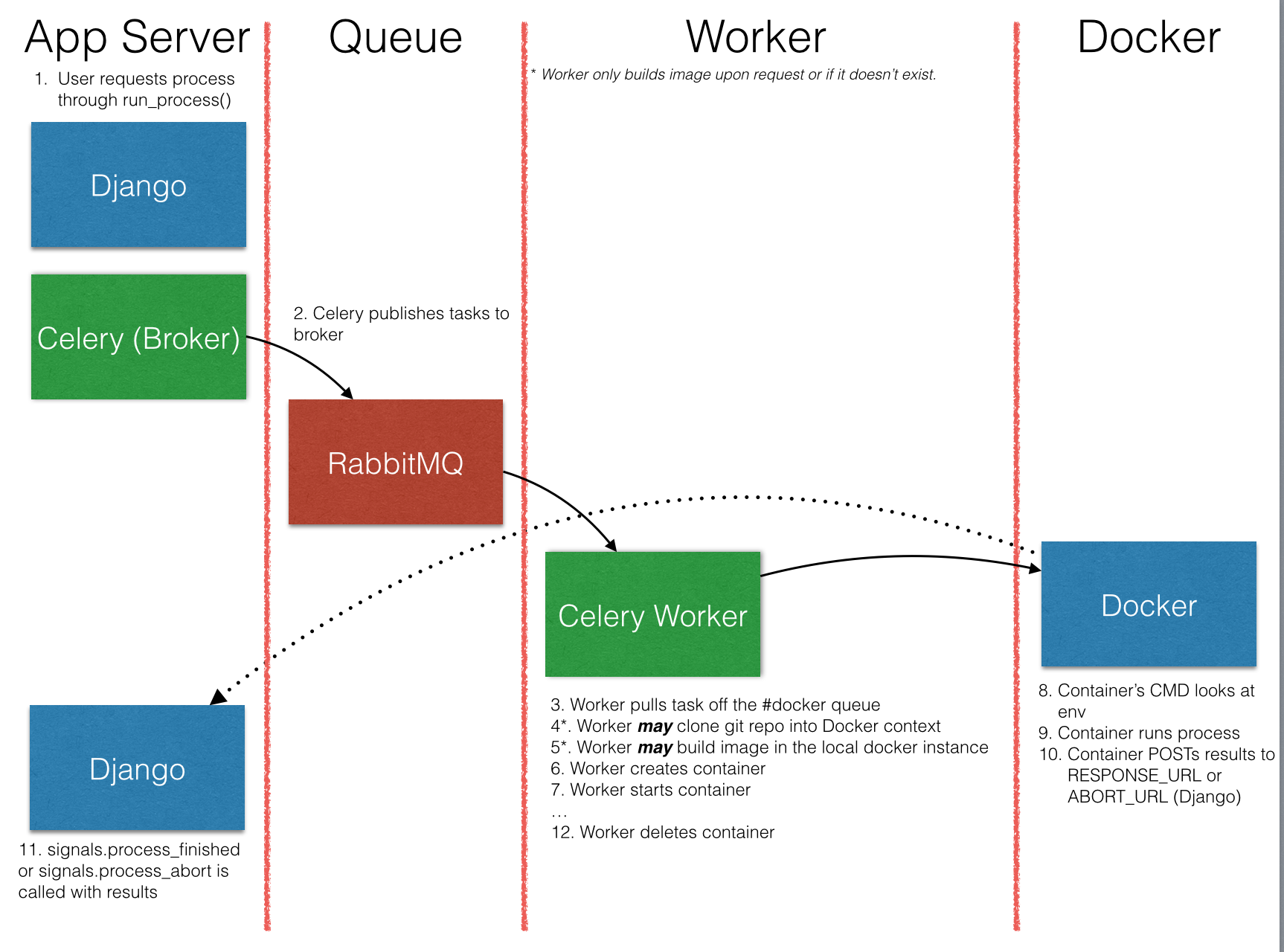
`django_docker_processes` will:
* Clone any commit of any branch of a git repository, which is assumed to container a Dockerfile (at least)
* Init and update any submodules in that repository
* `docker build` that repository and tag it with a name.
* Run a container from the built images and post the results of running the container back to the requestor.
## Why would I want to do that?
Because you want to set up "canned" processes for people to execute on arbitrary data. Celery tasks are great if you have a well-defined set of tasks to start with, but what if you want to load new tasks at runtime, and what if those tasks come with frankly maniacal sets of dependencies and requirements you don't want to install on your servers running Celery?
Well, then you use Django Docker Processes to manage those tasks. This way someone can register a Git repo in Django and their task is encapsulated in that git repo. They then set up the task so that it executes and pulls all its configuration information from its environment. Issue a build command for that task and it's ready to go.
## Requirements
Docker Processes is implemented as a Django app and requireds Celery and an AMQP backend that supports broadcast messaging (such as RabbitMQ). And of course you also need Docker. In short:
* [Celery](http://www.celeryproject.org)
* [RabbitMQ](http://www.rabbitmq.com)
* [Django](http://www.djangoproject.com)
* [Docker](http://www.docker.io)
* django-jsonfield (pip)
* kombu
* Python 2.7
* Git
## Installation
1) Add the `django_docker_processes` app to your `settings.py`'s `INSTALLED_APPS`.
2) Add something like the below code to settings.py to establish the broadcast and direct queues for dispatching Docker tasks. Correct the DOCKER_API_VERSION and DOCKER_URL to match your Docker configuration (if you're running Celery in a container, don't forget to make sure that the Docker socket or remote API is available to your celery workers.
```python
CELERY_DEFAULT_QUEUE = 'default'
DOCKER_EXCHANGE=Exchange('docker', type='direct')
DEFAULT_EXCHANGE=Exchange('default', type='topic')
CELERY_QUEUES = (
Queue('default', routing_key='task.#'),
Queue('docker_container_tasks', DOCKER_EXCHANGE, routing_key='docker.container'),
Broadcast('docker_broadcast_tasks', DOCKER_EXCHANGE, routing_key='docker.broadcast'),
)
CELERY_DEFAULT_EXCHANGE = 'tasks'
CELERY_DEFAULT_EXCHANGE_TYPE = 'topic'
CELERY_DEFAULT_ROUTING_KEY = 'task.default'
CELERY_ROUTES = ('django_docker_processes.router.Router',)
DOCKER_URL = 'tcp://192.168.59.103:2375/'
DOCKER_API_VERSION = '1.12'
```
3) Run `python manage.py syncdb` to install all the models (or create migrations for South/Django 1.7 if you like)
4) Run celery workers that listen to the docker_container_tasks and docker_broadcast_tasks queues on machines also running Docker daemons
```sh
$ export DOCKER_HOST=
$ export DOCKER_API_VERSION=
$ celery worker -A $(app_name) -E -Q docker_container_tasks,docker_broadcast_tasks
```
## Caveats
The only links supported so far are flat. If a container requires a link to a container that requires a link, it will not work. You can link other containers to your target container, but there's no nesting. I have no need for nested linking right now, but if someone wants to add it, I would support that.
This code was originally developed at the [NCEAS/RENCI Open Science Codefest 2014](http://nceas.github.io/open-science-codefest/) in support of the [Hydroshare](https://github.com/hydroshare) project.