https://github.com/hyper-prog/dht22m
Kernel module for reading DHT22 / AM2302 sensors on Raspberry Pi
https://github.com/hyper-prog/dht22m
am2302 dht22 kernel kernel-driver kernel-module raspberry-pi sensor sensors
Last synced: 14 days ago
JSON representation
Kernel module for reading DHT22 / AM2302 sensors on Raspberry Pi
- Host: GitHub
- URL: https://github.com/hyper-prog/dht22m
- Owner: hyper-prog
- License: gpl-2.0
- Created: 2025-03-15T07:02:58.000Z (over 1 year ago)
- Default Branch: main
- Last Pushed: 2025-03-26T05:55:16.000Z (over 1 year ago)
- Last Synced: 2025-09-26T15:51:39.451Z (10 months ago)
- Topics: am2302, dht22, kernel, kernel-driver, kernel-module, raspberry-pi, sensor, sensors
- Language: C
- Homepage:
- Size: 281 KB
- Stars: 0
- Watchers: 1
- Forks: 0
- Open Issues: 0
-
Metadata Files:
- Readme: README.md
- License: LICENSE
Awesome Lists containing this project
README

Kernel module for reading DHT22 / AM2302 sensors on Raspberry Pi
================================================================
_**The most reliable dht22 sensor reader!**_
This project implements a [Raspberry Pi](https://en.wikipedia.org/wiki/Raspberry_Pi)
[kernel module](https://en.wikipedia.org/wiki/Loadable_kernel_module)
for the DHT22 temperature and humidity sensor.
The goal of the driver is to read multiple sensors so that
the [GPIOs](https://en.wikipedia.org/wiki/General-purpose_input/output)
can be dynamically set without reloading the kernel module.
The sensor data can easely read from `/dev/dht22mX` character devices.
This kernel module uses [hardware interrupts](https://en.wikipedia.org/wiki/Interrupt#Hardware_interrupts)
to collect sensor data, which results in much more reliable results (fewer crc errors) than
user-mode readers that constantly monitor the status of the gpio.
Introduction & Backgrounds
----------------------------
I was created a project which handle multiple DHT22 sensors.
My code collected statistics on the number of successful and failed readings,
and I found that some cases approximately 20 percent of the readings were erroneous.
It is very big amount of error!
Initially, I attempted to improve the user-space reading code,
but the DHT22 sensor transmits data using so very short pulses
(20, 50, and 70 microseconds) which makes very hard to read without loosing a bit.
Accurately capturing these signals with conventional GPIO polling proved to be unreliable.
Due to the operation system task switching, interrupts,
and system load, the number of failed readings remained high.
To achieve more precise timing and improve reading accuracy,
I turned to kernel module development. By handling GPIO signal processing at the kernel level,
the module ensures much finer timing control,
significantly reducing read errors and enhancing overall reliability.
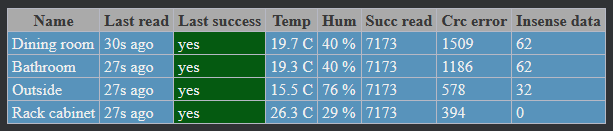
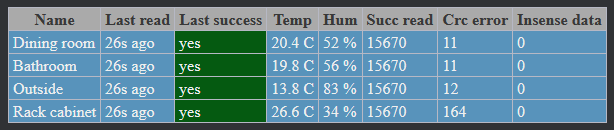
My moderately loaded Raspberri Pi with 4 sensor produce the following statistics:
With user mode reader
With kernel mode reader
_It can be seen that with the traditional user mode reading method the percentage of errors is 5-20%,
while with the dht22m kernel module it is less than 1%. (typically less than 0.1%)_
Configure sensor GPIOs to read data
-------------------------------------
You can send your dht22m sensor GPIOs numbers to as
[sysfs](https://en.wikipedia.org/wiki/Sysfs) file: `/sys/class/dht22m/gpiolist`
The GPIO numbers are separated by spaces. After If success the `/dev/dht22mX`
devices will be created in same order as the GPIOs listed in the sysfs file.
echo "2 3 22" > /sys/class/dht22m/gpiolist
You can always check the GPIOs settings of your dht22 devices
cat /sys/class/dht22m/gpiolist
2 3 22
ls /dev/dht22*
/dev/dht22m0 /dev/dht22m1 /dev/dht22m2
_Note: The kernel module is written in such a way that if a configuration request
is received matches the running configuration, recognizes the matching and does nothing.
So the user programs can safely send the necessary settings at startup, it will not cause kernel overhead._
Read the values
----------------
You can read temperature and humidity values by simple read from `/dev/dht22mX` device files.
cat /dev/dht22m*
Ok;19.7;38.2
Ok;20.1;42.1
Ok;11.7;26.0
The device files could send the following strings
| Received string | Possible events / meaning |
| --------------------------- | --------------------------------------------------------------- |
| `Ok;TEMPERATURE;HUMIDITY` | Successful read, with the read values. |
| `ChecksumError` | Checksum error during the read. Wait 2 sec and read again! |
| `ReadTooSoon` | Read the sensor too quickly. Read later! |
| `IOError` | GPIO/Sensor/Other error |
| `NotRead` | Data not read |
Pre-requisites to build the kernel module
-----------------------------------------
To build the kernel module, you need to first install the following
packages:
sudo apt install build-essential raspberrypi-kernel-headers
On some [raspbian](https://www.raspberrypi.com/software/) versions, the sources for the running kernel
may not be installed from a package.
In this case, check the https://github.com/RPi-Distro/rpi-source tool
which downloads the current running raspbery pi kernel for you.
If you did so, run the following commands to configure soruces as your running kernel:
cd /lib/modules/$(uname -r)/build
zcat /proc/config.gz > .config
make olddefconfig
make modules_prepare
Building and install the kernel module
--------------------------------------
Clone dht22m sources from github.
To compile module enter the dht22m directory and build & install it.
git clone https://github.com/hyper-prog/dht22m
cd dht22m
sudo make
sudo make install
If success, you can load the module:
sudo modprobe dht22m
In case you would like to make the dht22m module loads after reboot run:
sudo echo "dht22m" > /etc/modules-load.d/dht22m.conf
Wiring of DHT22 & Hardware connections
--------------------------------------
The hardware connection of the dht22 sensor is the same as the method described in user mode reading,
which can be found here https://github.com/hyper-prog/DHT22-Raspberry-Pi
References
-----------
To learn more about Linux kernel
modules in general, see [The Linux Kernel Module Programming
Guide](https://sysprog21.github.io/lkmpg/). To learn more about the DHT22 / AM2302
sensor, see the [data sheet](https://files.seeedstudio.com/wiki/Grove-Temperature_and_Humidity_Sensor_Pro/res/AM2302-EN.pdf).
Author
-------
- Written by Péter Deák (C) hyper80@gmail.com, License GPLv2
- Thanks to the Google and Lars Engebretsen for sensor handling tips and codes!
- The author wrote this project entirely as a hobby. Any help is welcome!
------
[](https://www.paypal.com/donate/?business=EM2E9A6BZBK64&no_recurring=0¤cy_code=USD)