https://github.com/hyprlab/homepage-gui
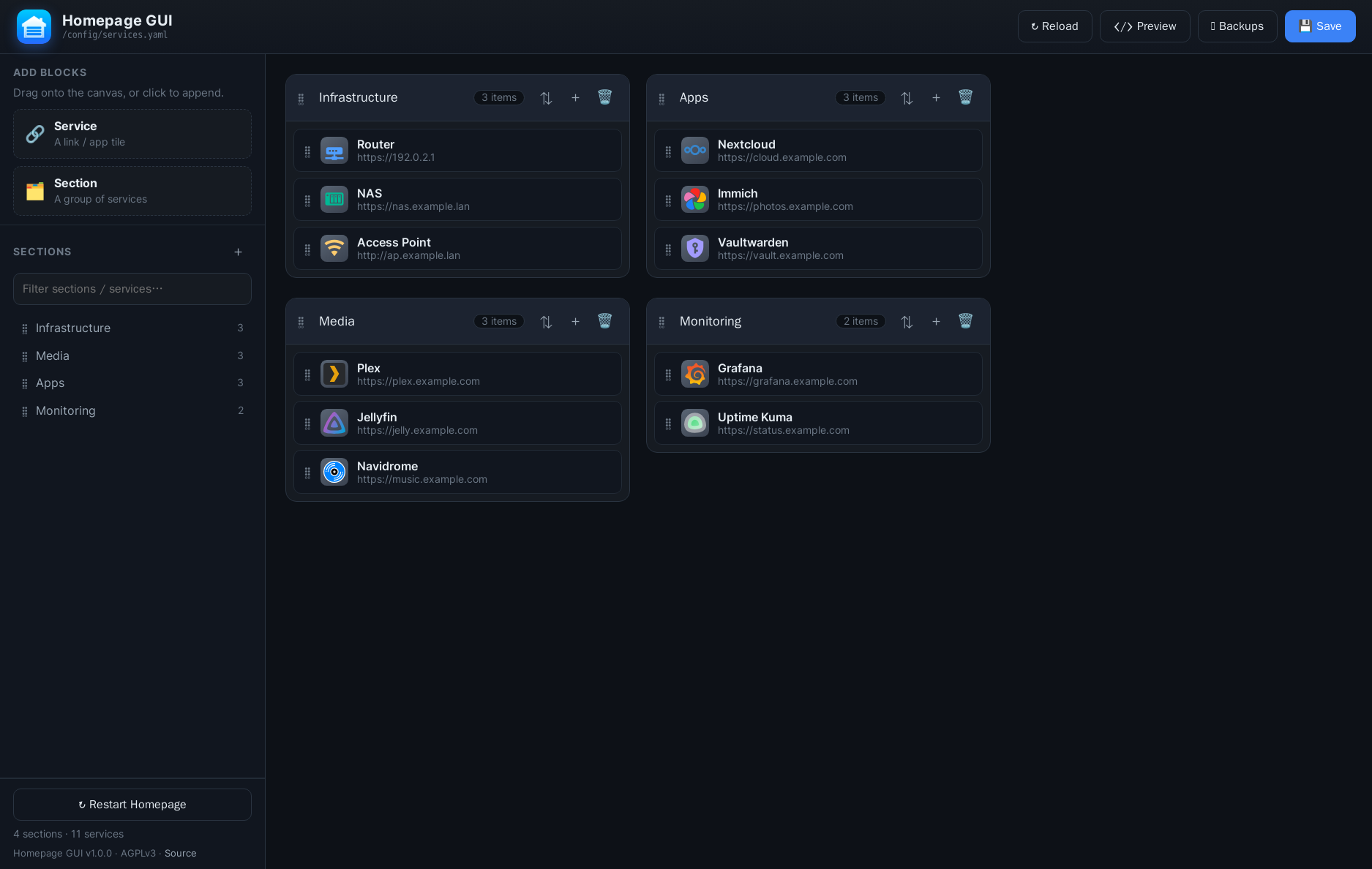
Drag-and-drop web GUI for editing gethomepage services.yaml — organize services, edit fields, pick or upload icons, with backups. Runs in Docker. Built with Claude Code.
https://github.com/hyprlab/homepage-gui
dashboard docker drag-and-drop flask gethomepage homelab homepage self-hosted selfhosted services-yaml yaml
Last synced: 1 day ago
JSON representation
Drag-and-drop web GUI for editing gethomepage services.yaml — organize services, edit fields, pick or upload icons, with backups. Runs in Docker. Built with Claude Code.
- Host: GitHub
- URL: https://github.com/hyprlab/homepage-gui
- Owner: hyprlab
- License: agpl-3.0
- Created: 2026-06-17T14:48:23.000Z (20 days ago)
- Default Branch: main
- Last Pushed: 2026-07-04T14:40:02.000Z (3 days ago)
- Last Synced: 2026-07-04T15:27:49.669Z (3 days ago)
- Topics: dashboard, docker, drag-and-drop, flask, gethomepage, homelab, homepage, self-hosted, selfhosted, services-yaml, yaml
- Language: JavaScript
- Homepage: https://hyprlab.co
- Size: 1.05 MB
- Stars: 0
- Watchers: 0
- Forks: 0
- Open Issues: 0
-
Metadata Files:
- Readme: README.md
- Changelog: CHANGELOG.md
- License: LICENSE
Awesome Lists containing this project
README
# Homepage GUI
> A self-hosted, drag-and-drop web editor for [gethomepage](https://gethomepage.dev)'s
> `services.yaml` — organize sections and services, edit every field, pick or upload icons,
> and apply changes to your live dashboard. No login, no database, runs in one container.
[](LICENSE)
[](https://hub.docker.com/r/hyprlab/homepage-gui)
[](https://hub.docker.com/r/hyprlab/homepage-gui)
---
## Table of contents
- [What it does](#what-it-does)
- [Features](#features)
- [Requirements](#requirements)
- [Install with Docker Compose](#install-with-docker-compose)
- [1. Get the files](#1-get-the-files)
- [2. Configure `.env`](#2-configure-env)
- [3. Enable custom icon uploads (optional)](#3-enable-custom-icon-uploads-optional)
- [4. Start it](#4-start-it)
- [Configuration reference](#configuration-reference)
- [Using the app](#using-the-app)
- [Custom icon uploads & the Homepage restart](#custom-icon-uploads--the-homepage-restart)
- [Backups](#backups)
- [Updating](#updating)
- [How icons render](#how-icons-render)
- [Release notes](#release-notes)
- [Building from source / development](#building-from-source--development)
- [Limitations](#limitations)
- [License](#license)
---
## What it does
Homepage's `services.yaml` is hand-edited YAML: a list of sections, each containing a list
of services with fields like `icon`, `href`, `description`, `ping`, and widgets. Homepage GUI
gives that file a fast, modern editor:
- Mount your existing Homepage `config` directory into the container.
- Edit `services.yaml` visually in your browser, on any LAN device.
- Saves write **straight back** to the same file Homepage reads, with a timestamped backup
every time. Homepage hot-reloads, so changes appear immediately (only new **icon uploads**
need a Homepage restart, which the app can do for you).
## Features
- **Drag & drop** — reorder sections, reorder services within a section, and drag services
between sections.
- **Sidebar** — section navigator with a live filter, plus draggable "Service" / "Section"
blocks you can drop onto the canvas or click to append.
- **Full service editing** — name, icon, URL (`href`), description and `ping` as first-class
fields, plus an **Advanced (YAML)** panel that round-trips widgets, `server`/`container`
and any other keys without losing them.
- **Icon chooser** with combined search across all sources (origin-badged), or per-source tabs:
- **Dashboard Icons** (`name.svg`) · **Material Design Icons** (`mdi-`) · **Font Awesome**
(`fas-`/`far-`/`fab-`) · **SVG / freesvgicons** (200k+ Iconify icons, stored as a URL).
- **My Uploads** — upload your own **PNG/SVG** files.
- **Icon color overrides** — for sources Homepage can recolor (`mdi-`/`si-`/`sh-` via `-#hex`,
and Iconify SVG URLs via `?color=`), with a color picker.
- **Alphabetical sort** per section (A→Z / Z→A).
- **Safe saves** — generated YAML is validated before writing, writes are atomic, and a
timestamped backup is taken first. Common fields are emitted in Homepage's conventional
order (`icon`, `href`, `description`, `ping`); empty fields stay blank, not `null`.
- **Backups & restore** in the UI, with **14-day auto-purge** (configurable) and a count cap.
- **YAML preview** before saving.
- **One-click Homepage restart** so newly-uploaded icons get served.
- **In-app release notes** (click the version in the sidebar footer).
- Self-hosted **Inter** font and cache-busted assets; in-app **Source** link (AGPL §13).
## Requirements
- A host running **Docker** and **Docker Compose v2** (`docker compose …`).
- An existing **Homepage** install whose `config` directory (containing `services.yaml`) is
on the same host.
- A browser with internet access for icon **search/preview** (Iconify & jsDelivr CDNs — the
same ones Homepage uses). Editing and saving work fully offline.
## Install with Docker Compose
Docker Compose is the supported way to run Homepage GUI.
### 1. Get the files
```bash
git clone https://github.com/hyprlab/homepage-gui.git
cd homepage-gui
```
The repo ships a ready-to-use `compose.yaml` that pulls `hyprlab/homepage-gui:latest`:
```yaml
services:
homepage-gui:
image: ${IMAGE:-hyprlab/homepage-gui:latest}
build: .
container_name: homepage-gui
restart: unless-stopped
user: "0:0" # needed to write a root-owned services.yaml
environment:
- HOMEPAGE_CONFIG_DIR=/config
- BACKUP_DIR=/config/.homepage-gui-backups
- KEEP_BACKUPS=40
- KEEP_BACKUP_DAYS=14
- ICONS_DIR=/icons
- HOMEPAGE_CONTAINER=${HOMEPAGE_CONTAINER:-homepage}
ports:
- "${HOST_PORT:-5005}:5000"
volumes:
- ${HOST_CONFIG_DIR:-./config}:/config
- ${HOST_ICONS_DIR:-./icons}:/icons
- /var/run/docker.sock:/var/run/docker.sock
```
### 2. Configure `.env`
Copy the example and point it at your host paths:
```bash
cp .env.example .env
```
```ini
# .env
HOST_CONFIG_DIR=/path/to/homepage/config # folder containing services.yaml
HOST_ICONS_DIR=/path/to/homepage/icons # shared custom-icons folder (see step 3)
HOST_PORT=5005 # browse to http://:5005
HOMEPAGE_CONTAINER=homepage # your Homepage container's name
```
> **Tip:** verify the resolved config before starting with `docker compose config`.
### 3. Enable custom icon uploads (optional)
Homepage serves local icons from `/app/public/icons` (referenced as `/icons/`).
For uploads to appear in Homepage, the **same host folder** must be mounted into **both**
containers. Add this volume to your **Homepage** `compose.yaml`:
```yaml
services:
homepage:
volumes:
- /path/to/homepage/config:/app/config
- /path/to/homepage/icons:/app/public/icons # <-- add this (matches HOST_ICONS_DIR)
- /var/run/docker.sock:/var/run/docker.sock
```
Then recreate Homepage once: `docker compose up -d` in your Homepage directory.
The Docker socket mount on the GUI lets its **Restart Homepage** button apply new icons.
If you'd rather not expose the socket, omit that volume — uploads still work, you'll just
restart Homepage yourself.
### 4. Start it
```bash
docker compose up -d
```
Open **`http://:5005`** (the port from `HOST_PORT`) on any device on your LAN.
## Configuration reference
These are set in `compose.yaml`'s `environment:` (container-side) and `.env` (host-side).
**Container environment variables**
| Variable | Default | Purpose |
|---|---|---|
| `HOMEPAGE_CONFIG_DIR` | `/config` | Directory (inside the container) holding `services.yaml` |
| `SERVICES_PATH` | `$HOMEPAGE_CONFIG_DIR/services.yaml` | Override the exact file path |
| `BACKUP_DIR` | `$HOMEPAGE_CONFIG_DIR/.homepage-gui-backups` | Where backups are written |
| `KEEP_BACKUPS` | `40` | Hard cap on number of backups (`0` = unlimited) |
| `KEEP_BACKUP_DAYS` | `14` | Auto-purge backups older than N days (`0` = keep forever) |
| `ICONS_DIR` | `/icons` | Where uploaded icons are stored (shared with Homepage) |
| `HOMEPAGE_CONTAINER` | `homepage` | Container the GUI restarts to load new icons |
| `DOCKER_SOCK` | `/var/run/docker.sock` | Docker socket used for the restart |
| `SOURCE_URL` | this repo | Source link shown in-app (set to your fork if modified) |
| `PORT` | `5000` | In-container listen port (host port is mapped in compose) |
**`.env` (host-side, used by compose)**
| Variable | Example | Purpose |
|---|---|---|
| `HOST_CONFIG_DIR` | `/srv/homepage/config` | Host path mounted to `/config` |
| `HOST_ICONS_DIR` | `/srv/homepage/icons` | Host path mounted to `/icons` |
| `HOST_PORT` | `5005` | Host port mapped to the container's `5000` |
| `HOMEPAGE_CONTAINER` | `homepage` | Passed through for the restart feature |
| `IMAGE` | `hyprlab/homepage-gui:1.0.0` | Pin a specific image tag (optional) |
The container runs as `root` (`user: "0:0"`) so it can write a typically root-owned
`services.yaml`. Change `user:` if your config files are owned by a different UID/GID.
## Using the app
- **Add a section** — the `+` in the sidebar, or drag the "Section" block onto the canvas.
- **Add a service** — a section's `+`, or drag the "Service" block into a section.
- **Edit** — click ✎ on a card (or double-click it) to open the editor; set fields and pick
an icon. Use **Advanced (YAML)** for widgets and other keys.
- **Reorder / move** — drag the ⠿ handles; drag services across sections.
- **Sort a section** — the ⇅ button (toggles A→Z / Z→A).
- **Preview** — see the exact YAML before saving.
- **Save** — `Ctrl/Cmd+S` or the Save button. A backup is taken automatically.
- **Backups** — open the Backups dialog to restore a previous version.
## Custom icon uploads & the Homepage restart
In the icon chooser, the **My Uploads** tab lets you upload **PNG/SVG** icons (button or
drag-and-drop). They're saved to the shared icons folder and referenced as `/icons/`.
Because Homepage only reads `public/icons` at startup, **new uploads require a Homepage
restart** — use the **Restart Homepage** button in the sidebar (it restarts the
`HOMEPAGE_CONTAINER` via the Docker socket). Workflow: upload → select the icon for a
service → **Save** → **Restart Homepage**.
## Backups
Every save and restore first writes a timestamped copy to `BACKUP_DIR`
(`/config/.homepage-gui-backups/` by default — a dot-folder Homepage ignores). Backups older
than `KEEP_BACKUP_DAYS` (default **14**) are purged automatically, with `KEEP_BACKUPS`
(default 40) as a hard cap. Purging runs on each save and whenever the page or Backups dialog
loads. Restore or inspect any backup from the **Backups** dialog.
## Updating
```bash
cd homepage-gui
docker compose pull # fetch the latest image
docker compose up -d # recreate the container
```
To pin a version, set `IMAGE=hyprlab/homepage-gui:1.0.0` in `.env`.
## How icons render
Icon previews and search use public CDNs (the Iconify API and jsDelivr), so the browser you
edit from needs internet access — the same CDNs Homepage itself uses for dashboard icons.
Core editing and saving work fully offline; only icon search/preview needs the network.
## Release notes
See [CHANGELOG.md](CHANGELOG.md), or click the version number in the app's sidebar footer for
in-app release notes (both read from the same source).
## Building from source / development
Build and run the image locally instead of pulling:
```bash
docker compose up -d --build
```
Run the Flask app directly (without Docker) for development:
```bash
pip install -r requirements.txt
HOMEPAGE_CONFIG_DIR=/path/to/homepage/config \
ICONS_DIR=/path/to/homepage/icons \
python app.py # serves on http://localhost:5000
```
**Stack:** Flask + PyYAML + gunicorn (backend); vanilla JS + SortableJS + js-yaml (frontend);
bundled [Inter](https://rsms.me/inter/) (SIL OFL). No build step, no database.
## Limitations
- Comments in `services.yaml` (other than the standard header) are not preserved — the file
is regenerated from the parsed structure. The previous version is always backed up first.
- Group-level settings (a section whose value is a mapping rather than a list of services)
are shown read-only and preserved verbatim; edit those via **Preview**/raw if needed.
## License
Licensed under the **GNU Affero General Public License v3.0** — see [LICENSE](LICENSE).
Because Homepage GUI is network-served software, AGPL §13 requires that users who interact
with a modified version over a network can obtain its corresponding source. The in-app
**Source** link and `SOURCE_URL` exist for this — point them at your fork if you modify it.