https://github.com/hyprland-community/hypr_steam_watcher
Automatically tags newly launched Steam games in Hyprland [maintainer=@LennardKittner]
https://github.com/hyprland-community/hypr_steam_watcher
deamon hyprland steam
Last synced: 6 days ago
JSON representation
Automatically tags newly launched Steam games in Hyprland [maintainer=@LennardKittner]
- Host: GitHub
- URL: https://github.com/hyprland-community/hypr_steam_watcher
- Owner: hyprland-community
- License: mit
- Created: 2026-02-27T20:03:15.000Z (3 months ago)
- Default Branch: main
- Last Pushed: 2026-04-19T16:48:36.000Z (about 2 months ago)
- Last Synced: 2026-05-09T07:42:57.044Z (30 days ago)
- Topics: deamon, hyprland, steam
- Language: Rust
- Homepage:
- Size: 1.18 MB
- Stars: 1
- Watchers: 0
- Forks: 0
- Open Issues: 0
-
Metadata Files:
- Readme: README.md
- License: LICENSE
Awesome Lists containing this project
README
# hypr_steam_watcher
[](https://aur.archlinux.org/packages/hypr_steam_watcher-git)
[](https://github.com/LennardKittner/hypr_steam_watcher/releases)
Automatically tags newly launched Steam games in Hyprland so you can target or exclude them in window rules without manual configuration.
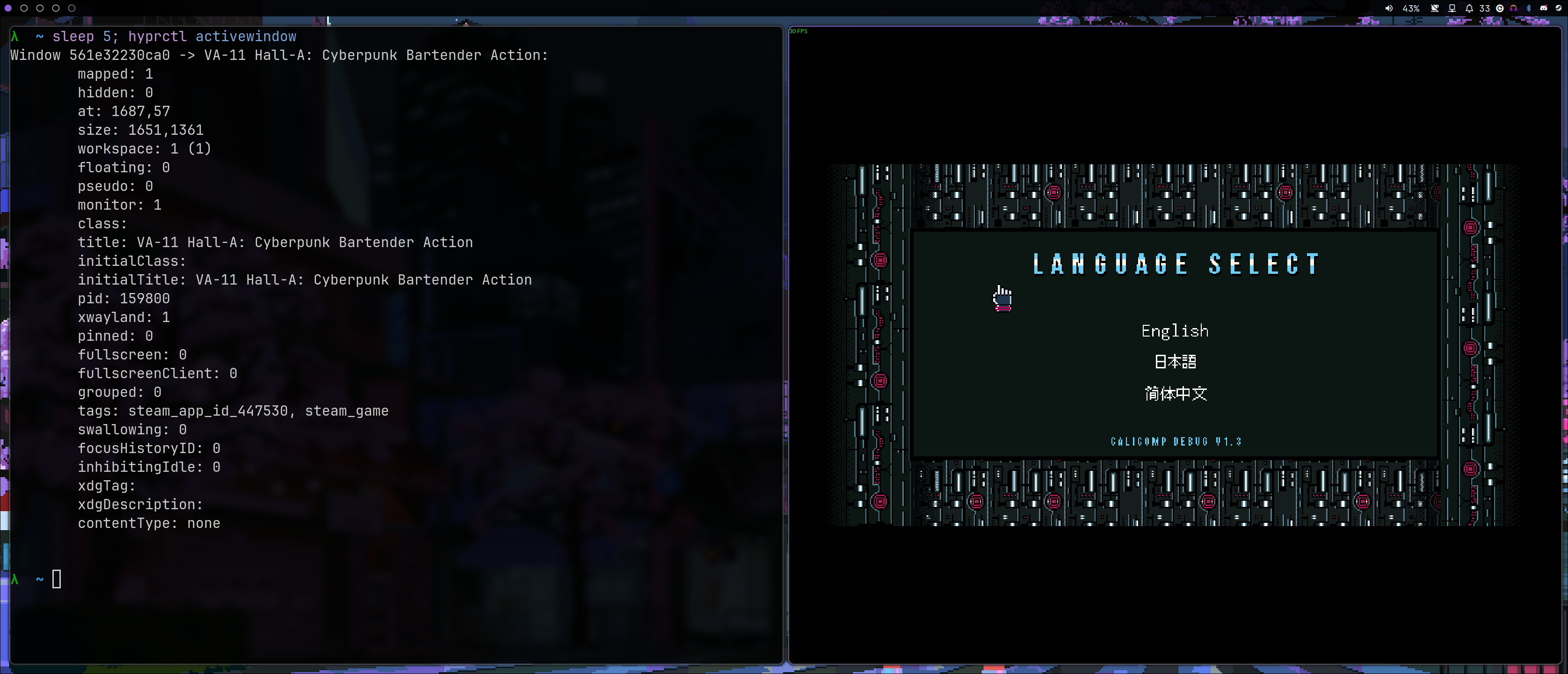
VA-11 Hall-A tagged with steam_game and steam_app_id_447530
`hypr_steam_watcher` listens for newly created windows in Hyprland and automatically tags Steam game windows with `steam_game` and `steam_app_id_`.
This allows you to exclude Steam games from certain window rules or define specific window rules that only apply to Steam games.
```text
windowrule = match:tag negative:steam_game, opacity 0.9 # Everything except steam games is transparent
windowrule = match:tag steam_game, opacity no_blur # Disable blur for steam games
windowrule = match:tag steam_game, render_unfocused true # Forces the window to think it’s being rendered when it’s not visible
windowrule = match:tag steam_app_id_447530, immediate true # Forces the game with app ID 447530 to allow tearing
windowrule = match:tag steam_game, idle_inhibit always # Apps like hypridle will not fire
```
⚠️ Since the tag is applied after the game window appears, only [dynamic effects](https://wiki.hypr.land/Configuring/Window-Rules/#dynamic-effects) can be used.
## Compatibility
The app works with both native Linux and Proton games.
## Requirements
- Hyprland (Wayland compositor)
- Steam
- Rust (only if building from source)
## Installation
### Release
You can download a prebuilt version from the [releases](https://github.com/LennardKittner/hypr_steam_watcher/releases).
Then add `exec-once = hypr_steam_watcher` to your `hyprland.conf` to start it automatically.
### AUR
Install it via the AUR:
```fish
yay -S hyperheadset-git
```
Then add `exec-once = hypr_steam_watcher` to your `hyprland.conf` to start it automatically.
### Build from Source
You can build the project from source using cargo:
```fish
git clone https://github.com/LennardKittner/hypr_steam_watcher.git
cd hypr_steam_watcher
cargo build --release
sudo cp target/release/hypr_steam_watcher /usr/bin/
```
Then add `exec-once = hypr_steam_watcher` to your `hyprland.conf` to start it automatically.
## Usage
```text
hypr_steam_watcher --help
Automatically tag newly launched Steam games in Hyprland.
Usage: hypr_steam_watcher [OPTIONS] [callback] [callback-arguments]...
Arguments:
[callback] A callback that will be called when a new window of a steam game appears.
[callback-arguments]... Arguments for the callback. The PID and Steam app ID will be appended to the arguments.
Options:
--open-callback ...
A callback that will be called when a new window of a steam game appears. The PID and Steam app ID will be appended to the arguments.
--close-callback ...
A callback that will be called when a new window of a steam game closes. The PID and Steam app ID will be appended to the arguments.
-h, --help
Print help
-V, --version
Print version
```
Running `hypr_steam_watcher` without any arguments will automatically tag any Steam game windows launched while the watcher is running.
### Callbacks
You can optionally run a command whenever a Steam game window opens or closes.
The simplest is to pass a callback directly:
```fish
hypr_steam_watcher echo game:
```
This prints:
```fish
game:
```
each time a steam game window opens.
You can also execute script:
```fish
hypr_steam_watcher ./activate_game_mod.sh
```
Callbacks are executed asynchronously so they will not block the watcher.
#### More Complex Callbacks
More complex callbacks can be executed using `bash -c`:
```fish
hypr_steam_watcher bash -c 'sleep 2 && echo game: "$0 $1"'
```
This prints the game information after a two-second delay
#### Open / Close Callbacks
To register a callback on window closure, use the dedicated options:
```fish
hypr_steam_watcher --open-callback echo open: \; --close-callback echo close:
```
Output example:
```text
open:
close:
```
More complex callbacks are also possible:
```fish
hypr_steam_watcher \
--open-callback bash -c 'sleep 2 && echo open: "$0 $1"' \; \
--close-callback bash -c 'sleep 2 && echo close: "$0 $1"'
```
You may specify only an open callback, only a close callback, or both.
#### Callback Arguments
The callback receives:
`[callback-arguments...] `
Where:
- `pid`: process ID of the game
- `steam_app_id`: Steam application ID of the game
## Use Cases
- Disable blur or transparency for games
- Automatically move games to a dedicated workspace
- Enable performance scripts automatically
- Apply per-game rules using Steam App IDs
## How it works
**On open**
- Uses the hyprland crate to detect new windows
- Gets the PID
- Checks whether the environment of the process contains `SteamAppId`
- Uses the hyprland crate to tag the window
- Save the window address to detect if the game is closed
- Executes the callback (if provided)
**On close**
- Uses the hyprland crate to detect closing windows
- check if the window address is know
- if so execute the callback (if provided)
## Troubleshooting
- Ensure hypr_steam_watcher is running
- Start it before launching the game
If a game is not tagged correctly, please open an issue and include:
- Game name
- Native or Proton
- Output of `hyprctl activewindow`
## License
MIT see LICENSE file