https://github.com/hzqtc/taproom
An interactive TUI for Homebrew
https://github.com/hzqtc/taproom
Last synced: about 1 month ago
JSON representation
An interactive TUI for Homebrew
- Host: GitHub
- URL: https://github.com/hzqtc/taproom
- Owner: hzqtc
- License: mit
- Created: 2025-06-26T05:14:19.000Z (about 1 year ago)
- Default Branch: main
- Last Pushed: 2026-05-28T03:45:58.000Z (about 1 month ago)
- Last Synced: 2026-05-28T05:20:21.771Z (about 1 month ago)
- Language: Go
- Size: 2.47 MB
- Stars: 598
- Watchers: 1
- Forks: 11
- Open Issues: 4
-
Metadata Files:
- Readme: README.md
- License: LICENSE
Awesome Lists containing this project
- starred - hzqtc/taproom - An interactive TUI for Homebrew (Go)
README
`taproom` is featured as "Tool of the Week" (July 15, 2025) on [Terminal Trove](https://terminaltrove.com/taproom/), the $HOME of all things in the terminal.

# taproom
`taproom` is a cozy terminal user interface (TUI) for Homebrew. It provides a fast and fluid way to explore formulae and casks directly in your terminal.

## ⭐ Highlights
`taproom` does a few things faster and easier than the `brew` cli:
- Search: searching in `taproom` gives results with all the details in real time; while using `brew`, you need to run `brew search`, then
`brew info` on each package.
- Dependencies: `brew info` shows direct dependencies; while `taproom` also shows all recursive dependencies that are not installed - this is helpful
to understand what exactly would be installed as dependencies
- `taproom` also has a clear indication for packages installed as dependencies vs installed explicitly
- Dependents: `brew uses --eval-all` shows dependents that require the target package, but it is a pretty slow command; `taproom` has this information
available without additional data loading
- Sorting: `taproom` supports sorting by popularity (90d installs) and size (disk space used)
- Navigation: 'h' opens an app's home page and 'b' opens the brew formula page
## ✨ Features
- **Table View:** Overview of all available formulae and casks in Homebrew.
- **Detailed View:** Get more info on any package, including its description, version, homepage, license, dependencies, and 90-day install count.
- Also shows dependencies recursively (only when the dependencies are not installed)
- Also shows dependents (which other packages depend on this one)
- **Search:** Quickly find packages by keywords
- Default: match each keyword in either name or description
- Prefix `n:`: match the keyword only in the name
- Prefix `d:`: match the keyword only in description
- Prefix `t:`: match the keyword only in tap
- Prefix `h:`: match the keyword only in the home page
- Prefix `-`: turn into a negative keyword, can be combined with prefixes
- For example: `ebook -facebook` - search for `ebook` but not `facebook`
- **Filtering:** View all packages, or filter by:
- Formulae only
- Casks only
- Installed packages
- Outdated packages
- Packages you installed explicitly (not as dependencies)
- **Flexible Sorting:** Sort packages alphabetically by name or by 90-day popularity.
- **Status Indicators:** See at a glance which packages are installed, outdated, or pinned.
- **Execute brew commands:** upgrade, install, uninstall, pin, or unpin packages directly in the TUI.
## 🚀 Getting Started
### Dependencies
- A terminal emulator with a [nerd font](https://www.nerdfonts.com/)
- `du` (MacOS builtin command)
- `brew` [Homebrew](https://brew.sh/)
- `gh` [Github CLI](https://github.com/cli/cli)
- Optional, used for getting release info when `--fetch-release` flag is set
### Install from pre-built binary
`gromgit@` (Thank you!) maintains a [formula](https://github.com/gromgit/homebrew-brewtils/blob/main/Formula/taproom.rb):
```
brew install gromgit/brewtils/taproom
```
Or use [`eget`](https://github.com/zyedidia/eget):
```
eget hzqtc/taproom
```
### Build from source
To build from source, follow these simple steps:
#### Build dependencies
- [Go](https://go.dev/doc/install)
#### Build
1. Navigate to the project directory.
2. Build the binary:
```sh
make
```
3. Run the application:
```sh
./taproom
```
## 🪄 Customization
The app's behavior can be further customized with command-line flags:
- `--invalidate-cache` or `-i` in short: invalidate cache and re-download data from brew.sh
- `--fetch-release`: fetch release information for installed packages. This flag enables displaying the release date and the 'r' key to open the release page
- Note: release information is only available when the homebrew URL or home page points to a GitHub repo with releases
- About 60% packages would show the release date and support 'r' to open the release page with this flag enabled
- Requires `gh` (Github CLI) to be in the PATH
- `--hide-columns`: hide and skip loading data for specified columns
- This can be helpful to further simplify the UI
- While all data loading is done in parallel, some may be slower than others. This flag can be used to skip loading certain data to speed up app load
- `--load-timer` or `-t` in short: show a timer in the loading screen
- `--hide-help`: hide the help text at the bottom of the app
- `--sort-column` or `-s` in short: specify the column to sort by (this can still be changed in app with `s` and `S` keys)
- `--filters` or `-f` in short: specify initial filters (can still be changed later in the app)
- `--theme`: color theme for light/dark terminal backgrounds (`auto`, `light`, `dark`; default: `auto`)
- By default, taproom auto-detects your terminal's background color and picks a matching palette
- Use `--theme light` or `--theme dark` to override if auto-detection doesn't work for your terminal
Run `taproom -h` to learn more about the command line flags.
## 🛠️ Built With
- [Go](https://go.dev/)
- [Bubble Tea](https://github.com/charmbracelet/bubbletea)
- [Bubbles](https://github.com/charmbracelet/bubbles)
- [Lip Gloss](https://github.com/charmbracelet/lipgloss)
## 🔀 Alternatives
`taproom` is inspired by [`boldbrew`](https://github.com/Valkyrie00/bold-brew) but it's not a clone.
- `taproom` has a different UI style
- `taproom` supports casks
- `taproom` supports sorting by different columns
- `taproom` shows missing dependencies recursively (i.e. dependencies of dependencies)
- `taproom` shows reverse dependencies (i.e. used by) that replaces a very slow `brew uses --eval-all` command
- `taproom` shows the size of installed packages
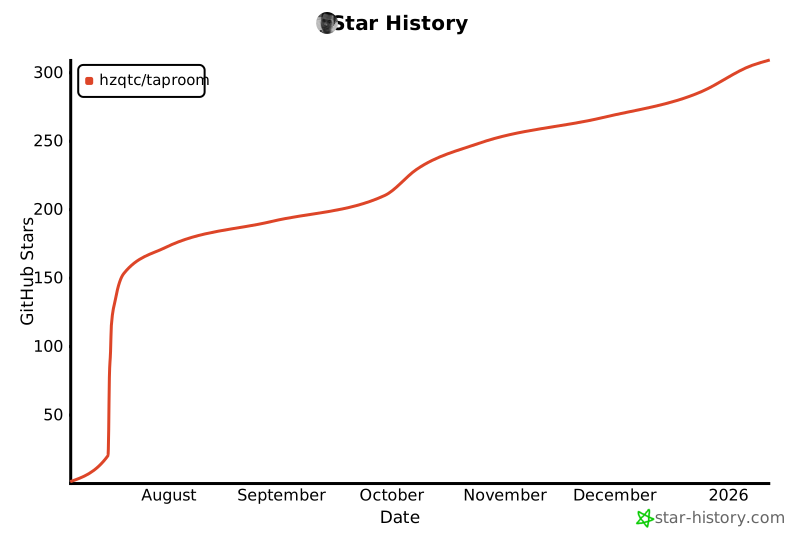
## ✨ Star History
[](https://www.star-history.com/#hzqtc/taproom&Date)