https://github.com/i-e-b/snivellinggit
An experimental GUI for the Git SCM.
https://github.com/i-e-b/snivellinggit
c-sharp experimental git gui visualisation visualization working
Last synced: 3 months ago
JSON representation
An experimental GUI for the Git SCM.
- Host: GitHub
- URL: https://github.com/i-e-b/snivellinggit
- Owner: i-e-b
- License: bsd-3-clause
- Created: 2014-06-23T12:16:25.000Z (about 12 years ago)
- Default Branch: master
- Last Pushed: 2020-06-05T08:21:37.000Z (about 6 years ago)
- Last Synced: 2025-03-22T12:30:30.334Z (over 1 year ago)
- Topics: c-sharp, experimental, git, gui, visualisation, visualization, working
- Language: C#
- Homepage:
- Size: 4.84 MB
- Stars: 0
- Watchers: 3
- Forks: 0
- Open Issues: 0
-
Metadata Files:
- Readme: README.md
- License: LICENSE
Awesome Lists containing this project
README
SnivellingGit
=============
An experimental GUI for the Git SCM.
To use, run the Sg.Web self-host exe, and then load the stated Url in your browser.
Remember to include a path to your target git directory (i.e. `C:\Work\MyProj` would need a url of `http://localhost:8080/Work/MyProj`)
### To do
* If a history line goes off the page, draw a continuation arrow
* Basic right-click menu system
### Goals
* Navigation when not in a git repo?
* Move head (checkout)
* New branch on selected commit (checkout -b)
* Add files ; commit ; push
* fetch ; merge (probably best as separate?)
* rebase ; solve merge conflicts?
* stashes -- both loose on a shelf, and as 'fake commits' to allow moving head without losing work (stage and index as needed, with coded stash names?)
* show / hide unmerged remote branches (plus fetch all)
* Change visualisation settings:
- flattened history by default (only unmerged branches spread out, how it is now); Ancestry trace for indiviual commits (like gitk does); Per contributor display (column per person).
* git reflog explorer and recovery tool (open a new branch for a given sha)
* option to attribute-tag the last commit before a merge to show branch history?
### Implementation details
* select multiple nodes with shift-click
* cherry-pick with ctrl-click
* rebase with ctrl-shift-click (or drag-and-drop?)
* merge with context menu after selecting
* squash with context menu after selecting
Comparison of Sg with `gitk --all`
----------------------------------
Only unmerged branches are shown out-of-line. Non simple ancestry shown with arcs to the side.
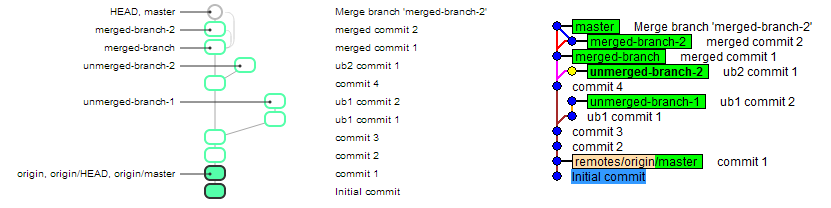
Commits are shown in strict time order. Node colours are based on author's name.
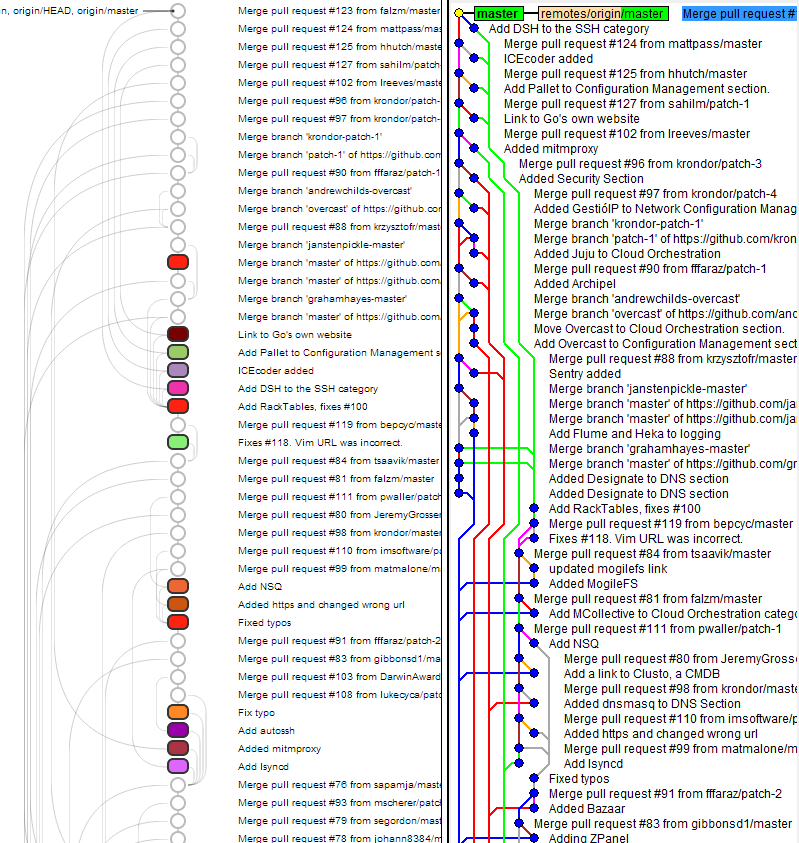
### References
* http://tonsky.me/blog/reinventing-git-interface/
* http://marklodato.github.io/visual-git-guide/index-en.html
* https://github.com/libgit2/libgit2sharp/wiki/LibGit2Sharp-Hitchhiker%27s-Guide-to-Git