https://github.com/i-ky/voicepipe
A simple communication device for use with development containers
https://github.com/i-ky/voicepipe
codespace codespaces containerization dev-container dev-containers devcontainer devcontainers modularization
Last synced: 5 months ago
JSON representation
A simple communication device for use with development containers
- Host: GitHub
- URL: https://github.com/i-ky/voicepipe
- Owner: i-ky
- License: mit
- Created: 2024-04-22T19:17:14.000Z (about 2 years ago)
- Default Branch: main
- Last Pushed: 2024-09-28T21:58:05.000Z (almost 2 years ago)
- Last Synced: 2025-04-19T22:06:04.383Z (about 1 year ago)
- Topics: codespace, codespaces, containerization, dev-container, dev-containers, devcontainer, devcontainers, modularization
- Language: C++
- Homepage:
- Size: 8.79 KB
- Stars: 0
- Watchers: 1
- Forks: 0
- Open Issues: 1
-
Metadata Files:
- Readme: README.md
- License: LICENSE
Awesome Lists containing this project
README
# voicepipe [](https://codespaces.new/i-ky/voicepipe)
[A simple communication device](https://en.wikipedia.org/wiki/Speaking_tube)
for use with
[development containers](https://containers.dev).
## summary
Development containers are great.
But there is an issue which can be seen in the following picture:
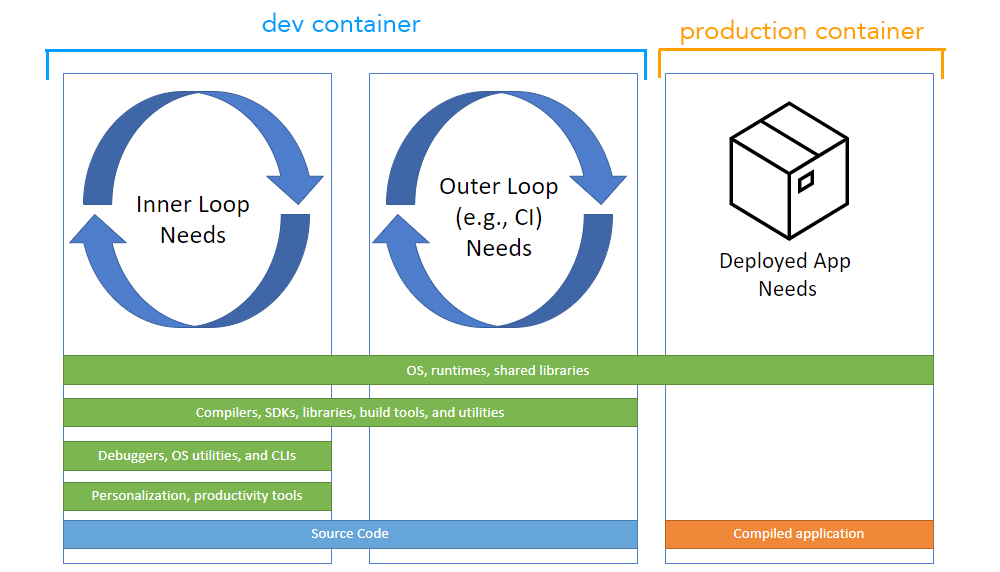
It's not to scale!
Stuff required to _run_ the application is only a fraction (both in numbers and in size) of the stuff required to _develop_ it.
All those compilers, SDKs, build tools, debuggers, productivity tools, etc.
when put into a _single container_ may at some point start to interfere with one another.
Tools that are useful, say, 1% of the time will still sit there increasing image build time and size.
Abundance of things means more frequent upgrades and hence more frequent image rebuilds.
Moreover, upgrading any one thing will require rebuilding half of the image
due to how [build cache](https://docs.docker.com/build/cache/) works.
This means that you are about to spend O(N2) time rebuilding your dev container
(where N is the number of things installed into it).
The solution is to split development environment into _multiple containers_,
each responsible for its own compiler, SDK, build tool, debugger, etc.
Each can be built and run independently.
All is needed is a voicepipe.
One container will shout commands into it.
On the other side a different container will run the command and send the results back.
## disclaimer
It has been developed and tested on Linux.
Whether it works on other systems is an open question.
Your feedback (both positive and negative) is highly appreciated!
## prerequisites
You will need `make` and C++ compiler.
## compile
Simply:
```bash
make
```
It should produce `voicepipe-client` and `voicepipe-server` executables in the project root directory.
## install
Copy `voicepipe-client` executable into the container where you want to shout commands into a voicepipe.
Create symlinks pointing to it named after the commands you want to offload into a different container.
Make sure those symlinks are in `PATH`.
Copy `voicepipe-server` executable into the containers that are responsible for running the commands.
Set it as container's [`ENTRYPOINT`](https://docs.docker.com/reference/dockerfile/#entrypoint).
## configure
## use