https://github.com/iFaceless/tinkv
[WIP] ✨ TinKV is a simple and fast key-value storage written in Rust, which provides a bultin CLI and a Redis compatible server.
https://github.com/iFaceless/tinkv
bitcask key-value-store log-structured redis-compatiable-storage redis-protocol rust tinkv
Last synced: about 1 year ago
JSON representation
[WIP] ✨ TinKV is a simple and fast key-value storage written in Rust, which provides a bultin CLI and a Redis compatible server.
- Host: GitHub
- URL: https://github.com/iFaceless/tinkv
- Owner: iFaceless
- License: mit
- Created: 2020-06-08T07:23:16.000Z (about 6 years ago)
- Default Branch: master
- Last Pushed: 2022-02-16T15:14:50.000Z (over 4 years ago)
- Last Synced: 2024-11-16T04:46:05.429Z (over 1 year ago)
- Topics: bitcask, key-value-store, log-structured, redis-compatiable-storage, redis-protocol, rust, tinkv
- Language: Rust
- Homepage: https://ifaceless.github.io/tinkv
- Size: 166 KB
- Stars: 31
- Watchers: 3
- Forks: 6
- Open Issues: 3
-
Metadata Files:
- Readme: README.md
- License: LICENSE
Awesome Lists containing this project
README
[](https://travis-ci.org/iFaceless/tinkv)
[](https://crates.io/crates/tinkv)
[](#license)
# 
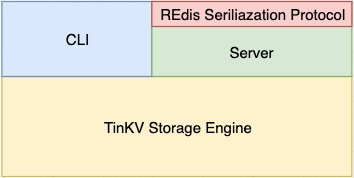
[TinKV](https://github.com/iFaceless/tinkv) is a simple and fast key-value storage engine written in Rust. Inspired by [basho/bitcask](https://github.com/basho/bitcask), written after attending the [Talent Plan courses](https://github.com/pingcap/talent-plan).
**Notes**:
- *Do not use it in production.*
- *Operations like set/remove/compact are not thread-safe currently.*
Happy hacking~
# Features
- Embeddable (use `tinkv` as a library);
- Builtin CLI (`tinkv`);
- Builtin Redis compatible server;
- Predictable read/write performance.
# Usage
## As a library
```shell
$ cargo add tinkv
```
Full example usage can be found in [examples/basic.rs](./examples/basic.rs).
```rust
use tinkv::{self, Store};
fn main() -> tinkv::Result<()> {
pretty_env_logger::init();
let mut store = Store::open("/path/to/tinkv")?;
store.set("hello".as_bytes(), "tinkv".as_bytes())?;
let value = store.get("hello".as_bytes())?;
assert_eq!(value, Some("tinkv".as_bytes().to_vec()));
store.remove("hello".as_bytes())?;
let value_not_found = store.get("hello".as_bytes())?;
assert_eq!(value_not_found, None);
Ok(())
}
```
### Open with custom options
```rust
use tinkv::{self, Store};
fn main() -> tinkv::Result<()> {
let mut store = tinkv::OpenOptions::new()
.max_data_file_size(1024 * 1024)
.max_key_size(128)
.max_value_size(128)
.sync(true)
.open(".tinkv")?;
store.set("hello".as_bytes(), "world".as_bytes())?;
Ok(())
}
```
### APIs
Public APIs of tinkv store are very easy to use:
| API | Description |
|--------------------------|---------------------------------------------------------------|
|`Store::open(path)` | Open a new or existing datastore. The directory must be writeable and readable for tinkv store.|`
|`tinkv::OpenOptions()` | Open a new or existing datastore with custom options. |
|`store.get(key)` | Get value by key from datastore.|
|`store.set(key, value)` | Store a key value pair into datastore.|
|`store.remove(key, value)`| Remove a key from datastore.|
|`store.compact()` | Merge data files into a more compact form. drop stale segments to release disk space. Produce hint files after compaction for faster startup.|
|`store.keys()` | Return all the keys in database.|
|`store.len()` | Return total number of keys in database.|
|`store.for_each(f: Fn(key, value) -> Result)` | Iterate all keys in database and call function `f` for each entry.|
|`store.stas()` | Get current statistics of database.|
|`store.sync()` | Force any writes to datastore.|
|`store.close()` | Close datastore, sync all pending writes to disk.|
### Run examples
```shell
$ RUST_LOG=trace cargo run --example basic
```
`RUST_LOG` level can be one of [`trace`, `debug`, `info`, `error`].
CLICK HERE | Example output.
```shell
$ RUST_LOG=info cargo run --example basic
2020-06-18T10:20:03.497Z INFO tinkv::store > open store path: .tinkv
2020-06-18T10:20:04.853Z INFO tinkv::store > build keydir done, got 100001 keys. current stats: Stats { size_of_stale_entries: 0, total_stale_entries: 0, total_active_entries: 100001, total_data_files: 1, size_of_all_data_files: 10578168 }
200000 keys written in 9.98773 secs, 20024.57 keys/s
initial: Stats { size_of_stale_entries: 21155900, total_stale_entries: 200000, total_active_entries: 100001, total_data_files: 2, size_of_all_data_files: 31733728 }
key_1 => "value_1_1592475604853568000_hello_world"
after set 1: Stats { size_of_stale_entries: 21155900, total_stale_entries: 200000, total_active_entries: 100002, total_data_files: 2, size_of_all_data_files: 31733774 }
after set 2: Stats { size_of_stale_entries: 21155946, total_stale_entries: 200001, total_active_entries: 100002, total_data_files: 2, size_of_all_data_files: 31733822 }
after set 3: Stats { size_of_stale_entries: 21155994, total_stale_entries: 200002, total_active_entries: 100002, total_data_files: 2, size_of_all_data_files: 31733870 }
after remove: Stats { size_of_stale_entries: 21156107, total_stale_entries: 200003, total_active_entries: 100001, total_data_files: 2, size_of_all_data_files: 31733935 }
2020-06-18T10:20:14.841Z INFO tinkv::store > compact 2 data files
after compaction: Stats { size_of_stale_entries: 0, total_stale_entries: 0, total_active_entries: 100001, total_data_files: 2, size_of_all_data_files: 10577828 }
key_1 => "value_1_1592475604853568000_hello_world"
```
## CLI
Install `tinkv` executable binaries.
```shell
$ cargo install tinkv
```
```shell
$ tinkv --help
...
USAGE:
tinkv [FLAGS]
FLAGS:
-h, --help Prints help information
-q, --quiet Pass many times for less log output
-V, --version Prints version information
-v, --verbose Pass many times for more log output
ARGS:
Path to tinkv datastore
SUBCOMMANDS:
compact Compact data files in datastore and reclaim disk space
del Delete a key value pair from datastore
get Retrive value of a key, and display the value
help Prints this message or the help of the given subcommand(s)
keys List all keys in datastore
scan Perform a prefix scanning for keys
set Store a key value pair into datastore
stats Display statistics of the datastore
```
Example usages:
```shell
$ tinkv /tmp/db set hello world
$ tinkv /tmp/db get hello
world
# Change verbosity level (info).
$ tinkv /tmp/db -vvv compact
2020-06-20T10:32:45.582Z INFO tinkv::store > open store path: tmp/db
2020-06-20T10:32:45.582Z INFO tinkv::store > build keydir from data file /tmp/db/000000000001.tinkv.data
2020-06-20T10:32:45.583Z INFO tinkv::store > build keydir from data file /tmp/db/000000000002.tinkv.data
2020-06-20T10:32:45.583Z INFO tinkv::store > build keydir done, got 1 keys. current stats: Stats { size_of_stale_entries:0, total_stale_entries: 0, total_active_entries: 1,total_data_files: 2, size_of_all_data_files: 60 }
2020-06-20T10:32:45.583Z INFO tinkv::store > there are 3 datafiles need to be compacted
```
## Client & Server
[`tinkv-server`](./bin/../src/bin/tinkv-server.rs) is a redis-compatible key/value store server. However, not all the redis commmands are supported. The available commands are:
- `get `
- `mget [...]`
- `set `
- `mset [ ]`
- `del `
- `keys `
- `ping []`
- `exists `
- `info []`
- `command`
- `dbsize`
- `flushdb/flushall`
- `compact`: extended command to trigger a compaction manually.
Key/value pairs are persisted in log files under directory `/urs/local/var/tinkv`. The default listening address of server is `127.0.0.1:7379`, and you can connect to it with a redis client.
### Quick Start
It's very easy to install `tinkv-server`:
```shell
$ cargo install tinkv
```
Start server with default config (set log level to `info` mode):
```shell
$ tinkv-server -vv
2020-06-24T13:46:49.341Z INFO tinkv::store > open store path: /usr/local/var/tinkv
2020-06-24T13:46:49.343Z INFO tinkv::store > build keydir from data file /usr/local/var/tinkv/000000000001.tinkv.data
2020-06-24T13:46:49.343Z INFO tinkv::store > build keydir from data file /usr/local/var/tinkv/000000000002.tinkv.data
2020-06-24T13:46:49.343Z INFO tinkv::store > build keydir done, got 0 keys. current stats: Stats { size_of_stale_entries: 0,total_stale_entries: 0, total_active_entries: 0, total_data_files: 2, size_of_all_data_files: 0 }
2020-06-24T13:46:49.343Z INFO tinkv::server > TinKV server is listening at '127.0.0.1:7379'
```
Communicate with `tinkv-server` by using `reids-cli`:
CLICK HERE
```shell
$ redis-cli -p 7379
127.0.0.1:7379> ping
PONG
127.0.0.1:7379> ping "hello, tinkv"
"hello, tinkv"
127.0.0.1:7379> set name tinkv
OK
127.0.0.1:7379> exists name
(integer) 1
127.0.0.1:7379> get name tinkv
(error) ERR wrong number of arguments for 'get' command
127.0.0.1:7379> get name
"tinkv"
127.0.0.1:7379> command
1) "ping"
2) "get"
3) "set"
4) "del"
5) "dbsize"
6) "exists"
7) "compact"
8) "info"
9) "command"
...and more
127.0.0.1:7379> info
# Server
tinkv_version: 0.9.0
os: Mac OS, 10.15.4, 64-bit
# Stats
size_of_stale_entries: 143
size_of_stale_entries_human: 143 B
total_stale_entries: 3
total_active_entries: 1109
total_data_files: 5
size_of_all_data_files: 46813
size_of_all_data_files_human: 46.81 KB
127.0.0.1:7379> notfound
(error) ERR unknown command `notfound`
127.0.0.1:7379>
```
# About Compaction
Compation process will be triggered if `size_of_stale_entries >= config::COMPACTION_THRESHOLD` after each call of `set/remove`. Compaction steps are very simple and easy to understand:
1. Freeze current active segment, and switch to another one.
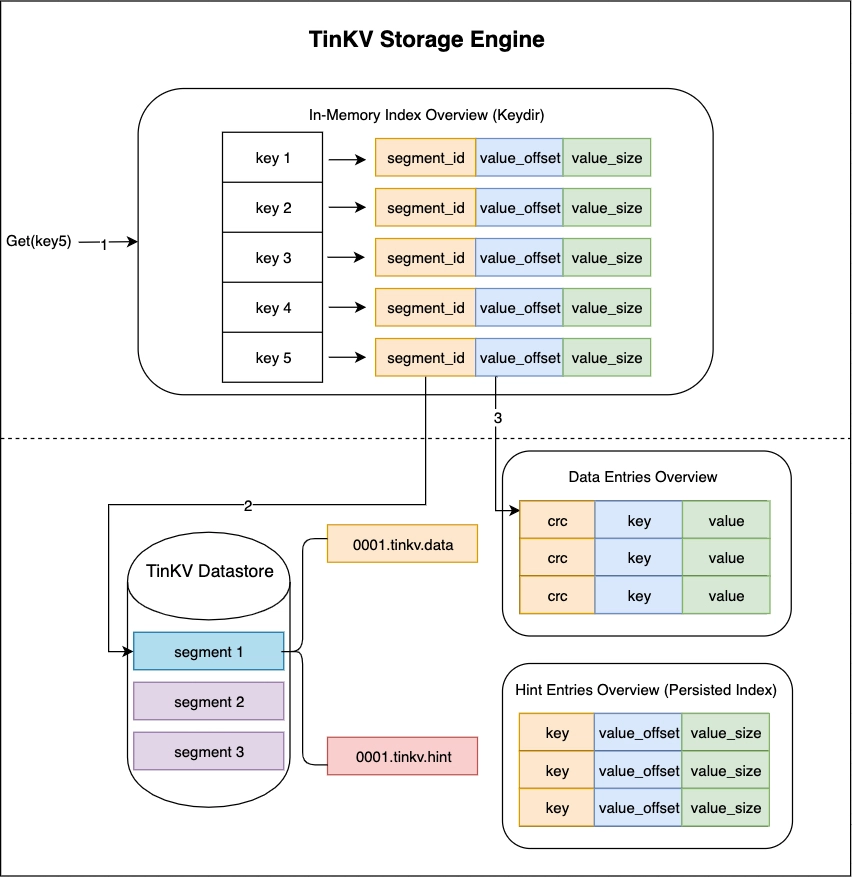
2. Create a compaction segment file, then iterate all the entries in `keydir` (in-memory hash table), copy related data entries into compaction file and update `keydir`.
3. Remove all the stale segment files.
Hint files (for fast startup) of corresponding data files will be generated after each compaction.
You can call `store.compact()` method to trigger compaction process if nessesary.
```rust
use tinkv::{self, Store};
fn main() -> tinkv::Result<()> {
pretty_env_logger::init();
let mut store = Store::open("/path/to/tinkv")?;
store.compact()?;
Ok(())
}
```
# Structure of Data Directory
```shell
.tinkv
├── 000000000001.tinkv.hint -- related index/hint file, for fast startup
├── 000000000001.tinkv.data -- immutable data file
└── 000000000002.tinkv.data -- active data file
```
# Refs
## Projects
I'm not familiar with erlang, but I found some implementations in other languages worth learning.
1. Go: [prologic/bitcask](https://github.com/prologic/bitcask)
2. Go: [prologic/bitraft](https://github.com/prologic/bitraft)
3. Python: [turicas/pybitcask](https://github.com/turicas/pybitcask)
4. Rust: [dragonquest/bitcask](https://github.com/dragonquest/bitcask)
Found another simple key-value database based on Bitcask model, please refer [xujiajun/nutsdb](https://github.com/xujiajun/nutsdb).
## Articles and more
- [Implementing a Copyless Redis Protocol in Rust with Parsing Combinators](https://dpbriggs.ca/blog/Implementing-A-Copyless-Redis-Protocol-in-Rust-With-Parsing-Combinators)
- [Expected type parameter, found struct](https://stackoverflow.com/questions/26049939/expected-type-parameter-found-struct)
- [Help understanding how trait bounds workd](https://users.rust-lang.org/t/help-understanding-how-trait-bounds-work/19253/3)
- [Idiomatic way to take ownership of all items in a Vec?](https://users.rust-lang.org/t/idiomatic-way-to-take-ownership-of-all-items-in-a-vec-string/7811/12)
- [Idiomatic callbacks in Rust](https://stackoverflow.com/questions/41081240/idiomatic-callbacks-in-rust)
- [What are reasonable ways to store a callback in a struct?](https://users.rust-lang.org/t/what-are-reasonable-ways-to-store-a-callback-in-a-struct/5810)
- [Things Rust doesn’t let you do](https://medium.com/@GolDDranks/things-rust-doesnt-let-you-do-draft-f596a3c740a5)
# License
Licensed under the [MIT license](./LICENSE).